依應用程式類型的啟動流程

啟動流程取決於你在哪裡購買或能使用 Designer:

版本
啟動過程
創意雲端桌面(CCD)
從 CCD 應用程式安裝產品,然後啟動。 如果你遇到授權問題,請參考這些頁面: 應用程式因訂閱錯誤 無法啟動 / 帳號、方案與帳單協助
蒸汽
直接從你的 Steam 遊戲庫啟動產品。
實質(獨立作品)
請參考下方說明的啟動流程。

啟動步驟(Substance 版)

使用啟動精靈

當你第一次啟動 Designer 時,啟動精靈會打開並引導你完成啟動流程。

有三種選擇:

  • 評估此產品:舊有試驗已不再提供。 你可以在這裡或使用 Creative Cloud Desktop 開始為每個 Substance 3D 應用程式🔗開啟 30 天試用。每個試驗都獨立於其他Substance 3D應用程式,所以你可以一次嘗試一個或全部。
  • 使用授權檔案啟用:請於 2022 年 9 月 30 日前,使用 Substance 3D 網站🔗帳號頁面下載的授權檔案(*.key)啟用產品。
  • 使用您的帳戶啟用:舊有物質帳戶已無法再用於啟用。
IMPORTANT
要用啟用精靈安裝授權檔案,請確保以管理員身份執行 Designer,並暫時停用防毒軟體。
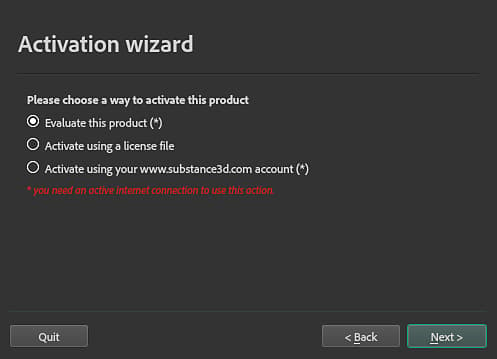
啟動精靈

手動啟動

你可以手動啟用 Designer,方法是將 license.key 檔案放入以下資料夾:

平台
版本
路徑
窗戶
11.2 或更高
AppData\Local
C:\Users\[username]\AppData\Local\Adobe\Adobe Substance 3D Designer
AppData\Roaming
C:\Users\[username]\AppData\Roaming\Adobe\Adobe Substance 3D Designer
11.1 或更低
AppData\Local
C:\Users\[username]\AppData\Local\Allegorithmic\Substance Designer
AppData\Roaming
C:\Users\[username]\AppData\Roaming\Allegorithmic\Substance Designer
macOS
11.2 或更高
/Users/[username]/Library/Application Support/Adobe/Adobe Substance 3D Designer
11.1 或更低
/Users/[username]/Library/Application Support/Allegorithmic/Substance Designer
Linux
11.2 或更高
/home/[username]/.local/share/Adobe/Adobe Substance 3D Designer
11.1 或更低
/home/[username]/.local/share/Allegorithmic/Substance Designer
NOTE
上述路徑中的部分目錄可能預設是隱藏的。 在檔案總管手動輸入路徑,或顯示隱藏檔案以查看。
IMPORTANT
請確保該檔案被呼叫 license.key ,否則應用程式找不到。

環境變數

你可以用環境變數覆蓋設計者檢查license.key檔案的位置。

recommendation-more-help
substance-3d-designer-help-guide