大量自訂物件匯入
使用大量API以非同步方式匯入大量自訂物件記錄。 以逗號、定位字元或分號分隔的平面檔案提供小於10 MB的記錄。 如果檔案較大,API會傳回HTTP 413狀態代碼。
檔案內容取決於自訂物件定義。 第一列必須為標題,且每個標題欄位都必須符合API名稱。 其餘的每一列包含一個記錄。
大量自訂物件匯入僅支援「插入或更新」記錄作業。
處理限制
每個大量匯入請求都會新增為先進先出(FIFO)佇列的工作。 下列限制適用:
- 最多可同時處理兩個工作。
- 佇列中最多可有10個工作,包括正在處理的兩個工作。
如果您超過10個作業的上限,API會傳回1016, Too many imports錯誤。
自訂物件範例
在使用大量API之前,請使用Marketo管理UI來建立您的自訂物件。
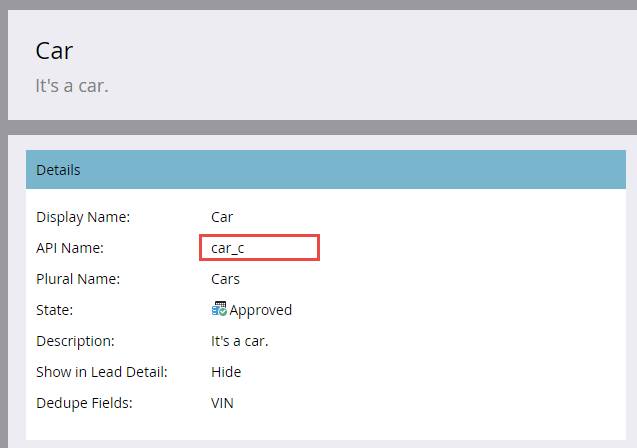
此範例使用具有Color、Make、Model和VIN欄位的Car自訂物件。 VIN欄位用於重複資料刪除。 管理員UI畫面會醒目顯示批次API端點所需的API名稱。
以下是管理UI中顯示的自訂物件欄位。
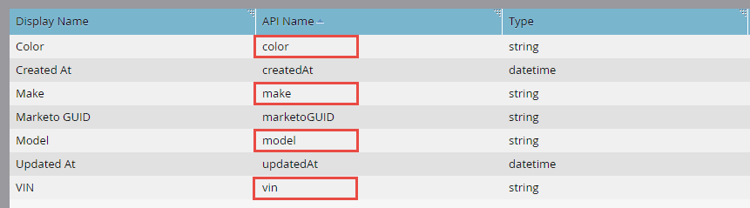
API名稱
若要以程式設計方式擷取API名稱,請將自訂物件API名稱傳遞至描述自訂物件端點。
/rest/v1/customobjects/{apiName}/describe.json
{
    "requestId": "46ff#15a686e66de",
    "result": [
        {
            "name": "car_c",
            "displayName": "Car",
            "description": "It is a car.",
            "createdAt": "2017-02-22T19:55:51Z",
            "updatedAt": "2017-02-22T19:55:51Z",
            "idField": "marketoGUID",
            "dedupeFields": [
                "vin"
            ],
            "searchableFields": [
                [
                    "vin"
                ],
                [
                    "marketoGUID"
                ]
            ],
            "fields": [
                {
                    "name": "createdAt",
                    "displayName": "Created At",
                    "dataType": "datetime",
                    "updateable": false
                },
                {
                    "name": "marketoGUID",
                    "displayName": "Marketo GUID",
                    "dataType": "string",
                    "length": 36,
                    "updateable": false
                },
                {
                    "name": "updatedAt",
                    "displayName": "Updated At",
                    "dataType": "datetime",
                    "updateable": false
                },
                {
                    "name": "color",
                    "displayName": "Color",
                    "dataType": "string",
                    "length": 255,
                    "updateable": true
                },
                {
                    "name": "make",
                    "displayName": "Make",
                    "dataType": "string",
                    "length": 255,
                    "updateable": true
                },
                {
                    "name": "model",
                    "displayName": "Model",
                    "dataType": "string",
                    "length": 255,
                    "updateable": true
                },
                {
                    "name": "vin",
                    "displayName": "VIN",
                    "dataType": "string",
                    "length": 255,
                    "updateable": true
                }
            ]
        }
    ],
    "success": true
}
匯入檔案
下列CSV檔案包含三個Car自訂物件記錄:
color,make,model,vin
red,bmw,2002,WBA4R7C55HK895912
yellow,bmw,320i,WBA4R7C30HK896061
blue,bmw,325i,WBS3U9C52HP970604
第一行是標題。 第2-4行包含自訂物件資料記錄。
建立工作
若要建立大量匯入工作,請在匯入自訂物件端點的路徑中包含自訂物件API名稱。 包含下列引數:
file:匯入檔案的名稱。format:檔案分隔符號格式(csv、tsv或ssv)。
POST /bulk/v1/customobjects/{apiName}/import.json?format=csv
Transfer-Encoding: chunked
Content-Type: multipart/form-data; boundary=----WebKitFormBoundaryXjWP6BP8Ciq6bPeo
Content-Length: 290
Host: <munchkinId>.mktorest.com
------WebKitFormBoundaryXjWP6BP8Ciq6bPeo
Content-Disposition: form-data; name="file"; filename="custom_object_import.csv"
Content-Type: text/csv

color,make,model,vin
red,bmw,2002,WBA4R7C55HK895912
yellow,bmw,320i,WBA4R7C30HK896061
blue,bmw,325i,WBS3U9C52HP970604
------WebKitFormBoundaryXjWP6BP8Ciq6bPeo--
{
    "requestId": "c015#15a68a23418",
    "result": [
        {
            "batchId": 1013,
            "status": "Queued",
            "objectApiName": "car_c"
        }
    ],
    "success": true
}
此範例指定csv格式並命名匯入檔案custom_object_import.csv。
因為呼叫為非同步,所以回應包含batchId,而不是同步自訂物件端點傳回的個別成功和失敗。 status可以是Queued、Importing或Failed。
保留batchId以檢查匯入狀態,並在完成後擷取失敗或警告。 batchId的有效期限為七天。
以下命令列cURL請求會提交範例作業:
curl -X POST -i -F format='csv' -F file='@custom_object_import.csv' -F access_token='<Access Token>' <REST API Endpoint URL>/bulk/v1/customobjects/car_c/import.json
在此範例中,custom_object_import.csv檔案包含下列資料:
color,make,model,vin
red,bmw,2002,WBA4R7C55HK895912
yellow,bmw,320i,WBA4R7C30HK896061
blue,bmw,325i,WBS3U9C52HP970604
輪詢工作狀態
建立匯入工作後,每5到30秒輪詢一次。 傳遞自訂物件API名稱和batchId(在路徑中),以至取得匯入自訂物件狀態端點。
GET /bulk/v1/customobjects/{apiName}/import/{batchId}/status.json
{
    "requestId": "2a5#15a68dd9be1",
    "result": [
        {
            "batchId": 1013,
            "operation": "import",
            "status": "Complete",
            "objectApiName": "car_c",
            "numOfObjectsProcessed": 3,
            "numOfRowsFailed": 0,
            "numOfRowsWithWarning": 0,
            "importTime": "2 second(s)",
            "message": "Import succeeded, 3 records imported (3 members)"
        }
    ],
    "success": true
}
此回應會顯示已完成的匯入。 status可以是Complete、Queued、Importing或Failed。
當工作完成時,回應會列出已處理、失敗和已處理但出現警告的列數。 message屬性可提供額外的作業資訊。
失敗
取得匯入自訂物件狀態回應中的numOfRowsFailed屬性表示失敗的資料列數目。 值大於零表示發生失敗。
將自訂物件API名稱和batchId在路徑中傳遞至取得匯入自訂物件失敗端點。 端點會傳回包含失敗詳細資料的檔案。 如果不存在失敗檔案,則會傳回HTTP 404狀態代碼。
若要示範失敗,請將vin變更為 vin,並在逗號和vin之間新增空格,以修改標題。
color,make,model, vin
重新匯入檔案後,狀態回應會顯示numRowsFailed: 3,指出三個失敗。
GET /bulk/v1/customobjects/car_c/import/{batchId}/status.json
{
    "requestId": "12260#15a68f491ed",
    "result": [
        {
            "batchId": 1016,
            "operation": "import",
            "status": "Complete",
            "objectApiName": "car_c",
            "numOfObjectsProcessed": 0,
            "numOfRowsFailed": 3,
            "numOfRowsWithWarning": 0,
            "importTime": "1 second(s)",
            "message": "Import completed with errors, 0 records imported (0 members), 3 failed"
        }
    ],
    "success": true
}
如需詳細資訊,請呼叫Get Import Custom Object Failures端點:
GET /bulk/v1/customobjects/car_c/import/{batchId}/failures.json
color,make,model, vin,Import Failure Reason
red,bmw,2002,WBA4R7C55HK895912,missing.dedupe.fields
yellow,bmw,320i,WBA4R7C30HK896061,missing.dedupe.fields
blue,bmw,325i,WBS3U9C52HP970604,missing.dedupe.fields
回應顯示遺漏重複資料刪除欄位vin。
警告
「取得匯入自訂物件狀態」回應中的numOfRowsWithWarning屬性指出含有警告的列數。 大於零的值表示發生警告。
傳遞自訂物件API名稱和batchId (在取得匯入自訂物件警告端點的路徑中)。 端點會傳回包含警告詳細資料的檔案。 如果警告檔案不存在,則會傳回HTTP 404狀態代碼。
GET /bulk/v1/customobjects/car_c/import/{batchId}/warnings.json