表單
使用表單端點管理遠端系統的表單。 一個表單可以包含數個物件型別:
- 表單
- 欄位
- 欄位集
- 可見度規則
- 後續追蹤頁面規則
查詢
Forms支援標準資產擷取方法:依識別碼、依名稱及瀏覽。 表單回應包含每個表單屬性,但欄位清單除外。
依ID
將表單id作為路徑引數傳遞至依ID取得表單。 端點會傳回相符的表單記錄。
GET /rest/asset/v1/form/{id}.json
{
    "success": true,
    "warnings": [],
    "errors": [],
    "requestId": "948f#154e3bad8e3",
    "result": [
        {
            "id": 736,
            "name": "newForm",
            "description": "test",
            "createdAt": "2016-05-24T17:05:54Z+0000",
            "updatedAt": "2016-05-24T17:05:54Z+0000",
            "url": "https://app-devlocal1.marketo.com/#FO736B2",
            "status": "draft",
            "theme": "simple",
            "language": "French",
            "locale": "fr_FR",
            "progressiveProfiling": false,
            "labelPosition": "left",
            "fontFamily": "Helvetica",
            "fontSize": "13px",
            "folder": {
                "type": "Folder",
                "value": 293,
                "folderName": "yyLNLHzgOM"
            },
            "knownVisitor": {
                "type": "form",
                "template": null
            },
            "thankYouList": [
                {
                    "followupType": "none",
                    "followupValue": null,
                    "default": true
                }
            ],
            "buttonLocation": 120,
            "buttonLabel": "Envoyer",
            "waitingLabel": "Veuillez patienter"
        }
    ]
}
依名稱
傳遞表單name至依名稱取得表單。 端點會傳回相符的表單記錄。
GET /rest/asset/v1/form/byName.json?name=newForm
{
    "success": true,
    "warnings": [],
    "errors": [],
    "requestId": "948f#154e3bad8e3",
    "result": [
        {
            "id": 736,
            "name": "newForm",
            "description": "test",
            "createdAt": "2016-05-24T17:05:54Z+0000",
            "updatedAt": "2016-05-24T17:05:54Z+0000",
            "url": "https://app-devlocal1.marketo.com/#FO736B2",
            "status": "draft",
            "theme": "simple",
            "language": "French",
            "locale": "fr_FR",
            "progressiveProfiling": false,
            "labelPosition": "left",
            "fontFamily": "Helvetica",
            "fontSize": "13px",
            "folder": {
                "type": "Folder",
                "value": 293,
                "folderName": "yyLNLHzgOM"
            },
            "knownVisitor": {
                "type": "form",
                "template": null
            },
            "thankYouList": [
                {
                    "followupType": "none",
                    "followupValue": null,
                    "default": true
                }
            ],
            "buttonLocation": 120,
            "buttonLabel": "Envoyer",
            "waitingLabel": "Veuillez patienter"
        }
    ]
}
瀏覽
取得Forms遵循標準的資產API瀏覽模式。 支援下列可選用的篩選器:
status:依approved、approved with draft或draft篩選。maxReturn:限制傳回的記錄數。offset:結果集的頁面。
GET /rest/asset/v1/forms.json
{
    "success": true,
    "warnings": [],
    "errors": [],
    "requestId": "645d#154e3d499ac",
    "result": [
        {
            "id": 227,
            "name": "aKAUVDfbsX",
            "description": "",
            "createdAt": "2016-05-18T20:36:20Z+0000",
            "updatedAt": "2016-05-18T20:36:20Z+0000",
            "url": "https://app-devlocal1.marketo.com/#FO227B2",
            "status": "draft",
            "theme": "simple",
            "language": "English",
            "locale": "en_US",
            "progressiveProfiling": false,
            "labelPosition": "left",
            "fontFamily": "Helvetica",
            "fontSize": "13px",
            "folder": {
                "type": "Folder",
                "value": 293,
                "folderName": "yyLNLHzgOM"
            },
            "knownVisitor": {
                "type": "form",
                "template": null
            },
            "thankYouList": [
                {
                    "followupType": "none",
                    "followupValue": null,
                    "default": true
                }
            ],
            "buttonLocation": 120,
            "buttonLabel": "Submit",
            "waitingLabel": "Please Wait"
        },
        {
            "id": 695,
            "name": "AoMXgfFbma",
            "description": "",
            "createdAt": "2016-05-19T18:50:40Z+0000",
            "updatedAt": "2016-05-19T18:50:40Z+0000",
            "url": "https://app-devlocal1.marketo.com/#FO695B2",
            "status": "draft",
            "theme": "simple",
            "language": "English",
            "locale": "en_US",
            "progressiveProfiling": true,
            "labelPosition": "left",
            "fontFamily": "Helvetica",
            "fontSize": "13px",
            "folder": {
                "type": "Folder",
                "value": 565,
                "folderName": "WfUvYmlcyT"
            },
            "knownVisitor": {
                "type": "form",
                "template": null
            },
            "thankYouList": [
                {
                    "followupType": "none",
                    "followupValue": null,
                    "default": true
                }
            ],
            "buttonLocation": 120,
            "buttonLabel": "Submit",
            "waitingLabel": "Please Wait"
        }
    ]
}
欄位清單
傳遞表單ID以個別擷取每個表單的欄位清單。
GET /rest/asset/v1/form/{id}/fields.json
{
    "success": true,
    "warnings": [],
    "errors": [],
    "requestId": "2165#154eee00d01",
    "result": [
        {
            "id": "FirstName",
            "label": "First Name:",
            "dataType": "text",
            "validationMessage": "This field is required.",
            "rowNumber": 0,
            "columnNumber": 0,
            "maxLength": 255,
            "required": false,
            "formPrefill": true,
            "visibilityRules": {
                "ruleType": "alwaysShow"
            }
        },
        {
            "id": "LastName",
            "label": "Last Name:",
            "dataType": "text",
            "validationMessage": "This field is required.",
            "rowNumber": 1,
            "columnNumber": 0,
            "maxLength": 255,
            "required": false,
            "formPrefill": true,
            "visibilityRules": {
                "ruleType": "alwaysShow"
            }
        },
        {
            "id": "Email",
            "label": "Email Address:",
            "dataType": "email",
            "validationMessage": "Must be valid email. <span class='mktoErrorDetail'>example@yourdomain.com</span>",
            "rowNumber": 2,
            "columnNumber": 0,
            "required": false,
            "formPrefill": true,
            "visibilityRules": {
                "ruleType": "alwaysShow"
            }
        },
        {
            "id": "Profiling",
            "dataType": "profiling",
            "rowNumber": 3,
            "columnNumber": 0
        }
    ]
}
在更新或刪除欄位或變更其行為之前,請擷取表單的欄位清單。 在後續請求中使用傳回的欄位ID。
欄位型別
相依性
將表單id作為路徑引數傳遞給取得使用的表單。 端點會傳回與表單相依的資產。
以下資產型別可使用表單:
- 登陸頁面
- 智慧清單
- 智慧行銷活動
- 報表
- 電子郵件方案
GET /rest/asset/v1/form/{id}/usedBy.json
{
    "success": true,
    "errors": [],
    "requestId": "fdf4#17285b25038",
    "warnings": [],
    "result": [
        {
            "id": 1038,
            "name": "LP Redirect Rules Program.LP Test 01",
            "type": "Landing Page",
            "status": "approved",
            "updatedAt": "2020-02-23T01:31:21Z+0000"
        }
    ]
}
建立和更新
若要建立表單,請提供兩個必要欄位:
- 表單的父資料夾。
- 表單名稱。
其他所有引數均為選用引數,且具有預設值。 新表單包含三個預設欄位:名字、姓氏和電子郵件。
POST /rest/asset/v1/forms.json
Content-Type: application/x-www-form-urlencoded
name=newForm&description=test&folder={"type": "Folder","id": 293}&language=French
{
    "success": true,
    "warnings": [],
    "errors": [],
    "requestId": "948f#154e3bad8e3",
    "result": [
        {
            "id": 736,
            "name": "newForm",
            "description": "test",
            "createdAt": "2016-05-24T17:05:54Z+0000",
            "updatedAt": "2016-05-24T17:05:54Z+0000",
            "url": "https://app-devlocal1.marketo.com/#FO736B2",
            "status": "draft",
            "theme": "simple",
            "language": "French",
            "locale": "fr_FR",
            "progressiveProfiling": false,
            "labelPosition": "left",
            "fontFamily": "Helvetica",
            "fontSize": "13px",
            "folder": {
                "type": "Folder",
                "value": 293,
                "folderName": "yyLNLHzgOM"
            },
            "knownVisitor": {
                "type": "form",
                "template": null
            },
            "thankYouList": [
                {
                    "followupType": "none",
                    "followupValue": null,
                    "default": true
                }
            ],
            "buttonLocation": 120,
            "buttonLabel": "Envoyer",
            "waitingLabel": "Veuillez patienter"
        }
    ]
}
若要更新表單,請傳遞其識別碼。 在建立或更新期間,您可以設定基本樣式引數,以控制向使用者顯示表單的方式。
POST /rest/asset/v1/form/736.json
Content-Type: application/x-www-form-urlencoded
name=updated name&description=This is a test for updateapi&language=English&progressiveProfiling=true&locale=en_US
{
    "success": true,
    "warnings": [],
    "errors": [],
    "requestId": "6307#154e3cf6efe",
    "result": [
        {
            "id": 736,
            "name": "updated name",
            "description": "This is a test for update api",
            "createdAt": "2016-05-24T17:05:54Z+0000",
            "updatedAt": "2016-05-24T17:28:23Z+0000",
            "status": "draft",
            "theme": "simple",
            "language": "English",
            "locale": "en_US",
            "progressiveProfiling": true,
            "labelPosition": "left",
            "fontFamily": "Helvetica",
            "fontSize": "13px",
            "folder": {
                "type": "Folder",
                "value": 293,
                "folderName": "yyLNLHzgOM"
            },
            "knownVisitor": {
                "type": "form",
                "template": null
            },
            "thankYouList": [
                {
                    "followupType": "none",
                    "followupValue": null,
                    "default": true
                }
            ],
            "buttonLocation": 120,
            "buttonLabel": "Submit",
            "waitingLabel": "Please Wait"
        }
    ]
}
建立和更新表單端點不會修改已知訪客或感謝頁面行為。 使用相應的端點來管理這些行為。
欄位中繼資料
新增或編輯表單欄位之前,請先擷取目標例項的有效欄位。 欄位作業會使用每個欄位傳回的id屬性。
針對潛在客戶欄位,請使用取得可用的表單欄位端點。 回應包含每個欄位的資料型別,以及在將欄位新增至表單時套用的預設中繼資料。
GET /rest/asset/v1/form/fields.json
{
    "success": true,
    "errors": [],
    "requestId": "176ca#167a9808f4c",
    "warnings": [],
    "result": [
        {
            "id": "AnnualRevenue",
            "isRequired": false,
            "dataType": "currency"
        },
        {
            "id": "City",
            "isRequired": false,
            "dataType": "string",
            "maxLength": 255
        },
        {
            "id": "Company",
            "isRequired": false,
            "dataType": "string",
            "maxLength": 255
        },
        {
            "id": "Country",
            "isRequired": false,
            "dataType": "string",
            "maxLength": 255
        },
        {
            "id": "Description",
            "isRequired": false,
            "dataType": "textarea",
            "maxLength": 32000,
            "visibleRows": 2
        },
        {
            "id": "Email",
            "isRequired": false,
            "dataType": "email"
        },
        {
            "id": "Fax",
            "isRequired": false,
            "dataType": "phone"
        },
        {
            "id": "FirstName",
            "isRequired": false,
            "dataType": "string",
            "maxLength": 255
        },
        {
            "id": "Industry",
            "isRequired": false,
            "dataType": "string",
            "maxLength": 255
        },
        {
            "id": "LastName",
            "isRequired": false,
            "dataType": "string",
            "maxLength": 255
        },
        {
            "id": "LeadSource",
            "isRequired": false,
            "dataType": "string",
            "maxLength": 255
        },
        {
            "id": "MobilePhone",
            "isRequired": false,
            "dataType": "phone"
        },
        {
            "id": "NumberOfEmployees",
            "isRequired": false,
            "dataType": "int"
        },
        {
            "id": "Phone",
            "isRequired": false,
            "dataType": "phone"
        },
        {
            "id": "PostalCode",
            "isRequired": false,
            "dataType": "string",
            "maxLength": 255
        },
        {
            "id": "Rating",
            "isRequired": false,
            "dataType": "string",
            "maxLength": 255
        },
        {
            "id": "Salutation",
            "isRequired": false,
            "dataType": "picklist",
            "picklistValues": "Mr.,Ms.,Mrs.,Dr.,Prof."
        },
        {
            "id": "State",
            "isRequired": false,
            "dataType": "picklist",
            "picklistValues": "AK::AK,AL::AL,AR::AR,AZ::AZ,CA::CA,CO::CO,CT::CT,DE::DE,FL::FL,GA::GA,HI::HI,IA::IA,ID::ID,IL::IL,IN::IN,KS::KS,KY::KY,LA::LA,MA::MA,MD::MD,ME::ME,MI::MI,MN::MN,MO::MO,MS::MS,MT::MT,NC::NC,ND::ND,NE::NE,NH::NH,NJ::NJ,NM::NM,NV::NV,NY::NY,OH::OH,OK::OK,OR::OR,PA::PA,RI::RI,SC::SC,SD::SD,TN::TN,TX::TX,UT::UT,VA::VA,VT::VT,WA::WA,WI::WI,WV::WV,WY::WY"
        },
        {
            "id": "Street",
            "isRequired": false,
            "dataType": "textarea",
            "maxLength": 2000,
            "visibleRows": 2
        },
        {
            "id": "Title",
            "isRequired": false,
            "dataType": "picklist"
        }
    ]
}
針對程式成員自訂欄位,請呼叫取得可用的表單程式成員欄位端點。 回應包括方案成員自訂欄位資料型別和預設中繼資料。
若要使用這些欄位,表單必須位於「程式」下,而不是位於Design Studio中。 包含具有這些欄位的表單的登陸頁面也必須位於計畫下。 它不能在Design Studio中或複製到其中。
GET /rest/asset/v1/form/programMemberFields.json
{
    "success": true,
    "errors": [],
    "requestId": "109c6#16fa0b9c51a",
    "warnings": [],
    "result": [
        {
            "id": "pMCFCustomField01",
            "isRequired": false,
            "dataType": "string",
            "maxLength": 255
        },
        {
            "id": "pMCFCustomField02",
            "isRequired": false,
            "dataType": "string",
            "maxLength": 255
        },
        {
            "id": "myPMCF",
            "isRequired": false,
            "dataType": "string",
            "maxLength": 255
        }
    ]
}
編輯欄位
每個表單都有一個可編輯的欄位清單,在表單載入時向使用者顯示。 使用對應的端點來一次新增、更新或刪除一個欄位。
若要新增欄位,請提供上層表單識別碼和欄位fieldId。 所有其他屬性都是空的,或根據欄位的資料型別和中繼資料使用預設值。
以POST形式與application/x-www-form-urlencoded傳送資料,而非以JSON傳送。
POST /rest/asset/v1/form/{id}/fields.json
Content-Type: application/x-www-form-urlencoded
fieldId=NumberOfEmployees&maxLength=125&defaultValue=this is default&required=true&fieldWidth=100&validationMessage=hey, you there?&label=employee count&hintText=Hint me&minValue=10
{
    "success": true,
    "warnings": [],
    "errors": [],
    "requestId": "1826e#154f41b214c",
    "result": [
        {
            "id": "NumberOfEmployees",
            "label": "employee count",
            "fieldWidth": 100,
            "dataType": "number",
            "defaultValue": "this is default",
            "validationMessage": "hey, you there?",
            "rowNumber": 5,
            "columnNumber": 0,
            "required": true,
            "formPrefill": true,
            "fieldMetaData": {
                "minValue": 10,
                "maxValue": null
            },
            "visibilityRules": {
                "ruleType": "alwaysShow"
            },
            "hintText": "Hint me"
        }
    ]
}
更新可以編輯在新增欄位時使用的相同屬性。 它也需要表單ID和fieldId,但更新端點傳遞fieldId作為路徑引數,而不是查詢引數。
POST /rest/asset/v1/form/{id}/field/LastName.json
Content-Type: application/x-www-form-urlencoded
label=enter the last name here
{
    "success": true,
    "warnings": [],
    "errors": [],
    "requestId": "5634#15508303abb",
    "result": [
        {
            "id": "LastName",
            "label": "enter the last name here",
            "dataType": "text",
            "validationMessage": "This field is required.",
            "rowNumber": 0,
            "columnNumber": 0,
            "maxLength": 255,
            "required": false,
            "formPrefill": true,
            "visibilityRules": {
                "ruleType": "alwaysShow"
            }
        }
    ]
}
前一個範例會更新LastName,這是簡單的字串欄位。 其他表單欄位具有更複雜的中繼資料。 例如,Salutation是包含專案清單和預設值的select欄位。
新增或更新選取欄位時,請將一個選擇的isDefault值設定為true。 否則,第一個選擇沒有值且標示為Select...。
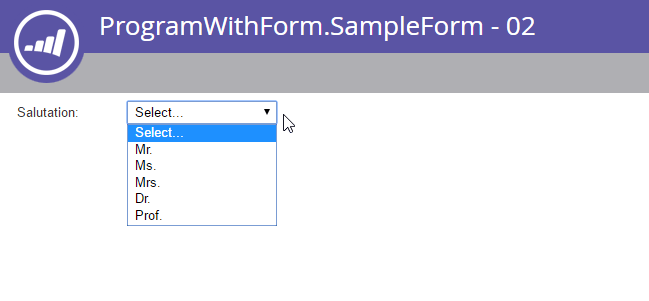
若要更新清單專案,請將values引數格式化,如下列範例所示:
POST /rest/asset/v1/form/{id}/field/Salutation.json
Content-Type: application/x-www-form-urlencoded
values=[{"label":"Select...","value":"","isDefault":true,"selected":true}, {"label":"MR","value":"MR"}, {"label":"MS","value":"MS"}, {"label":"MRS","value":"MRS"}, {"label":"DR","value":"DR"}, {"label":"PROF","value":"PROF"}]
{
  "success": true,
  "warnings": [ ],
  "errors": [ ],
  "requestId": "71fd#1588d9d1b0c",
  "result": [
    {
      "id": "Salutation",
      "label": "Salutation:",
      "dataType": "select",
      "validationMessage": "This field is required.",
      "rowNumber": 3,
      "columnNumber": 0,
      "required": false,
      "formPrefill": true,
      "fieldMetaData": {
        "multiSelect": false,
        "values": [
          {
            "label": "Select...",
            "value": "",
            "isDefault": true,
            "selected": true
          },
          {
            "label": "MR",
            "value": "MR"
          },
          {
            "label": "MS",
            "value": "MS"
          },
          {
            "label": "MRS",
            "value": "MRS"
          },
          {
            "label": "DR",
            "value": "DR"
          },
          {
            "label": "PROF",
            "value": "PROF"
          }
        ],
        "visibleLines": 1
      },
      "visibilityRules": {
        "ruleType": "alwaysShow"
      }
    }
  ]
}
使用「新增欄位至表單」回應來決定如何格式化複雜的表單欄位。
重新排列欄位
使用變更表單欄位位置端點將所有表單欄位重新排列為單一單位。 端點需要positions,一個具有三個成員的物件JSON陣列:
columnNumberrowNumberfieldName,參照欄位識別碼
表單欄位使用類似表格的排列,最多有三個欄和10個列。 列與欄的索引從0開始,所以第一列與欄都使用0。 每個欄位都必須佔據不重複的位置。
如果目標欄位是欄位集,則其在positions中的記錄也必須包含fieldList。 此引數是一個物件陣列,具有相同的columnNumber、rowNumber和fieldName成員。
父清單會將欄位集視為一個欄位。 fieldList中的位置決定其子欄位的排列。
POST /rest/asset/v1/form/{id}/reArrange.json
Content-Type: application/x-www-form-urlencoded
positions=[{"columnNumber":0,"rowNumber":0,"fieldName":"FirstName"},{"columnNumber":0,"rowNumber":1,"fieldName":"LastName"}, {"columnNumber":0,"rowNumber":2, "fieldName":"Email"}]
{
    "success": true,
    "warnings": [],
    "errors": [],
    "requestId": "bb18#15508ef9c04",
    "result": [
        {
            "id": 764
        }
    ]
}
RTF 文字
使用個別的端點來新增RTF文字欄位。 在multipart/form-data請求中傳遞內容作為HTML。 HTML不得包含指令碼、中繼標籤或連結標籤。
POST /rest/asset/v1/form/{id}/richText.json
Content-Type: multipart/form-data; boundary=---------------------------9051914041544843365972754266
-----------------------------9051914041544843365972754266
Content-Disposition: form-data; name="text"
Content-Type: text/html
<div>Fancy Rich Text Component</div>
-----------------------------9051914041544843365972754266--
{
    "success": true,
    "warnings": [],
    "errors": [],
    "requestId": "82c8#154f423bf5c",
    "result": [
        {
            "id": "SHRtbFRleHRfMjAxNi0wNS0yN1QxNDozNDoyNC4xMTVa",
            "labelWidth": 260,
            "dataType": "htmltext",
            "rowNumber": 8,
            "columnNumber": 0,
            "visibilityRules": {
                "ruleType": "alwaysShow"
            },
            "text": "<div>Fancy Rich Text Component</div>"
        }
    ]
}
欄位集
欄位集是一組選用的欄位。 頂層欄位清單會將欄位集視為一個欄位,以供定位和可見性規則使用。 例如,在「相容性要求」欄位中選取「是」,會顯示包含「HIPAA」和「PCI相容性」欄位的欄位集。
表單中的欄位必須是唯一的。 相同的欄位無法同時出現在表單的父欄位清單和子欄位集中。
將具有Add Fieldset的欄位集新增至Form端點。 欄位集接著會出現在表單🔗回應的取得欄位中。 若要將欄位新增至欄位集,請使用更新欄位位置以將其移至其fieldList。
對於這些端點,以application/x-www-form-urlencoded的POST形式傳送資料,而非以JSON形式傳送。
可見度規則
可見性規則會根據表單中輸入的值,判斷訪客是否可以看到欄位。 每個規則會比較表單中subjectField的值與規則中的值清單。
欄位可以有一個可見性規則型別: show、hide或alwaysShow。 API會從上到下評估欄位的規則,並套用評估為true的第一個規則。
變更可見度規則是破壞性更新。
POST /rest/asset/v1/form/{id}/field/Email/visibility.json
Content-Type: application/x-www-form-urlencoded
visibilityRule={"ruleType":"show", "rules":[{"subjectField": "LastName", "operator": "isNotEmpty", "values": [], "altLabel": "Email:"}]}
{
    "success": true,
    "warnings": [],
    "errors": [],
    "requestId": "ab4a#15509030601",
    "result": [
        {
            "formFieldId": "Email",
            "ruleType": "show",
            "rules": [
                {
                    "subjectField": "LastName",
                    "operator": "isNotEmpty",
                    "values": [],
                    "altLabel": "Email:"
                }
            ]
        }
    ]
}
如需完整的運運算元清單,請參閱新增表單欄位可見性規則。
後續追蹤
動態後續追蹤規則可將訪客重新導向至頁面,或根據提交時指定的欄位值將其保留在目前頁面。 感謝頁面規則和後續頁面規則參照相同的行為。
將規則表示為JSON陣列,其記錄包含followupType、followupValue、operator、subjectField、values和default。 陣列中只有一個記錄可以將布林值default設定為true。 當訪客不符合其他規則的資格時,表單會使用該記錄。
followupType值可以是lp或url。 lp值表示followupValue是Marketo登陸頁面ID。 url值表示followupValue是其他頁面的URL。 運運算元會比較主旨欄位值與提供的值。
提交按鈕
使用更新提交按鈕端點修改提交按鈕樣式。 您可以更新buttonPosition、buttonStyle、label和waitingLabel。 waitingLabel會在提交擱置時顯示。
這是破壞性更新。
核准
Forms會遵循草稿核准的生命週期。 表單可以有草稿版本、核准版本或兩者。 更新一律適用於草稿,並僅在核准後上線。
核准表單會以目前的草稿取代現有的已核准版本(如果有的話)。 取消核准即時表單會刪除任何目前的草稿,並將核准的版本降級為僅草稿狀態。 在嘗試刪除表單前,請一律取消核准。
Progressive設定檔分析
啟用漸進式設定時,表單欄位清單會包含名為Profiling的欄位集。 使用「更新欄位位置」端點可新增或移除漸進式效能分析清單中的欄位。
此端點會執行破壞性更新,因此每個請求都必須包含表單中的所有欄位。 下列範例將Phone新增至漸進式設定檔清單。
POST /rest/asset/v1/form/{id}/reArrange.json
Content-Type: application/x-www-form-urlencoded
positions=[{"columnNumber":0,"rowNumber":0,"fieldName":"Email"},{"columnNumber":0,"rowNumber":1,"fieldName":"LastName"},{"columnNumber":0,"rowNumber":2,"fieldName":"Company"},{"columnNumber":0,"rowNumber":3,"fieldName":"Website"},{"columnNumber":0,"rowNumber":4,"fieldName":"Profiling","fieldList":[{"columnNumber":0,"rowNumber":0,"fieldName":"Phone"}]}]
{
    "success": true,
    "errors": [],
    "requestId": "3d6a#164190dbdf2",
    "result": [
        {
            "id": 1031
        }
    ]
}