多媒體推薦
若要顯示Rich Media Recommendation範本,請將必要的標籤和API呼叫新增至頁面。
-
在頁首中:
- 安裝RTP標籤。
- 新增GET呼叫以填入Recommendations。
- 新增設定範本的SET呼叫。
-
在頁面本文中:
- 將範本標籤(div類別)放置在要顯示範本的位置。
如需詳細資訊,請參閱為網頁多媒體啟用預測性內容。
範本標籤
div。 允許的值: template1、template2、template3。範例
使用「template1」可水準顯示建議。
<div class="RTP_RCMD2" data-rtp-template-id="template1"></div>
使用「template2」可垂直顯示建議。
<div class="RTP_RCMD2" data-rtp-template-id="template2"></div>
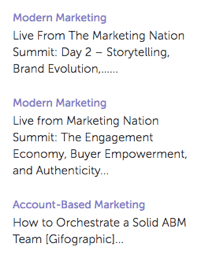
使用「template3」可垂直顯示建議,只有標題和說明。
<div class="RTP_RCMD2" data-rtp-template-id="template3"></div>
檢視範本對齊範例。
填入建議
此方法會使用建議填入頁面上的所有豐富媒體<divs>。
使用情況
rtp('get', 'rcmd', 'richmedia');
變更範本組態
此方法會變更預設範本設定。
在呼叫rtp(‘get’,‘rcmd’, ‘richmedia’)之前呼叫此方法;
使用情況
rtp('set', 'rcmd', 'richmedia', 'template_id', conf_obj);
範例
此範例會變更範本的標題文字。
rtp("set", "rcmd", "richmedia","template1",
    {
        "rcmd.title.text": "RECOMMENDED CONTENT"
    }
);
此範例會設定範本的類別和多個設定屬性。
rtp("set", "rcmd", "richmedia",
    {
        "template1":
        {
            "rcmd.title.text": "RECOMMENDED CONTENT",
            "rcmd.general.font.family": "arial",
            "category":
            [
                "webinar",
                "blog posts",
                "pricing_page_category",
                "product_a_category"
            ]
        }
    }
);
使用「類別」來篩選預測性內容建議中顯示的內容。 若要針對所有已啟用的內容使用預測性內容,請將「類別」留空。
若只要建議多媒體範本中的特定內容,請在「設定內容」頁面上新增內容類別。 然後將該類別與建議範本程式碼建立關聯。 例如,依網站的產品或解決方案區段來分類相關內容。
此範例會設定範本的多個設定屬性。
rtp("set", "rcmd", "richmedia",
    {
        "template1":
        {
            "rcmd.title.text": "RECOMMENDED CONTENT",
            "rcmd.general.font.family": "arial"
        }
    }
);
設定屬性
設定支援可能因範本而異。
基本範例
此範例在一個範本中顯示三個建議。 將範例複製到HTML頁面,然後將RTP標籤取代為您的標籤。
<!DOCTYPE>
<html>
<head>
<meta http-equiv="Content-Type" content="text/html; charset=UTF-8">
<title>RTP recommendation</title>
<!-- RTP tag -->
<script type='text/javascript'>

// This tag needs to be replaced with your account tag
(function(c,h,a,f,i,e){c[a]=c[a]||function(){(c[a].q=c[a].q||[]).push(arguments)};
c[a].a=i;c[a].e=e;var g=h.createElement("script");g.async=true;g.type="text/javascript";
g.src=f+'?aid='+i;var b=h.getElementsByTagName("script")[0];b.parentNode.insertBefore(g,b);
})(window,document,"rtp","//example.rtp.com/rtp-api/v1/rtp.js","account_id");

// Send page view (required by  the recommendation)
rtp('send','view');
// Populate recommendation
rtp('get','rcmd', 'richmedia');
</script>
<!-- End of RTP tag -->
</head>
<body>
<div class="RTP_RCMD2" data-rtp-template-id="template1"></div>
</body>
</html>
進階範例
此範例在一個範本中顯示三個建議。 範本標題為「建議內容」,而按鈕文字為「瞭解詳情」。 將範例複製到HTML頁面,然後將RTP標籤取代為您的標籤。
<!DOCTYPE>
<html>
<head>
<meta http-equiv="Content-Type" content="text/html; charset=UTF-8">
<title>RTP recommendation</title>
<!-- RTP tag -->
<script type='text/javascript'>

// This tag needs to be replaced with your account tag
(function(c,h,a,f,i,e){c[a]=c[a]||function(){(c[a].q=c[a].q||[]).push(arguments)};
c[a].a=i;c[a].e=e;var g=h.createElement("script");g.async=true;g.type="text/javascript";
g.src=f+'?aid='+i;var b=h.getElementsByTagName("script")[0];b.parentNode.insertBefore(g,b);
})(window,document,"rtp","//example.rtp.com/rtp-api/v1/rtp.js","account_id");

// Send page view (required by  the recommendation)
rtp('send','view');
// Populate the recommendation zone
rtp('get', 'campaign',true);
// Change template configuration
rtp('set', 'rcmd', 'richmedia',
    {
        template1 :
        {
            "rcmd.title.text" : "RECOMMENDED CONTENT",
            "rcmd.cta.text" : "Read More"
        }
    }
);
// Populate recommendation
rtp('get','rcmd', 'richmedia');
</script>
<!-- End of RTP tag -->
</head>
<body>
<div class="RTP_RCMD2" data-rtp-template-id="template1"></div>
</body>
</html>
多媒體建議範本范#1範例
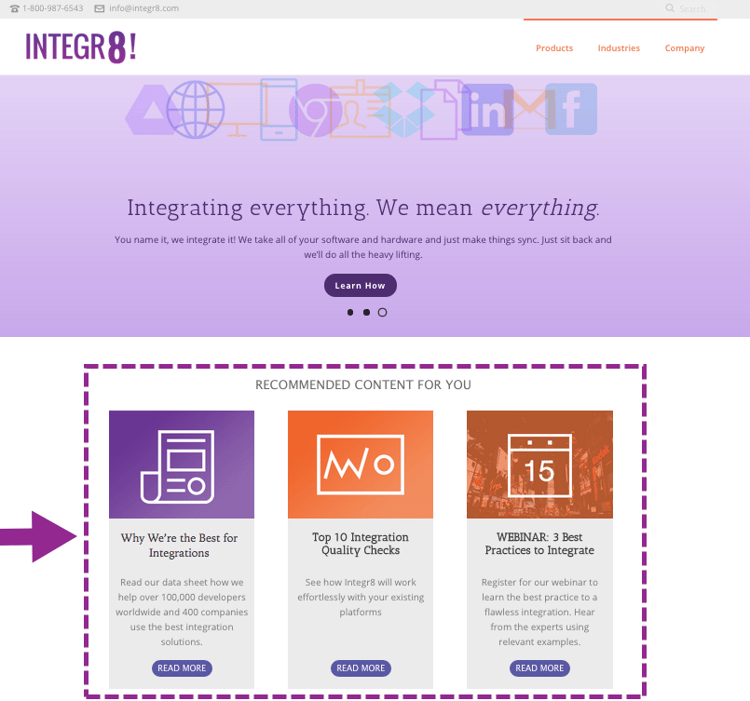
名稱: template1
說明:包含影像、標題、說明和call-to-action按鈕的水準內容。
多媒體建議範本范#2範例
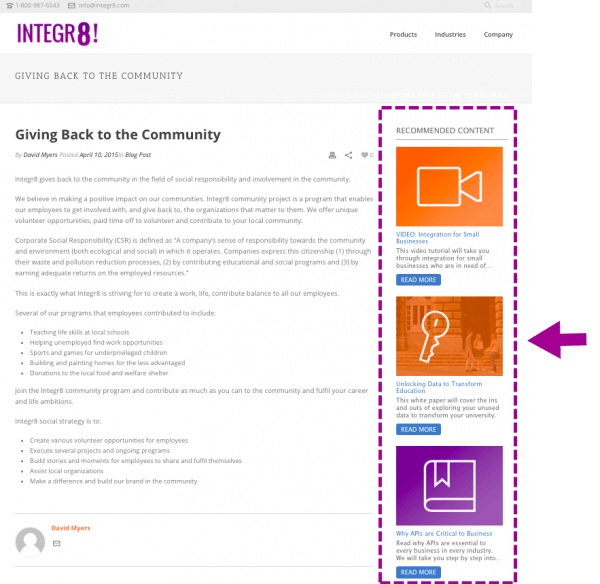
名稱: template2
描述:垂直內容,包括影像、標題、描述和call-to-action按鈕。
多媒體建議範本范#3範例
名稱: template3
描述:僅包含標題和描述的垂直內容。 當滑鼠停留在滑鼠上時,標題會變更顏色並連結至內容URL。 說明也會連結至內容,而不會變更顏色。