可編輯的固定元件
可編輯的React元件可以「固定」,或硬式編碼到SPA的檢視中。 如此一來,開發人員就能將與SPA Editor相容的元件放入SPA檢視中,且使用者能在AEM SPA Editor中編寫元件的內容。
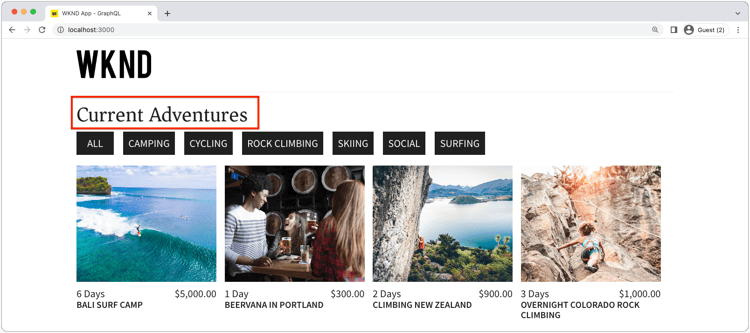
在本章中,我們會以固定但可編輯的Title元件取代Home檢視的標題「Current Adventures」(在Home.js中為硬式編碼文字)。 固定元件可保證標題的位置,但也允許編寫標題的文字,並在開發週期之外進行變更。
更新WKND應用程式
若要將 Fixed 元件新增至Home檢視:
- 建立自訂可編輯的標題元件並將其註冊到專案的標題資源型別
- 將可編輯的標題元件放在SPA的「首頁」檢視上
建立可編輯的React Title元件
在SPA的「首頁」檢視中,以自訂的可編輯標題元件取代硬式編碼文字<h2>Current Adventures</h2>。 在使用標題元件之前,我們必須:
- 建立自訂Title React元件
- 使用來自
@adobe/aem-react-editable-components的方法裝飾自訂Title元件,使其可編輯。 - 透過
MapTo註冊可編輯的Title元件,以便稍後在容器元件中使用。
執行方法:
-
在IDE中的
~/Code/aem-guides-wknd-graphql/remote-spa-tutorial/react-app開啟遠端SPA專案 -
在
react-app/src/components/editable/core/Title.js建立React元件 -
將下列程式碼新增至
Title.js。code language-javascript import React from 'react' import { RoutedLink } from "./RoutedLink"; const TitleLink = (props) => { return ( <RoutedLink className={props.baseCssClass + (props.nested ? '-' : '__') + 'link'} isRouted={props.routed} to={props.linkURL}> {props.text} </RoutedLink> ); }; const TitleV2Contents = (props) => { if (!props.linkDisabled) { return <TitleLink {...props} /> } return <>{props.text}</> }; export const Title = (props) => { if (!props.baseCssClass) { props.baseCssClass = 'cmp-title' } const elementType = (!!props.type) ? props.type.toString() : 'h3'; return (<div className={props.baseCssClass}> { React.createElement(elementType, { className: props.baseCssClass + (props.nested ? '-' : '__') + 'text', }, <TitleV2Contents {...props} /> ) } </div>) } export const titleIsEmpty = (props) => props.text == null || props.text.trim().length === 0請注意,您尚無法使用AEM SPA Editor編輯此React元件。 此基本元件將在下一個步驟中變為可編輯。
閱讀程式碼的註釋,以瞭解實作詳細資訊。
-
在
react-app/src/components/editable/EditableTitle.js建立React元件 -
將下列程式碼新增至
EditableTitle.js。code language-javascript // Import the withMappable API provided bu the AEM SPA Editor JS SDK import { EditableComponent, MapTo } from '@adobe/aem-react-editable-components'; import React from 'react' // Import the AEM the Title component implementation and it's Empty Function import { Title, titleIsEmpty } from "./core/Title"; import { withConditionalPlaceHolder } from "./core/util/withConditionalPlaceholder"; import { withStandardBaseCssClass } from "./core/util/withStandardBaseCssClass"; // The sling:resourceType of the AEM component used to collected and serialize the data this React component displays const RESOURCE_TYPE = "wknd-app/components/title"; // Create an EditConfig to allow the AEM SPA Editor to properly render the component in the Editor's context const EditConfig = { emptyLabel: "Title", // The component placeholder in AEM SPA Editor isEmpty: titleIsEmpty, // The function to determine if this component has been authored resourceType: RESOURCE_TYPE // The sling:resourceType this component is mapped to }; export const WrappedTitle = (props) => { const Wrapped = withConditionalPlaceHolder(withStandardBaseCssClass(Title, "cmp-title"), titleIsEmpty, "TitleV2") return <Wrapped {...props} /> } // EditableComponent makes the component editable by the AEM editor, either rendered statically or in a container const EditableTitle = (props) => <EditableComponent config={EditConfig} {...props}><WrappedTitle /></EditableComponent> // MapTo allows the AEM SPA Editor JS SDK to dynamically render components added to SPA Editor Containers MapTo(RESOURCE_TYPE)(EditableTitle); export default EditableTitle;此
EditableTitleReact元件會包裝TitleReact元件,並將其包裝及裝飾為可在AEM SPA Editor中編輯。
使用React EditableTitle元件
現在EditableTitle React元件已在中註冊並可在React應用程式中使用,請取代「首頁」檢視上的硬式編碼標題文字。
-
編輯
react-app/src/components/Home.js -
在底部的
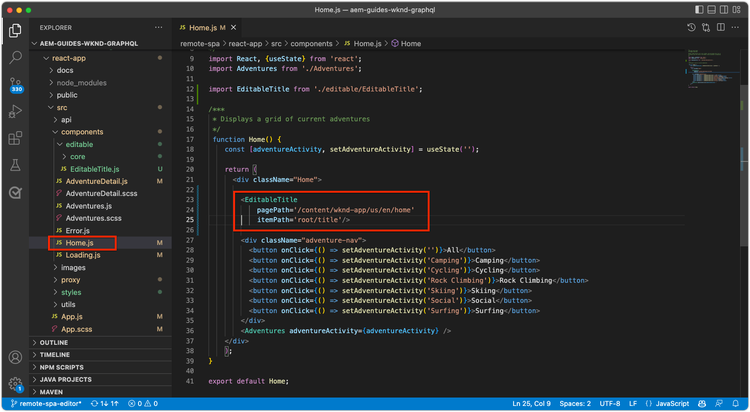
Home()中,匯入EditableTitle並以新的AEMTitle元件取代硬式編碼的標題:code language-javascript ... import EditableTitle from './editable/EditableTitle'; ... function Home() { return ( <div className="Home"> <EditableTitle pagePath='/content/wknd-app/us/en/home' itemPath='root/title'/> <Adventures /> </div> ); }
Home.js檔案應該如下所示:
在AEM中編寫標題元件
-
登入AEM Author
-
導覽至網站> WKND應用程式
-
點選首頁,然後從最上方的動作列選取編輯
-
從「頁面編輯器」右上角的編輯模式選取器中選取編輯
-
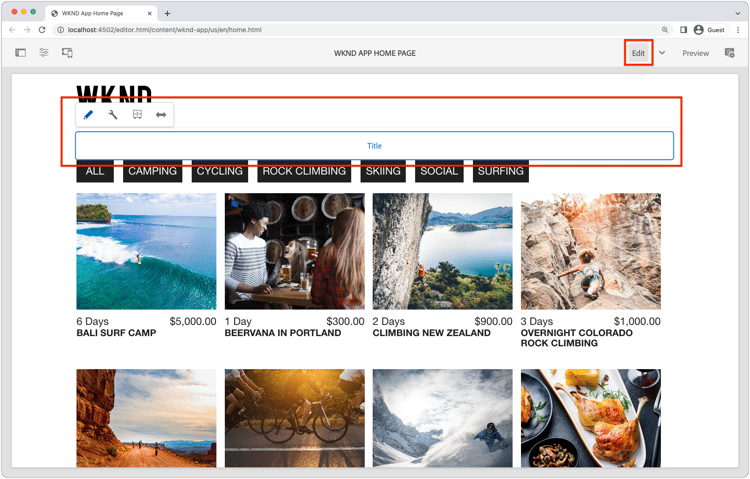
將游標暫留在WKND標誌下方和冒險清單上方的預設標題文字上,直到顯示藍色編輯外框為止
-
點選以公開元件的動作列,然後點選 扳手 以進行編輯
-
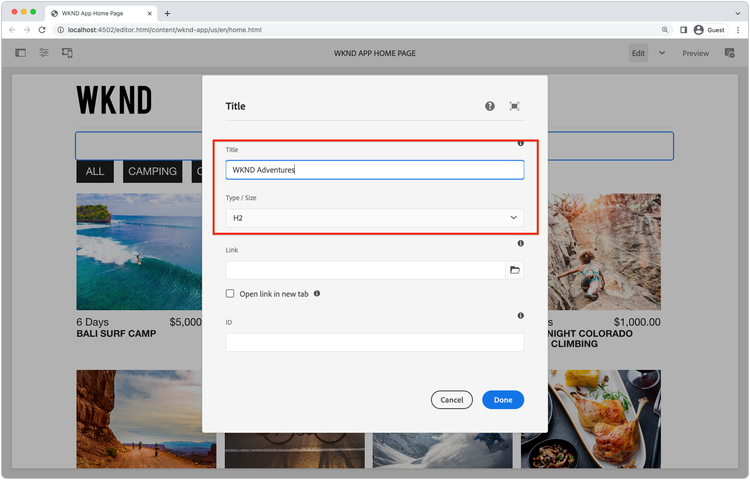
編寫標題元件:
-
標題: WKND冒險
-
型別/大小: H2
-
-
點選 完成 以儲存
-
在AEM SPA Editor中預覽變更
-
重新整理在http://localhost:3000本機執行的WKND應用程式,並立即看到編寫的標題變更。
SPA中的
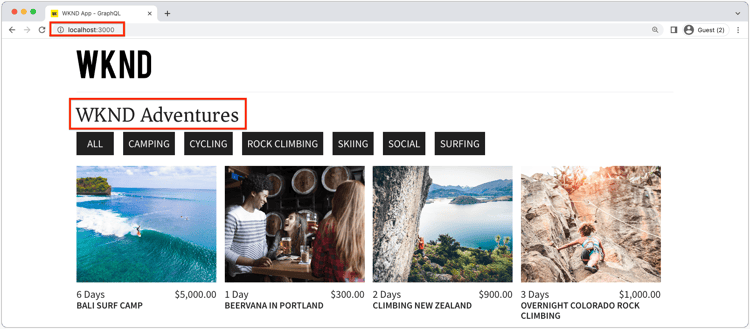
恭喜!
您已將固定、可編輯的元件新增至WKND應用程式! 您現在知道如何:
- 建立固定但可編輯的元件至SPA
- 在AEM中編寫固定元件
- 檢視遠端SPA中的撰寫內容
後續步驟
接下來的步驟是新增AEM ResponsiveGrid容器元件至SPA,讓作者將可編輯的元件新增至SPA!