尋找並移除AEM as a Cloud Service中已棄用的API
瞭解如何在AEM as a Cloud Service中尋找及移除已棄用的API。
概觀
為確保您的應用程式安全且效能,以及您能夠繼續使用Cloud Manager管道部署程式碼,請從您的專案中移除已棄用的API。
在本教學課程中,您將瞭解如何使用AEM Analyzer Maven外掛程式,在您的AEM as a Cloud Service環境中尋找及移除已棄用的API。
關於已棄用API的通知
關於已過時的API使用情形和修正注意事項會定期回報,讓我們檢閱一些範例。
-
AEM as a Cloud Service 動作中心會通知您專案中已棄用的API。
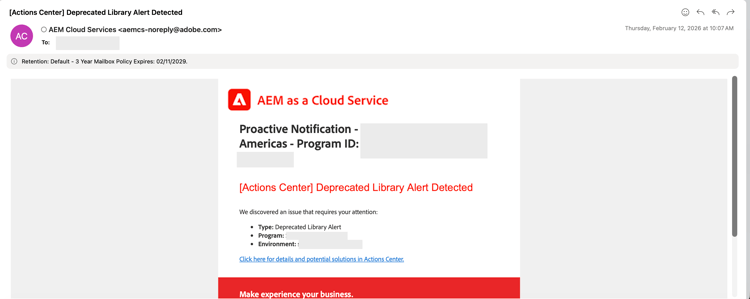
-
Cloud Manager管道中的 程式碼掃描 步驟會報告專案中已被取代的API,請檢閱 下載詳細資料 報告以檢視已被取代的API完整清單。

-
Cloud Manager管道中的 成品準備 步驟會報告專案中已被取代的API、下載記錄檔並在記錄檔中尋找分析器警告。
code language-none 2026-02-20 15:40:48.376 Analyser warnings have been found 2026-02-20 15:40:48.376 The analyser found the following warnings for author and publish : 2026-02-20 15:40:48.376 [region-deprecated-api] com.adobe.aem.guides:aem-guides-wknd.core:4.0.5-SNAPSHOT: Usage of deprecated package found : org.apache.commons.lang : Commons Lang 2 is in maintenance mode. Commons Lang 3 should be used instead. Deprecated since 2021-04-30 For removal : 2021-12-31 (com.adobe.aem.guides:aem-guides-wknd.all:4.0.5-SNAPSHOT) 2026-02-20 15:40:56.458 Convert Merge Analyse finished.
如何尋找已過時的API
請依照下列步驟,在您的AEM as a Cloud Service專案中尋找已棄用的API。
-
使用最新的AEM Analyzer Maven外掛程式
在您的AEM專案中,使用最新版本的AEM Analyzer Maven外掛程式。
-
在主要
pom.xml中,通常會宣告外掛程式版本。 比較您的版本與最新的發行版本。code language-xml ... <aemanalyser.version>1.6.16</aemanalyser.version> <!-- Latest released version as of 20-Feb-2026 --> ... <!-- AEM Analyser Plugin --> <plugin> <groupId>com.adobe.aem</groupId> <artifactId>aemanalyser-maven-plugin</artifactId> <version>${aemanalyser.version}</version> <extensions>true</extensions> </plugin> ... -
外掛程式會根據最新可用的AEM SDK進行檢查。 在您的專案的
pom.xml檔案中使用最新的AEM SDK版本。 將已棄用的API顯示為IDE警告會有所幫助。code language-xml ... <aem.sdk.api>2026.2.24464.20260214T050318Z-260100</aem.sdk.api> <!-- Latest available AEM SDK version as of 20-Feb-2026 --> ... -
請確定
all模組在verify階段中執行外掛程式。code language-xml ... <build> <plugins> ... <plugin> <groupId>com.adobe.aem</groupId> <artifactId>aemanalyser-maven-plugin</artifactId> <extensions>true</extensions> <executions> <execution> <id>analyse-project</id> <phase>verify</phase> <goals> <goal>project-analyse</goal> </goals> </execution> </executions> </plugin> ... </plugins> </build> ...
-
-
執行組建並檢查警告
當您執行
mvn clean install時,分析器會在輸出中將已棄用的API回報為 [WARNING] 訊息。 例如:code language-shell ... [WARNING] The analyser found the following warnings for author and publish : [WARNING] [region-deprecated-api] com.adobe.aem.guides:aem-guides-wknd.core:4.0.5-SNAPSHOT: Usage of deprecated package found : org.apache.commons.lang : Commons Lang 2 is in maintenance mode. Commons Lang 3 should be used instead. Deprecated since 2021-04-30 For removal : 2021-12-31 (com.adobe.aem.guides:aem-guides-wknd.all:4.0.5-SNAPSHOT) ...專注於建置成功或失敗時,很容易忽略這些訊息。
-
取得已棄用的API的清除清單
上述步驟也提供相同資訊。 但是,請在
all模組上執行verify階段,以在一個位置檢視所有 [警告] 訊息。 例如:code language-shell $ mvn clean verify -pl all組建輸出中的 [WARNING] 訊息會列出專案中已棄用的API。
如何移除已過時的API
AEM分析器報告 哪些 已過時,並提供如何修正的建議。 不過,請使用下表來選擇正確的動作,並在您需要更多詳細資訊時遵循連結的檔案。
已棄用的API補救策略
實用指引
- 將分析器警告視為未來的管道失敗,而不是選擇性訊息。
- 使用 最新的AEM SDK 在本機修正已棄用的API。
- 保持分析器輸出整潔,以避免在未來AEM升級期間出現問題。
及早修正已棄用的API可讓您的專案升級安全且部署準備就緒。