設定參考存放區清理
設定參考存放區清理工作並管理Guides BTree deletion設定,讓您的系統保持最佳化和存放區整潔。
設定參考存放區清理工作
下列標籤提供根據Experience Manager Guides設定來設定參考存放區清理工作的指示: Cloud Service或內部部署。
-
使用組態覆寫中提供的指示來建立組態檔。
-
在設定檔案中,提供下列(屬性)詳細資訊:
table 0-row-3 1-row-3 PID 屬性索引鍵 屬性值 com.adobe.guides.utils.schedulers.GuidesBTreesCleanupSchedulerJobcronExpression預設值: “0 0 0 * * ?”
-
開啟Adobe Experience Manager Web主控台設定頁面。
存取設定頁面的預設URL為:
code language-http http://<server name>:<port>/system/console/configMgr -
搜尋並選取 com.adobe.guides.utils.schedulers.GuidesBTreesCleanupSchedulerJob 套件組合。
-
更新cron運算式以設定參考存放區清理排程器工作執行頻率。
-
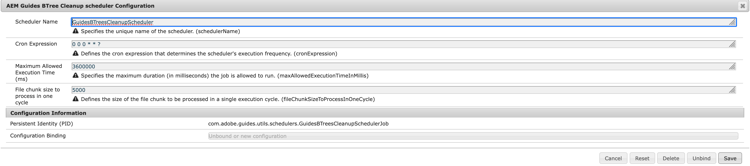
設定參考存放區清理排程器,如下所示。
-
選取「儲存」。
設定參考線B樹狀結構刪除啟用設定
下列標籤會提供根據您的Experience Manager Guides設定啟用設定的指示: Cloud Service或內部部署。
-
使用組態覆寫中提供的指示來建立組態檔。
-
在設定檔案中,提供下列(屬性)詳細資訊:
table 0-row-3 1-row-3 PID 屬性索引鍵 屬性值 com.adobe.fmdita.config.ConfigManagerbtree.deletion.enabled預設值: “True”
-
開啟Adobe Experience Manager Web主控台設定頁面。
存取設定頁面的預設URL為:
code language-http http://<server name>:<port>/system/console/configMgr -
搜尋並選取 com.adobe.fmdita.config.ConfigManager 套件。
-
啟用設定Guides btree刪除已啟用 (btree.deletion.enabled)。

-
選取「儲存」。