發佈階層上適用於 AEM as a Cloud Service 的 Open ID Connect 支援 open-id-connect-support-for-aem-as-a-cloud-service-on-publish-tier
簡介 introduction
隨著組織的數位體驗現代化,安全又能擴展的身分管理即成為基本需求。Adobe Experience Manager (AEM) Cloud Service 現在可在發佈階層支援 OpenID Connect (OIDC),允許與業界領先的身分提供者 (IdP) (例如 Entra ID (Azure AD)、Google、Okta、Auth0、Ping Identity、ForgeRock 和支援 OIDC 的 IdP) 進行緊密整合和標準型整合。
OIDC 是 OAuth 2.0 通訊協定上的身分層,可以在為開發人員維持簡潔操作的同時實現強大的使用者驗證。其廣泛應用於企業對消費者 (B2C)、內部網路和合作夥伴入口網站等情境,這些情境都需要安全的使用者登入和身分識別同盟。
目前為止,AEM 客戶都負責在發佈階層實施自己的自訂登入邏輯,這既增加了開發時間,也帶來長期維護和安全性的挑戰。透過對 OIDC 的原生支援,AEM Cloud Service 為存取發佈環境的一般使用者提供安全、可擴充且 Adobe 支援的驗證機制,從而消除此負擔。
無論您提供的是個人化的消費者網站還是經過驗證的內部入口網站,發佈的 OIDC 都可以簡化身分識別同盟並透過集中身分治理降低風險。它還可以幫助組織在不犧牲靈敏度的情況下滿足現代的合規性和安全性標準。
設定 AEM 以進行 OIDC 驗證 configure-aem-oidc-authentication
先決條件 prerequisits
我們假設以下資訊可用或已定義:
- AEM 存放庫中受保護內容的路徑
- 待設定 IdP 的識別碼。這可以是任何字串
IdP 設定的資訊:
- IdP 中設定的用戶端 ID
- IdP 中設定的用戶端密碼若已在 Idp 上設定 PKCE,則用戶端密碼不可用。請勿在設定檔中儲存純文字值。使用 CM 密碼並將其用來參照
- 在 Idp 上設定的範圍。至少必須提供
openid範圍 - 是否啟用了 IdP 上的 PKCE
callbackUrl使用第 1 點定義的設定路徑之一新增字尾加以定義:/j_security_check- 存取標準
.well-known檔案的baseUrl。例如,如果知名 URL 是:https://login.microsoftonline.com/53279d7a-438f-41cd-a6a0-fdb09efc8891/v2.0/.well-known/openid-configuration,那麼baseUrl就是:https://login.microsoftonline.com/53279d7a-438f-41cd-a6a0-fdb09efc8891
設定檔概觀 overview-of-the-configuration-files
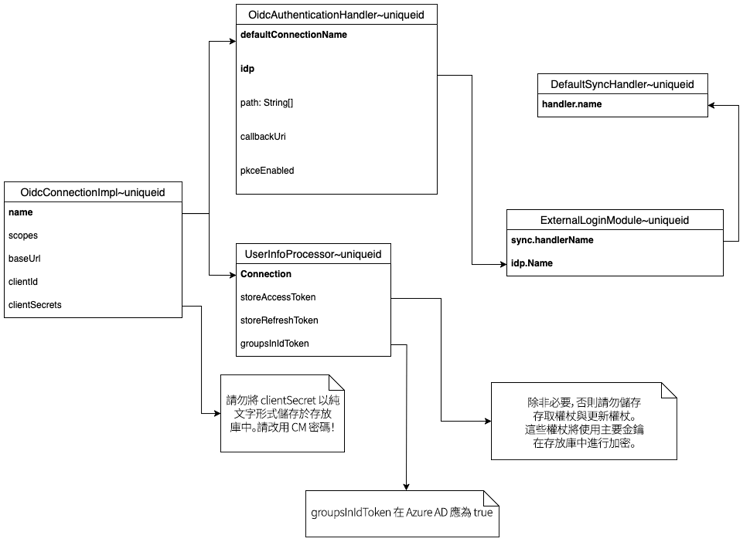
以下是需要設定的檔案清單:
- OIDC 連線:這將由
OidcAuthenticationHandler用於對使用者進行驗證,或由其他元件用於 授權以 OAuth 存取受 IdP 保護的資源 - OIDC 驗證處理常式:這是用於對存取設定路徑的使用者進行驗證的驗證處理常式
- UserInfoProcessor:此元件會處理 IdP 收到的資訊。客戶可以將其擴充以實施自訂邏輯
- 預設同步處理常式:此元件在存放庫中建立使用者
- 外部登入模組:此元件在本機 oak 存放庫中對使用者進行驗證。
下圖顯示上述設定元素如何相互連結。請注意,由於這些是 ServiceFactory 元件,因此 ~uniqueid 可以是任何隨機的唯一字串:
設定 OIDC 連線 configure-the-oidc-connection
首先,我們需要設定 OIDC 連線。可以設定多個 OIDC 連線,且每個連線必須有不同名稱。
-
建立新的
.cfg.json檔案來儲存設定。例如,您可以使用org.apache.sling.auth.oauth_client.impl.OidcConnectionImpl~azure.cfg.json:azure 字尾必須是連線的唯一識別碼 -
遵循以下範例中的設定格式:
code language-none { "name":"azure", "scopes":[ "openid" ], "baseUrl":"<https://login.microsoftonline.com/tenant-id/v2.0>", "clientId":"client-id-from-idp", "clientSecret":"xxxxxx" }
在某些環境中,身分提供者(IdP)可能不會公開有效的.well-known端點。
發生此情況時,可在組態檔案中指定下列屬性,以手動定義必要的端點。
在此設定模式中,不得設定baseUrl屬性。
"authorizationEndpoint": "https://idp-url/oauth2/v1/authorize",
"tokenEndpoint": "https://idp-url/oauth2/v1/token",
"jwkSetURL":"https://idp-url/oauth2/v1/keys",
"issuer": "https://idp-url"
-
依以下方式設定其屬性:
- 「名稱」 可由使用者定義
baseUrl、clientid和clientSecret是來自 IdP 的設定值。- 範圍必須至少包含值
openid。
設定 OIDC 驗證處理常式 configure-oidc-authentication-handler
現在,設定 OIDC 驗證處理常式可設定多個 OIDC 連線。每個都必須有不同的名稱。如果這些連線共用相同的 OAK 外部身分提供者,就可以共用使用者。
-
建立設定檔。對於此範例,我們將使用
org.apache.sling.auth.oauth_client.impl.OidcAuthenticationHandler~azure.cfg.json。azure字尾必須是唯一識別碼。請參閱以下的設定檔範例:code language-none { "path":"/content/tests/us/en/test-7", "callbackUri":"http://localhost:14503/content/tests/us/en/test-7/j_security_check", "pkceEnabled":false, "defaultConnectionName":"azure" "idp": "azure-idp" } -
接著,請依以下方式設定其屬性:
path:要保護的路徑callbackUri:要保護的路徑,新增尾碼:/j_security_check。 您還必須在遠端IdP中將同一callbackUri設定為重新導向url。defaultConnectionName:使用先前步驟中為 OIDC 連線定義的相同名稱進行設定 +pkceEnabled:授權代碼流程的trueProof Key for Code Exchange (PKCE)idp:OAK 外部身分提供者的名稱。請注意,不同的 OAK IDP 無法共用使用者或群組
設定 SlingUserInfoProcessor configure-slinguserinfoprocessor
-
建立設定檔。對於此範例,我們將使用
org.apache.sling.auth.oauth_client.impl.SlingUserInfoProcessorImpl~azure.cfg.json。azure字尾必須是唯一識別碼。請參閱以下的設定檔範例:code language-none { "groupsInIdToken":true, "groupsClaimName": "groups", "connection":"azure", "storeAccessToken": false, "storeRefreshToken": false, "idpNameInPrincipals": true } -
接著,請依以下方式設定其屬性:
groupsInIdToken:如果群組在 ID 權杖中傳送,則設為真。如果值為假或未指定,則從 UserInfo 端點讀取群組。groupsClaimName:申請的名稱包含要在 AEM 中同步的群組。connection:使用先前步驟中為 OIDC 連線定義的相同名稱進行設定storeAccessToken:如果存取權杖必須儲存在存放庫,則為真。在預設情況下,則為假。只有當 AEM 需要代表儲存在受相同 IdP 保護的外部伺服器中的使用者存取資源時,才將其設為真。storeRefreshToken:如果重新整理權杖必須儲存在存放庫,則為真。在預設情況下,則為假。只有在AEM需要代表儲存在受相同IdP保護的外部伺服器中的使用者存取資源,並需要從IdP重新整理權杖時,才可將其設為true。idpNameInPrincipals:設定為true時,會將IdP的名稱新增為尾碼,並以’;'分隔使用者和群組主體。 例如,如果IdP名稱為azure-idp,使用者名稱為john.doe,則儲存在Oak中的主體將為john.doe;azure-idp。 在Oak中設定多個IdP以避免來自不同IdP的同名使用者或群組之間發生衝突時,此方法會很實用。 也可以設定此設定,以避免與其他驗證處理常式(例如Saml)所建立的使用者或群組發生衝突。
請注意,存取權杖和重新整理權杖以 AEM 主要金鑰加密儲存。
設定同步處理常式 configure-the-synchronization-handler
必須設定至少一個同步處理常式來同步在 oak 中經過驗證的使用者。如需詳細資訊,請參閱此頁面。
建立一個名為 org.apache.jackrabbit.oak.spi.security.authentication.external.impl.DefaultSyncHandler~azure.cfg.json 的檔案。azure 字尾必須是唯一識別碼。關於更多如何設定其屬性的資訊,請參閱 Oak 使用者和群組同步文件。請參閱以下的範例設定:
{
  "user.expirationTime":"1h",
  "user.membershipExpTime":"1h",
  "group.expirationTime": "1d"
  "user.propertyMapping":[
    "profile/givenName=profile/given_name",
    "profile/familyName=profile/family_name",
    "rep:fullname=profile/name",
    "profile/email=profile/email",
    "access_token=access_token",
    "refresh_token=refresh_token"
  ],
  "user.pathPrefix":"azure",
  "handler.name":"azure"
}
在開發期間,可將到期時間減少至較低的值(例如:1s),以加快Oak中使用者和群組同步化的測試。
下列為一些最相關的屬性,要在預設同步處理常式中設定。請注意,應始終在雲端服務中啟用動態群組會籍。
user.expirationTimeuser.membershipExpTimeuser.dynamicMembershipuser.enforceDynamicMembershipgroup.dynamicGroupsUserInfoProcessor 實施僅同步少數屬性。它可以修改和自訂。“profile/givenName=profile/given_name”、“profile/familyName=profile/family_name”、“rep:fullname=profile/name”、“profile/email=profile/email”、“access_token=access_token”、“refresh_token=refresh_token”user.membershipNestingDepth設定外部登入模組 configure-the-external-login-module
最後,您需要設定外部登入模組。
-
建立一個名為
org.apache.jackrabbit.oak.spi.security.authentication.external.impl.ExternalLoginModuleFactory~azure.cfg.json的檔案。請參閱以下範例設定:code language-none { "sync.handlerName":"azure", "idp.name":"azure-idp" } -
依以下方式設定其屬性:
sync.handlerName:先前定義的同步處理常式的名稱idp.name:OIDC 驗證處理常式中定義的 OAK 身分提供者
選用:實施自訂 UserInfoProcessor implement-a-custom-userinfoprocessor
使用者已由ID權杖驗證,並且會從為IdP定義的userInfo端點擷取其他屬性。 UserInfoProcessor負責將從身分提供者收到的資料轉換成認證和屬性,以供AEM用於使用者同步處理。
何時建立自訂UserInfoProcessor when-to-create-custom-userinfoprocessor
預設SlingUserInfoProcessorImpl處理標準OIDC宣告和群組同步處理。 如果您有以下需要,您可能需要自訂實施:
- 從ID權杖或UserInfo回應中擷取及處理自訂宣告
- 將宣告轉換或對應至不同的屬性名稱
- 對巢狀宣告的群組擷取實作自訂邏輯
- 新增不屬於標準OIDC設定檔的其他使用者屬性
- 處理存取權杖或重新整理特定使用案例的權杖
- 與外部系統整合,在驗證期間豐富使用者資料
瞭解UserInfoProcessor介面 understanding-userinfoprocessor-interface
來自UserInfoProcessor封裝的org.apache.sling.auth.oauth_client.spi介面定義了兩個方法:
public interface UserInfoProcessor {
    /**
     * Process the UserInfo and token response to create OIDC credentials
     *
     * @param userInfo - JSON response from the UserInfo endpoint (may be null)
     * @param tokenResponse - JSON response from the token endpoint
     * @param oidcSubject - The subject claim from the ID token
     * @param idp - The configured IDP name
     * @return OidcAuthCredentials containing user attributes and group memberships
     */
    @NotNull OidcAuthCredentials process(
        @Nullable String userInfo,
        @NotNull String tokenResponse,
        @NotNull String oidcSubject,
        @NotNull String idp
    );

    /**
     * @return The name of the OIDC connection this processor is associated with
     */
    @NotNull String connection();
}
傳回的OidcAuthCredentials物件允許您:
- 透過
setAttribute(key, value)設定使用者屬性 — 這些是根據DefaultSyncHandler屬性對應進行同步的 - 透過
addGroup(groupName)新增群組成員資格 — 這些群組是在AEM中建立/同步的
範例:自訂UserInfoProcessor實施 custom-userinfoprocessor-implementation
以下為完整範例,說明如何實作自訂UserInfoProcessor:
package com.mycompany.aem.auth;

import java.nio.charset.StandardCharsets;
import java.util.Base64;

import org.apache.sling.auth.oauth_client.spi.OidcAuthCredentials;
import org.apache.sling.auth.oauth_client.spi.UserInfoProcessor;
import org.jetbrains.annotations.NotNull;
import org.jetbrains.annotations.Nullable;
import org.osgi.service.component.annotations.Activate;
import org.osgi.service.component.annotations.Component;
import org.osgi.service.metatype.annotations.AttributeDefinition;
import org.osgi.service.metatype.annotations.Designate;
import org.osgi.service.metatype.annotations.ObjectClassDefinition;
import org.slf4j.Logger;
import org.slf4j.LoggerFactory;

import com.google.gson.JsonObject;
import com.google.gson.JsonParser;

/**
 * Custom UserInfoProcessor that extracts additional claims from the ID token
 * and adds custom user attributes and group memberships.
 */
@Component(service = UserInfoProcessor.class, property = {"service.ranking:Integer=50"})
@Designate(ocd = CustomUserInfoProcessor.Config.class, factory = true)
public class CustomUserInfoProcessor implements UserInfoProcessor {

    private static final Logger logger = LoggerFactory.getLogger(CustomUserInfoProcessor.class);

    @ObjectClassDefinition(name = "Custom UserInfo Processor")
    @interface Config {
        @AttributeDefinition(name = "Connection Name", description = "OIDC Connection Name")
        String connection();
    }

    private final String connection;

    @Activate
    public CustomUserInfoProcessor(Config config) {
        this.connection = config.connection();
        logger.info("CustomUserInfoProcessor activated for connection: {}", connection);
    }

    @Override
    public @NotNull OidcAuthCredentials process(
            @Nullable String userInfo,
            @NotNull String tokenResponse,
            @NotNull String oidcSubject,
            @NotNull String idp) {

        // Parse the token response to extract tokens
        JsonObject tokenJson = JsonParser.parseString(tokenResponse).getAsJsonObject();
        String accessToken = tokenJson.has("access_token") ?
            tokenJson.get("access_token").getAsString() : null;
        String idToken = tokenJson.has("id_token") ?
            tokenJson.get("id_token").getAsString() : null;

        logger.debug("Processing authentication for subject: {}", oidcSubject);

        // Decode and extract claims from ID Token
        JsonObject claims = null;
        if (idToken != null) {
            claims = decodeJwtPayload(idToken);
            logger.debug("Extracted claims from ID token: {}", claims);
        }

        // Create credentials object
        OidcAuthCredentials credentials = new OidcAuthCredentials(oidcSubject, idp);
        credentials.setAttribute(".token", "");

        // Extract standard profile attributes
        if (claims != null) {
            // Standard OIDC claims
            setAttributeIfPresent(credentials, claims, "given_name", "profile/given_name");
            setAttributeIfPresent(credentials, claims, "family_name", "profile/family_name");
            setAttributeIfPresent(credentials, claims, "email", "profile/email");
            setAttributeIfPresent(credentials, claims, "name", "profile/name");

            // Custom claims from your IdP
            setAttributeIfPresent(credentials, claims, "department", "profile/department");
            setAttributeIfPresent(credentials, claims, "employee_id", "profile/employeeId");
            setAttributeIfPresent(credentials, claims, "job_title", "profile/jobTitle");
        }

        // Extract group memberships from claims
        if (claims != null && claims.has("groups")) {
            if (claims.get("groups").isJsonArray()) {
                claims.get("groups").getAsJsonArray().forEach(group -> {
                    credentials.addGroup(group.getAsString());
                });
            }
        }

        // Optionally store tokens if needed for later API calls
        // Note: Only store tokens if your application needs to call external APIs
        // on behalf of the user. Tokens are encrypted before storage.
        if (accessToken != null) {
            credentials.setAttribute("access_token", accessToken);
        }

        return credentials;
    }

    @Override
    public @NotNull String connection() {
        return connection;
    }

    /**
     * Helper method to set attribute if present in claims
     */
    private void setAttributeIfPresent(OidcAuthCredentials credentials,
                                      JsonObject claims,
                                      String claimName,
                                      String attributeName) {
        if (claims.has(claimName) && !claims.get(claimName).isJsonNull()) {
            String value = claims.get(claimName).getAsString();
            if (value != null && !value.isEmpty()) {
                credentials.setAttribute(attributeName, value);
            }
        }
    }

    /**
     * Decode JWT payload (middle part) to extract claims
     */
    private JsonObject decodeJwtPayload(String jwt) {
        try {
            String[] parts = jwt.split("\\.");
            if (parts.length != 3) {
                logger.warn("Invalid JWT format");
                return null;
            }

            // Decode the payload (second part)
            String payload = parts[1];
            // Add padding if needed
            payload = payload + "====".substring(0, (4 - payload.length() % 4) % 4);
            // Replace URL-safe characters
            payload = payload.replace('-', '+').replace('_', '/');

            byte[] decoded = Base64.getDecoder().decode(payload);
            String json = new String(decoded, StandardCharsets.UTF_8);
            return JsonParser.parseString(json).getAsJsonObject();
        } catch (Exception e) {
            logger.error("Failed to decode JWT payload", e);
            return null;
        }
    }
}
設定 custom-userinfoprocessor-configuration
在UserInfoProcessor底下的AEM專案中建立自訂ui.config/src/main/content/jcr_root/apps/myapp/osgiconfig/config.publish/的設定檔:
com.mycompany.aem.auth.CustomUserInfoProcessor~azure.cfg.json
{
  "connection": "azure"
}
組態必須符合您OidcConnectionImpl組態中定義的連線名稱。 service.ranking註解中的@Component屬性(在此範例中設定為50)會決定同一連線註冊多個處理器時的優先順序。 較高的排名優先於預設的SlingUserInfoProcessorImpl (其排名為0)。
相依性 custom-userinfoprocessor-dependencies
將下列相依性新增至核心模組的pom.xml:
<dependency>
    <groupId>org.apache.sling</groupId>
    <artifactId>org.apache.sling.auth.oauth-client</artifactId>
    <version>0.1.7</version>
    <scope>provided</scope>
</dependency>
<dependency>
    <groupId>com.google.code.gson</groupId>
    <artifactId>gson</artifactId>
    <version>2.8.9</version>
    <scope>provided</scope>
</dependency>
使用DefaultSyncHandler同步處理屬性 synchronizing-custom-attributes
若要確保您的自訂屬性持續儲存到JCR中的使用者節點,請更新您的DefaultSyncHandler設定以包含屬性對應:
org.apache.jackrabbit.oak.spi.security.authentication.external.impl.DefaultSyncHandler~azure.cfg.json
{
  "user.expirationTime": "1h",
  "user.membershipExpTime": "1h",
  "user.propertyMapping": [
    "profile/givenName=profile/given_name",
    "profile/familyName=profile/family_name",
    "rep:fullname=profile/name",
    "profile/email=profile/email",
    "profile/department=profile/department",
    "profile/employeeId=profile/employeeId",
    "profile/jobTitle=profile/jobTitle",
    "access_token=access_token"
  ],
  "user.pathPrefix": "azure",
  "handler.name": "azure"
}
格式為 jcrPropertyPath=credentialAttributeName。左邊是屬性儲存在/home/users下的使用者節點中的位置,而右邊與您使用UserInfoProcessor在credentials.setAttribute()中設定的屬性名稱相符。
部署和測試 custom-userinfoprocessor-deployment
-
建置和部署包含自訂
UserInfoProcessor的AEM專案:code language-bash mvn clean install -PautoInstallPackage -
在的OSGi主控台中驗證註冊
/system/console/components:- 搜尋您的自訂處理器類別名稱
- 驗證元件是否作用中以及連線設定是否正確
-
測試驗證流程:
- 存取在
OidcAuthenticationHandler中設定的受保護路徑 - 成功驗證後,請在
/home/users/<prefix>/<username>檢查CRXDE中的使用者節點 - 確認自訂屬性已同步化
- 檢查
/home/groups下的群組成員資格
- 存取在
-
啟用偵錯記錄以疑難排解問題:
code language-none Logger: com.mycompany.aem.auth Log Level: DEBUG
最佳做法 custom-userinfoprocessor-best-practices
- 將權杖儲存空間最小化:如果您的應用程式需要代表使用者對外部服務進行API呼叫,請僅儲存存取權杖或重新整理權杖。 Token已加密,但仍會增加額外負荷。
- 驗證宣告:在處理宣告之前,請一律檢查宣告是否存在且不是Null。
- 錯誤處理:適當記錄錯誤,但即使遺漏選擇性宣告,仍要確保驗證流程可以完成。
- 效能:保持處理邏輯輕量級,因為這項作業會在每次驗證時執行。
- 安全性:永遠不記錄機密資訊,例如完整權杖或使用者密碼。 如果記錄權杖以進行偵錯,請使用
substring()。 - 測試:使用您IdP中的各種使用者設定檔進行測試,以確保所有宣告變數都得到正確處理。
設定外部群組的ACL configure-acl-for-external-groups
透過OIDC驗證使用者時,其群組成員資格通常會與外部身分提供者同步。
這些外部群組是在AEM存放庫中動態建立的,不會自動與任何存取控制專案建立關聯。
為確保使用者擁有適當的許可權,必須為這些群組明確定義存取控制清單(ACL)。
有兩種主要方法可供使用。
選項1 — 本機群組
可以將外部群組新增為已具有所需ACL之本機群組的成員。
- 外部群組必須存在於存放庫中,當屬於該群組的使用者首次登入時,就會自動發生這種情況。
- 使用封閉式使用者群組(CUG)時,此選項通常是首選,因為本機群組同時存在於製作和發佈環境中。
選項2 — 透過RepoInit在外部群組上直接ACL
ACL可以使用RepoInit指令碼直接套用至外部群組。
-
這種方法更有效率,而且在不使用CUG時較偏好使用。
-
下列範例顯示指派讀取許可權給外部群組的RepoInit設定。 選項
ignoreMissingPrincipal允許建立ACL,即使該群組尚未存在於存放庫中:code language-none { "scripts":[ "set ACL for \"my-group;my-idp\" (ACLOptions=ignoreMissingPrincipal)\r\n allow jcr:read on /content/wknd/us/en/magazine\r\nend" ] }
範例:使用 Azure Active Directory 設定 OIDC 驗證
在 Azure Active Directory 中設定新的應用程式 configure-a-new-application-in-azure-ad
-
請依照 Azure Active Directory 文件在 Azure Active Directory 中建立新的應用程式。請參閱以下詳細介紹應用程式概觀的畫面:

-
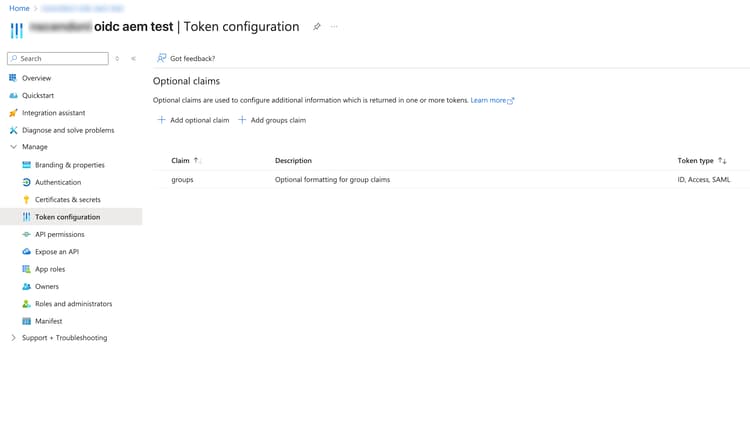
如果需要群組或應用程式角色,請遵循文件以在應用程式啟用並將其傳送進 ID 權杖中。以下是設定群組的範例:
-
依照前文記錄的步驟建立必要的設定檔。以下是針對 Azure AD 的特定範例:
- 我們將 OIDC 連線、驗證處理常式和預設同步處理常式的名稱定義為:
azure - 網站網址為:
www.mywebsite.com - 我們保護只有群組
/content/wknd/us/en/adventures的已驗證使用者成員才能存取的路徑adventures - 租用戶為:
tennat-id, - 用戶端識別碼為:
client-id, - 密碼為:
secret, - 這些群組在 ID 權杖中用以下申請形式傳送:
groups
- 我們將 OIDC 連線、驗證處理常式和預設同步處理常式的名稱定義為:
org.apache.sling.auth.oauth_client.impl.OidcConnectionImpl~azure.cfg.json
{
  "name":"azure",
  "scopes":[
    openid", "User.Read", "profile", "email"
  ],
  "baseUrl":"https://login.microsoftonline.com/tenant-id/v2.0",
  "clientId":"client-id",
  "clientSecret":"secret"
}
org.apache.sling.auth.oauth_client.impl.OidcAuthenticationHandler~azure.cfg.json
{
  "callbackUri":"https://www.mywebsite.com/content/wknd/us/en/adventures/j_security_check",
  "path":[
    "/content/wknd/us/en/adventures"
  ],
  "idp":"azure",
  "defaultConnectionName":"azure"
}
org.apache.jackrabbit.oak.spi.security.authentication.external.impl.ExternalLoginModuleFactory~azure.cfg.json
{
  "sync.handlerName":"azure",
  "idp.name":"azure"
}
org.apache.jackrabbit.oak.spi.security.authentication.external.impl.DefaultSyncHandler~azure.cfg.json
{
  "user.expirationTime":"1h",
  "user.membershipExpTime":"1h",
  "group.expirationTime": "1d"
  "user.propertyMapping":[
    "profile/givenName=profile/given_name",
    "profile/familyName=profile/family_name",
    "rep:fullname=profile/name",
    "profile/email=profile/email",
    "access_token=access_token",
    "refresh_token=refresh_token"
  ],
  "user.pathPrefix":"azure",
  "group.pathPrefix": "oidc",
  "user.membershipNestingDepth": "1",
  "handler.name":"azure"
}
org.apache.sling.jcr.repoinit.RepositoryInitializer~azure.cfg.json
{
  "scripts":[
    "set ACL for \"adventures;azure\"  (ACLOptions=ignoreMissingPrincipal)\r\n  allow jcr:read on /content/wknd/us/en/adventures\r\nend"
  ]
}
org.apache.sling.auth.oauth_client.impl.SlingUserInfoProcessorImpl~azure.cfg.json
{
  "groupsInIdToken": "true",
  "storeAccessToken": "false",
  "storeRefreshToken": "false",
  "connection": "azure",
  "groupsClaimName": "groups"
}
關於 Azure AD 群組的其他資訊 additional-information-about-azure-ad-groups
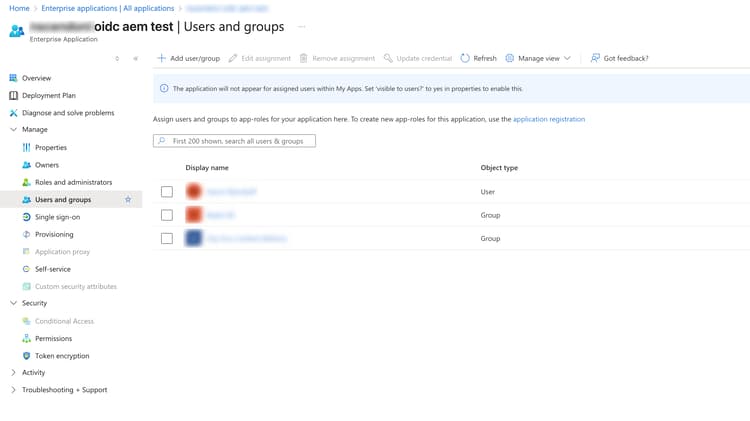
要在 Microsoft Azure 入口網站中為企業應用程式設定群組,您需要在 企業應用程式 搜尋該應用程式並新增群組:
若要在 ID 權杖中啟用群組申請,請在 Microsoft Azure 入口網站的 權杖設定 欄位新增申請:
SlingUserInfoProcessor 的設定必須依照下列範例進行修改。
需要修改的檔案名稱為 org.apache.sling.auth.oauth_client.impl.SlingUserInfoProcessorImpl.cfg.json。內容應設定如下:
{
  "connection": "azure",
  "groupsInIdToken": "true",
  "storeAccessToken": "false",
  "storeRefreshToken": "false"
}
驗證後自訂重新導向 custom-redirect-after-authentication
根據預設,在成功OIDC驗證後,會將使用者重新導向回最初請求的URL。 不過,您可以使用redirect查詢引數自訂此行為。
使用重新導向引數
起始驗證時,您可以將redirect引數新增至驗證請求,以指定自訂重新導向URL:
/content/wknd/us/en/adventures?redirect=/content/wknd/us/en/welcome
在此範例中,在成功驗證後,會將使用者重新導向至/content/wknd/us/en/welcome,而非最初要求的頁面。
安全性限制
基於安全理由,redirect引數有下列限制:
- 必須是相對路徑:重新導向URL必須以
/開頭(例如/content/mysite/dashboard) - 沒有跨網站重新導向:不允許絕對URL (例如
https://external-site.com) - 沒有通訊協定相對URL:拒絕以
//開頭的URL,以防止通訊協定相對重新導向
如果提供的重新導向URL無效,驗證將會失敗並出現錯誤。
範例使用案例
-
登入後的歡迎頁面:將使用者首次登入後的使用者重新導向至個人化歡迎頁面
code language-none /content/mysite/secure-area?redirect=/content/mysite/welcome -
儀表板重新導向:驗證後,將使用者導向至特定的儀表板
code language-none /content/mysite/login?redirect=/content/mysite/user/dashboard -
深層連結:允許使用者驗證,然後存取特定資源
code language-none /content/mysite/protected?redirect=/content/mysite/protected/specific-document
如何從Saml驗證處理常式移轉至Oidc驗證處理常式
當AEM已設定SAML驗證處理常式,且使用者存在於已啟用資料同步化的存放庫時,原始SAML使用者與新OIDC使用者之間可能會發生衝突。
- 設定OidcAuthenticationHandler,並在
idpNameInPrincipalsSlingUserInfoProcessor設定中啟用 - 設定外部群組的ACL。
- 從使用者登入後,可以刪除saml驗證處理常式建立的舊使用者。