Adobe Commerce:未知模組Magento_BundleSampleData
在Adobe Commerce安裝期間,您可能會看到LogicException指出Magento_BundleSampleData是未知模組。 在Web安裝精靈中停用模組,然後清除您的瀏覽器歷程記錄和網站資料,再重試安裝。
說明 description
環境
Adobe Commerce安裝
問題/症狀
安裝期間會顯示類似下列的訊息:
[ERROR]例外狀況’LogicException’訊息為’Unknown module in the requested list: ‘Magento_BundleSampleData’
解決方法 resolution
請逐一嘗試下列各項,然後再次嘗試安裝。
-
執行Web安裝精靈。 模組列在 進階模組組態 中。 若要停用
Magento_BundleSampleData模組,請清除 Magento_BundleSampleData 核取方塊,如下圖所示。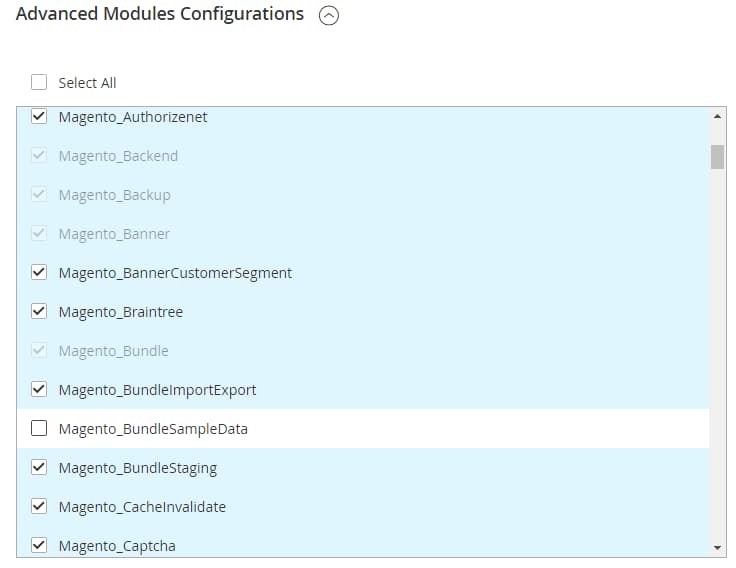
-
清除網頁瀏覽器中的所有瀏覽器歷史記錄和資料。
-
如果您有Chrome,請清除與網站相關的所有瀏覽器資料。 移至設定
>進階選項>隱私權>內容設定>所有Cookie和網站資料。 在[網站]欄中,按一下Adobe Commerce伺服器的位址,然後按一下[全部移除]。
recommendation-more-help
experience-cloud-kcs-help-kbarticles