[由Adobe資深技術架構師Tony Evers撰寫]{class="badge informative" title="托尼·埃弗斯撰寫"}
The Split Git global reference architecture pattern
此資訊適用於:
This guide explains how to set up Adobe Commerce with the Split Git Global Reference Architecture (GRA) Pattern.
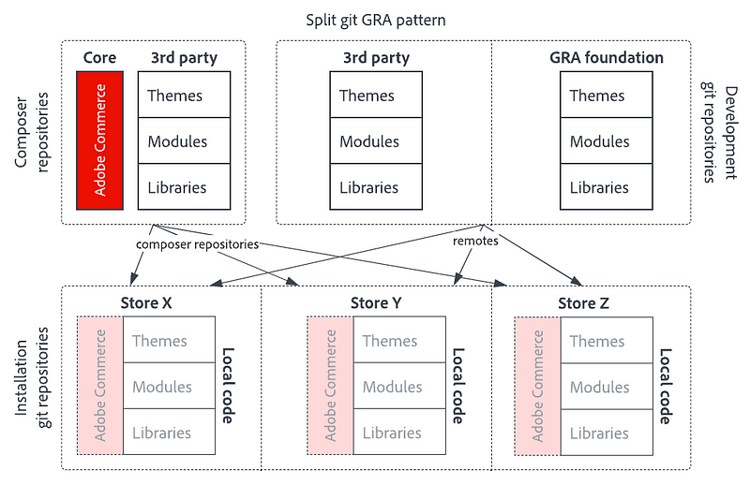
The split Git GRA pattern involves two Git repositories for development and one Git repository per Adobe Commerce instance. In the examples, it is assumed that each instance represents a unique brand.
此模式的優缺點
優點:
- 透過共用程式碼存放庫重複使用程式碼
- Simple GRA pattern, suitable even for teams with limited Composer knowledge
- In addition to Adobe Commerce modules, themes and language packs, it is possible to install any type of Composer package through this model, including composer-plugin, composer-metapackage, magento2-component and patches
- Possible to release in phases, planning releases to regions in their own maintenance windows
- Support for Git tags for administration purposes, not for deployment control
- Guarantee that the combination of packages in a production deployment is developed and tested in this exact configuration
缺點:
- No added flexibility compared to other GRA patterns
- Not possible to upgrade or downgrade individual modules per instance, always upgrade or downgrade the GRA as a whole
- In most cases, the bulk packages pattern is a better fit as it is equally simple, but more conventional
使用分割Git GRA模式設定Adobe Commerce
目錄結構
The Split Git GRA pattern has two types of repositories; development repositories and installation repositories. 開發存放庫僅包含完整Adobe Commerce安裝的一部分。 安裝存放庫包含完整的Adobe Commerce安裝,並用於部署,但不用於開發。
使用分割Git GRA模式的完整Adobe Commerce安裝的最終目錄結構看起來像這樣:
.
├── .gitignore
├── app/
│   └── etc/
│       └── config.php
├── composer.json
├── composer.lock
└── packages/
    ├── 3rdparty/
    ├── gra/
    └── local/
app/code、app/i18n和app/design目錄被有意省略,因為Composer不會評估這些目錄中的程式碼。 因此,在套件中宣告的相依性不會自動安裝。 分割Git GRA模式透過在packages/中安裝所有自訂程式碼並將該目錄視為撰寫器存放庫來解決此問題。 Composer將packages/內的封裝連結至vendor/。
準備Git存放庫
建立3個Git存放庫:
- Adobe Commerce執行個體
- 未透過撰寫器安裝的協力廠商程式碼
- 您的自訂,以模組、主題、語言包等形式呈現;您的GRA
在本指南中,以下名稱用於這些存放庫:
- gra-split-brand-x
- gra-split-3rdparty
- gra-split-gra
分割Git GRA模式中的所有存放庫會合併為一個。 若要Git允許合併多個存放庫,則所有三個存放庫都需要共用歷史記錄。 使用單一認可建立Git專案,並將其推送到所有遠端。
mkdir gra-split-brand-x
cd gra-split-brand-x
git init
git remote add origin git@github.com:AntonEvers/gra-split-brand-x.git
git remote add 3rdparty git@github.com:AntonEvers/gra-split-3rdparty.git
git remote add gra git@github.com:AntonEvers/gra-split-gra.git
touch .gitkeep
git add .gitkeep
git commit -m 'initialize repository'
git push -u origin main
git push 3rdparty main
git push gra main
將暫存檔案.gitkeep推播到所有遠端,會建立具有相同認可雜湊的相同初始認可,進而建立共用歷史記錄。 在一個遠端中建立的每個變更都可以合併到其他變更中。
從這裡,存放庫發生了變化。 gra-split-brand-x存放庫包含品牌專屬的程式碼。 gra-split-3rdparty存放庫僅包含第三方程式碼。 gra-split-gra存放庫僅包含您的全域參考架構基礎,其中包含您所有自訂的程式碼。
Install Adobe Commerce in the gra-split-brand-x repository.
composer create-project --no-install --repository-url=https://repo.magento.com/ magento/project-enterprise-edition temp
mv temp/composer.json ./
rmdir temp
git add composer.json
git commit -m 'install Adobe Commerce'
git push origin main
Create initial commits in the gra-split-3rdparty and the gra-split-gra repositories. The easiest way is by checking out these repositories in separate directories.
cd ..
git clone git@github.com:AntonEvers/gra-split-3rdparty.git
git clone git@github.com:AntonEvers/gra-split-gra.git
cd gra-split-3rdparty
mkdir -p packages/3rdparty
touch packages/3rdparty/.gitkeep
git add packages/3rdparty/.gitkeep
git commit -m 'initialize 3rd party package storage'
git push origin main
cd ../gra-split-gra
mkdir -p packages/gra
touch packages/gra/.gitkeep
git add packages/gra/.gitkeep
git commit -m 'initialize GRA package storage'
git push origin main
These two repositories store third-party packages and GRA packages. There may be code that is exclusive to each instance of Adobe Commerce. Create a place to store these local packages in the gra-split-brand-x repository.
cd ../gra-split-brand-x
mkdir -p packages/local
touch packages/local/.gitkeep
git add packages/local/.gitkeep
git commit -m 'initialize local package storage'
git push origin main
Where to store different types of code
Adobe Commerce is a Composer application. The preferred way to install is always through Composer repositories. Only if a module vendor does not offer installation through a Composer repository, you can store third-party modules in the third-party repository. The preferred place for custom code is in the GRA repository. When a module is only used by one specific instance, it becomes local code.
Summarizing:
- Adobe Commerce: stored in a Composer repository.
- Third-party modules: stored in a Composer repository.
- Third-party modules fallback option: stored in the gra-split-3rdparty Git repository.
- GRA foundation code: stored in the gra-split-gra Git repository.
- Local code: stored in the gra-split-brand-x Git repository.
Connect package storage to Composer
Composer can treat the packages directory as a composer repository. Inform Composer about the location of packages inside the packages directory.
"repositories": [
  {"type": "path", "url": "packages/local/*/*"},
  {"type": "path", "url": "packages/gra/*/*"},
  {"type": "path", "url": "packages/3rdparty/*/*"},
  {"type": "composer", "url": "https://repo.magento.com"}
]
Composer looks for composer.json files two levels deep in the three storage directories. Create subdirectories inside the three code storage directories exactly like they would appear in the vendor/ directory.
For instance: If a package is normally installed in vendor/example-corp/module-example/, then you store it in packages/3rdparty/example-corp/module-example/. Composer symlinks the package to vendor/example-corp/module-example/ when you require it.
使用撰寫器套件名稱空間和名稱作為目錄結構。 例如:傳統上存在於app/code/MyCorp/MyCustomization/中的模組在composer.json中具有名稱my-corp/module-my-customization。 將此封裝儲存在packages/gra/my-corp/module-my-customization。
在執行個體存放庫中包含新套裝程式
將來自協力廠商和GRA的套件遠端合併到gra-split-brand-x存放庫中。
cd gra-split-brand-x
git fetch - all
git merge gra/main 3rdparty/main
git push origin main
結果會是下列目錄結構:
.
├── composer.json
└── packages/
    ├── 3rdparty/
    ├── gra/
    └── local/
第三方和GRA Foundation存放庫中的變更會合併至品牌存放庫。 如此一來,第三方和GRA程式碼只會在一個地方進行維護。 透過Git合併將變更移至品牌。
Adobe Commerce不會自動辨識新模組。 執行撰寫器在合併後需要新增套件。 每次在合併後更新其中一個套件時,請執行撰寫器更新。
安裝範例模組
如需概念證明,請安裝範例模組以瞭解GRA模式的運作方式。
執行composer install和bin/magento install再繼續。
GitHub上有3個測試模組:
安裝本機模組
將模組新增至本機程式碼集區相當簡單。 下載並解壓縮模組。 使用Composer時需要它。 使用bin/magento啟用它,並認可品牌存放庫中的檔案。
cd gra-split-brand-x
cd packages/local
mkdir antonevers
cd antonevers
curl -OL https://github.com/AntonEvers/module-example-local/archive/refs/heads/main.zip
unzip main.zip
rm main.zip
mv module-example-local-main module-local
git add module-local
cd ../../..
composer require antonevers/module-local:@dev
bin/magento module:enable AntonEvers_Local
bin/magento test:local
最後一個命令應該會產生以下輸出,以證明模組已安裝且運作正常:
Local module is installed successfully and working!
如果您看到上述輸出,則可以安全地將其提交至品牌存放庫。
git add packages/local/antonevers/module-local app/etc/config.php composer.json composer.lock
git commit -m 'add local module'
git push origin main
安裝及開發GRA基礎模組
將模組新增到GRA存放庫與安裝本機模組不同。 依預設,認可會新增至來源/主要(gra-split-brand-x存放庫)。 對GRA模組所做的變更應推送至gra-split-gra存放庫,並在之後合併至gra-split-brand-x存放庫。
建立開發環境
在一個位置建立包含所有程式碼集區的開發環境。 您可以透過symlink個別將程式碼推送至本機、GRA和協力廠商存放庫。 首先,在您的品牌、GRA和協力廠商存放庫目錄旁邊建立新的開發目錄。
.
├── gra-development    # <---
├── gra-split-3rdparty
├── gra-split-brand-x
└── gra-split-gra
cd ..
mkdir gra-development
cd gra-development
cp ../gra-split-brand-x/composer.json ../gra-split-brand-x/composer.lock .
mkdir packages
ln -s ../../gra-split-brand-x/packages/local/ packages/
ln -s ../../gra-split-3rdparty/packages/3rdparty/ packages/
ln -s ../../gra-split-gra/packages/gra/ packages/
結果會是下列目錄結構:
.
├── packages/
│ ├── 3rdparty -> ../../gra-split-3rdparty/packages/3rdparty/
│ ├── gra -> ../../gra-split-gra/packages/gra/
│ └── local -> ../../gra-split-brand-x/packages/local/
├── composer.lock
└── composer.json
在gra-development目錄中執行composer install和bin/magento install。
現在可以直接從packages/3rdparty、packages/gra和package/local目錄認可變更。 Git會將變更提交至與目錄符號連結的Git存放庫。 在packages/3rdparty、packages/gra或package/local目錄中發出Git認可命令很重要。 請勿在專案根目錄執行Git認可。
安裝範例模組
在封裝目錄中安裝第三方和GRA範例模組。
cd packages/gra
mkdir antonevers
cd antonevers
curl -OL https://github.com/AntonEvers/module-example-gra/archive/refs/heads/main.zip
unzip main.zip
rm main.zip
mv module-example-gra-main module-gra
git add module-gra

cd ../../3rdparty
mkdir antonevers
cd antonevers
curl -OL https://github.com/AntonEvers/module-example-3rdparty/archive/refs/heads/main.zip
unzip main.zip
rm main.zip
mv module-example-3rdparty-main module-3rdparty
git add module-3rdparty

cd ../../..
composer require antonevers/module-gra:@dev antonevers/module-3rdparty:@dev
bin/magento module:enable AntonEvers_Gra AntonEvers_ThirdParty
bin/magento test:gra
bin/magento test:3rdparty
最後一個命令應該會產生以下輸出,以證明模組已安裝且運作正常:
GRA module is installed successfully and working!
3rd party module is installed successfully and working!
如果您看到上述輸出,則可以安全地將其提交至品牌存放庫。 執行git remote -v以確認您認可到正確的遠端。
cd packages/gra
git remote -v
origin git@github.com:AntonEvers/gra-split-gra.git (fetch)
origin git@github.com:AntonEvers/gra-split-gra.git (push)
git add antonevers/module-gra
git commit -m 'add GRA module'
git push origin main

cd ../3rdparty
git remote -v
origin git@github.com:AntonEvers/gra-split-3rdparty.git (fetch)
origin git@github.com:AntonEvers/gra-split-3rdparty.git (push)
git add antonevers/module-3rdparty
git commit -m 'add third-party module'
git push origin main
將程式碼傳遞至執行個體
將GRA和第三方存放庫合併至gra-split-brand-x存放庫,以將程式碼傳送至Adobe Commerce執行個體。 執行composer require、bin/magento module:enable並認可結果。
cd gra-split-brand-x
git fetch - all
git merge gra/main 3rdparty/main
composer require antonevers/module-gra:@dev antonevers/module-3rdparty:@dev
bin/magento module:enable AntonEvers_Gra AntonEvers_ThirdParty
git add app/etc/config.php composer.lock composer.json
git commit -m 'install GRA and third-party modules'
git push origin main
分支策略
如果您在第三方和GRA存放庫中映象存放區存放庫的分支策略,此GRA模式可與所有分支策略搭配使用。 針對版本,在所有三個存放庫中建立具有相同名稱的版本分支。 在發行準備期間將存放區存放庫上的發行分支合併在一起。
有時候,您的票證分支會要求變更本機程式碼和協力廠商程式碼或GRA程式碼。 在這種情況下,需要在所有相關存放庫中建立票證分支。
切勿將第三方和GRA認可合併至票證分支內的品牌存放庫。 反之,請檢視開發環境中每個程式碼集區的正確分支。 只有在構成版本或構成QA分支時,才能合併至品牌存放庫。
程式碼範例
本文的程式碼範例可作為一組Git存放庫提供,用於測試概念證明。
- 範例生產存放區: https://github.com/AntonEvers/gra-split-brand-x
- 協力廠商程式碼存放庫: https://github.com/AntonEvers/gra-split-3rdparty
- GRA程式碼存放庫: https://github.com/AntonEvers/gra-split-gra
- 範例本機模組: https://github.com/AntonEvers/module-example-local
- GRA模組範例: https://github.com/AntonEvers/module-example-gra
- 範例第三方模組: https://github.com/AntonEvers/module-example-3rdparty