[僅限PaaS]{class="badge informative" title="僅適用於雲端專案(Adobe管理的PaaS基礎結構)和內部部署專案的Adobe Commerce 。"}
免運費
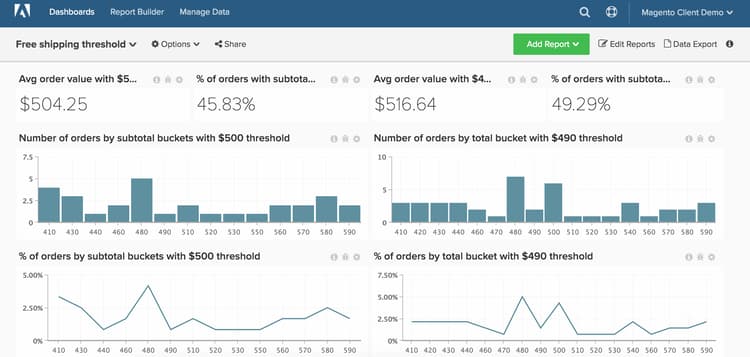
Data Warehouse Views後有Manage Data區段可用,則表示您使用新架構。本主題將示範如何設定追蹤免運費運送臨界值績效的控制面板。 這個儀表板(如下所示)是A/B測試兩個免運費臨界值的好方法。 例如,貴公司可能不確定您應以$50或$100的價格提供免運費。 您應該針對客戶的兩個隨機子集執行A/B測試,並在Commerce Intelligence中執行分析。
開始之前,您想要識別兩個獨立的時段,您在此時段擁有不同的商店免運費臨界值。
此分析包含進階計算資料行。
計算欄
如果您使用原始架構(例如,如果您的「Data Warehouse Views」功能表下沒有「Manage Data」選項),您希望聯絡支援團隊以建置以下欄。 在新架構上,可從Manage Data > Data Warehouse頁面建立這些欄。 詳細指示如下。
-
sales_flat_order資料表- 此計算會以相對於您一般購物車大小的增量建立值區。 增量範圍包括5、10、50、100
-
Order subtotal (buckets)原始架構:由分析人員建立,作為您[FREE SHIPPING ANALYSIS]票證的一部分 -
Order subtotal (buckets)新架構:- 如上所述,這項計算會以相對於您一般購物車大小的增量建立值區。 如果您有原生小計資料行,例如
base_subtotal,可以做為這個新資料行的基礎。 如果沒有,它可以是計算欄,其中不包含收入的送貨和折扣。
note note NOTE 「貯體」大小取決於適合您作為使用者端的尺寸。 您可以從 average order value開始,建立一些小於或大於該數量的值區。 檢視以下計算時,您會瞭解如何輕鬆複製部分查詢、編輯查詢及建立其他值區。 範例是以50為增量完成。Column type - Same table, Column definition - Calculation, Column Inputs-base_subtotal或calculated column,Datatype:Integer- Calculation:
case when A >= 0 and A<=200 then 0 - 200
當A< 200和A <= 250然後201 - 250
當A<251和A<= 300然後251 - 300
當A<301和A<= 350然後301 - 350
當A<351與A<=400然後351 - 400
當A<401與A<=450然後401 - 450
否則'超過450'
結束
- 如上所述,這項計算會以相對於您一般購物車大小的增量建立值區。 如果您有原生小計資料行,例如
量度
無新量度!!!
報表
-
平均訂單值(送貨規則A)
- Metric:
Average order value
- Metric:
-
量度
A:Average Order Value -
Time period:
Time period with shipping rule A -
Interval:None -
Chart Type:Scalar -
根據小計貯體排列的訂單數(送貨規則為A)
- Metric:
Number of orders
note note NOTE 您可以顯示 X中的前sorted byOrder subtotalShow top/bottom(貯體)以截斷尾端。 - Metric:
-
量度
A:Number of orders -
Time period:
Time period with shipping rule A -
Interval:None -
Group by:
Order subtotal (buckets) -
Chart Type:Column -
送貨規則為A 之小計訂單的 百分比
-
Metric:
Number of orders -
Metric:
Number of orders -
群組依據:Independent -
Formula:
(A / B) -
Format:%
-
-
量度
A:Number of orders by subtotal (hide) -
量度
B:Total number of orders (hide) -
Formula:
% of orders -
Time period:
Time period with shipping rule A -
Interval:None -
Group by:
Order subtotal (buckets) -
Chart Type:Line -
小計超過送貨規則A 的訂單的 百分比
-
Metric:
Number of orders -
Perspective:Cumulative -
Metric:
Number of orders -
群組依據:Independent -
Formula:
1- (A / B) -
Format:%
-
-
量度
A:Number of orders by subtotal -
量度
B:Total number of orders (hide) -
Formula:
% of orders -
Time period:
Time period with shipping rule A -
Interval:None -
Group by:
Order subtotal (buckets) -
Chart Type:Line
針對送貨規則B重複上述步驟與報表,並重複時間週期。
編譯所有報表後,您可以視需要在控制面板上組織報表。 結果看起來可能像這個頁面頂端的影像。