Add users to a company account
When enabled in the configuration, the company administrator adds and manages company users from the storefront. However, company users accounts can also be added and managed from the Admin.
If needed, you can assign a user to more than one company. For example, if B2B buyers support multiple companies, you can add their user accounts to all companies they do business with. Company
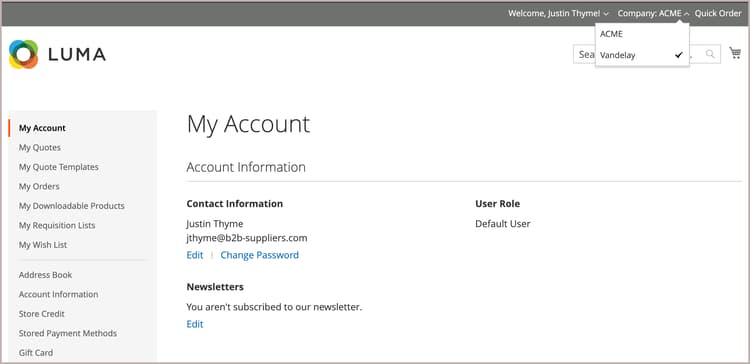
Add a company user
當您新增公司使用者時,與該使用者帳戶建立關聯的第一個公司是預設公司。
-
在管理員側邊欄上,移至 Customers > All Customers。
-
按一下 Add new customer。
-
設定新帳戶。
-
設定 Customer Active 切換以指定初始帳戶狀態。
將其開啟以立即啟用帳戶,或停用以建立非使用中帳戶。
-
從 Associate to Website 清單中選取網站範圍。
-
按一下 Associate to Company 以檢視可用的公司。
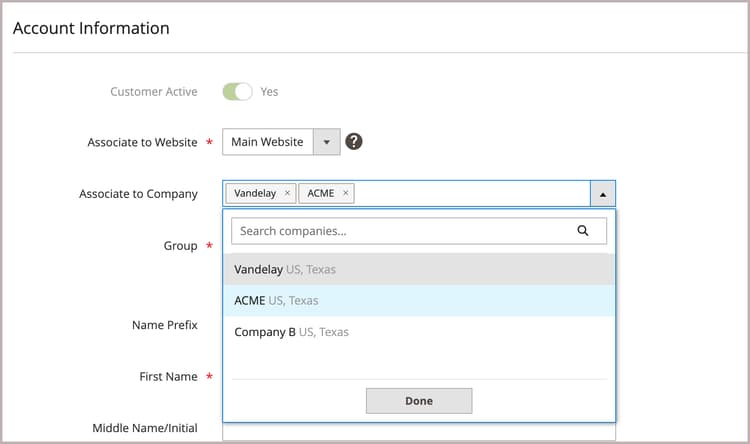
如有需要,在輸入方塊中輸入公司名稱的前幾個字母來篩選清單。
-
在清單中,選取一或多個要指派客戶的公司,然後按一下 Done。
-
First Name Last Name Email
-
Allow remote shopping assistance
-
Save Customer
-
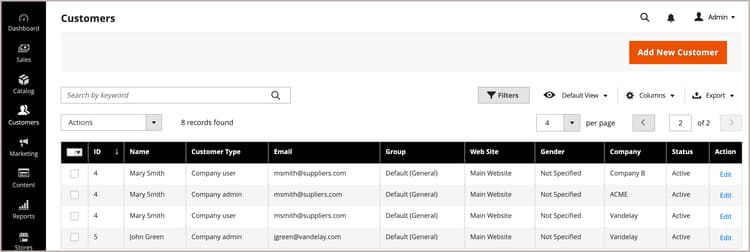
Customers grid會針對指派給使用者的每個公司顯示個別的列。 The following columns are updated.
-
Customer Type
Customer Type Individual user Company User
-
Group
-
Company
Assign a user to one or more company accounts
當您指派新使用者時,您與使用者帳戶建立關聯的第一個公司是預設公司。
-
在 管理員 側邊欄上,移至 Customers > All Customers。
-
在格線中尋找客戶,然後按一下 Action 欄中的 Edit。
-
在左側面板中選擇 Account Information。
-
從 Associate to Company 清單中,選取一或多個要指派給公司使用者的公司,然後按一下 Done。
-
按一下 Save Customer 套用變更。
從使用者帳戶移除公司指派
從使用者設定檔中移除公司會撤銷該公司的使用者存取權。 使用者資料仍可在「管理員」中存取。 如果您移除所有公司指派,Customer Type 會變更為 Individual user 並停用該帳戶的B2B功能。
-
從「管理員」的「客戶」格線中,編輯要更新的客戶設定檔。
-
在*Account Information區段中,按一下公司名稱標籤中的 X,從 Associate to Company 欄位中移除指派的公司。
-
Save Customer