追蹤型別
追蹤型別會決定Adobe Analytics實作如何追蹤您的搜尋引擎資料。 此追蹤型別是必要步驟,可讓搜尋引擎資料正確增加Adobe Analytics資料。
支援兩種追蹤模式: 自動和手動。
自動追蹤 concept_C4C6107838C947CFBB7F4E0CB94264F0
自動追蹤可讓Adobe Advertising引擎決定如何處理搜尋引擎資料。 自動追蹤是比較簡單的方法,但可能不會產生最佳的整合資料集。
因此,當您選取 自動 時,必須先核取確認核取方塊,才能儲存帳戶設定。
請注意,若要使用 Auto 型別設定搜尋引擎帳戶,您必須執行下列動作:
s_kwcid引數和值已新增至帳戶中的帳戶追蹤範本或登陸頁面URL。 此引數和值會插入在URL的結尾。 如果您的網頁伺服器在URL末端需要特定key=value配對,您可能需要執行其他動作。 或更新以支援URL中的任何新key=value配對。 您有責任確認新增的URL引數正確無誤,才能順利前往最終的登陸頁面。- 此外,關鍵字可作為
s_kwcid值的一部分插入至登陸 URL 中。 如果它們包含特殊字元或符號,請確認您的網頁伺服器可以支援這些字元。 例如,常見的特殊字元為+,用於「修改廣泛比對」關鍵字。
s_kwcid 參數新增至您的內容安全性原則。手動追蹤 concept_87B28BA9E7F84BA5972F69E6F3482A33
手動追蹤可讓您指定Advertising Analytics資料整合程式應如何處理搜尋引擎資料。
將手動追蹤新增至Google帳戶 section_41C1EB1AEB034544A5BC291F53C05C67
以下是需要新增至 Google 帳戶的字串。 您需要將字串新增至帳戶使用的所有追蹤範本中。
<Advertising Analytics ID> 值 (下文中的粗體字) 是通用值,請務必替換為您專屬的帳戶 ID 字串。 您可以從追蹤區段下的帳戶畫面取得您的特定帳戶ID字串。活動的追蹤字串:
s_kwcid=AL!
<b><Advertising Analytics ID></b>!3!{creative}!{matchtype}!{placement}!{network}!{product_partition_id}!{keyword}

各種追蹤範本格式的追蹤程式碼範例:
{lpurl}
{lpurl}?s_kwcid=AL!9999!3!{creative}!{matchtype}!{placement}!network}!{product_partition_id}!{keyword}
{lpurl}及其他 URL 參數
{lpurl}?campaign=PPC&s_kwcid=AL!9999!3!{creative}!{matchtype}!{placement}!network}!{product_partition_id}!{keyword}
第三方 (DoubleClick){unescapedlpurl}
https://clickserve.dartsearch.net/link/click?{_dssagcrid}&{_dssftfiid}&ds_e_adid={creative}&ds_e_matchtype={ifsearch:search}{ifcontent:content}&ds_e_device={device}&ds_e_network={network}&{ifpla:ds_e_product_group_id={product_partition_id}&ds_e_product_id={product_id}&ds_e_product_merchant_id={merchant_id}&ds_e_product_country={product_country}&ds_e_product_language={product_language}&ds_e_product_channel={product_channel}&ds_e_product_store_id={product_store_id}}&ds_url_v=2&ds_dest_url={unescapedlpurl}?s_kwcid=AL!9999!3!{creative}!{matchtype}!{placement}!{network}!{product_partition_id}!{keyword}
第三方 (DoubleClick){lpurl}
若要確保字串在重新導向至最終登陸頁面URL期間持續存在,您必須將字串充分編碼:
- 如果URL需經過重新導向,且
- 並未使用「unescapedlpurl」值。
https://clickserve.dartsearch.net/link/click?{_dssagcrid}&{_dssftfiid}&ds_e_adid={creative}&ds_e_matchtype={ifsearch:search}{ifcontent:content}&ds_e_device={device}&ds_e_network={network}&{ifpla:ds_e_product_group_id={product_partition_id}&ds_e_product_id={product_id}&ds_e_product_merchant_id={merchant_id}&ds_e_product_country={product_country}&ds_e_product_language={product_language}&ds_e_product_channel={product_channel}&ds_e_product_store_id={product_store_id}}&ds_url_v=2&ds_dest_url={lpurl}?s_kwcid%3DAL!9999!3!{creative}!{matchtype}!{placement}!{network}!{product_partition_id}!{keyword}
將手動追蹤新增至Microsoft Advertising帳戶 section_094F8ACA493C4D65B1F54A695558EBF2
以下是需要新增至Microsoft Advertising帳戶的字串。 您需要將字串新增至帳戶使用的所有最終 URL 尾碼中。
<Advertising Analytics ID>_值 (下文中的粗體字) 是通用值,請務必替換為您專屬的帳戶 ID 字串。 您可以在「追蹤」區段下方的帳戶畫面中取得特定帳戶ID字串。活動的追蹤字串:
s_kwcid=AL!<Advertising Analytics ID>!10!{AdId}!{OrderItemId}
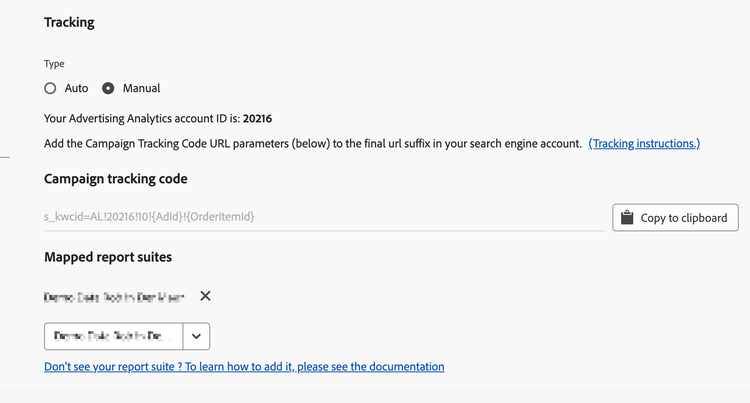
各種最終 URL 尾碼格式的追蹤程式碼範例:
{lpurl}
{lpurl}?s_kwcid=AL!9999!10!{AdId}!{OrderItemId}
{lpurl}及其他 URL 參數
{lpurl}?campaign=PPC&
s_kwcid=AL!9999!10!{AdId}!{OrderItemId}
第三方 (DoubleClick){unescapedlpurl}
https://clickserve.dartsearch.net/link/click?{_dssagcrid}&{_dssftfiid}&ds_e_adid={creative}&ds_e_matchtype={ifsearch:search}{ifcontent:content}&ds_e_device={device}&ds_e_network={network}&{ifpla:ds_e_product_group_id={product_partition_id}&ds_e_product_id={product_id}&ds_e_product_merchant_id={merchant_id}&ds_e_product_country={product_country}&ds_e_product_language={product_language}&ds_e_product_channel={product_channel}&ds_e_product_store_id={product_store_id}}&ds_url_v=2&ds_dest_url={unescapedlpurl}?s_kwcid=AL!9999!10!{AdId}!{OrderItemId}
第三方 (DoubleClick){lpurl}
若要確保字串在重新導向至最終登陸頁面URL期間持續存在,您必須將字串充分編碼:
- 如果URL需經過重新導向,且
- 並未使用「unescapedlpurl」值。
https://clickserve.dartsearch.net/link/click?{_dssagcrid}&{_dssftfiid}&ds_e_adid={creative}&ds_e_matchtype={ifsearch:search}{ifcontent:content}&ds_e_device={device}&ds_e_network={network}&{ifpla:ds_e_product_group_id={product_partition_id}&ds_e_product_id={product_id}&ds_e_product_merchant_id={merchant_id}&ds_e_product_country={product_country}&ds_e_product_language={product_language}&ds_e_product_channel={product_channel}&ds_e_product_store_id={product_store_id}}&ds_url_v=2&ds_dest_url={lpurl}?s_kwcid%3DAL!9999!10!{AdId}!{OrderItemId}