通过 Adobe Admin Console 向 Adobe Workfront Fusion 添加用户
您可以将用户添加到Adobe Admin Console并将他们分配给Adobe Workfront Fusion,或将Adobe Admin Console中的现有用户分配给Workfront Fusion。
有关描述Adobe Admin Console中的Workfront Fusion的视频(包括如何添加用户),请参阅Adobe IMS🔗上的Fusion 。
访问权限要求
| table 0-row-2 1-row-2 2-row-2 3-row-2 4-row-2 layout-auto html-authored no-header | |
|---|---|
| Adobe Workfront 包 |
任意 Adobe Workfront Workflow 包以及任意 Adobe Workfront 自动化和集成包 Workfront Ultimate Workfront Prime 和 Select 包,且需额外购买 Workfront Fusion。 |
| Adobe Workfront 许可证 |
标准 工作版或更高版本 |
| 产品 | 如果您的组织使用的 Workfront Select 或 Prime 包不包含 Workfront 自动化和集成,则必须单独购买 Adobe Workfront Fusion。 |
| 访问级别配置 |
您必须是组织的Workfront Fusion管理员。 您必须是团队的Workfront Fusion管理员。 |
| 访问级别配置 | 您必须是贵组织的Adobe产品的产品配置管理员。 |
有关此表中信息的更多详细说明,请参阅文档中的访问权限要求。
先决条件
在使用Admin Console for Workfront之前,您应该会收到一封邀请您加入控制台的电子邮件。
-
如果您是Adobe的新用户,并且已收到一封电子邮件,告知您现在拥有管理贵组织的Adobe软件和服务的管理权限,请单击电子邮件中的按钮以创建Adobe帐户并打开Admin Console。
或
如果您已经拥有Adobe帐户,请转到Adobe Admin Console 页面。
向Adobe Admin Console和Workfront Fusion添加新用户
-
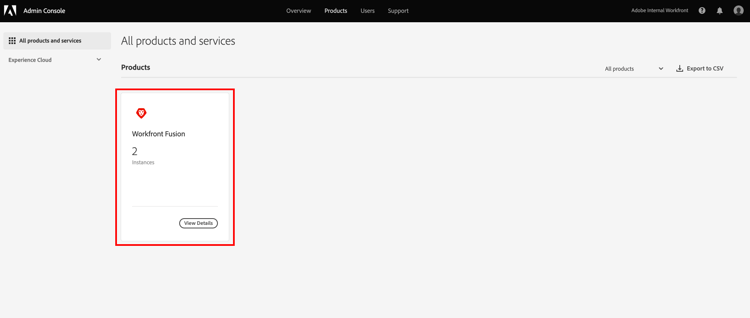
从Adobe Admin Console 页面中,选择顶部导航栏中的 产品 选项卡,然后选择 Workfront Fusion 产品拼贴。
Admin Console中的
-
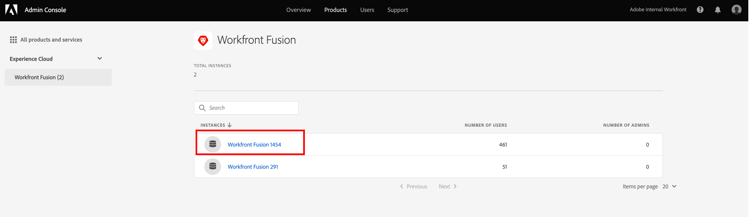
在显示的列表中,选择要添加用户的组织。
Admin Console中的
-
在显示的列表中,选择 产品配置文件 选项卡,单击Workfront Fusion 产品配置文件链接的名称。
note important IMPORTANT 不要对产品配置文件本身进行任何更改。 -
在列表上方选择 用户 选项卡,单击添加用户。
-
在 将用户添加到此产品配置文件 框中,输入要添加的用户的电子邮件地址或名称,然后在显示的列表中选择该用户。
-
单击保存。
将在Workfront Fusion中创建用户。
-
(可选)继续在Workfront Fusion🔗中更改用户的访问级别。
在Workfront Fusion中更改用户的访问级别
将用户的角色更改为管理员
必须在Adobe Admin Console中为用户分配管理员角色。
-
在您添加用户的Workfront Fusion 产品配置文件页面上,选择 管理员 选项卡。
-
单击添加管理员。
-
在 添加产品配置文件管理员 框中,输入要成为管理员的用户的电子邮件地址或名称,然后在显示的列表中选择该用户。
-
单击保存。
用户现在是Workfront Fusion中的管理员。
将用户的角色更改为成员、会计或应用程序开发人员
在Workfront Fusion中处理成员、会计和应用程序开发人员角色。
有关说明,请参阅查看或编辑用户角色。
将Adobe Admin Console中的现有用户分配给Workfront Fusion
您可以在Fusion中将现有用户添加到团队。 这在Fusion中处理。
有关说明,请参阅将用户添加到团队。