创建Python插件
本分步指南介绍如何创建简单的Python增效工具,以允许导出具有特定导出预设的纹理集的通道。
导航到插件文件夹
要添加新的Python增效工具,可以在Substance 3D Painter的增效工具文件夹中创建简单的脚本文件。
要访问python文件夹,请导航到:
NOTE
文件夹“插件”用于Javascript插件。 Python插件需要位于“python/plugins”文件夹下。
2 — 创建新的插件文件
在插件文件夹的根位置,新建一个文本文件,并为其命名custom_export.py 。
3 — 脚本内容
在文本编辑器中打开空脚本文件,并粘贴以下代码片段。 查看代码注释以了解有关其行为的更多详细信息。
import os

# Substance 3D Painter modules
import substance_painter.ui
import substance_painter.export
import substance_painter.project
import substance_painter.textureset

# PySide module to build custom UI
from PySide2 import QtWidgets

plugin_widgets = []

def export_textures() :
    # Verify if a project is open before trying to export something
    if not substance_painter.project.is_open() :
        return

    # Get the currently active layer stack (paintable)
    stack = substance_painter.textureset.get_active_stack()

    # Get the parent Texture Set of this layer stack
    material = stack.material()

    # Build Export Preset resource URL
    # - Context: name of the library where the resource is located
    # - Name: name of the resource (filename without extension or Substance graph path)
    export_preset = substance_painter.resource.ResourceID(
        context="starter_assets",
        name="PBR Metallic Roughness" )

    print( "Preset:" )
    print( export_preset.url() )

    # Setup the export settings
    resolution = material.get_resolution()

    # Setup the export path, in this case the textures
    # will be put next to the spp project file on the disk
    Path = substance_painter.project.file_path()
    Path = os.path.dirname(Path) + "/"

    # Build the configuration
    config = {
        "exportShaderParams"  : False,
        "exportPath" : Path,
        "exportList" : [ { "rootPath" : str(stack) } ],
        "exportPresets" : [ { "name" : "default", "maps" : [] } ],
        "defaultExportPreset" : export_preset.url(),
        "exportParameters" : [
            {
                "parameters" : { "paddingAlgorithm": "infinite" }
            }
        ]
    }

    substance_painter.export.export_project_textures( config )

def start_plugin():
    # Create a text widget for a menu
    Action = QtWidgets.QAction("Custom Python Export",
            triggered=export_textures)

    # Add this widget to the existing File menu of the application
    substance_painter.ui.add_action(
    substance_painter.ui.ApplicationMenu.File,
    Action )

    # Store the widget for proper cleanup later when stopping the plugin
    plugin_widgets.append(Action)

def close_plugin():
    # Remove all widgets that have been added to the UI
    for widget in plugin_widgets:
    substance_painter.ui.delete_ui_element(widget)

    plugin_widgets.clear()

if __name__ == "__main__":
    start_plugin()
加载和启用插件
启动Substance 3D Painter以让应用程序发现插件。
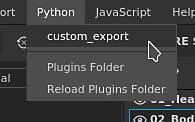
单击 Python 菜单,然后单击插件名称以启用它:
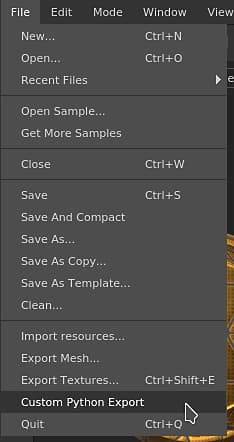
最后,单击 文件 菜单并选择 自定义Python导出 以触发脚本的导出功能:
recommendation-more-help
substance-3d-dev-help-painter-python-guide