用户首选项 — 自动设置

永久或基于会话
有两种方法可以将Designer配置为使用其他配置文件,但并非默认值,这有两种方法的优缺点:
- 永久修改user_preferences.xml\ 此文件位于 ~User\AppData\Local\Adobe\Adobe Substance 3D Designer 中(Windows)。 如果对其进行修改,Designer将始终使用其中定义的内容,而不管您如何启动、何时启动或在何处启动它。 进行更改需要再次修改XML(下文将详细介绍这两者),并且往往涉及一些修改。
- 通过命令行参数临时设置会话\ Designer可以在启动时采用命令行参数来覆盖该会话的SBSCFG文件(具体方法请参阅下文)。 它是一种简单、优雅的解决方案,允许以比修改XML更快的方式切换项目。 危险在于,如果通过多种快捷键(例如Windows上的“开始”菜单和桌面)打开,可能会获得不同的结果,而不会过于明显。 除此之外,它也没有防篡改功能,因为用户删除、移动或修改快捷键要比删除用户_preferences.xml容易得多。
XML修改
手动修改首选项
如果没有自动设置或出于测试目的,可以手动转到编辑>首选项……,然后单击左侧的“项目”部分。
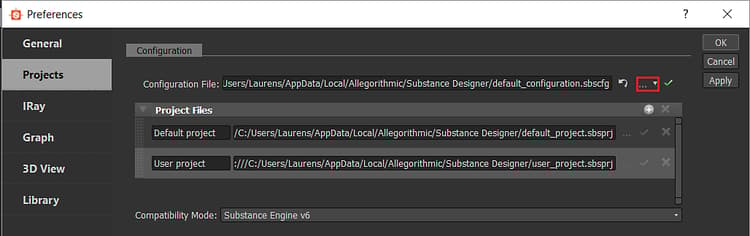
红色标记的按钮允许用户选择其他SBSCFG文件。
通过脚本修改
与项目和配置文件一样,用户首选项也是结构化XML,可以清楚识别相关设置。 它非常适合通过外部脚本设置进行修改,而不是通过文本编辑器(如Notepad++或Sublime Text)进行修改。
编写脚本的优点是,用户无需执行任何操作,只需单击一个按钮,如果创建了一个足够复杂的系统,便可以轻松管理和交换项目,而无需手动管理文件和设置。
相关行如下所示:
  <configuration>

   <configurationfile>file:///C:/Users/John/AppData/Local/Adobe/Adobe Substance 3D Designer/default_configuration.sbscfg</configurationfile>

  </configuration>
Python示例
以下是Windows的一个简单的Python 2.7示例函数,它将user_preferences.xml修改为另一个配置文件。 这会永久更改该值,直到更改回来。 然后可以使用自定义sbscfg文件的路径作为参数来调用函数SetConfigurationFile。
Python脚本允许使用功能强大且干净的代码,并且可以轻松地在其他位置集成,但缺点是对于要运行该脚本的用户,需要将其编译为可执行文件,或者用户需要Python部署。
import xml.etree.ElementTree as ElementTree

import os


##Example Python script for changing Substance 3D Designer user preference file##


def SetConfigurationFile(p_ConfigPath):

## Check is the path passed as parameter exists.

    if(os.path.isfile(p_ConfigPath)):

## replace backslashes by forwardslahes to ensure consistency

        p_ConfigPath = p_ConfigPath.replace("\", "/")

## get Local Appadata path from Environment variables, construct full path to user_preferences.xml and check if it exists.

        m_AppDataPath = os.environ.get('LOCALAPPDATA')

        if m_AppDataPath != None:

            m_UserPrefsPath = os.path.join(m_AppDataPath, str("Adobe/Adobe Substance 3D Designer/user_preferences.xml"))

            if(os.path.isfile(m_UserPrefsPath)):

## read XML elementtree from file, find correct element until we get to the actual line that defines the configurationfile path

                m_PrefsTree = ElementTree.parse(m_UserPrefsPath)

                m_PrefsRoot = m_PrefsTree.getroot()

                m_PrefsElement = m_PrefsRoot.find("preferences")

                m_XMLError = True

                if(m_PrefsElement != None):

                    m_ConfigElement = m_PrefsElement.find("configuration")

                    if(m_ConfigElement != None):

                        m_ConfigFileElement = m_ConfigElement.find("configurationfile")

                        if(m_ConfigFileElement != None):

                            m_XMLError = False

## Check if path is already set, to avoid double work

                            if m_ConfigFileElement.text.replace("file:///","") == p_ConfigPath:

                                print "configurationfile is already set to desired path. Aborting."

                                return True

                            else:

## construct correctly formatted path, insert into elementtree

                                m_ConfigPath = str("file:///" + p_ConfigPath)

                                m_ConfigFileElement.text = m_ConfigPath


## Write to file

                                m_XMLString = str("<?xml version="1.0" encoding="UTF-8"?>n") + ElementTree.tostring(m_PrefsRoot, 'utf-8')

                                m_File = open(m_UserPrefsPath,'w')

                                m_File.write(m_XMLString)

                                m_File.close()

                                print "configuration file path succesfully changed!"

                                return True

                if m_XMLError:

## if this flag was not set to false, we can assume something was missing or went wrong when walking through the XML

                    print("Error: malformed content in user_preferences.xml!")

                    return False

            else:

                print "Error: user_preferences.xml does not exist, try starting Substance 3D Designer first!"

                return False

        else:

            print "Error: LocalAppData path returned None"

            return False

    else:

        print "Error: Invalid Configuration File path!"

        return False
命令行参数快捷键
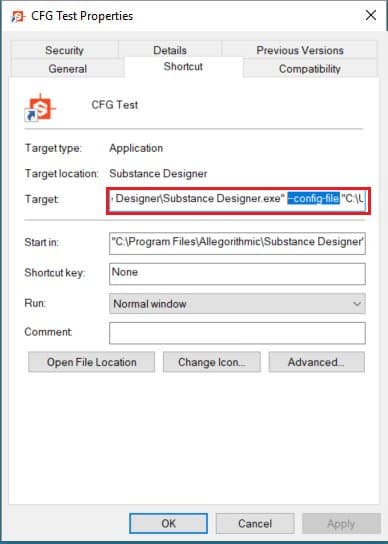
更简单的方法是,可让Designer在启动时通过“ — config-file”(可选)参数使用特定的SBSCFG。
手动设置
虽然不建议在生产环境中使用手动方法,但出于测试目的,如果您已经设置了SSBSCFG文件,可以相当快地完成此操作。
-
添加空间
-
在“目标”部分中,将 — config-file添加到设计器路径之后。
-
添加其他空间
-
添加您的路径 ,用引号 括起来,以避免路径中的空格出现问题
-
结果应该是:
“C:\Program Files\Adobe\Adobe Substance 3D Designer\Adobe Substance 3D Designer.exe” —config-file “C:\Dev\Substance\custom_configuration.sbscfg”