内容片段预览
AEM Headless应用程序支持集成的创作预览。 预览体验将AEM作者的内容片段编辑器与您的自定义应用程序链接到一起(可通过HTTP寻址),从而允许深层链接进入应用程序,以呈现正在预览的内容片段。
要使用内容片段预览,必须满足多个条件:
- 必须将应用程序部署到作者可访问的URL中
- 必须配置应用程序以连接到AEM创作服务(而不是AEM发布服务)
- 应用程序必须设计有URL或路由,它们可以使用内容片段路径或ID选择要显示的内容片段,以便在应用程序体验中预览。
预览URL
在内容片段模型的属性上设置使用URL表达式的预览URL。
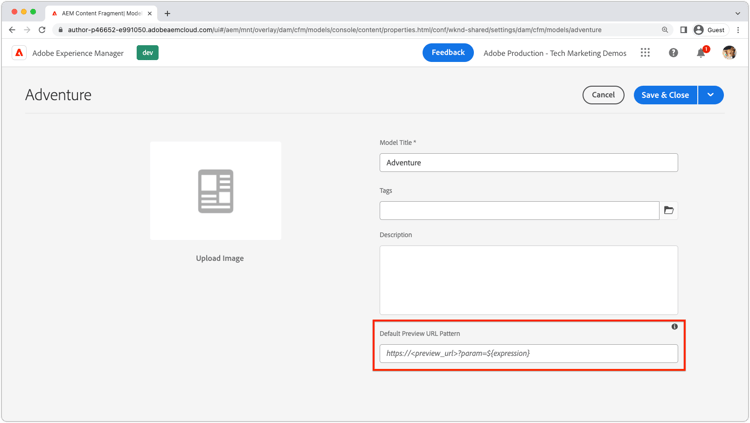
- 以管理员身份登录AEM创作服务
- 导航到工具>常规>内容片段模型
- 选择 内容片段模型 并从顶部操作栏中选择属性。
- 使用URL表达式输入内容片段模型的预览URL
- 预览URL必须指向连接到AEM Author服务的应用程序部署。
URL表达式
每个内容片段模型都可以设置预览URL。 可以使用下表中列出的URL表达式,为每个内容片段参数化预览URL。 可以在单个预览URL中使用多个URL表达式。
${contentFragment.path}/content/dam/wknd-shared/en/adventures/surf-camp-bali/surf-camp-bali${contentFragment.id}12c34567-8901-2aa3-45b6-d7890aa1c23c${contentFragment.variation}main${contentFragment.model.path}/conf/wknd-shared/settings/dam/cfm/models/adventure${contentFragment.model.name}adventure示例预览URL:
- 冒险模型上的预览URL可能类似于
https://preview.app.wknd.site/adventure${contentFragment.path},解析为https://preview.app.wknd.site/adventure/content/dam/wknd-shared/en/adventures/surf-camp-bali/surf-camp-bali - Article模型上的预览URL可能类似于
https://preview.news.wknd.site/${contentFragment.model.name}/${contentFragment.id}.html?variation=${contentFragment.variation}解析的https://preview.news.wknd.site/article/99c34317-1901-2ab3-35b6-d7890aa1c23c.html?variation=main
应用程序内预览
任何使用配置的内容片段模型的内容片段都具有预览按钮。 “预览”按钮可打开内容片段模型的预览URL,并将打开的内容片段的值注入到URL表达式中。
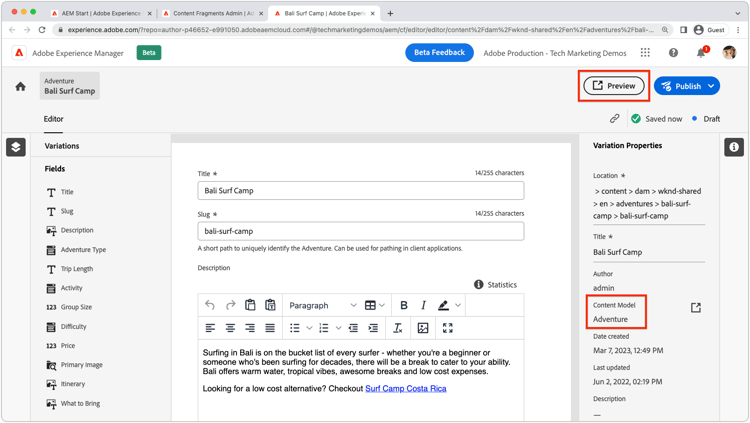
在预览应用程序中的内容片段更改时,执行硬刷新(清除浏览器的本地缓存)。
React示例
让我们来探索WKND应用程序,它是一个简单的React应用程序,使用AEM Headless GraphQL API显示AEM中的冒险。
示例代码在Github.com上可用。
URL和路由
用于预览内容片段的URL或路由必须可以使用URL表达式进行组合。 在此启用了预览的WKND应用程序版本中,冒险内容片段通过绑定到路由AdventureDetail的/adventure<CONTENT FRAGMENT PATH>组件显示。 因此,必须将WKND Adventure模型的预览URL设置为https://preview.app.wknd.site:3000/adventure${contentFragment.path}才能解析到此路由。
仅当应用程序具有可寻址路由时,内容片段预览才有效,可寻址路由由URL表达式填充,该表达式以可预览的方式在应用中呈现内容片段。
src/App.js
...
function App() {
  return (
    <Router>
      <div className="App">
        <header>
            <Link to={"/"}>
                <img src={logo} className="logo" alt="WKND Logo"/>
            </Link>
            <hr />
        </header>
        <Routes>
          {/* The route's path must match the Adventure Model's Preview URL expression. In React since the path has `/` you must use wildcards to match instead of the usual `:path` */}
          <Route path='/adventure/*' element={<AdventureDetail />}/>
          <Route path="/" element={<Home />}/>
        </Routes>
      </div>
    </Router>
  );
}

export default App;
显示创作的内容
AdventureDetail组件只是解析内容片段路径,从路由URL通过${contentFragment.path} URL表达式插入预览URL中,并使用它来收集和呈现WKND Adventure。
src/components/AdventureDetail.js
...
function AdventureDetail() {

    // Read the `path` value which is the parameter used to query for the adventure's details
    // since the params value captures the `*` wildcard in `/adventure/*`, or everything after the first `/` in the Content Fragment path.
    const params = useParams();
    const pathParam = params["*"];

    // Add the leading '/' back on
    const path = '/' + pathParam;

    // Query AEM for the Adventures's details, using the Content Fragment's `path`
    const { adventure, references, error } = useAdventureByPath(path);

    // Handle error and loading conditions
    if (error) {
        return <Error errorMessage={error} />;
    } else if (!adventure) {
        return <Loading />;
    }

    return (<div className="adventure-detail">
        ...
        <AdventureDetailRender {...adventure} references={references} />
    </div>);
}
...