来自 AEM 的相互传输层安全性 (mTLS) 身份验证
了解如何从 AEM 向需要相互传输层安全性 (mTLS) 身份验证的 Web API 进行 HTTPS 调用。
mTLS 或双向 TLS 身份验证通过要求 客户端和服务器相互验证 来增强 TLS 协议的安全性。这种身份验证是通过使用数字证书来完成的。它通常用于对安全性和身份验证要求极高的场景。
默认情况下,当尝试与需要 mTLS 身份验证的 Web API 建立 HTTPS 连接时,连接会失败,并显示以下错误:
javax.net.ssl.SSLHandshakeException: Received fatal alert: certificate_required
当客户端未提供证书进行身份验证时,会出现此问题。
让我们学习如何使用 Apache HttpClient 和 AEM 的 KeyStore 和 TrustStore,成功调用需要 mTLS 身份验证的 API。
HttpClient 和加载 AEM KeyStore 材料
从 AEM 调用受 mTLS 保护的 API,大致需要以下步骤。
AEM 证书生成
与您的组织的安全团队合作,申请 AEM 证书。安全团队提供或询问与证书相关的详细信息,如密钥、证书签名请求 (CSR),并使用 CSR 颁发证书。
出于演示目的,生成与证书相关的详细信息,如密钥、证书签名请求 (CSR)。在下述示例中,我们使用自签名 CA 来颁发证书。
-
首先,生成内部证书颁发机构 (CA) 证书。
code language-shell # Create an internal Certification Authority (CA) certificate openssl req -new -x509 -days 9999 -keyout internal-ca-key.pem -out internal-ca-cert.pem -
生成 AEM 证书。
code language-shell # Generate Key openssl genrsa -out client-key.pem # Generate CSR openssl req -new -key client-key.pem -out client-csr.pem # Generate certificate and sign with internal Certification Authority (CA) openssl x509 -req -days 9999 -in client-csr.pem -CA internal-ca-cert.pem -CAkey internal-ca-key.pem -CAcreateserial -out client-cert.pem # Verify certificate openssl verify -CAfile internal-ca-cert.pem client-cert.pem -
将 AEM 私钥转换为 DER 格式,AEM 的 KeyStore 需要 DER 格式的私钥。
code language-shell openssl pkcs8 -topk8 -inform PEM -outform DER -in client-key.pem -out client-key.der -nocrypt
证书交换
如果像上面一样使用自签名 CA 为 AEM 证书,请将证书或内部认证机构 (CA) 证书发送给 API 提供商。
此外,如果 API 提供程序使用的是自签名 CA 证书,请从 API 提供程序处接收证书或内部证书颁发机构 (CA) 证书。
证书导入
要导入 AEM 的证书,请按照以下步骤操作:
-
以 管理员 身份登录AEM Author。
-
导航至 AEM Author > 工具 > 安全 > 用户 > 创建或选择现有用户。
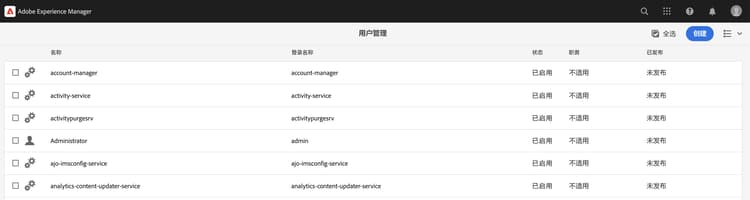
出于演示目的,创建了一个名为
mtl-demo-user的新用户。 -
要打开用户属性,请单击用户名。
-
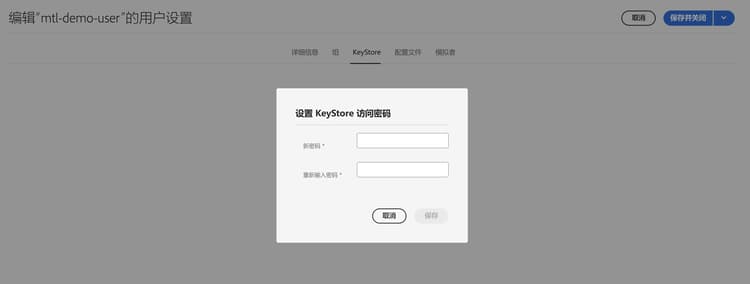
点击 密钥库 选项卡,然后点击 创建密钥库 按钮。然后在 设置密钥库访问密码 对话框中,为该用户的密钥库设置密码,并点击“保存”。
-
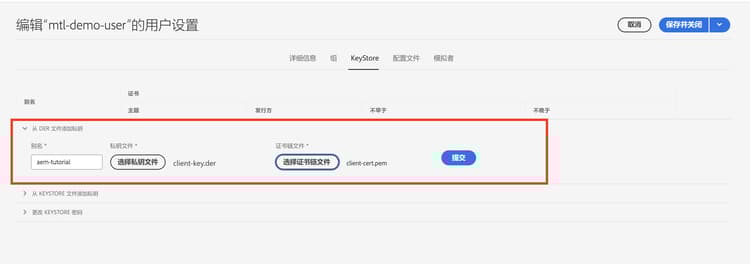
在新屏幕中,在 从 DER 文件添加私钥 部分下,请按照以下步骤操作:
-
输入别名
-
导入上面生成的 DER 格式的 AEM 私钥。
-
导入上面生成的证书链文件。
-
单击“提交”
-
-
验证证书是否导入成功。
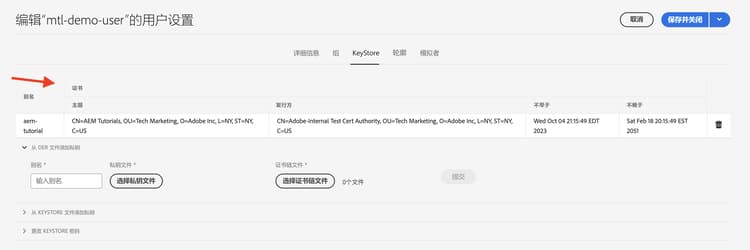
如果 API 提供商使用的是自签名 CA 证书,请将收到的证书导入 AEM 的 TrustStore 中,并按照这里的步骤进行操作。
同样,如果 AEM 正在使用自签名 CA 证书,请求 API 提供程序导入它。
使用 HttpClient 的原型 mTLS API 调用代码
更新 Java™ 代码如下。要使用 @Reference 注解来获取 AEM 的 KeyStoreService 服务,调用代码必须是 OSGi 组件/服务,或 Sling 模型(且在那里使用了 @OsgiService)。
...

// Get AEM's KeyStoreService reference
@Reference
private com.adobe.granite.keystore.KeyStoreService keyStoreService;

...

// Get AEM KeyStore using KeyStoreService
KeyStore aemKeyStore = getAEMKeyStore(keyStoreService, resourceResolver);

if (aemKeyStore != null) {

    // Create SSL Context
    SSLContextBuilder sslbuilder = new SSLContextBuilder();

    // Load AEM KeyStore material into above SSL Context with keystore password
    // Ideally password should be encrypted and stored in OSGi config
    sslbuilder.loadKeyMaterial(aemKeyStore, "admin".toCharArray());

    // If API provider cert is self-signed, load AEM TrustStore material into above SSL Context
    // Get AEM TrustStore
    KeyStore aemTrustStore = getAEMTrustStore(keyStoreService, resourceResolver);
    sslbuilder.loadTrustMaterial(aemTrustStore, null);

    // Create SSL Connection Socket using above SSL Context
    SSLConnectionSocketFactory sslsf = new SSLConnectionSocketFactory(
            sslbuilder.build(), NoopHostnameVerifier.INSTANCE);

    // Create HttpClientBuilder
    HttpClientBuilder httpClientBuilder = HttpClientBuilder.create();
    httpClientBuilder.setSSLSocketFactory(sslsf);

    // Create HttpClient
    CloseableHttpClient httpClient = httpClientBuilder.build();

    // Invoke API
    closeableHttpResponse = httpClient.execute(new HttpGet(MTLS_API_ENDPOINT));

    // Code that reads response code and body from the 'closeableHttpResponse' object
    ...
}

/**
 * Returns the AEM KeyStore of a user. In this example we are using the
 * 'mtl-demo-user' user.
 *
 * @param keyStoreService
 * @param resourceResolver
 * @return AEM KeyStore
 */
private KeyStore getAEMKeyStore(KeyStoreService keyStoreService, ResourceResolver resourceResolver) {

    // get AEM KeyStore of 'mtl-demo-user' user, you can create a user or use an existing one.
    // Then create keystore and upload key, certificate files.
    KeyStore aemKeyStore = keyStoreService.getKeyStore(resourceResolver, "mtl-demo-user");

    return aemKeyStore;
}

/**
 *
 * Returns the global AEM TrustStore
 *
 * @param keyStoreService OOTB OSGi service that makes AEM based KeyStore
 *                         operations easy.
 * @param resourceResolver
 * @return
 */
private KeyStore getAEMTrustStore(KeyStoreService keyStoreService, ResourceResolver resourceResolver) {

    // get AEM TrustStore from the KeyStoreService and ResourceResolver
    KeyStore aemTrustStore = keyStoreService.getTrustStore(resourceResolver);

    return aemTrustStore;
}

...
- 将 OOTB
com.adobe.granite.keystore.KeyStoreServiceOSGi 服务注入到您的 OSGi 组件中。 - 使用
KeyStoreService和ResourceResolver获取用户的 AEM KeyStore,getAEMKeyStore(...)方法可以做到这一点。 - 如果 API 提供程序正在使用自签名 CA 证书,那么获取全局 AEM TrustStore,
getAEMTrustStore(...)方法可以做到这一点。 - 创建一个
SSLContextBuilder的对象,查看 Java™ API 详情。 - 使用
loadKeyMaterial(final KeyStore keystore,final char[] keyPassword)方法将用户的 AEM KeyStore 加载到SSLContextBuilder中。 - 密钥库密码是在创建密钥库时设置的密码,应存储在 OSGi 配置中,请参阅秘密配置值。
避免更改 JVM 密钥库
使用私有证书有效调用 mTLS API 的传统方法涉及修改 JVM 密钥库。这是通过使用 Java™ 的 keytool 命令导入私有证书来实现的。
然而,这种方法并不符合安全最佳实践,而 AEM 通过使用用户特定的密钥库和全局 TrustStore 以及 KeyStoreService,提供了一种更优的选择。
解决方案包
视频中演示的示例 Node.js 项目可以从此处下载。
AEM servlet 代码可在 WKND Sites 项目的 tutorial/web-api-invocation 分支中找到,请参阅。