[集成]{class="badge positive"}
使用Adobe Sign辅助函数方法
[AEM Forms 6.5]{class="badge informative"}
在某些用例中,您可能需要在不使用AEM工作流的情况下发送文档进行签名。 在这种情况下,使用本文提供的示例包公开的包装器方法将会非常方便。
部署示例OSGi捆绑包
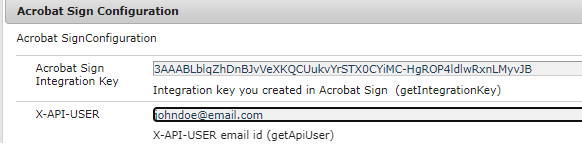
通过AEM OSGi Web控制台部署OSGi捆绑包。 通过AEM OSGi Web控制台的Configuration Manager,使用如下所示的OSGi配置指定API集成密钥和API用户。
请注意,AdobeSignHelperMethods OSGi捆绑包无法识别为Adobe Experience Manager (AEM)产品代码,因此Adobe支持部门不支持它。
API文档
以下内容可通过在OSGi捆绑包中提供的AcrobatSignHelperMethods OSGi服务获得。
getTransientDocumentID
String getTransientDocumentID(Document documentForSigning) throws IOException
用于创建协议或Web窗体的文档。 该文档首先由发件人上传到Acrobat Sign。 这称为临时,因为它在上传后7天内才可用。 此方法接受com.adobe.aemfd.docmanager.Document并返回临时文档ID。
getAgreementID
String getAgreementId(String transientDocumentID, String email) throws ClientProtocolException, IOException
使用临时文档ID将待签名文档发送给电子邮件参数标识的用户。
getWidgetID
String getWidgetID(String transientDocumentID)
构件类似于可重复使用的模板,可以向用户展示多次,也可以多次签名。 使用此方法可使用临时文档ID获取构件ID。
getWidgetURL
String getWidgetURL(String widgetId) throws ClientProtocolException, IOException
获取特定构件ID的构件URL。 随后,可以将该构件URL呈现给用户以对文档进行签名。
使用API
AcrobatSignHelperMethods是OSGi服务,因此必须在Java代码中使用@Reference注释对其进行注释。
...
// Import the AcrobatSignHelperMethods from the provided bundle
import com.acrobatsign.core.AcrobatSignHelperMethods;
...

@Component(service = { Example.class })
public class ExampleImpl implements Example {

 // Gain a reference to the provided AcrobatSignHelperMethods OSGi service
 @Reference
 com.acrobatsign.core.AcrobatSignHelperMethods acrobatSignHelperMethods;

 function void example() {
    ...
    // Use the AcrobatSignHelperMethods API methods in your code
    String transientDocumentId = acrobatSignHelperMethods.getTransientDocumentID(documentForSigning);

    String agreementId = acrobatSignHelperMethods.getAgreementId(transientDocumentID, "johndoe@example.com");
    ...
 }
}