显示配置的感谢消息
在提交表单时向您发送感谢邮件,这是一种周到的方法,用于确认和感谢用户填写和提交表单。 这可以确认他们的提交内容已收到并受到赞赏。 可以使用自适应表单指南容器的提交选项卡配置感谢消息
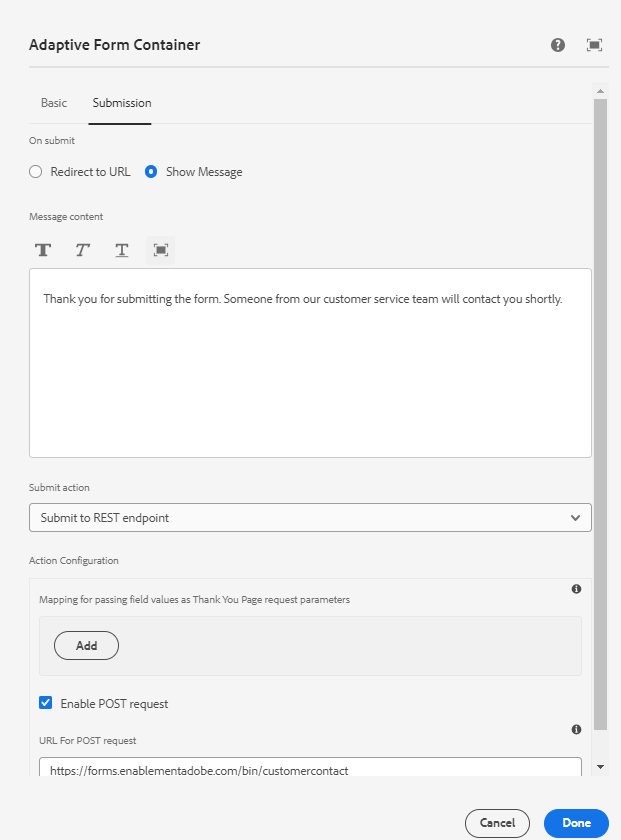
可以在AdaptiveForm超级组件的onSuccess事件处理程序中访问配置的感谢消息。
下面列出了用于关联onSuccess事件的代码和onSuccess事件处理程序的代码
<AdaptiveForm mappings={extendMappings} onSubmitSuccess={onSuccess} formJson={selectedForm}/>
const onSuccess=(action) =>{
        let body = action.payload?.body;
        debugger;
        setThankYouMessage(body.thankYouMessage.replace(/<(.|\n)*?>/g, ''));
        console.log("Thank you message "+body.thankYouMessage.replace(/<(.|\n)*?>/g, ''));

      }
Contact函数组件的完整代码如下所示
import Form from './components/Form';
import PlainText from './components/plainText';
import TextField from './components/TextField';
import Button from './components/Button';
import { useState,useEffect } from "react";
import { AdaptiveForm } from "@aemforms/af-react-renderer";
export default function Contact(){

    const [selectedForm, setForm] = useState("");
    const [thankYouMessage, setThankYouMessage] = useState("");
    const [formSubmitted, setFormSubmitted] = useState(false);

    const extendMappings = {
        'plain-text' : PlainText,
        'text-input' : TextField,
        'button' : Button,
        'form': Form
      };
     const onSuccess=(action) =>{
        let body = action.payload?.body;
        debugger;
        setFormSubmitted(true);
        setThankYouMessage(body.thankYouMessage.replace(/<(.|\n)*?>/g, ''));
        // Remove any html tags in the thank you message
        console.log("Thank you message "+body.thankYouMessage.replace(/<(.|\n)*?>/g, ''));

      }

      const getForm = async () => {

        const resp = await fetch('/adobe/forms/af/L2NvbnRlbnQvZm9ybXMvYWYvY29udGFjdHVz');
        // Get the form id manually using the listform api
        let formJSON = await resp.json();
        setForm(formJSON.afModelDefinition)
      }
      useEffect( ()=>{
        getForm()


    },[]);

    return(

        <div>
           {!formSubmitted ?
            (
                <div>
                    <h1>Get in touch with us!!!!</h1>
                    <AdaptiveForm mappings={extendMappings} onSubmitSuccess={onSuccess} formJson={selectedForm}/>
                </div>
            ) :
            (
                <div>
                    <div>{thankYouMessage}</div>
                </div>
            )}
        </div>


    )
}
上述代码使用本机html组件,这些组件映射到自适应表单中使用的组件。 例如,我们将文本输入自适应表单组件映射到TextField组件。 可以从此处🔗下载文章中使用的本机组件
recommendation-more-help
8de24117-1378-413c-a581-01e660b7163e