从一个xml数据文件生成一组PDF文档
[AEM Forms 6.5]{class="badge informative"}
OutputService提供了多种方法来使用表单设计创建文档,并提供要与表单设计合并的数据。 以下文章将介绍使用案例,通过包含多个单独记录的一个大型xml生成多个pdf。
以下是包含多个记录的xml文件的屏幕截图。
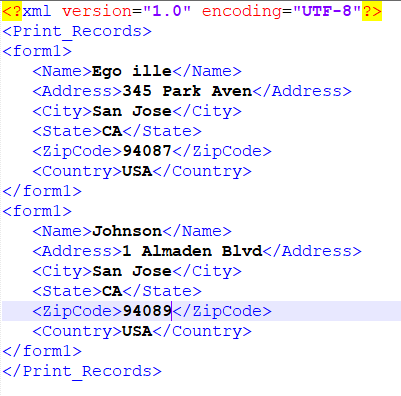
数据xml有2条记录。 每个记录由form1元素表示。 此xml传递到OutputService generatePDFOutputBatch方法,我们将获得PDF文档的列表(每个记录一个)
generatePDFOutputBatch方法的签名采用以下参数
- 模板 — 包含模板的映射,用键进行标识
- 数据 — 包含xml数据文档的映射,通过键进行标识
- pdfOutputOptions — 用于配置pdf生成的选项
- batchOptions — 用于配置批次的选项
用例详细信息 use-case-details
在本使用案例中,我们将提供一个简单的Web界面来上传模板和数据(xml)文件。 文件上传完成后,将POST请求发送到AEM Servlet。 此servlet提取文档并调用OutputService的generatePDFOutputBatch方法。 生成的pdf将压缩为zip文件,供最终用户从Web浏览器下载。
Servlet代码 servlet-code
以下是servlet中的代码片段。 代码从请求中提取模板(xdp)和数据文件(xml)。 模板文件将保存到文件系统。 创建了两个映射 — templateMap和dataFileMap,它们分别包含模板和xml(数据)文件。 然后调用DocumentServices服务的generateMultipleRecords方法。
for (final java.util.Map.Entry < String, org.apache.sling.api.request.RequestParameter[] > pairs: params
.entrySet()) {
final String key = pairs.getKey();
final org.apache.sling.api.request.RequestParameter[] pArr = pairs.getValue();
final org.apache.sling.api.request.RequestParameter param = pArr[0];
try {
if (!param.isFormField()) {

if (param.getFileName().endsWith("xdp")) {
    final InputStream xdpStream = param.getInputStream();
    com.adobe.aemfd.docmanager.Document xdpDocument = new com.adobe.aemfd.docmanager.Document(xdpStream);

    xdpDocument.copyToFile(new File(saveLocation + File.separator + "fromui.xdp"));
    templateMap.put("key1", "file://///" + saveLocation + File.separator + "fromui.xdp");
    System.out.println("####  " + param.getFileName());

}
if (param.getFileName().endsWith("xml")) {
    final InputStream xmlStream = param.getInputStream();
    com.adobe.aemfd.docmanager.Document xmlDocument = new com.adobe.aemfd.docmanager.Document(xmlStream);
    dataFileMap.put("key1", xmlDocument);
}
}

Document zippedDocument = documentServices.generateMultiplePdfs(templateMap, dataFileMap,saveLocation);
.....
.....
....
界面实现代码 Interface-Implementation-Code
以下代码使用OutputService的generatePDFOutputBatch生成多个pdf,并将包含pdf文件的zip文件返回到调用servlet
public Document generateMultiplePdfs(HashMap < String, String > templateMap, HashMap < String, Document > dataFileMap, String saveLocation) {
    log.debug("will save generated documents to " + saveLocation);
    com.adobe.fd.output.api.PDFOutputOptions pdfOptions = new com.adobe.fd.output.api.PDFOutputOptions();
    pdfOptions.setAcrobatVersion(com.adobe.fd.output.api.AcrobatVersion.Acrobat_11);
    com.adobe.fd.output.api.BatchOptions batchOptions = new com.adobe.fd.output.api.BatchOptions();
    batchOptions.setGenerateManyFiles(true);
    com.adobe.fd.output.api.BatchResult batchResult = null;
    try {
        batchResult = outputService.generatePDFOutputBatch(templateMap, dataFileMap, pdfOptions, batchOptions);
        FileOutputStream fos = new FileOutputStream(saveLocation + File.separator + "zippedfile.zip");
        ZipOutputStream zipOut = new ZipOutputStream(fos);
        FileInputStream fis = null;

        for (int i = 0; i < batchResult.getGeneratedDocs().size(); i++) {
              com.adobe.aemfd.docmanager.Document dataMergedDoc = batchResult.getGeneratedDocs().get(i);
            log.debug("Got document " + i);
            dataMergedDoc.copyToFile(new File(saveLocation + File.separator + i + ".pdf"));
            log.debug("saved file " + i);
            File fileToZip = new File(saveLocation + File.separator + i + ".pdf");
            fis = new FileInputStream(fileToZip);
            ZipEntry zipEntry = new ZipEntry(fileToZip.getName());
            zipOut.putNextEntry(zipEntry);
            byte[] bytes = new byte[1024];
            int length;
            while ((length = fis.read(bytes)) >= 0) {
                zipOut.write(bytes, 0, length);
            }
            fis.close();
        }
        zipOut.close();
        fos.close();
        Document zippedDocument = new Document(new File(saveLocation + File.separator + "zippedfile.zip"));
        log.debug("Got zipped file from file system");
        return zippedDocument;


    } catch (OutputServiceException | IOException e) {

        e.printStackTrace();
    }
    return null;


}
在您的服务器上部署 Deploy-on-your-server
要在您的服务器上测试此功能,请按照以下说明操作:
- 下载示例资源。此zip文件包含模板和xml数据文件。
- 将浏览器指向Felix Web控制台
- 部署DevelopingWithServiceUser包。
- 使用configMgr在Apache Sling服务用户映射器服务中添加以下条目。
DevelopingWithServiceUser.core:getformsresourceresolver=fd-service

- 部署自定义AEMFormsDocumentServices包。使用OutputService API生成PDF的自定义包
- 将浏览器指向包管理器
- 导入并安装包。 此包包含html页面,通过该页面可删除模板和数据文件。
- 将浏览器指向MultiRecords.html
- 将模板和xml数据文件拖放到一起
- 下载创建的zip文件。 此zip文件包含输出服务生成的pdf文件。