Github.com webhook验证
Webhook允许您构建或设置可订阅GitHub.com上特定事件的集成。 触发其中某个事件时,GitHub会将HTTP POST有效负载发送到webhook配置的URL。 但是,出于安全原因,请务必验证传入的webhook请求是否实际来自GitHub,而不是来自恶意操作者。 本教程将指导您完成在Adobe App Builder操作中使用共享密钥验证GitHub.com webhook请求的步骤。
在AppBuilder中设置Github密钥
-
向
.env文件添加密钥:在App Builder项目的
.env文件中,为GitHub.com webhook密钥添加自定义密钥:code language-env # Specify your secrets here # This file must not be committed to source control ... GITHUB_SECRET=my-github-webhook-secret-1234! -
更新
ext.config.yaml文件:必须更新
ext.config.yaml文件以验证GitHub.com webhook请求。- 将AppBuilder操作
web配置设置为raw以从GitHub.com接收原始请求正文。 - 在AppBuilder操作配置中的
inputs下,添加GITHUB_SECRET密钥,并将其映射到包含该密钥的.env字段。 此键的值是以$为前缀的.env字段名称。 - 将AppBuilder操作配置中的
require-adobe-auth注释设置为false以允许无需进行Adobe身份验证即可调用操作。
生成的
ext.config.yaml文件应如下所示:code language-yaml operations: view: - type: web impl: index.html actions: actions web: web-src runtimeManifest: packages: dx-excshell-1: license: Apache-2.0 actions: github-to-jira: function: actions/generic/index.js web: 'raw' runtime: nodejs:20 inputs: LOG_LEVEL: debug GITHUB_SECRET: $GITHUB_SECRET annotations: require-adobe-auth: false final: true - 将AppBuilder操作
将验证代码添加到AppBuilder操作
接下来,将下面提供的JavaScript代码(复制自GitHub.com的文档)添加到您的AppBuilder操作中。 确保导出verifySignature函数。
// src/dx-excshell-1/actions/generic/github-webhook-verification.js

let encoder = new TextEncoder();

async function verifySignature(secret, header, payload) {
    let parts = header.split("=");
    let sigHex = parts[1];

    let algorithm = { name: "HMAC", hash: { name: 'SHA-256' } };

    let keyBytes = encoder.encode(secret);
    let extractable = false;
    let key = await crypto.subtle.importKey(
        "raw",
        keyBytes,
        algorithm,
        extractable,
        [ "sign", "verify" ],
    );

    let sigBytes = hexToBytes(sigHex);
    let dataBytes = encoder.encode(payload);
    let equal = await crypto.subtle.verify(
        algorithm.name,
        key,
        sigBytes,
        dataBytes,
    );

    return equal;
}

function hexToBytes(hex) {
    let len = hex.length / 2;
    let bytes = new Uint8Array(len);

    let index = 0;
    for (let i = 0; i < hex.length; i += 2) {
        let c = hex.slice(i, i + 2);
        let b = parseInt(c, 16);
        bytes[index] = b;
        index += 1;
    }

    return bytes;
}

module.exports = { verifySignature };
在AppBuilder操作中实施验证
接下来,通过将请求标头中的签名与verifySignature函数生成的签名进行比较,验证请求是否来自GitHub。
在AppBuilder操作的index.js中,将以下代码添加到main函数中:
// src/dx-excshell-1/actions/generic/index.js

const { verifySignature } = require("./github-webhook-verification");
...

// Main function that will be executed by Adobe I/O Runtime
async function main(params) {
  // Create a Logger
  const logger = Core.Logger("main", { level: params?.LOG_LEVEL || "info" });

  try {
    // Log parameters if LOG_LEVEL is 'debug'
    logger.debug(stringParameters(params));

    // Define required parameters and headers
    const requiredParams = [
      // Verifies the GITHUB_SECRET is present in the action's configuration; add other parameters here as needed.
      "GITHUB_SECRET"
    ];

    const requiredHeaders = [
      // Require the x-hub-signature-256 header, which GitHub.com populates with a sha256 hash of the payload
      "x-hub-signature-256"
    ];

    // Check for missing required parameters and headers
    const errorMessage = checkMissingRequestInputs(params, requiredParams, requiredHeaders);

    if (errorMessage) {
      // Return and log client errors
      return errorResponse(400, errorMessage, logger);
    }

    // Decode the request body (which is base64 encoded) to a string
    const body = Buffer.from(params.__ow_body, 'base64').toString('utf-8');

    // Verify the GitHub webhook signature
    const isSignatureValid = await verifySignature(
      params.GITHUB_SECRET,
      params.__ow_headers["x-hub-signature-256"],
      body
    );

    if (!isSignatureValid) {
      // GitHub signature verification failed
      return errorResponse(401, "Unauthorized", logger);
    } else {
      logger.debug("Signature verified");
    }

    // Parse the request body as JSON so its data is useful in the action
    const githubParams = JSON.parse(body) || {};

    // Optionally, merge the GitHub webhook request parameters with the action parameters
    const mergedParams = {
      ...params,
      ...githubParams
    };

    // Do work based on the GitHub webhook request
    doWork(mergedParams);

    return {
      statusCode: 200,
      body: { message: "GitHub webhook received and processed!" }
    };

  } catch (error) {
    // Log any server errors
    logger.error(error);
    // Return with 500 status code
    return errorResponse(500, "Server error", logger);
  }
}
在GitHub中配置webhook
返回GitHub.com,在创建webhook时向GitHub.com提供相同的机密值。 使用在.env文件的GITHUB_SECRET密钥中指定的机密值。
在GitHub.com中,转到存储库设置,并编辑webhook。 在webhook设置中,在Secret字段中提供机密值。 单击底部的 更新webhook 以保存更改。
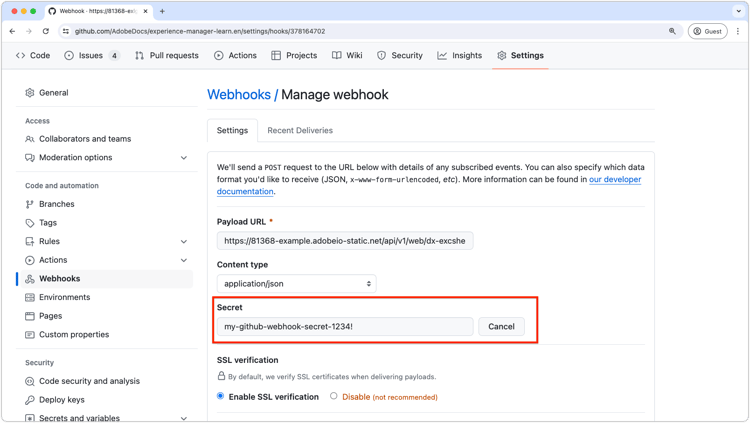
按照以下步骤操作,您将确保App Builder操作可以安全地验证传入webhook请求确实来自您的GitHub.com webhook。