Understanding Abandonment Trigger Evaluation in Adobe Experience Cloud.
This technical note explains how Abandonment triggers are evaluated in Adobe Experience Cloud. It describes the purpose of each configuration section in the Triggers UI, how qualification and inactivity are assessed, when a trigger fires, when evaluation stops, and how the 1-hour hold period, exit state, and 3-hour maximum session length affect trigger behavior.
描述 description
body { font-family: "Aptos", "Calibri", "Segoe UI", Arial, sans-serif; font-size: 16px; color: rgba(44, 44, 44, 1); background: rgba(255, 255, 255, 1); max-width: 880px; margin: 0 auto; padding: 40px 48px 80px; line-height: 1.6 }
.breadcrumb { font-size: 0.82rem; color: rgba(20, 115, 230, 1); text-decoration: underline; margin-bottom: 28px }
h1 { font-size: 2rem; font-weight: 700; line-height: 1.2; margin-bottom: 10px }
.last-update { font-size: 0.82rem; color: rgba(110, 110, 110, 1); margin-bottom: 24px }
hr { border-top: 1px solid rgba(224, 224, 224, 1); border-right: none; border-bottom: none; border-left: none; margin: 20px 0 28px }
.intro { font-size: 1rem; line-height: 1.65; margin-bottom: 28px }
.toc-heading { font-size: 0.95rem; font-weight: 700; margin-bottom: 6px }
.toc ol { list-style: decimal; margin-left: 20px }
.toc li { font-size: 0.88rem; color: rgba(20, 115, 230, 1); text-decoration: underline; margin-bottom: 2px }
h3 { font-size: 1.3rem; font-weight: 700; color: rgba(44, 44, 44, 1); margin-top: 44px; margin-bottom: 12px; padding-bottom: 8px; border-bottom: 2px solid rgba(20, 115, 230, 1); line-height: 1.3 }
h4 { font-size: 0.97rem; font-weight: 700; color: rgba(44, 44, 44, 1); margin-top: 24px; margin-bottom: 6px }
p { font-size: 0.93rem; color: rgba(44, 44, 44, 1); line-height: 1.65; margin-top: 10px }
ul, ol { margin: 10px 0 0 24px }
li { font-size: 0.93rem; color: rgba(44, 44, 44, 1); line-height: 1.65; margin-bottom: 3px }
table { width: 100%; border-collapse: collapse; margin-top: 14px; font-size: 0.9rem }
thead th { text-align: left; font-weight: 700; padding: 8px 12px; background: rgba(245, 245, 245, 1); border: 1px solid rgba(208, 208, 208, 1); font-size: 0.85rem }
td { padding: 8px 12px; border: 1px solid rgba(208, 208, 208, 1); vertical-align: top; line-height: 1.6 }
td:first-child { font-weight: 600; width: 210px; background: rgba(250, 250, 250, 1) }
.note { background: rgba(245, 245, 245, 1); border-left: 3px solid rgba(176, 176, 176, 1); padding: 12px 16px; margin-top: 16px; font-size: 0.88rem; line-height: 1.6 }
.figure-block { margin-top: 20px; border: 1px dashed rgba(176, 176, 176, 1); background: rgba(250, 250, 250, 1) }
.figure-placeholder { padding: 36px 24px; text-align: center; font-size: 0.85rem; color: rgba(110, 110, 110, 1); font-style: italic }
.figure-caption { border-top: 1px solid rgba(224, 224, 224, 1); padding: 10px 14px; font-size: 0.78rem; color: rgba(110, 110, 110, 1); line-height: 1.55 }
.outcome-pair { display: grid; grid-template-columns: 1fr 1fr; gap: 14px; margin-top: 14px }
.outcome-box { border: 1px solid rgba(208, 208, 208, 1); padding: 12px 14px }
.outcome-box h4 { font-size: 0.85rem; margin-bottom: 8px; margin-top: 0 }
.outcome-box ul { margin-left: 16px }
.outcome-box li { font-size: 0.88rem }
.faq-item { border-bottom: 1px solid rgba(224, 224, 224, 1); padding: 14px 0 }
.faq-item:last-child {border-bottom: none}
.faq-q { font-size: 0.93rem; font-weight: 700; margin-bottom: 5px }
.faq-a { font-size: 0.9rem; line-height: 1.65; margin: 0 }
@media (max-width: 640px) { body { padding: 24px 18px 48px } .outcome-pair { grid-template-columns: 1fr } td:first-child {width: auto} }
How Abandonment Triggers Are Evaluated
Last update: April 28, 2026
Adobe Experience Cloud Triggers allow organizations to respond to visitor behavior in near real time by evaluating visit activity against conditions configured in the Triggers interface. For Abandonment triggers, evaluation is based on the rules defined in sections such as Visit must include, Visit must not include, and Trigger after no action for. 有关设置触发器的更多信息,请参阅创建和管理Experience Cloud触发器和触发器概述。
本文介绍了如何从监控开始到最终完成期间评估“放弃”触发器。 它概述了如何评估合格条件,如何使用非活动状态来确定触发器应何时触发,以及评估停止而不触发的情况。 它还解释了三种可能影响结果的重要行为:退出状态、1小时保留期和3小时最大会话时长。
通过本文了解为什么放弃触发器可能触发,为什么它可能会在触发之前停止评估,以及与时间相关的行为如何影响最终结果。
在此页面上
- 概述
- 触发器配置部分
- 其他评估概念
- 评估如何开始
- 触发评估工作流
- 不再进一步评估触发器时
- 为什么存在1小时的保留期
- 实际摘要
- 常见问题
概述
放弃触发器监视定义的一组符合条件的行为的访问,然后仅在没有操作后,在触发器中配置了一段不活动时间后才发送触发器。
*当看到符合条件的事件时,触发器不会立即发送。 相反,Adobe会评估一段时间的访问,以确定是否满足所需条件、是否发生任何取消资格条件,以及访问是否有资格持续足够长的时间来触发触发器。本文说明: 触发器配置的每个部分的含义
- Adobe如何评估“放弃”触发器
- 退出状态是什么意思
- 为什么有一小时的保留期
- 最长3小时的会话长度对评估有何影响
- 不再进一步评估触发器时### 触发器配置部分此部分介绍“放弃”触发器的每个可配置部分。#### 类型=放弃使用 Type = Abandonment 创建触发器时,Adobe会评估访客是否已完成所需的符合条件行为,然后在配置的时间内变为非活动状态。 此类型通常用于浏览放弃、表单放弃或预订放弃等情况。#### 访问必须包括访问必须包括部分定义了触发器获得资格所必须满足的条件。 示例包括:* 特定的eVar值
- 产品值存在
- 发生的特定事件
- 已达到页面或步骤值如果包含多个条件,则仅当满足UI中定义的所需逻辑时,触发器才具有资格。#### 访问不得包括访问不能包括部分定义了取消资格条件。 如果在评估期间收到与 访问不可以包含 规则匹配的点击,则触发器不再符合条件,将退出而不发送。 这通常用于在发生完成事件(例如购买或结账事件)时禁止放弃触发器。#### 没有操作后触发没有针对执行任何操作后触发器的设置定义了Adobe在放弃评估中使用的非活动期。 此值有两个实际用途:* 这是在限定后等待触发器触发时使用的非活动时间间隔
- 此外,该值也是当仍在评估触发会话时应用的非活动时间间隔因此,在完全满足合格条件之前和之后,不活动都会影响触发器。 例如,如果此值设置为10分钟,Adobe会等待10分钟再停止活动,之后在访问符合条件时发送触发器。### 其他评估概念概念描述退出状态Adobe停止评估当前触发器会话而不发送触发器的时间。 当访客在满足所有必需的合格条件之前处于非活动状态,或者收到 访问中不能包括 的取消合格条件时,就会发生这种情况。1小时保留期在触发器会话结束后应用的固定时间间隔 — 可能是因为它成功触发,也可能是因为它退出而不触发。 在此期间,不会立即重新评估同一访客是否具有新的触发会话。 此值不可由客户配置。最长会话时长3小时Adobe在任何触发会话上强制实施的最大硬值。 如果触发会话在三小时内一直保持活动状态且未达到最终结果,则Adobe会停止会话。 这样可防止触发会话无限期地继续。### 评估如何开始对于“放弃”触发器,Adobe在触发器会话期间开始监控访问,并根据配置的规则继续评估传入点击。 在收到点击时,Adobe会检查:1) 是否已满足 访问必须包括 条件
- 是否已发生任何 访问不能包括 条件
- 是否已经过了配置的非活动期
- 触发器会话是否已达到最大会话时长3小时触发会话将一直持续到达到定义的结果之一为止。### 触发评估工作流以下步骤描述了Adobe如何从头到尾处理“放弃”触发会话。#### 步骤1 — Adobe开始评估触发会话在为配置的“放弃”触发器评估访问时,Adobe会开始根据触发器定义监控传入点击。 在此阶段,触发器尚未符合条件,也没有触发。#### 步骤2 — Adobe检查符合和取消符合条件的规则Adobe会根据 访问必须包括 和 访问不得包括 来持续评估访问。 有两种可能的方向:* 如果满足所有必需的合格条件并且没有发生取消合格条件,则触发器将进入非活动等待期
- 如果触发器仍未完全符合条件,则会继续评估,直到达到停止条件之一为止#### 第3步 — 如果触发器符合条件,则Adobe将等待非活动期一旦满足 访问必须包括 中的条件并且没有取消资格条件,Adobe就不会立即发送触发器。 相反,在对 没有操作后,它将等待 触发器定义的完整时段。 如果访客在整个时段内保持不活动状态,则会触发触发器。#### 第4步 — 可能的成果结果发生什么情况触发器成功触发已发送触发器。 会话将进入1小时的保留期。 在保持期之后,会话将被完全清除。已收到取消资格条件触发立即退出而不发送。 会话将进入1小时的保留期。 在保持期之后,会话将被完全清除。完全资格前不活动触发器进入退出状态。 不发送触发器。 会话将进入1小时的保留期。 在保持期之后,会话将被完全清除。已达到3小时会话限制会话已终止。 不发送触发器。 评估将立即停止。注意:即使触发器完全符合条件,非活动状态也会影响评估。 在满足所有 访问必须包括 个条件之前变为非活动的访客将导致会话退出而不触发。
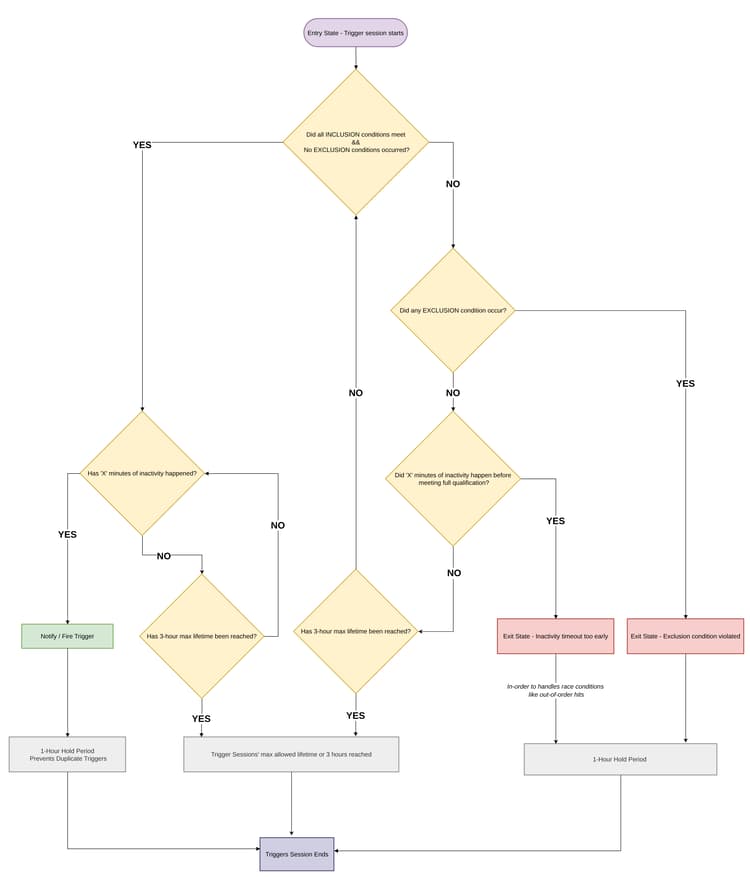
- no disqualifying condition occurs
- the configured inactivity period completes successfully
- the session remains within the allowed session windowA trigger does not fire when:* the visitor becomes inactive before full qualification
- a disqualifying condition occurs
- the 3-hour maximum session length is reached### 常见问题#### 是否会在满足合格条件时立即触发触发器?不是。 对于“放弃”触发器,在对 无操作后,Adobe会等待 触发器配置的完整非活动时间段,然后再发送触发器。#### 能否更改1小时的保留期?不是。 1小时的保留期是固定的,不能由客户配置。#### 如果触发逻辑在其他方面有效,则3小时最大会话长度是否仍适用?可以。 3小时最大会话长度将用作触发器会话的绝对最大生命周期,而不管逻辑是否允许触发器触发。#### 如果取消资格事件在资格鉴定之后但在非活动期结束之前发生,会发生什么情况?触发器将在不发送的情况下退出,并进入1小时的保留期。 收到取消资格事件后,不会额外的不活动等待。#### 退出和触发之间有何区别?正在触发意味着触发器已成功发送。 退出意味着Adobe停止评估会话而没有发送触发器。## 解决方法 resolution*, *::before, *::after { box-sizing: border-box; margin: 0; padding: 0; }
html {background: #fff;}
body {
font-family: 'Aptos', 'Calibri', 'Segoe UI', Arial, sans-serif;
font-size: 16px;
font-weight: 400;
color: #2c2c2c;
background: #fff;
max-width: 880px;
margin: 0 auto;
padding: 40px 48px 80px;
line-height: 1.6;
}
.breadcrumb {
font-size: 0.82rem;
color: #1473e6;
text-decoration: underline;
margin-bottom: 28px;
cursor: default;
}
h1 {
font-size: 2rem;
font-weight: 700;
color: #2c2c2c;
line-height: 1.2;
margin-bottom: 10px;
}
.last-update {
font-size: 0.82rem;
color: #6e6e6e;
margin-bottom: 24px;
}
hr {
border: none;
border-top: 1px solid #e0e0e0;
margin: 20px 0 28px;
}
.intro {
font-size: 1rem;
color: #2c2c2c;
line-height: 1.65;
margin-bottom: 28px;
}
/* TOC */
.toc { margin: 0 0 8px; }
.toc-heading { font-size: 0.95rem; font-weight: 700; margin-bottom: 6px; }
.toc ol { list-style: decimal; margin-left: 20px; }
.toc li { font-size: 0.88rem; color: #1473e6; text-decoration: underline; margin-bottom: 2px; }
/* Headings */
h2 {
font-size: 1.3rem;
font-weight: 700;
color: #2c2c2c;
margin-top: 44px;
margin-bottom: 12px;
padding-bottom: 8px;
border-bottom: 2px solid #1473e6;
line-height: 1.3;
}
h3 {
font-size: 0.97rem;
font-weight: 700;
color: #2c2c2c;
margin-top: 24px;
margin-bottom: 6px;
}
/* Body */
p {
font-size: 0.93rem;
color: #2c2c2c;
line-height: 1.65;
margin-top: 10px;
}
ul, ol.steps {
margin: 10px 0 0 24px;
}
li {
font-size: 0.93rem;
color: #2c2c2c;
line-height: 1.65;
margin-bottom: 3px;
}
/* Table */
table {
width: 100%;
border-collapse: collapse;
margin-top: 14px;
font-size: 0.9rem;
}
thead th {
text-align: left;
font-weight: 700;
padding: 8px 12px;
background: #f5f5f5;
border: 1px solid #d0d0d0;
font-size: 0.85rem;
color: #2c2c2c;
}
td {
padding: 8px 12px;
border: 1px solid #d0d0d0;
vertical-align: top;
color: #2c2c2c;
line-height: 1.6;
}
td:first-child {
font-weight: 600;
width: 210px;
background: #fafafa;
}
/* Note */
.note {
background: #f5f5f5;
border-left: 3px solid #b0b0b0;
padding: 12px 16px;
margin-top: 16px;
font-size: 0.88rem;
color: #2c2c2c;
line-height: 1.6;
}
/* Figure */
.figure-block {
margin-top: 20px;
border: 1px dashed #b0b0b0;
background: #fafafa;
}
.figure-placeholder {
padding: 36px 24px;
text-align: center;
font-size: 0.85rem;
color: #6e6e6e;
font-style: italic;
}
.figure-caption {
border-top: 1px solid #e0e0e0;
padding: 10px 14px;
font-size: 0.78rem;
color: #6e6e6e;
line-height: 1.55;
}
/* Outcome grid */
.outcome-pair {
display: grid;
grid-template-columns: 1fr 1fr;
gap: 14px;
margin-top: 14px;
}
.outcome-box {
border: 1px solid #d0d0d0;
padding: 12px 14px;
}
.outcome-box h4 {
font-size: 0.85rem;
font-weight: 700;
margin-bottom: 8px;
color: #2c2c2c;
}
.outcome-box ul { margin-left: 16px; }
.outcome-box li { font-size: 0.88rem; }
/* FAQ */
.faq-item {
border-bottom: 1px solid #e0e0e0;
padding: 14px 0;
}
.faq-item:last-child { border-bottom: none; }
.faq-q {
font-size: 0.93rem;
font-weight: 700;
color: #2c2c2c;
margin-bottom: 5px;
}
.faq-a {
font-size: 0.9rem;
color: #2c2c2c;
line-height: 1.65;
margin: 0;
}
@media (max-width: 640px) {
body { padding: 24px 18px 48px; }
.outcome-pair { grid-template-columns: 1fr; }
td:first-child { width: auto; }
}**