如何在Adobe动态标签管理器中设置Marketing CloudID服务辅助函数
本指南详细介绍了如何在Adobe动态标签管理器中设置Marketing CloudID服务帮助程序功能。
描述 description
环境
Adobe Experience Cloud
问题
本文介绍了如何在Adobe动态Tag Management (DTM)中实施Adobe Marketing Cloud ID服务附加访客ID函数。
注意: 在原始域和目标域上的DTMMarketing CloudID服务中加载Marketing CloudID服务VisitorAPI.js 1.8.0或更高版本。 应在阻止Cookie以验证功能的浏览器情况下进行测试。
解决方法 resolution
安装程序 — 域A
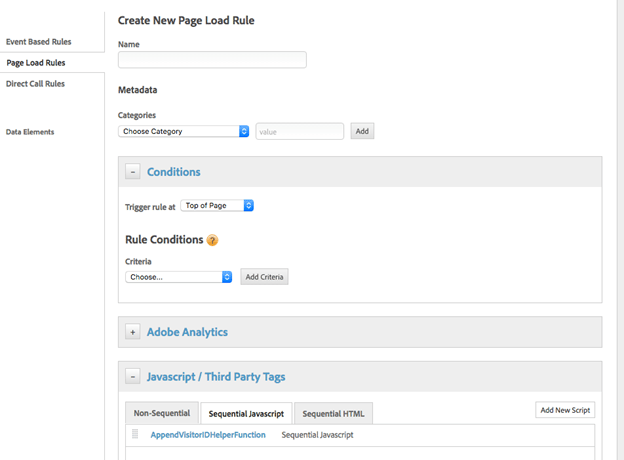
使用域A上的自定义第三方Javascript在连续的“页面加载顶部”规则中设置目标域(域B)。
请参阅下面的屏幕截图作为示例:
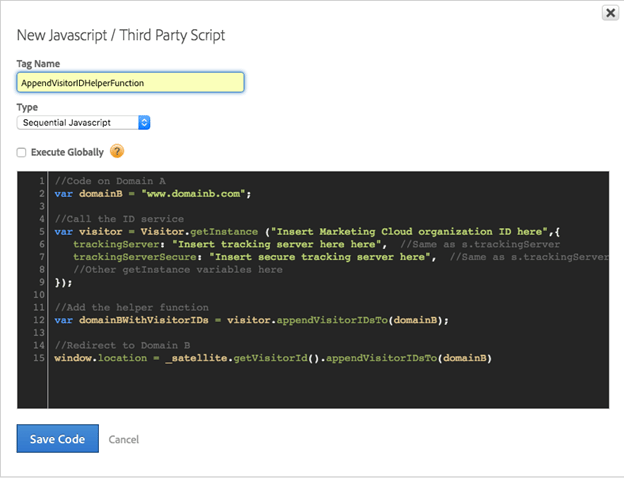
//Code on Domain A
var domainB = "www.domainb.com";

//Call the ID service
var visitor = Visitor.getInstance ("Insert Marketing Cloud organization ID here",{
trackingServer:"Insert tracking server here here", //Same as s.trackingServer
trackingServerSecure: "Insert secure tracking server here", //Same as s.trackingServerSecure
...
//Other getInstance variables here
...
});

//Add the helper function
var domainBWithVisitorIDs = visitor.appendVisitorIDsTo(domainB);

//Redirect to Domain B
window.location = _satellite.getVisitorId().appendVisitorIDsTo(domainB)
注意: 要重定向到更明确的路径,域设置需要反映该意图。 如果重定向需要更加动态的构造,则可以将自定义代码添加到数据元素或直接调用规则中。 例如:var domainB = "http://www.domainb.com/products/"
验证 — 域B
从域A导航到域B。通过在开发人员控制台中调用以下内容,验证域B上的MID是否与域A上的MID匹配: _satellite.getVisitorId().getMarketingCloudVisitorID()().appendVisitorIDsTo(domainB)
recommendation-more-help
3d58f420-19b5-47a0-a122-5c9dab55ec7f