自定义自动匹配
如果默认自动匹配策略(OOTB自动匹配)与您的特定业务要求不一致,请选择自定义匹配选项。 此选项支持使用Adobe Developer App Builder开发自定义匹配器应用程序,该应用程序可处理复杂的匹配逻辑,或者处理来自无法将元数据填充到AEM Assets中的第三方系统的资源。
配置自定义自动匹配
-
在Commerce管理员中,导航到Store >配置> ADOBE SERVICES > AEM Assets Integration。
-
选择 Custom Matcher 作为匹配规则。
-
当您选择此匹配规则时,管理员会显示用于配置 端点 和自定义匹配逻辑所需 身份验证参数 的其他字段。
workspace.json
Adobe I/O Workspace Configuration字段通过导入App Builder workspace.json配置文件提供了一种配置自定义匹配器的简化方法。
您可以从Adobe Developer Console下载workspace.json文件。 该文件包含App Builder工作区的所有凭据和配置详细信息。
workspace.json| code language-json |
|---|
|
- 将
workspace.json文件从App Builder项目拖放到 Adobe I/O Workspace Configuration 字段中。 或者,您可以单击浏览并选择文件。
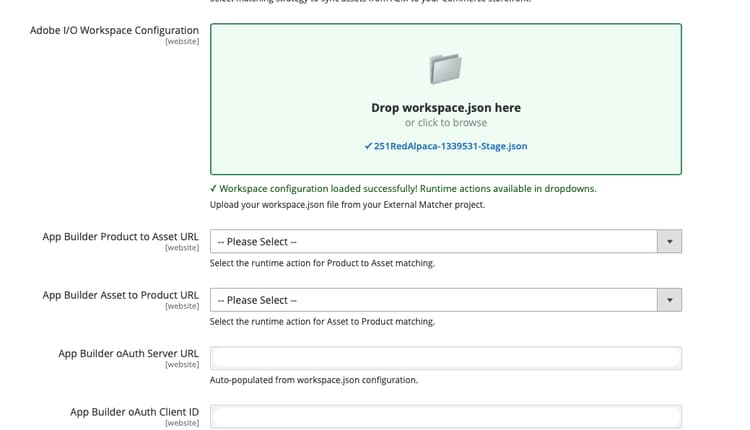
-
系统自动:
- 验证JSON结构
- 提取和填充OAuth凭据
- 获取工作区的可用运行时操作
- 填充 Product to Asset URL 和 Asset to Product URL 字段的下拉列表选项
-
从每个流的下拉菜单中选择相应的运行时操作。
-
单击Save Config。
异步配置保存
如果您的Commerce实例启用了异步配置保存选项,则配置更改将排入队列并由异步使用者应用,而不是立即保存在同一请求中。 要在此模式下上载自定义自动匹配的workspace.json文件,请依次完成以下步骤:
-
确认Commerce异步配置保存已启用。
-
从管理员转到Stores > Settings > Configuration > Adobe Services > AEM Assets Integration。
-
上传当前的App Builder
workspace.json文件。 -
保存配置。
-
等待异步配置使用者完成保存处理。
-
验证OAuth值和依赖的集成配置。
-
验证外部匹配程序注册是否反映了更新。
异步配置保存疑难解答
workspace.json文件,并等待队列处理完成,然后再次检查值。workspace.json文件并包含预期的App Builder凭据。自定义匹配器API端点
当您使用App Builder生成自定义匹配程序应用程序时,该应用程序必须公开以下端点:
- App Builder资源到产品URL端点
- App Builder产品到资源URL端点
App Builder资源到产品URL端点
此端点检索与给定资产关联的SKU列表:
使用示例
const { Core } = require('@adobe/aio-sdk')

async function main(params) {

    // Build your own matching logic here to return the products that map to the assetId
    // var productMatches = [];
    // params.assetId
    // params.eventData.assetMetadata['commerce:isCommerce']
    // params.eventData.assetMetadata['commerce:skus'][i]
    // params.eventData.assetMetadata['commerce:roles']
    // params.eventData.assetMetadata['commerce:positions'][i]
    // ...
    // End of your matching logic

    // Set skip to true if the mapping hasn't changed
    const skipSync = false;

    return {
        statusCode: 200,
        body: {
            asset_id: params.assetId,
            product_matches: [
                {
                    product_sku: "<YOUR-SKU-HERE>",
                    asset_roles: ["thumbnail", "image", "swatch_image", "small_image"],
                    asset_position: 1
                }
            ],
            skip: skipSync
        }
    };
}

exports.main = main;
请求
POST https://your-app-builder-url/api/v1/web/app-builder-external-rule/asset-to-product
assetIdeventDataeventData.assetMetadata中读取的资源元数据)。响应
{
  "asset_id": "{ASSET_ID}",
  "product_matches": [
    {
      "product_sku": "{PRODUCT_SKU_1}",
      "asset_roles": ["thumbnail", "image"]
    },
    {
      "product_sku": "{PRODUCT_SKU_2}",
      "asset_roles": ["thumbnail"]
    }
  ],
  "skip": false
}
asset_idproduct_matchesApp Builder产品到资源URL端点
此端点检索与给定SKU关联的资源列表:
使用示例
const { Core } = require('@adobe/aio-sdk')

async function main(params) {
    // return asset matches for a product
    // Build your own matching logic here to return the assets that map to the productSku
    // var assetMatches = [];
    // params.productSku
    // ...
    // End of your matching logic

    // Set skip to true if the mapping hasn't changed
    const skipSync = false;

    return {
        statusCode: 200,
        body: {
            product_sku: params.productSku,
            asset_matches: [
                {
                    asset_id: "<YOUR-ASSET-ID-HERE>", // urn:aaid:aem:1aa1d5i2-17h8-40a7-a228-e3ur588deee1
                    asset_roles: ["thumbnail", "image", "swatch_image", "small_image"],
                    asset_format: "image", // can be "image" or "video"
                    asset_position: 1
                }
            ],
            skip: skipSync
        }
    };
}

exports.main = main;
请求
POST https://your-app-builder-url/api/v1/web/app-builder-external-rule/product-to-asset
productSkueventData响应
{
  "product_sku": "{PRODUCT_SKU}",
  "asset_matches": [
    {
      "asset_id": "{ASSET_ID_1}",
      "asset_roles": ["thumbnail", "image"],
      "asset_position": 1,
      "asset_format": "image"
    },
    {
      "asset_id": "{ASSET_ID_2}",
      "asset_roles": ["thumbnail"],
      "asset_position": 2,
      "asset_format": "image"
    }
  ],
  "skip": false
}
product_skuasset_matchesasset_matches参数包含以下属性:
asset_idasset_rolesthumbnail、image、small_image和swatch_image。 使用AEM Assets集成扩展1.4.6及更高版本时,也可以使用自定义图像角色(如hero或custom_role_1)。asset_formatimage和video。asset_position跳过同步处理
skip参数允许自定义匹配程序绕过特定资产或产品的同步处理。
当您的App Builder应用程序在响应中返回"skip": true时,规则引擎不会向Commerce发送该资产或产品的更新或删除API请求。 此优化可减少不必要的API调用并提高性能。