针对Adobe Commerce数据库连接并运行查询
了解如何连接到Adobe Commerce on cloud项目、创建数据库转储以供异地使用,以及屏蔽或删除个人身份信息(PII)。 通过本地转储、MySQL Workbench或TablePlus等GUI或magento-cloud CLI访问数据。
视频内容
- 使用数据库管理工具(如MySQL Workbench或TablePlus)连接到远程Adobe Commerce云项目。
- 连接到项目并从命令行运行SQL。
您可以使用以下任一方法从云项目访问Adobe Commerce数据:
- 使用本地数据库转储。
- 使用应用程序(如MySQL Workbench或TablePlus)打开到远程云环境的数据库连接。
- 使用
magento-cloudCLI直接连接到云环境,并在远程服务器上运行命令。
希望通过推移来删除客户信息的数据库转储。 完全删除不需要的客户数据。
使用Adobe Commerce Cloud CLI工具
您需要安装Adobe Commerce Cloud CLI才能创建数据库转储。 在本地计算机上,打开一个目录并运行以下命令。 将your-project-id替换为您的项目ID(类似于asasdasd45q)。 将your-environment-name替换为您的环境名称,如master或staging。
magento-cloud db:dump -p your-project-id -e your-environment-name
如果您不确定项目ID或环境,可以在命令中忽略这些:
magento-cloud db:dump
CLI要求您指定正确的项目和环境。 以下示例显示该对话框。 此示例显示了分配给您帐户的多个项目,但您可能只有一个项目可用。
切换到目录
cd ~/Downloads/db-tutorial
现在,执行命令以创建数据库转储
magento-cloud db:dump
由于您未指定项目或环境,因此Adobe Commerce Cloud CLI会询问您几个问题。 以下示例显示了示例对话框。
Enter a number to choose a project:
  [0] demo-ralbin (ral32nryq4123)
  [1] adobe-commerce-demo (abc123zzkipexnqo)
  [2] DX Tutorials - Commerce (abasrpikfw4123)
 > 2

Enter a number to choose an environment:
Default: master
  [0] master (type: production)
  [1] remote-db (type: development)
 > 1

Creating SQL dump file: /Users/<username>/Downloads/db-tutorial/abasrpikfw4123--remote-db-ecpefky--mysql--main--dump.sql
使用Adobe Commerce ECE-tools
如果您没有Adobe Commerce CLI工具,则可以在项目中ssh并运行ece命令vendor/bin/ece-tools db-dump:
示例响应:
ssh abasrpikfw4123-remote-db-ecpefky--mymagento@ssh.us-4.magento.cloud

 __  __                   _          ___ _             _
|  \/  |__ _ __ _ ___ _ _| |_ ___   / __| |___ _  _ __| |
| |\/| / _` / _` / -_) ' \  _/ _ \ | (__| / _ \ || / _` |
|_|  |_\__,_\__, \___|_||_\__\___/  \___|_\___/\_,_\__,_|
            |___/

 Welcome to Magento Cloud.

 This is environment remote-db-ecpefky
 of project abasrpikfw4123.

web@mymagento.0:~$ vendor/bin/ece-tools db-dump
The db-dump operation switches the site to maintenance mode, stops all active cron jobs and consumer queue processes, and disables cron jobs before starting the dump process.
Your site will not receive any traffic until the operation completes.
Do you wish to proceed with this process? (y/N)?y
[2024-02-13T19:01:45.130999+00:00] INFO: Starting backup.
[2024-02-13T19:01:45.155039+00:00] NOTICE: Enabling Maintenance mode
[2024-02-13T19:01:46.404427+00:00] INFO: Trying to kill running cron jobs and consumers processes
[2024-02-13T19:01:46.420149+00:00] INFO: Running Magento cron and consumers processes were not found.
[2024-02-13T19:01:46.420434+00:00] INFO: Waiting for lock on db dump.
[2024-02-13T19:01:46.420499+00:00] INFO: Start creation DB dump for main database...
[2024-02-13T19:01:50.697886+00:00] INFO: Finished DB dump for main database, it can be found here: /app/var/dump-main-1707850906.sql.gz
[2024-02-13T19:01:51.628328+00:00] NOTICE: Maintenance mode is disabled.
[2024-02-13T19:01:51.628419+00:00] INFO: Backup completed.
web@mymagento.0:~$ exit
logout
Connection to ssh.us-4.magento.cloud closed.
使用SFTP或rsync将数据库转储拉到本地环境。
以下示例使用rsync将文件拉入~/Downloads/db-tutorial文件夹。
rsync -avrp -e ssh abasrpikfw4123-remote-db-ecpefky--mymagento@ssh.us-4.magento.cloud:/app/var/dump-main-1707850906.sql.gz ~/Downloads/db-tutorial
终端窗口将输出一些信息,下面是一些输出示例
rsync -avrp -e ssh abasrpikfw4123-remote-db-ecpefky--mymagento@ssh.us-4.magento.cloud:/app/var/dump-main-1707850906.sql.gz ~/Downloads/db-tutorial
receiving file list ... done
dump-main-1707850906.sql.gz

sent 38 bytes  received 2691041 bytes  358810.53 bytes/sec
total size is 2690241  speedup is 1.00
查看文件的内容以验证是否已成功下载。
ls -lah
total 29840
drwxr-xr-x    4 <username>  staff   128B Feb 13 13:02 .
drwx------@ 103 <username>   staff   3.2K Feb 13 12:52 ..
-rw-r--r--    1 <username>   staff    11M Feb 13 12:53 abasrpikfw4123--remote-db-ecpefky--mysql--main--dump.sql
-rw-r--r--    1 <username>   staff   2.6M Feb 13 13:01 dump-main-1707850906.sql.gz
获取数据后,请确保通过删除或屏蔽客户数据来清理数据。 以下示例脚本将帮助您入门。
此示例将客户数据转换为随机字符串,但保留所有项目。 此示例包含一些额外的表,以演示可在第三方表以及核心表中找到客户PII。 仔细检查每个表中的数据,屏蔽或删除任何客户数据。
通常,架构师或主要开发人员是负责屏蔽和清理数据库转储的唯一人员。 配备专门的清理器可降低原始数据的暴露程度,从而减少违反合规性规则和法规的机会。
SET FOREIGN_KEY_CHECKS=0;
UPDATE customer_entity SET email = REPLACE(email, SUBSTRING(email, LOCATE('@', email) +1), CONCAT(UUID(), '.com'));
UPDATE email_contact SET email = REPLACE(email, SUBSTRING(email, LOCATE('@', email) +1), CONCAT(UUID(), '.com'));
UPDATE sales_invoice_grid SET customer_email = 'customer@example.com', customer_name  = 'Jack Smith';
UPDATE sales_order SET customer_email = 'customer@example.com', customer_firstname = 'Sally', customer_lastname = 'Smith', remote_ip = '127.0.0.1';
UPDATE sales_order_address SET region = 'Ohio', postcode = '12345-1234', lastname = 'Smith', street = '123 Main street', region_id = 44, city = 'Phoenix', telephone = NULL, firstname = 'Jane', company = NULL;
UPDATE sales_order_grid SET customer_email = 'customer@example.com', shipping_name = 'Jack', billing_name = 'Jack Smith', billing_address = '123 Main Street', shipping_address = '321 Pine Street', customer_name = 'Jane Smith';
UPDATE sales_shipment_grid SET customer_email = 'customer@example.com', customer_name = 'Jane Smith', billing_address = '123 Main street', billing_name = 'Jack Doe', shipping_name = 'Susie Smith';
UPDATE quote SET customer_email = 'customer@example.com', customer_firstname = 'Sally', customer_lastname = 'Jones', customer_dob = NULL, remote_ip = '127.0.0.1';
UPDATE quote_address SET email = 'customer@example.com', firstname = 'Jack', lastname = 'Smith', company = NULL, street = '123 Main st', city = 'AnyCity', region = 'Some State', region_id = 44, postcode = '12345-1234', telephone = NULL;
UPDATE magento_rma SET customer_custom_email = 'customer@example.com' WHERE customer_custom_email IS NOT NULL;
UPDATE customer_address_entity SET firstname = 'Jack', lastname = 'Smith', telephone = '909-555-1212', postcode = NULL,  region = NULL, street = '123 Main street', city = 'Anycity', company = NULL;
UPDATE customer_grid_flat SET name = 'Jane Doe', email = 'customer@example.com', dob = NULL, gender = NULL, taxvat = NULL, shipping_full = '', billing_full = '', billing_firstname = 'Jack', billing_lastname = 'Smith', billing_telephone = NULL, billing_postcode = NULL, billing_country_id = NULL, billing_region = NULL, billing_street = '123 Main street', billing_city = 'Anycity', billing_fax = NULL, billing_vat_id = NULL, billing_company = NULL;
UPDATE sales_creditmemo_grid SET billing_name = 'Sally', billing_address = '123 Main Street', customer_name = 'Jack Smith', customer_email = 'customer@example.com';
UPDATE magento_rma_grid SET customer_name = 'Jack Smith';
UPDATE newsletter_subscriber SET subscriber_email = 'customer@example.com';
UPDATE core_config_data SET value = '' WHERE path = 'orderexport/general/serial';
UPDATE core_config_data SET value = '' WHERE path = 'productexport/general/serial';
UPDATE core_config_data SET value = '' WHERE path = 'trackingimport/general/serial';
UPDATE core_config_data SET value = '' WHERE path = 'stockimport/general/serial';
UPDATE core_config_data SET value = '' WHERE path = 'remarketing/onescript/merchant_id';
UPDATE core_config_data SET value = '' WHERE path = 'remarketing/onescript/merchant_id';
UPDATE core_config_data SET value = '' WHERE path = 'algoliasearch_credentials/credentials/application_id';
UPDATE core_config_data SET value = '' WHERE path = 'algoliasearch_credentials/credentials/search_only_api_key';
UPDATE core_config_data SET value = '' WHERE path = 'tax/avatax/production_account_number';
UPDATE core_config_data SET value = '' WHERE path = 'tax/avatax/production_license_key';
UPDATE core_config_data SET value = '' WHERE path = 'design/head/includes';
UPDATE core_config_data SET value = '' WHERE path = 'payment/braintree/merchant_id';
UPDATE core_config_data SET value = '' WHERE path = 'payment/braintree/public_key';
UPDATE core_config_data SET value = '' WHERE path = 'payment/braintree/private_key';
UPDATE core_config_data SET value = '' WHERE path = 'system/full_page_cache/fastly/fastly_service_id';
UPDATE core_config_data SET value = '' WHERE path = 'system/full_page_cache/fastly/fastly_api_key';
UPDATE core_config_data SET value = '' WHERE path = 'google/analytics/container_id';
UPDATE core_config_data SET value = '' WHERE path = 'analytics/general/token';
UPDATE vault_payment_token SET public_hash = UUID(), details = '{"type":"VI","maskedCC":"1111","expirationDate":"01\/2019"}';
TRUNCATE customer_log;
TRUNCATE customer_visitor;
TRUNCATE magento_logging_event;
TRUNCATE oauth_consumer;
TRUNCATE oauth_nonce;
TRUNCATE oauth_token;
TRUNCATE password_reset_request_event;
TRUNCATE acknowledgement;
TRUNCATE acknowledgement_report;
TRUNCATE avatax_log;
TRUNCATE avatax_queue;
TRUNCATE cron_schedule;
SET FOREIGN_KEY_CHECKS=1;
或者,您可以删除记录,而不是屏蔽信息,这也会使新数据库变小。 一旦PII被屏蔽或移除,数据就可以安全地提供给队友以供在其本地环境中使用。
到Adobe Commerce云项目的远程数据库连接
此方法允许意外编辑和删除实时数据。 请谨慎使用。 最好在可以时执行数据库备份和离线检查。 有时您必须直接在Adobe Commerce Cloud上访问数据;该工作流仍存在风险。 GUI不会添加确认提示,因此您可以错误地更改或删除数据。
远程数据库连接方便但风险很大。 您可以轻松地忘记自己已连接到生产环境,并删除或更改数据。 您可以连接到只读副本,但重型SQL仍会影响站点。 Adobe不建议与可写数据库建立常规远程连接;仅在您了解风险时才使用下面的步骤。
建立SSH通道:
magento-cloud tunnel:open
选择项目并选取环境后,将输出用于mysql图形界面的设置中的命令。
magento-cloud tunnel:open

Enter a number to choose a project:
  [0] demo-ralbin (ral32nryq4123)
  [1] adobe-commerce-demo (abc123zzkipexnqo)
  [2] DX Tutorials - Commerce (abasrpikfw4123)
 > 2

Enter a number to choose an environment:
Default: master
  [0] master (type: production)
  [1] remote-db (type: development)
 > 1

SSH tunnel opened to database at: mysql://user:@127.0.0.1:30000/main
SSH tunnel opened to redis at: redis://127.0.0.1:30001
SSH tunnel opened to opensearch at: http://127.0.0.1:30002
SSH tunnel opened to rabbitmq at: amqp://guest:guest@127.0.0.1:30003

Logs are written to: /Users/<user>/.magento-cloud/tunnels.log

List tunnels with: magento-cloud tunnels
View tunnel details with: magento-cloud tunnel:info
Close tunnels with: magento-cloud tunnel:close

Save encoded tunnel details to the MAGENTO_CLOUD_RELATIONSHIPS variable using:
  export MAGENTO_CLOUD_RELATIONSHIPS="$(magento-cloud tunnel:info --encode)"
使用SSH tunnel opened to database at命令选项通过MySQL图形界面建立连接。
SSH tunnel opened to database at: mysql://user:@127.0.0.1:30000/main
现在您有了正确的信息,请在Cloud Console中输入这些值。
您可以在Cloud Console中通过云凭据找到SSH主机名和用户名。
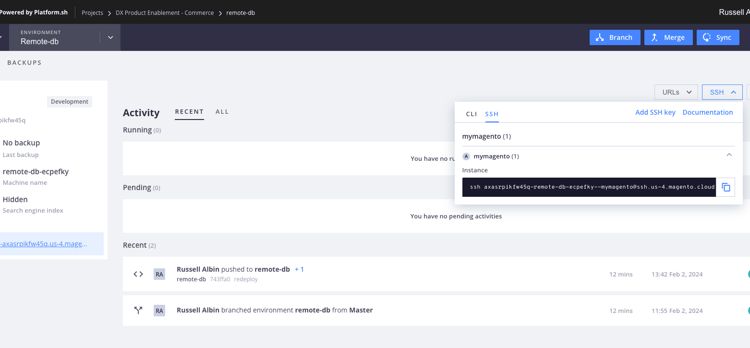
下面是一个示例: ssh abasrpikfw4123-remote-db-ecpefky--mymagento@ssh.us-4.magento.cloud
在此示例中,@符号后面的SSH主机名即为ssh.us-4.magento.cloud。
SSH用户名是@符号之前的所有内容: abasrpikfw4123-remote-db-ecpefky--mymagento
查找要连接到数据库的值
要直接访问MariaDB数据库,请使用SSH登录到远程云环境并连接到数据库。
-
使用SSH登录到远程环境。
code language-bash magento-cloud ssh -
从$MAGENTO_CLOUD_RELATIONSHIP变量中的
database和type属性检索MySQL登录凭据。code language-bash echo $MAGENTO_CLOUD_RELATIONSHIPS | base64 -d | json_pp或
code language-bash php -r 'print_r(json_decode(base64_decode($_ENV["MAGENTO_CLOUD_RELATIONSHIPS"])));'在响应中,查找MySQL信息。 例如:
code language-json "database" : [ { "password" : "", "rel" : "mysql", "hostname" : "nnnnnnnn.mysql.service._.magentosite.cloud", "service" : "mysql", "host" : "database.internal", "ip" : "###.###.###.###", "port" : 3306, "path" : "main", "cluster" : "projectid-integration-id", "query" : { "is_master" : true }, "type" : "mysql:10.3", "username" : "user", "scheme" : "mysql" } ],
然后在MySQL GUI中使用配置值。 以下示例使用MySQL Workbench,但任何支持MySQL连接的应用程序都将具有类似的字段。
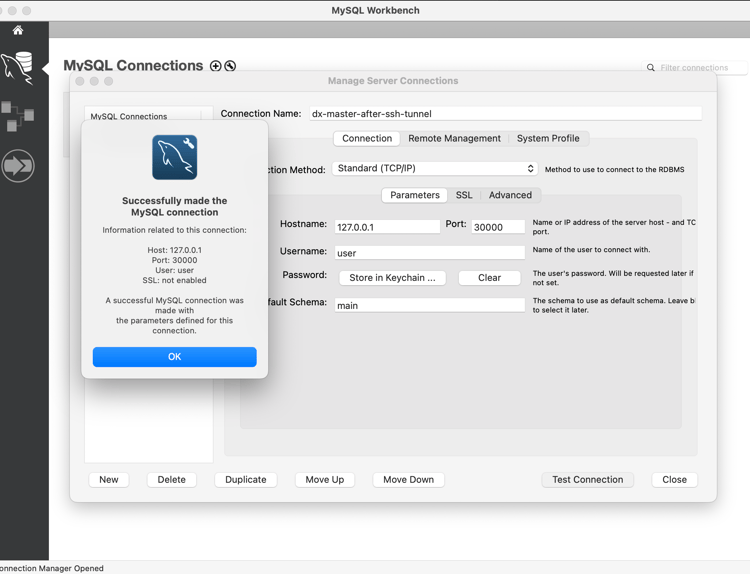
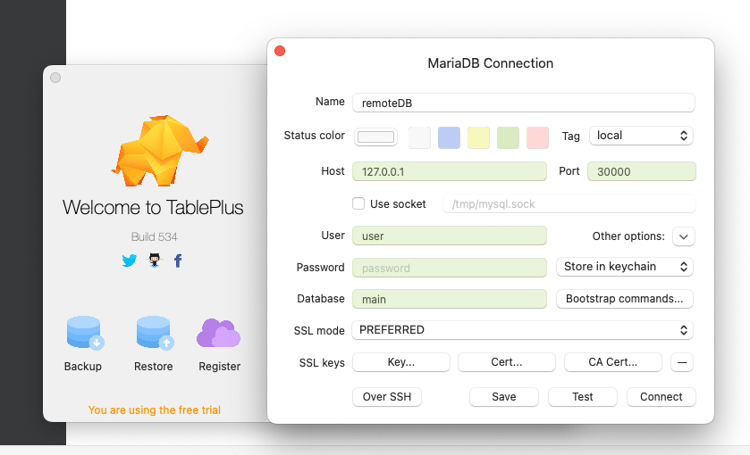
配置连接后,可以使用MySQL GUI对远程Adobe Commerce Cloud项目运行查询。
直接连接到云项目数据库以运行SQL
以下方法使用magento-cloud CLI直接连接到MySQL数据库并运行SQL以加快查询。 如果需要此数据库的副本,请使用一种替代方法创建数据库转储。
magento-cloud db:sql

Enter a number to choose a project:
  [0] demo-ralbin (ral32nryq4123)
  [1] adobe-commerce-demo (abc123zzkipexnqo)
  [2] DX Tutorials - Commerce (abasrpikfw4123)
 > 2

Enter a number to choose an environment:
Default: master
  [0] master (type: production)
  [1] remote-db (type: development)
 > 1

Welcome to the MariaDB monitor.  Commands end with ; or \g.
Your MariaDB connection id is 273454
Server version: 10.6.15-MariaDB-1:10.6.15+maria~deb10-log mariadb.org binary distribution

Copyright (c) 2000, 2018, Oracle, MariaDB Corporation Ab and others.

Type 'help;' or '\h' for help. Type '\c' to clear the current input statement.
例如,您可以从core_config_data表中找到包含作为列path一部分的单词secure的所有记录:
MariaDB [main]> SELECT * FROM core_config_data WHERE path LIKE '%secure%' \G;
*************************** 1. row ***************************
 config_id: 5
     scope: default
  scope_id: 0
      path: web/unsecure/base_url
     value: http://remote-db-ecpefky-abasrpikfw4123.us-4.magentosite.cloud/
updated_at: 2024-02-02 18:03:17
*************************** 2. row ***************************
 config_id: 6
     scope: default
  scope_id: 0
      path: web/secure/base_url
     value: https://remote-db-ecpefky-abasrpikfw4123.us-4.magentosite.cloud/
updated_at: 2024-02-02 18:03:17
*************************** 3. row ***************************
 config_id: 8
     scope: default
  scope_id: 0
      path: web/secure/use_in_adminhtml
     value: 1
updated_at: 2023-04-26 19:43:58
3 rows in set (0.001 sec)

ERROR: No query specified

MariaDB [main]>