App Builder简介
从历史上看,Adobe Commerce开发一直采用进程内可扩展性。 进程内模型要求任何新代码与升级、服务器的PHP版本以及Commerce使用的许多其他基本服务器应用程序和服务兼容。 Adobe Developer App Builder使用进程外可扩展性以避免这些兼容性问题。
适用于Adobe Commerce的App Builder app-builder
Adobe Developer App Builder是一个用于集成和创建自定义体验以扩展Adobe解决方案的无服务器可扩展性平台,现在可用于Adobe Commerce。 借助App Builder,您可以构建安全且可扩展的应用程序,以扩展Commerce原生功能并与第三方解决方案集成。 作为开发人员,您现在可以利用Adobe Commerce进程外的可扩展性,这反过来又会立即带来长期好处。
App Builder为集成和创建扩展Adobe Commerce的自定义应用程序提供了统一的第三方扩展框架。 由于此可扩展性框架是基于Adobe的基础架构构建的,因此开发人员可以构建自定义微服务,并跨其他Adobe解决方案和第三方集成扩展和集成Adobe Commerce。
App Builder为客户提供了在各种用例中扩展Adobe Commerce的方法:
- 中间件可扩展性 — 通过构建自定义连接器或利用预建的集成套件,将外部系统与Adobe应用程序相连接。
- 核心服务可扩展性 — 通过使用自定义功能和业务逻辑扩展默认行为,扩展核心应用程序功能。
- 用户体验可扩展性 — 为了支持业务需求或构建特定于客户的数字资产、店面和后台应用程序,请扩展核心体验。
Adobe Developer App Builder是一个基于云的解决方案,这意味着它会自动扩展。 此服务也是全球分布的,无论您位于何处,都能提供最佳性能。
为何要了解有关App Builder的更多信息
由于Adobe Commerce不是完全的SAAS产品,因此您开发的代码可能会增加复杂性和升级注意事项。 通过使用进程外可扩展性(如App Builder),您可以为Adobe Commerce存储提供自定义的独特功能,而无需进程内方法。
其他优势包括:
- 分离的功能可加快启动时间。
- 升级现在更轻松了。 自定义功能位于Commerce代码库之外,这可以防止升级时出现兼容性问题。
- 将功能和逻辑移出Commerce可释放进程内开发方法通常使用的资源。
架构 architecture
Adobe Developer App Builder提供了一个通用、一致和标准化的开发平台,用于扩展Adobe Cloud解决方案(如Adobe Commerce),而不是预配置解决方案,包括:
- Adobe Developer Console用于自定义微服务和扩展开发。 在访问创建插件和集成所需的所有工具和API时,构建和管理项目。
- 开源工具、SDK和库来构建自定义扩展和集成。 使用React Spectrum(Adobe的UI工具包)为所有Adobe应用程序具有一个通用UI。
- 一些服务,如用于在Adobe的无服务器平台上托管基础架构的I/O运行时,以及用于基于事件的集成的I/O事件。 Adobe还为存储数据和文件提供了预配置支持。
- Adobe Experience Cloud,您可以在此处提交扩展和集成,以在Experience Cloud组织中发布。系统管理员可以审核、管理和批准这些扩展。 发布后,您的自定义App Builder扩展和工具可与其他Adobe Experience Cloud应用程序一起使用。
下图说明了在App Builder上构建的标准应用程序如何使用这些功能:
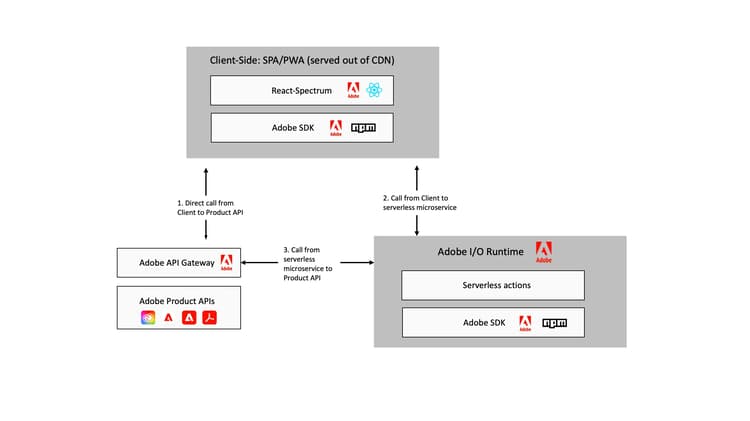
有关App Builder架构的更多详细信息,请参阅架构概述。
App Builder入门 additional-resources
可通过阅读以下博客帖子来大致了解包括初始设置的可组合商务策略:
为帮助您开始使用App Builder,Adobe已创建以下文档:
通过文档继续学习 appbuilder-documentation
App Builder为开发人员提供视频和文档,包括指南和参考文档,以帮助开发您自己的自定义应用程序:
试用其中一个示例应用程序 appbuilder-codesamples
准备好开始开发了吗? 以下链接包含帮助您入门的示例应用程序: