Roku — Tekstspatiëring in SceneGraph tracking-in-scenegraph-roku
Inleiding introduction
U kunt het Roku programmeringskader van XML gebruiken SceneGraph om toepassingen te ontwikkelen. Dit kader heeft twee belangrijke concepten:
- SceneGraph-rendering van de toepassingsschermen
- De configuratie van XML van de schermen SceneGraph
De Adobe Mobile SDK for Roku is geschreven in BrightScript. De SDK gebruikt vele componenten die niet beschikbaar voor een app zijn die op SceneGraph (bijvoorbeeld, draden) loopt. Daarom kan een ontwikkelaar van een Roku-app die het SceneGraph-framework wil gebruiken, geen Adobe Mobile SDK API's aanroepen (deze zijn vergelijkbaar met de API's die beschikbaar zijn in oudere BrightScript-toepassingen).
Architectuur architecture
Adobe heeft een nieuwe API toegevoegd die een verbindingsbrug maakt tussen de AdobeMobile SDK en adbmobileTask om SceneGraph-ondersteuning toe te voegen aan de AdobeMobile SDK. Dit laatste is een SceneGraph-knooppunt dat wordt gebruikt voor de uitvoering van de SDK API. (Het gebruik van adbmobileTask wordt in de rest van dit document uitgebreid uitgelegd.)
De verbindingsbrug is ontworpen om als volgt te presteren:
- De bridge retourneert een instantie die compatibel is met SceneGraph van Adobe Mobile SDK. De SceneGraph-compatibele SDK heeft alle APIs die erfenis SDK blootstelt.
- U gebruikt AdobeMobile SDK APIs in SceneGraph op een zeer gelijkaardige manier als hoe u verouderde APIs gebruikte.
- De bridge stelt ook een mechanisme beschikbaar om te luisteren naar callbacks voor API's die bepaalde gegevens retourneren.
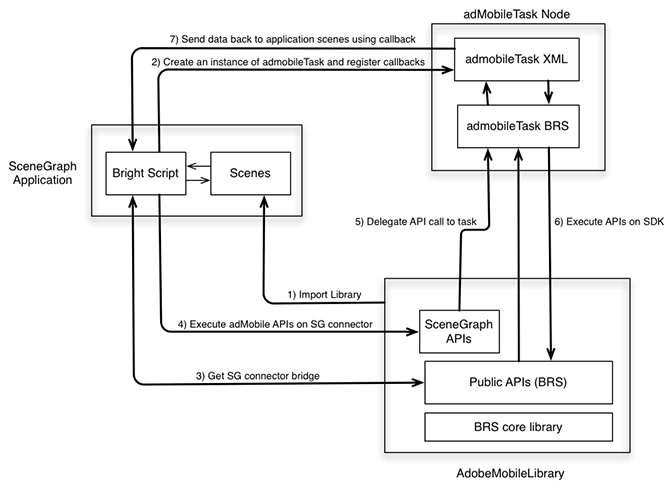
Onderdelen components
Toepassing SceneGraph:
- Verbruikt
AdobeMobileLibraryAPIs via SceneGraph schakelaarbrug APIs. - Registreert voor callbacks van reacties op
adbmobileTaskvoor verwachte variabelen van outputgegevens.
AdobeMobileLibrary:
- Stelt een reeks openbare APIs (Verouderd), met inbegrip van de schakelaarbrug API bloot.
- Retourneert een SceneGraph-connectorinstantie die alle oudere openbare API's omvat.
- Communiceert met een
adbmobileTaskknoop SceneGraph voor uitvoering van APIs.
adbmobileTask Node:
- Een SceneGraph taakknoop die
AdobeMobileLibraryAPIs op een achtergronddraad uitvoert. - Fungeert als afgevaardigde om gegevens terug te sturen naar toepassingsscènes.
Public SceneGraph-API's public-scenegraph-apis
ADBMobileConnector
sceneGraphConstantsSceneGraphConstants bevat. Zie de bovenstaande tabel voor meer informatie.setDebugLogginggetDebugLoggingsetPrivacyStatusgetPrivacyStatustrackStatetrackActiontrackingIdentifieruserIdentifiersetUserIdentifiergetAllIdentifiersvisitorSyncIdentifiersvisitorMarketingCloudIDaudienceSubmitSignalaudienceVisitorProfileaudienceDpidaudienceDpuuidaudienceSetDpidAndDpuuidmediaTrackLoadmediaTrackUnloadmediaTrackPlaymediaTrackCompletemediaTrackErrormediaUpdatePlayheadmediaUpdateQoSSceneGraphConstants
API_RESPONSEadbmobileTask van adbmobileApiResponse nodeDEBUG_LOGGINGapiName for getDebugLoggingPRIVACY_STATUSapiName for getPrivacyStatusTRACKING_IDENTIFIERapiName for trackingIdentifierUSER_IDENTIFIERapiName for userIdentifierVISITOR_MARKETING_CLOUD_IDapiName for visitorMarketingCloudIDAUDIENCE_VISITOR_PROFILEapiName for audienceVisitorProfileAUDIENCE_DPIDapiName for audienceDpidAUDIENCE_DPUUIDapiName for audienceDpuuidadbmobileTask Node
Alleen-lezen Alle API's die op AdobeMobileSDK worden uitgevoerd, retourneren reacties in dit veld. Registreer u voor een callback om te luisteren naar updates voor dit veld om reactieobjecten te ontvangen. Hier volgt de indeling voor het reactieobject:
response = {
  "apiName" : <SceneGraphConstants.
               API_NAME>
  "returnValue : <API_RESPONSE>
}
Een instantie van dit reactieobject wordt verzonden voor elke API-aanroep op AdobeMobileSDK die een waarde retourneert volgens de API-naslaggids. Een API-aanroep voor bezoekerMarketingCloudID() retourneert bijvoorbeeld het volgende reactieobject:
response = {
  "apiName" : m.
              adbmobileConstants.
              VISITOR_MARKETING_CLOUD_ID
  "returnValue : "07050x25671x33760x72644x14"
}
OR, kunnen de reactiegegevens ook ongeldig zijn:
response = {
  "apiName" : m.
              adbmobileConstants.
              VISITOR_MARKETING_CLOUD_ID
  "returnValue : invalid
}
adbmobile.brs
getADBMobileConnectorInstance
API-handtekening: ADBMobile().getADBMobileConnectorInstance()
Invoer: adbmobileTask
Retourneringstype: ADBMobileConnector
sgConstants
API-handtekening: ADBMobile().sgConstants()
Invoer: geen
Retourneringstype: SceneGraphConstants
ADBMobileConnector voor meer informatie.ADBMobile-constanten
versionPRIVACY_STATUS_OPT_INPRIVACY_STATUS_OPT_OUTGlobally defined nut MediaHeartbeat APIs op erfenis AdobeMobileLibrary is toegankelijk zoals is in het milieu SceneGraph omdat zij geen componenten van het Helderscript gebruiken die in knopen SceneGraph niet beschikbaar zijn. Zie de onderstaande tabel voor meer informatie over deze methoden:
Algemene methoden voor MediaHeartbeat
adb_media_init_mediainfoFunction adb_media_init_mediainfo(name As String, id As String, length As Double, streamType As String) As Objectadb_media_init_adinfoFunction adb_media_init_adinfo(name As String, id As String, position As Double, length As Double) As Objectadb_media_init_chapterinfoFunction adb_media_init_adbreakinfo(name As String, startTime as Double, position as Double) As Objectadb_media_init_adbreakinfoFunction adb_media_init_chapterinfo(name As String, position As Double, length As Double, startTime As Double) As Objectadb_media_init_qosinfoFunction adb_media_init_qosinfo(bitrate As Double, startupTime as Double, fps as Double, droppedFrames as Double) As ObjectImplementatie implementation
-
Download de Bibliotheek van Roku - Download de recentste bibliotheek van Roku.
-
opstelling Uw Ontwikkelomgeving
-
Kopieer
adbmobile.brs(AdobeMobileLibrary) naar de mappkg:/source/. -
Kopieer
adbmobileTask.brsenadbMobileTask.xmlnaar de mappkg:/components/voor ondersteuning voor scènegrafiek.
-
-
initialiseren
-
Importeer
adbmobile.brsin de scène.code language-none <script type="text/brightscript" uri="pkg:/source/adbmobile.brs" /> -
Maak een instantie van
adbmobileTasknode in uw scène.code language-none m.adbmobileTask = createObject("roSGNode", "adbmobileTask") -
Hiermee wordt een instantie van
adbmobileconnector voor SceneGraph opgehaald met deadbmobileTask-instantie.code language-none m.adbmobile = ADBMobile().getADBMobileConnectorInstance(m.adbmobileTask) -
Krijg
adbmobileSG constanten.code language-none m.adbmobileConstants = m.adbmobile.sceneGraphConstants() -
Registreer een callback voor het ontvangen van reactievoorwerp voor alle
AdbMobileAPI vraag.code language-none m.adbmobileTask.ObserveField(m.adbmobileConstants.API_RESPONSE, "onAdbmobileApiResponse") ' Sample implementation of the callback ' Listen for all the constants for which API calls are made on the SDK function onAdbmobileApiResponse() as void responseObject = m.adbmobileTask[m.adbmobileConstants.API_RESPONSE] if responseObject <> invalid methodName = responseObject.apiName retVal = responseObject.returnValue if methodName = m.adbmobileConstants.DEBUG_LOGGING if retVal print "API Response: DEBUG LOGGING: " + "True" else print "API Response: DEBUG LOGGING: " + "False" endif else if methodName = m.adbmobileConstants.PRIVACY_STATUS print "API Response: PRIVACY STATUS: " + retVal else if methodName = m.adbmobileConstants.TRACKING_IDENTIFIER if retVal <> invalid print "API Response: TRACKING IDENTIFIER: " + retVal else print "API Response: TRACKING IDENTIFIER: " + "invalid" endif else if methodName = m.adbmobileConstants.USER_IDENTIFIER if retVal <> invalid print "API Response: USER IDENTIFIER: " + retVal else print "API Response: USER IDENTIFIER: " + "invalid" endif else if methodName = m.adbmobileConstants.VISITOR_MARKETING_CLOUD_ID if retVal <> invalid print "API Response: MCID: " + retVal else print "API Response: MCID: " + "invalid" endif else if methodName = m.adbmobileConstants.AUDIENCE_DPID if retVal <> invalid print "API Response: AUDIENCE DPID: " + retVal else print "API Response: AUDIENCE DPID: " + "invalid" endif else if methodName = m.adbmobileConstants.AUDIENCE_DPUUID if retVal <> invalid print "API Response: AUDIENCE DPUUID: " + retVal else print "API Response: AUDIENCE DPUUID: " + "invalid" endif else if methodName = m.adbmobileConstants.AUDIENCE_VISITOR_PROFILE if retVal <> invalid print "API Response: AUDIENCE VISITOR PROFILE: Valid Object" else print "API Response: AUDIENCE VISITOR PROFILE: " + "invalid" endif endif endif end function
-
Voorbeeldimplementatie sample-implementation
Voorbeeld-API-aanroepen op verouderde SDK
'get an instance of SDK
m.adbmobile = ADBMobile()

'execute setter APIs
m.adbmobile.setDebugLogging(true)

'execute getter APIs
debugLogging = m.adbmobile.getDebugLogging()
Voorbeeld-API-aanroepen op SG SDK
'create adbmobileTask instance
m.adbmobileTask = createObject("roSGNode", "adbmobileTask")

'get an instance of SDK using task instance
m.adbmobile =
  ADBMobile().getADBMobileConnectorInstace(m.adbmobileTask)
m.adbmobileConstants = m.adbmobile.sceneGraphConstants()
'execute setter APIs
m.adbmobile.setDebugLogging(true)

'execute getter APIs
m.adbmobileTask.ObserverField(m.adbConstants.API_RESPONSE,
                              "onAdbmobileApiResponse")
m.adbmobile.getDebugLogging()

'listen for return data in registered callbacks
function onAdbmobileApiResponse() as void
    responseObject = m.adbmobileTask[m.adbmobileConstants.API_RESPONSE]

        if responseObject <> invalid
            methodName = responseObject.apiName
            retVal = responseObject.returnValue

        if methodName = m.adbmobileConstants.DEBUG_LOGGING
            if retVal
                print "API Response: DEBUG LOGGING: " + "True"
            else
                print "API Response: DEBUG LOGGING: " + "False"
         endif
    endif
end function