VOD afspelen met overgeslagen hoofdstuk vod-playback-with-a-skipped-chapter
Scenario scenario
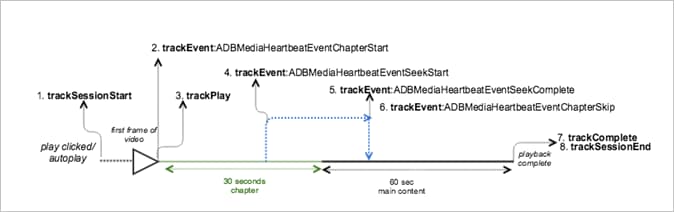
In dit scenario slaat de gebruiker een hoofdstuk in de hoofdinhoud over.
Dit is het zelfde scenario zoals de playback van VOD met één hoofdstuk , behalve de gebruiker in dit geval van plan is uit het hoofdstuk te zoeken daardoor het aan land in belangrijkste inhoud.
trackSessionStarttrackEvent:ChapterStarttrackPlaytrackEvent:trackSeekStarttrackEvent:trackSeekCompletetrackEvent:trackChapterSkiptrackCompletetrackSessionEndSessionEnd betekent het einde van een weergavesessie. Deze API moet worden aangeroepen, zelfs als de gebruiker de media niet controleert om te worden voltooid.Parameters parameters
De parameters die tijdens hoofdstukplayback worden gebruikt zijn identiek aan de parameters in de playback van VOD met één hoofdstuk scenario, behalve dat er geen hoofdstuk volledige netwerkvraag is.
Voorbeeldcode sample-code
Android
Stel de volgende code in om dit scenario in Android weer te geven:
// Set up mediaObject
MediaObject mediaInfo = MediaHeartbeat.createMediaObject(
  Configuration.MEDIA_NAME,
  Configuration.MEDIA_ID,
  Configuration.MEDIA_LENGTH,
  MediaHeartbeat.StreamType.VOD

);

HashMap<String, String> mediaMetadata = new HashMap<String, String>();
mediaMetadata.put(CUSTOM_KEY_1, CUSTOM_VAL_1);
mediaMetadata.put(CUSTOM_KEY_2, CUSTOM_VAL_2);

// 1. Call trackSessionStart() when the user clicks Play or if autoplay is used,
//    i.e., there is an intent to start playback.
_mediaHeartbeat.trackSessionStart(mediaInfo, mediaMetadata);

......
......

// Chapter
HashMap<String, String> chapterMetadata = new HashMap<String, String>();
chapterMetadata.put(CUSTOM_KEY_1, CUSTOM_VAL_1);
MediaObject chapterDataInfo =
MediaHeartbeat.createChapterObject(CHAPTER_NAME,
                                   CHAPTER_POSITION,
                                   CHAPTER_LENGTH,
                                   CHAPTER_START_TIME);

// 2. Track the MediaHeartbeat.Event.ChapterStart event when the chapter starts to play.
_mediaHeartbeat.trackEvent(MediaHeartbeat.Event.ChapterStart,
                         chapterDataInfo,
                         chapterMetadata);

.......
.......

// 3. Call trackPlay() when the playback actually starts, i.e., when the first frame
//    of the main content is rendered on the screen.
_mediaHeartbeat.trackPlay();

.......
.......

// 4. Track the MediaHeartbeat.Event.SeekStart event when the user begins to seek out
//    of the chapter with the intent to skip it.
_mediaHeartbeat.trackEvent(MediaHeartbeat.Event.SeekStart, null, null);

.......
.......

// 5. Track the MediaHeartbeat.Event.SeekComplete event when the user seeks out of the
//    chapter with the intent to skip it.
_mediaHeartbeat.trackEvent(MediaHeartbeat.Event.SeekComplete, null, null);

.......
.......

// 6. Track the MediaHeartbeat.Event.ChapterSkip event because the user skipped the
//    chapter by seeking out of it in the steps above.
_mediaHeartbeat.trackEvent(MediaHeartbeat.Event.ChapterSkip, null, null);

.......
.......

// 7. Call trackComplete() when the playback reaches the end, i.e., when the media
//    completes and finishes playing.
_mediaHeartbeat.trackComplete();

........

........

// 8. Call trackSessionEnd() when the playback session is over. This method must be
//    called even if the user does not watch the media to completion.
_mediaHeartbeat.trackSessionEnd();

........
........
iOS
Stel de volgende code in om dit scenario in iOS weer te geven:
// Set up mediaObject
ADBMediaObject *mediaObject =
[ADBMediaHeartbeat createMediaObjectWithName:MEDIA_NAME
                   length:MEDIA_LENGTH
                   streamType:ADBMediaHeartbeatStreamTypeVOD];

NSMutableDictionary *mediaContextData = [[NSMutableDictionary alloc] init];
[mediaContextData setObject:CUSTOM_VAL_1 forKey:CUSTOM_KEY_1];
[mediaContextData setObject:CUSTOM_VAL_2 forKey:CUSTOM_KEY_2];

// 1. Call trackSessionStart when the user clicks Play or if autoplay is used,
//    i.e., there's an intent to start playback.
[_mediaHeartbeat trackSessionStart:mediaObject data:mediaContextData];
.......
.......

// Chapter
NSMutableDictionary *chapterContextData = [[NSMutableDictionary alloc] init];
[chapterContextData setObject:CONTEXT_DATA_VALUE forKey:CONTEXT_DATA_KEY];

id chapterInfo =
[ADBMediaHeartbeat createChapterObjectWithName:CHAPTER_NAME
                   position:CHAPTER_POSITION
                   length:CHAPTER_LENGTH
                   startTime:CHAPTER_START_TIME];

// 2. Track the ADBMediaHeartbeatEventChapterStart event when the chapter starts.
[_mediaHeartbeat trackEvent:ADBMediaHeartbeatEventChapterStart
               mediaObject:chapterInfo
               data:chapterContextData];
.......
.......

// 3. Call trackPlay when the playback actually starts, i.e., when the first
//    frame of the main content is rendered on the screen.
[_mediaHeartbeat trackPlay];
.......
.......

// 4. Track the trackEvent:ADBMediaHeartbeatEventSeekStart event when the user
//    begins to seek out of the chapter with the intent to skip it.
[_mediaHeartbeat trackEvent:ADBMediaHeartbeatEventSeekStart mediaObject:nil data:nil];
.......
.......

// 5. Track the trackEvent:ADBMediaHeartbeatEventSeekComplete event when the
//    user seeks out of the chapter with the intent to skip it.
[_mediaHeartbeat trackEvent:ADBMediaHeartbeatEventSeekComplete mediaObject:nil data:nil];
.......
.......

// 6. Track the trackEvent:ADBMediaHeartbeatEventChapterSkip event because the
//    user skipped the chapter by seeking out of it in the steps above.
[_mediaHeartbeat trackEvent:ADBMediaHeartbeatEventChapterSkip
               mediaObject:chapterInfo
               data:chapterContextData];
.......
.......

// 7. Call trackComplete when the playback reaches the end, i.e., when the media
//    completes and finishes playing.
[_mediaHeartbeat trackComplete];
.......
.......

// 8. Call trackSessionEnd when the playback session is over. This method must
//    be called even if the user does not watch the media to completion.
[_mediaHeartbeat trackSessionEnd];
.......
.......
JavaScript
Voer de volgende tekst in om dit scenario in JavaScript weer te geven:
// Set up mediaObject
var mediaInfo = MediaHeartbeat.createMediaObject(
  Configuration.MEDIA_NAME,
  Configuration.MEDIA_ID,
  Configuration.MEDIA_LENGTH,
  MediaHeartbeat.StreamType.VOD
);

var mediaMetadata = {
  CUSTOM_KEY_1 : CUSTOM_VAL_1,
  CUSTOM_KEY_2 : CUSTOM_VAL_2,
  CUSTOM_KEY_3 : CUSTOM_VAL_3

};

// 1. Call trackSessionStart() when Play is clicked or if autoplay is used,
//    i.e., there's an intent to start playback.
this._mediaHeartbeat.trackSessionStart(mediaInfo, mediaMetadata);

......
......

// Chapter
var chapterMetadata = {
  CUSTOM_KEY_1 : CUSTOM_VAL_1
};

var chapterDataInfo =
MediaHeartbeat.createChapterObject(CHAPTER_NAME,
                                  CHAPTER_POSITION,
                                  CHAPTER_LENGTH,
                                  CHAPTER_START_TIME);

// 2. Track the MediaHeartbeat.Event.ChapterStart event when the chapter starts to play.
this._mediaHeartbeat.trackEvent(MediaHeartbeat.Event.ChapterStart,
                              chapterDataInfo,
                              chapterMetadata);

.......
.......

// 3. Call trackPlay() when the playback actually starts, i.e., when the
//    first frame of the main content is rendered on the screen.
this._mediaHeartbeat.trackPlay();

.......
.......

// 4. Track the MediaHeartbeat.Event.SeekStart event when the user begins
//    to seek out of the chapter with the intent to skip it.
this._mediaHeartbeat.trackEvent(MediaHeartbeat.Event.SeekStart);

.......
.......

// 5. Track the MediaHeartbeat.Event.SeekComplete event when the user seeks
//    out of the chapter with the intent to skip it.
this._mediaHeartbeat.trackEvent(MediaHeartbeat.Event.SeekComplete);

.......
.......

// 6. Track the MediaHeartbeat.Event.ChapterSkip event because the user
//    skipped the chapter by seeking out of it in the steps above.
this._mediaHeartbeat.trackEvent(MediaHeartbeat.Event.ChapterSkip);

.......
.......

// 7. Call trackComplete() when the playback reaches the end, i.e., completes
//    and finishes playing.
this._mediaHeartbeat.trackComplete();

........
........

// 8. Call trackSessionEnd() when the playback session is over. This method must be
//    called even if the user does not watch the media to completion.
this._mediaHeartbeat.trackSessionEnd();

........
........