VOD afspelen met bufferen vod-playback-with-buffering
Scenario scenario
In dit scenario vindt enige buffering plaats wanneer VOD-inhoud wordt afgespeeld.
Tenzij gespecificeerd, zijn de netwerkvraag in dit scenario het zelfde als de vraag in de playback van VOD zonder advertenties scenario.
Trigger
Hartslagmethode
Netwerkaanroepen
Notities
Gebruiker klikt Play
trackSessionStartStart inhoud analyse, Start inhoud hartslag
Dit kan een gebruiker zijn die Play klikt of een automatisch afgespeelde gebeurtenis.
Het eerste frame van de video wordt afgespeeld.
trackPlayHartslaginhoud afspelen
Deze methode activeert de timer. Hartslagen worden elke 10 seconden verzonden zolang het afspelen duurt.
De inhoud wordt afgespeeld.
Content Heartbeats
De buffering begint.
trackEvent:BufferStartHartslagbuffer
De inhoud wordt gebufferd.
Content Heartbeats
De buffering is voltooid.
trackEvent:BufferCompleteHartslagbuffer, hartslagspel
De inhoud wordt afgespeeld.
Content Heartbeats
Het afspelen van de inhoud is voltooid.
trackCompleteHartslaginhoud voltooid
Het einde van de afspeelkop is bereikt.
De sessie is afgelopen.
trackSessionEndSessionEnd betekent het einde van een weergavesessie. Deze API moet worden aangeroepen, zelfs als de gebruiker de video niet in de gaten houdt om te worden voltooid.Parameters parameters
Hartslagbuffer
Parameter
Waarde
Notities
s:event:type"buffer"Voorbeeldcode sample-code
In dit scenario vindt buffering plaats wanneer de VOD-inhoud wordt afgespeeld.
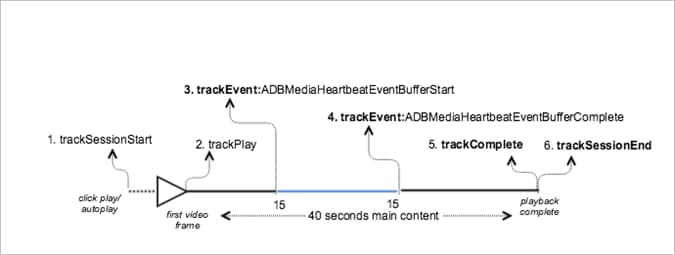
Android
Stel de volgende code in om dit scenario in Android weer te geven:
// Set up mediaObject

MediaObject mediaInfo = MediaHeartbeat.createMediaObject(
  Configuration.MEDIA_NAME,
  Configuration.MEDIA_ID,
  Configuration.MEDIA_LENGTH,
  MediaHeartbeat.StreamType.VOD

);

HashMap<String, String> videoMetadata = new HashMap<String, String>();
videoMetadata.put(CUSTOM_KEY_1, CUSTOM_VAL_1);
videoMetadata.put(CUSTOM_KEY_2, CUSTOM_VAL_2);

// 1. Call trackSessionStart() when the user clicks Play or if autoplay is used,
//    i.e., there is an intent to start playback.
_mediaHeartbeat.trackSessionStart(mediaInfo, videoMetadata);

......
......

// 2. Call trackPlay() when the playback actually starts, i.e., when the first
//    frame of the main content is rendered on the screen.
_mediaHeartbeat.trackPlay();

.......
.......

// 3. Track the MediaHeartbeat.Event.BufferStart event when the video player
//    goes into the buffering state and begins to buffer content.
_mediaHeartbeat.trackEvent(MediaHeartbeat.Event.BufferStart, null, null);

.......
.......

// 4. Track the MediaHeartbeat.Event.BufferComplete event when the video player
//    goes into the buffering state and begins to buffer content.
_mediaHeartbeat.trackEvent(MediaHeartbeat.Event.BufferComplete, null, null);

.......
.......

// 5. Call trackComplete() when the playback reaches the end, i.e., when the
//    video completes and finishes playing.
_mediaHeartbeat.trackComplete();

........
........

// 6. Call trackSessionEnd() when the playback session is over. This method must
//    be called even if the user does not watch the video to completion.
_mediaHeartbeat.trackSessionEnd();

........
iOS
Stel de volgende code in om dit scenario in iOS weer te geven:
// Set up mediaObject
ADBMediaObject *mediaObject =
[ADBMediaHeartbeat createMediaObjectWithName:MEDIA_NAME
                   length:MEDIA_LENGTH
                   streamType:ADBMediaHeartbeatStreamTypeVOD];

NSMutableDictionary *videoContextData = [[NSMutableDictionary alloc] init];
[videoContextData setObject:CUSTOM_VAL_1 forKey:CUSTOM_KEY_1];
[videoContextData setObject:CUSTOM_VAL_2 forKey:CUSTOM_KEY_2];

// 1. Call trackSessionStart when the user clicks Play or if autoplay is used,
//    i.e., there is an intent to start playback.
[_mediaHeartbeat trackSessionStart:mediaObject data:videoContextData];
.......
.......

// 2. Call trackPlay when the playback actually starts, i.e., when the first
//    frame of the main content is rendered on the screen.
[_mediaHeartbeat trackPlay];
.......
.......

// 3. Track the trackEvent:ADBMediaHeartbeatEventBufferStart event when the
//    video player goes in buffering state and begins to buffer content.
[_mediaHeartbeat trackEvent:ADBMediaHeartbeatEventBufferStart
               mediaObject:nil
               data:nil];
.......
.......

// 4. Track the trackEvent:ADBMediaHeartbeatEventBufferComplete event when
//    the video player goes in buffering state and begins to buffer content.
[_mediaHeartbeat trackEvent:ADBMediaHeartbeatEventBufferComplete
               mediaObject:nil
               data:nil];
.......
.......

// 5. Call trackComplete when the playback reaches the end, i.e., when the
//    video completes and finishes playing.
[_mediaHeartbeat trackComplete];
.......
.......

// 6. Call trackSessionEnd when the playback session is over. This method must
//    be called even if the user does not watch the video to completion.
[_mediaHeartbeat trackSessionEnd];
.......
.......
JavaScript
Voer de volgende tekst in om dit scenario weer te geven:
// Set up mediaObject

var mediaInfo = MediaHeartbeat.createMediaObject(
  Configuration.MEDIA_NAME,
  Configuration.MEDIA_ID,
  Configuration.MEDIA_LENGTH,
  MediaHeartbeat.StreamType.VOD

);

var videoMetadata = {
  CUSTOM_KEY_1 : CUSTOM_VAL_1,
  CUSTOM_KEY_2 : CUSTOM_VAL_2,
  CUSTOM_KEY_3 : CUSTOM_VAL_3
};

// 1. Call trackSessionStart() when Play is clicked or if autoplay is used,
//    i.e., there's an intent to start playback.
this._mediaHeartbeat.trackSessionStart(mediaInfo, videoMetadata);

......
......

// 2. Call trackPlay() when the playback actually starts, i.e., when the
//    first frame of the ad video is rendered on the screen.
this._mediaHeartbeat.trackPlay();

.......
.......

// 3. Track event MediaHeartbeat.Event.BufferStart when the video player
//    goes into the buffering state and begins to buffer content.
this._mediaHeartbeat.trackEvent(MediaHeartbeat.Event.BufferStart);

.......
.......

// 4. Track the MediaHeartbeat.Event.BufferComplete event when the
//    video player goes into the buffering state and begins to buffer content.
this._mediaHeartbeat.trackEvent(MediaHeartbeat.Event.BufferComplete);

.......
.......

// 5. Call trackComplete() when the playback reaches the end, i.e.,
//    when playback completes and finishes playing.
this._mediaHeartbeat.trackComplete();

........
........

// 6. Call trackSessionEnd() when the playback session is over. This method must
//    be called even if the user does not watch the video to completion.
this._mediaHeartbeat.trackSessionEnd();

........
........
recommendation-more-help
c8eee520-cef5-4f8c-a38a-d4952cfae4eb