Een Azure Blob Storage -doel configureren met aangepaste opties voor bestandsindeling en aangepaste configuratie van bestandsnaam
Overzicht overview
Deze pagina beschrijft hoe te om Destination SDK te gebruiken om een Azure Blob Storage bestemming met de opmaakopties van het douane dossier en een de naamconfiguratie van het douanedossier te vormen .
Op deze pagina worden alle configuratieopties weergegeven die beschikbaar zijn voor Azure Blob Storage-bestemmingen. U kunt de configuraties bewerken die in de onderstaande stappen worden weergegeven, of u kunt desgewenst bepaalde onderdelen van de configuraties verwijderen.
Voor gedetailleerde beschrijvingen van de hieronder gebruikte parameters, zie configuratieopties in Doelen SDK .
Vereisten prerequisites
Alvorens aan de hieronder geschetste stappen vooruit te gaan, te lezen gelieve de Destination SDK begonnen pagina voor informatie over het verkrijgen van de noodzakelijke de authentificatiegeloofsbrieven van de Adobe I/O en andere eerste vereisten om met Destination SDK APIs te werken.
Stap 1: Een server- en bestandsconfiguratie maken create-server-file-configuration
Begin door het /destination-server eindpunt te gebruiken creeer een server en dossierconfiguratie .
API formaat
POST platform.adobe.io/data/core/activation/authoring/destination-servers
Verzoek
Het volgende verzoek leidt tot een nieuwe configuratie van de bestemmingsserver, die door de parameters wordt gevormd die in de lading worden verstrekt.
De nuttige lading omvat hieronder een generische Azure Blob configuratie, met het dossier van douane CSV formatterend configuratieparameters die de gebruikers in Experience Platform UI kunnen bepalen.
curl -X POST https://platform.adobe.io/data/core/activation/authoring/destination-server \
 -H 'Authorization: Bearer {ACCESS_TOKEN}' \
 -H 'Content-Type: application/json' \
 -H 'x-gw-ims-org-id: {ORG_ID}' \
 -H 'x-api-key: {API_KEY}' \
 -H 'x-sandbox-name: {SANDBOX_NAME}' \
 -d '
{
   "name":"Azure Blob server with custom file formatting options and custom file name configuration",
   "description":"Azure Blob server with custom file formatting options and custom file name configuration",
   "destinationServerType":"FILE_BASED_AZURE_BLOB",
   "fileBasedAzureBlobDestination":{
      "path":{
         "templatingStrategy":"PEBBLE_V1",
         "value":"{{customerData.path}}"
      },
      "container":{
         "templatingStrategy":"PEBBLE_V1",
         "value":"{{customerData.container}}"
      }
   },
   "fileConfigurations":{
      "compression":{
         "templatingStrategy":"PEBBLE_V1",
         "value":"{{customerData.compression}}"
      },
      "fileType":{
         "templatingStrategy":"PEBBLE_V1",
         "value":"{{customerData.fileType}}"
      },
      "csvOptions":{
         "sep":{
            "templatingStrategy":"PEBBLE_V1",
            "value":"{{customerData.sep}}"
         },
         "encoding":{
            "templatingStrategy":"PEBBLE_V1",
            "value":"{{customerData.encoding}}"
         },
         "quote":{
            "templatingStrategy":"PEBBLE_V1",
            "value":"{{customerData.quote}}"
         },
         "quoteAll":{
            "templatingStrategy":"PEBBLE_V1",
            "value":"{{customerData.quoteAll}}"
         },
         "escape":{
            "templatingStrategy":"PEBBLE_V1",
            "value":"{{customerData.escape}}"
         },
         "escapeQuotes":{
            "templatingStrategy":"PEBBLE_V1",
            "value":"{{customerData.escapeQuotes}}"
         },
         "header":{
            "templatingStrategy":"PEBBLE_V1",
            "value":"{{customerData.header}}"
         },
         "ignoreLeadingWhiteSpace":{
            "templatingStrategy":"PEBBLE_V1",
            "value":"{{customerData.ignoreLeadingWhiteSpace}}"
         },
         "nullValue":{
            "templatingStrategy":"PEBBLE_V1",
            "value":"{{customerData.nullValue}}"
         },
         "dateFormat":{
            "templatingStrategy":"PEBBLE_V1",
            "value":"{{customerData.dateFormat}}"
         },
         "charToEscapeQuoteEscaping":{
            "templatingStrategy":"PEBBLE_V1",
            "value":"{{customerData.charToEscapeQuoteEscaping}}"
         },
         "emptyValue":{
            "templatingStrategy":"PEBBLE_V1",
            "value":"{{customerData.dateFormat}}"
         }
      }
   }
}'
Een succesvolle reactie keert de nieuwe configuratie van de bestemmingsserver, met inbegrip van het unieke herkenningsteken (instanceId) van de configuratie terug. Sla deze waarde op zoals deze in de volgende stap wordt vereist.
Stap 2: Doelconfiguratie maken create-destination-configuration
Na het creëren van de bestemmingsserver en de dossier het formatteren configuratie in de vorige stap, kunt u het /destinations API eindpunt nu gebruiken om een bestemmingsconfiguratie tot stand te brengen.
Om de serverconfiguratie in stap 1 aan deze bestemmingsconfiguratie aan te sluiten, vervang de destinationServerId waarde in het API verzoek hieronder met de waarde die wordt verkregen wanneer het creëren van uw bestemmingsserver in stap 1 .
API formaat
POST platform.adobe.io/data/core/activation/authoring/destinations
Verzoek
curl -X POST https://platform.adobe.io/data/core/activation/authoring/destinations \
 -H 'Authorization: Bearer {ACCESS_TOKEN}' \
 -H 'Content-Type: application/json' \
 -H 'x-gw-ims-org-id: {ORG_ID}' \
 -H 'x-api-key: {API_KEY}' \
 -H 'x-sandbox-name: {SANDBOX_NAME}' \
 -d ' {
   "name":"Azure Blob Storage destination with custom file formatting options and custom file name configuration",
   "description":"Azure Blob Storage destination with custom file formatting options and custom file name configuration",
   "status":"TEST",
   "customerAuthenticationConfigurations":[
      {
         "authType":"AZURE_CONNECTION_STRING"
      }
   ],
   "customerDataFields":[
      {
         "name":"path",
         "title":"Folder path",
         "description":"Enter your Azure Blob folder path",
         "type":"string",
         "isRequired":true,
         "readOnly":false,
         "hidden":false
      },
      {
         "name":"container",
         "title":"Azure Blob container name",
         "description":"Enter your Azure Blob container name",
         "type":"string",
         "isRequired":true,
         "readOnly":false,
         "hidden":false
      },
      {
         "name":"sep",
         "title":"Enter your desired separator for each field and value",
         "description":"Enter your desired separator for each field and value",
         "type":"string",
         "isRequired":false,
         "readOnly":false,
         "hidden":false
      },
      {
         "name":"encoding",
         "title":"Select the desired CSV file encoding",
         "description":"Select the desired CSV file encoding",
         "type":"string",
         "enum":[
            "UTF-8",
            "UTF-16"
         ],
         "isRequired":false,
         "readOnly":false,
         "hidden":false
      },
      {
         "name":"quote",
         "title":"Quoted values escape character",
         "description":"Enter the desired character to be used for escaping quoted values.",
         "type":"string",
         "isRequired":false,
         "readOnly":false,
         "hidden":false
      },
      {
         "name":"quoteAll",
         "title":"Escape all quoted values",
         "description":"Select whether to escape all quoted values.",
         "type":"string",
         "enum":[
            "true",
            "false"
         ],
         "default":"true",
         "isRequired":true,
         "readOnly":false,
         "hidden":false
      },
      {
         "name":"escape",
         "title":"Quote escaping character",
         "description":"Enter the desired character to be used for escaping quotes inside an already quoted value.",
         "type":"string",
         "isRequired":false,
         "readOnly":false,
         "hidden":false
      },
      {
         "name":"escapeQuotes",
         "title":"Enclose quoted values within quotes",
         "description":"Select whether values containing quotes should always be enclosed in quotes.",
         "type":"string",
         "enum":[
            "true",
            "false"
         ],
         "isRequired":false,
         "default":"true",
         "readOnly":false,
         "hidden":false
      },
      {
         "name":"header",
         "title":"Generate file header.",
         "description":"Select whether to write the names of columns as the first line of the exported files.",
         "type":"string",
         "isRequired":false,
         "enum":[
            "true",
            "false"
         ],
         "readOnly":false,
         "default":"true",
         "hidden":false
      },
      {
         "name":"ignoreLeadingWhiteSpace",
         "title":"Ignore leading white space",
         "description":"Select whether leading whitespaces should be trimmed from exported values.",
         "type":"string",
         "isRequired":false,
         "enum":[
            "true",
            "false"
         ],
         "readOnly":false,
         "default":"true",
         "hidden":false
      },
      {
         "name":"nullValue",
         "title":"NULL value string format",
         "description":"Enter the string representation of a NULL value. ",
         "type":"string",
         "isRequired":false,
         "readOnly":false,
         "hidden":false
      },
      {
         "name":"dateFormat",
         "title":"Date format",
         "description":"Enter the desired date format. ",
         "type":"string",
         "default":"yyyy-MM-dd",
         "isRequired":false,
         "readOnly":false,
         "hidden":false
      },
      {
         "name":"charToEscapeQuoteEscaping",
         "title":"Quote escaping escape character",
         "description":"Enter the desired character to be used for escaping the escaping of a quote character.",
         "type":"string",
         "isRequired":false,
         "readOnly":false,
         "hidden":false
      },
      {
         "name":"emptyValue",
         "title":"Empty value string format",
         "description":"Enter the string representation of an empty value.",
         "type":"string",
         "isRequired":false,
         "readOnly":false,
         "default":"",
         "hidden":false
      },
      {
         "name":"compression",
         "title":"Compression format",
         "description":"Select the desired file compression format.",
         "type":"string",
         "isRequired":true,
         "readOnly":false,
         "enum":[
            "SNAPPY",
            "GZIP",
            "DEFLATE",
            "NONE"
         ]
      },
      {
         "name":"fileType",
         "title":"File type",
         "description":"Select the exported file type.",
         "type":"string",
         "isRequired":true,
         "readOnly":false,
         "hidden":false,
         "enum":[
            "csv",
            "json",
            "parquet"
         ],
         "default":"csv"
      }
   ],
   "uiAttributes":{
      "documentationLink":"https://www.adobe.com/go/destinations-blob-connection-parameters-en",
      "category":"cloudStorage",
      "connectionType":"Azure Blob",
      "frequency":"Batch",
      "flowRunsSupported":true,
      "monitoringSupported":true
   },
   "destinationDelivery":[
      {
         "deliveryMatchers":[
            {
               "type":"SOURCE",
               "value":[
                  "batch"
               ]
            }
         ],
         "authenticationRule":"CUSTOMER_AUTHENTICATION",
         "destinationServerId":"{{instanceID of your destination server}}"
      }
   ],
   "schemaConfig":{
      "profileRequired":true,
      "segmentRequired":true,
      "identityRequired":true
   },
   "batchConfig":{
      "allowMandatoryFieldSelection":true,
      "allowJoinKeyFieldSelection":true,
      "defaultExportMode":"DAILY_FULL_EXPORT",
      "allowedExportMode":[
         "DAILY_FULL_EXPORT",
         "FIRST_FULL_THEN_INCREMENTAL"
      ],
      "allowedScheduleFrequency":[
         "DAILY",
         "EVERY_3_HOURS",
         "EVERY_6_HOURS",
         "EVERY_8_HOURS",
         "EVERY_12_HOURS",
         "ONCE",
         "EVERY_HOUR"
      ],
      "defaultFrequency":"DAILY",
      "defaultStartTime":"00:00",
      "filenameConfig":{
         "allowedFilenameAppendOptions":[
            "SEGMENT_NAME",
            "DESTINATION_INSTANCE_ID",
            "DESTINATION_INSTANCE_NAME",
            "ORGANIZATION_NAME",
            "SANDBOX_NAME",
            "DATETIME",
            "CUSTOM_TEXT"
         ],
         "defaultFilenameAppendOptions":[
            "DATETIME"
         ],
         "defaultFilename":"%DESTINATION%_%SEGMENT_ID%"
      },
      "backfillHistoricalProfileData":true
   }
}'
Een succesvolle reactie keert de nieuwe bestemmingsconfiguratie, met inbegrip van het unieke herkenningsteken (instanceId) van de configuratie terug. Sla deze waarde op zoals nodig is als u meer HTTP-aanvragen moet indienen om de doelconfiguratie bij te werken.
Stap 3: Verifieer de gebruikersinterface van het Experience Platform verify-ui
Op basis van de bovenstaande configuraties wordt in de catalogus met Experience Platforms nu een nieuwe persoonlijke doelkaart weergegeven die u kunt gebruiken.
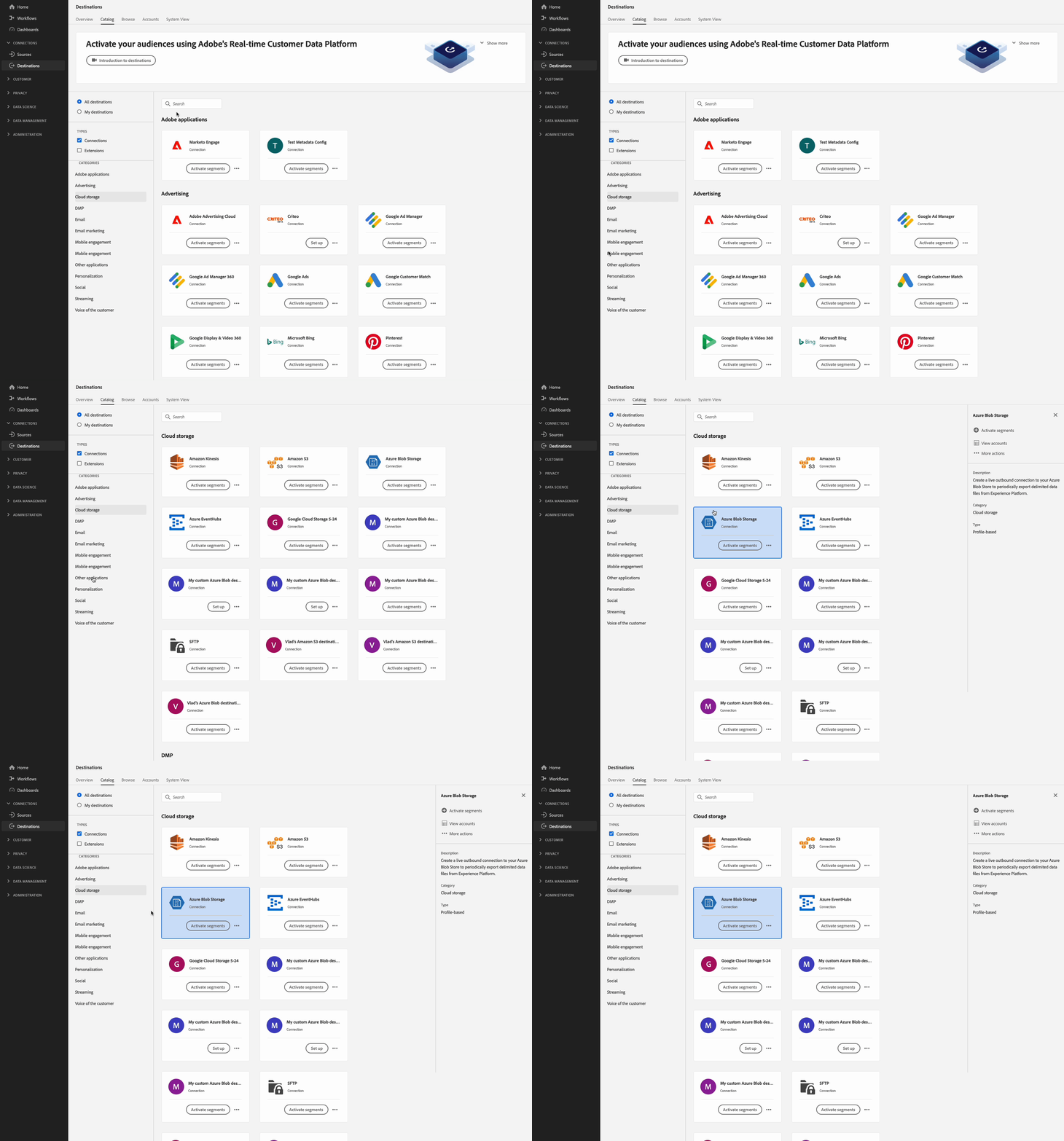
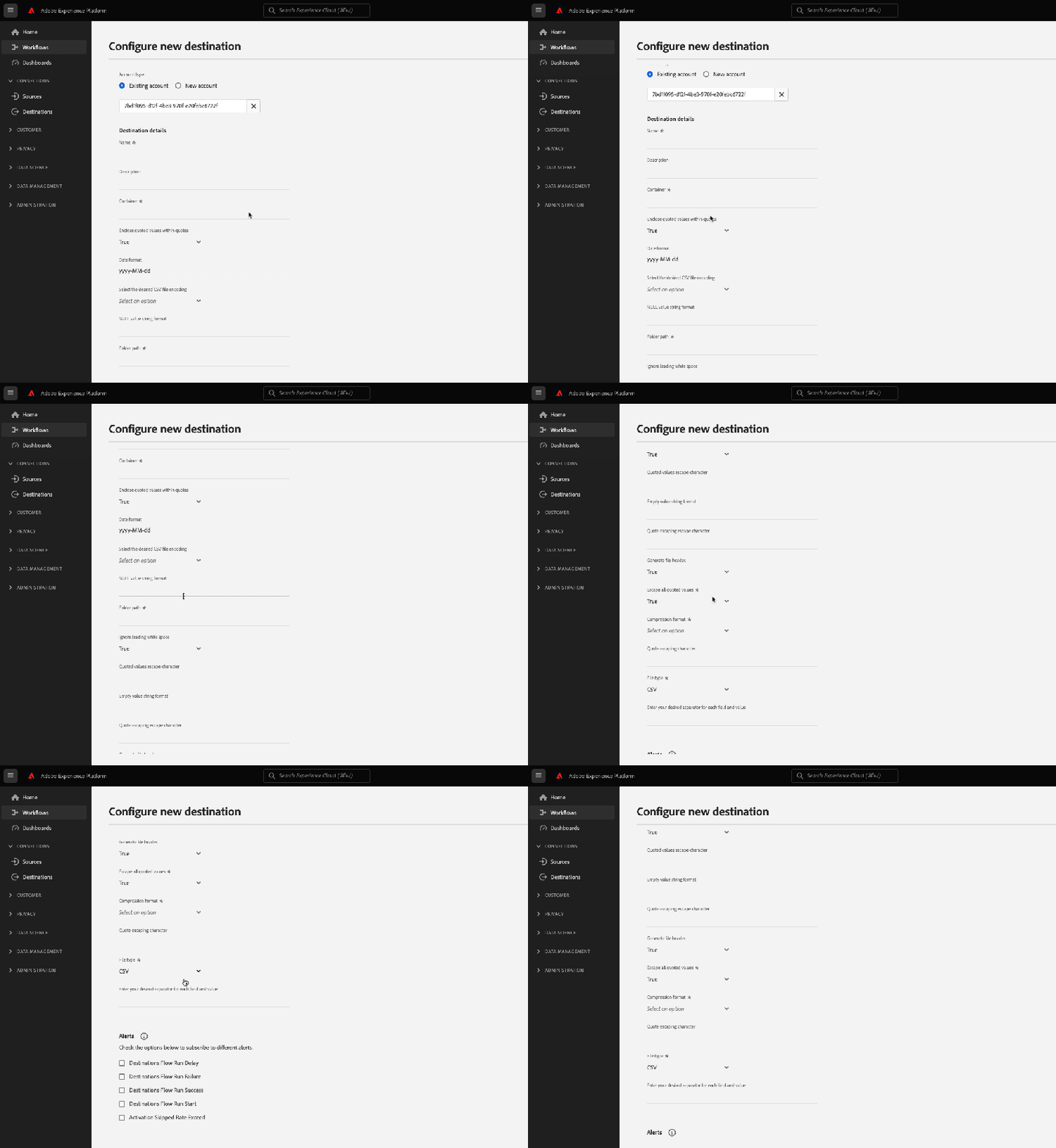
In de beelden en de opnamen hieronder, neem nota hoe de opties in het activeringswerkschema voor op dossier-gebaseerde bestemmingen de opties aanpassen die u in de bestemmingsconfiguratie selecteerde.
Wanneer u details over de bestemming invult, ziet u hoe de velden omringd zijn de aangepaste gegevensvelden die u instelt in de configuratie.
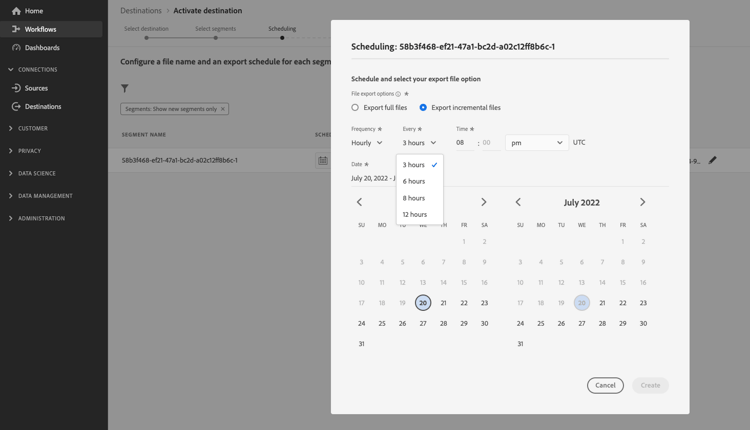
Wanneer u exportintervallen wilt plannen, ziet u hoe de velden die u opgeeft, de velden zijn die u instelt in de batchConfig -configuratie.
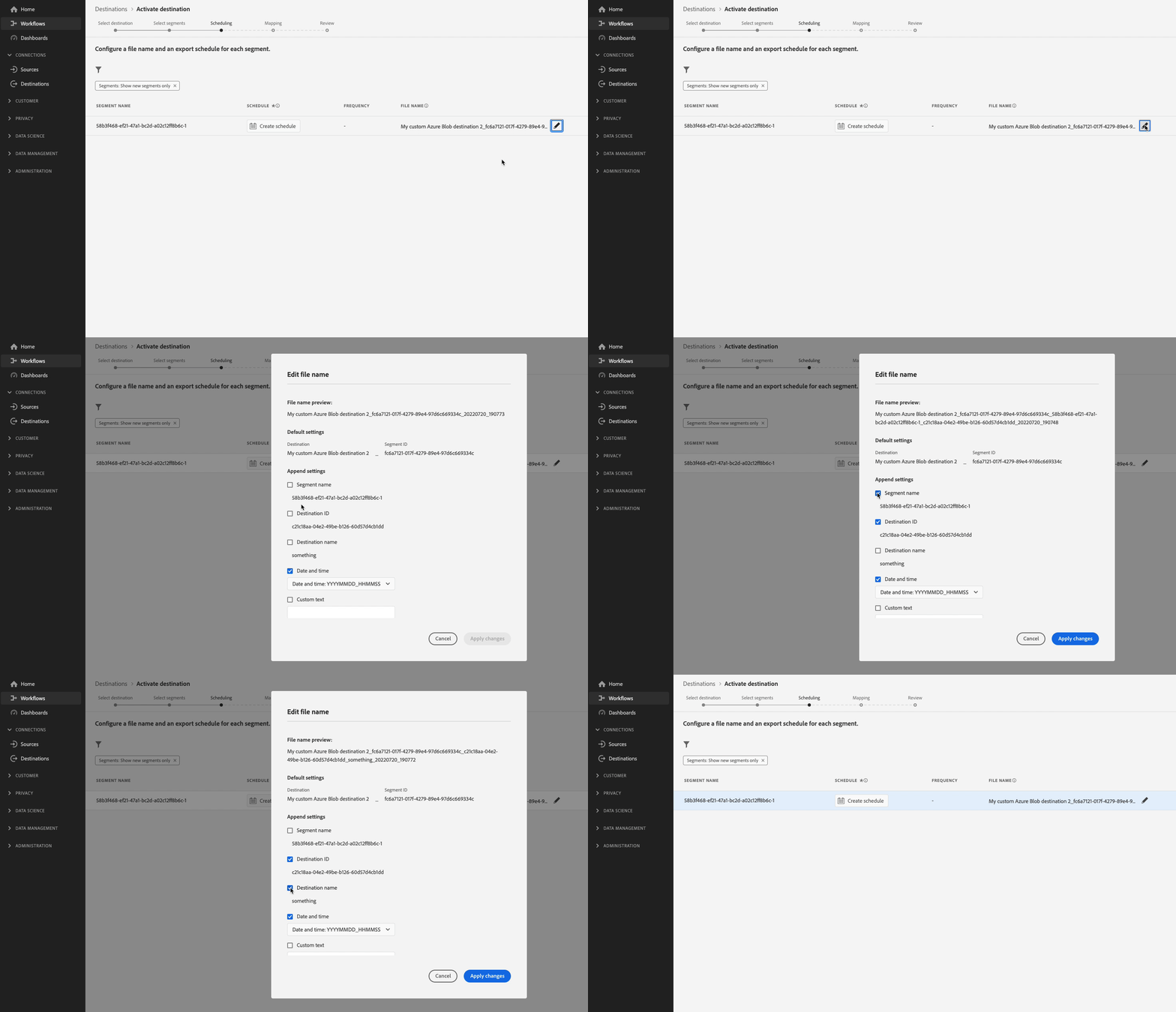
Wanneer u de opties voor de configuratie van bestandsnamen weergeeft, ziet u hoe de weergegeven velden de filenameConfig -opties vertegenwoordigen die u instelt in de configuratie.
Als u om het even welke hierboven vermelde gebieden wilt aanpassen, herhaal stappen één en twee om de configuraties volgens uw behoeften te wijzigen.
Stap 4: (Optioneel) Publish uw bestemming publish-destination
Na het vormen van uw bestemming, gebruik bestemmings het publiceren API om uw configuratie voor overzicht voor te leggen aan Adobe.
Stap 5: (Optioneel) Documenteer uw bestemming document-destination
Als u een Onafhankelijke Verkoper van de Software (ISV) of Integrator van het Systeem (SI) creërend a geproduceerde integratie bent, gebruik het zelfbedienings documentatieproces om een pagina van de productdocumentatie voor uw bestemming in de catalogus van de bestemmingen van het Experience Platform tot stand te brengen.
Volgende stappen next-steps
Door dit artikel te lezen, weet u nu hoe u een aangepaste Azure Blob Storage -bestemming kunt maken met behulp van Destination SDK. Daarna, kan uw team het activeringswerkschema voor op dossier-gebaseerde bestemmingen gebruiken om gegevens naar de bestemming uit te voeren.