Python 플러그인 만들기
이 단계별 안내서에서는 특정 내보내기 사전 설정으로 텍스처 세트의 채널을 내보낼 수 있는 간단한 Python 플러그인을 만드는 방법에 대해 설명합니다.
플러그인 폴더로 이동
새 Python 플러그인을 추가하기 위해 간단한 스크립트 파일을 Substance 3D Painter의 플러그인 폴더에 만들 수 있습니다.
python 폴더에 액세스하려면 다음으로 이동하십시오.
NOTE
"플러그인" 폴더는 Javascript 플러그인용입니다. Python 플러그인은 "python/plugins" 폴더로 이동해야 합니다.
2 - 새 플러그인 파일 만들기
플러그인 폴더의 루트에서 새 텍스트 파일을 만들고 이름을 custom_export.py 로 지정합니다.
3 - 스크립트 내용
빈 스크립트 파일을 텍스트 편집기에 열고 다음 코드 조각을 붙여넣습니다. 코드 주석의 동작에 대한 자세한 내용은 코드 주석을 참조하십시오.
import os

# Substance 3D Painter modules
import substance_painter.ui
import substance_painter.export
import substance_painter.project
import substance_painter.textureset

# PySide module to build custom UI
from PySide2 import QtWidgets

plugin_widgets = []

def export_textures() :
    # Verify if a project is open before trying to export something
    if not substance_painter.project.is_open() :
        return

    # Get the currently active layer stack (paintable)
    stack = substance_painter.textureset.get_active_stack()

    # Get the parent Texture Set of this layer stack
    material = stack.material()

    # Build Export Preset resource URL
    # - Context: name of the library where the resource is located
    # - Name: name of the resource (filename without extension or Substance graph path)
    export_preset = substance_painter.resource.ResourceID(
        context="starter_assets",
        name="PBR Metallic Roughness" )

    print( "Preset:" )
    print( export_preset.url() )

    # Setup the export settings
    resolution = material.get_resolution()

    # Setup the export path, in this case the textures
    # will be put next to the spp project file on the disk
    Path = substance_painter.project.file_path()
    Path = os.path.dirname(Path) + "/"

    # Build the configuration
    config = {
        "exportShaderParams"  : False,
        "exportPath" : Path,
        "exportList" : [ { "rootPath" : str(stack) } ],
        "exportPresets" : [ { "name" : "default", "maps" : [] } ],
        "defaultExportPreset" : export_preset.url(),
        "exportParameters" : [
            {
                "parameters" : { "paddingAlgorithm": "infinite" }
            }
        ]
    }

    substance_painter.export.export_project_textures( config )

def start_plugin():
    # Create a text widget for a menu
    Action = QtWidgets.QAction("Custom Python Export",
            triggered=export_textures)

    # Add this widget to the existing File menu of the application
    substance_painter.ui.add_action(
    substance_painter.ui.ApplicationMenu.File,
    Action )

    # Store the widget for proper cleanup later when stopping the plugin
    plugin_widgets.append(Action)

def close_plugin():
    # Remove all widgets that have been added to the UI
    for widget in plugin_widgets:
    substance_painter.ui.delete_ui_element(widget)

    plugin_widgets.clear()

if __name__ == "__main__":
    start_plugin()
플러그인 불러오기 및 활성화
Substance 3D Painter을 실행하여 애플리케이션이 플러그인을 검색하도록 합니다.
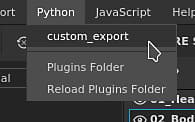
Python 메뉴를 클릭한 다음 플러그인 이름을 클릭하여 활성화합니다.
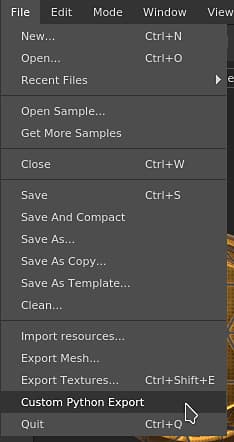
마지막으로 파일 메뉴를 클릭하고 사용자 지정 Python 내보내기를 선택하여 스크립트의 내보내기 함수를 트리거합니다.
recommendation-more-help
substance-3d-dev-help-painter-python-guide