모델 구축
사용자 지정 AI 기반 모델을 구축하기 위해 인터페이스는 단계별 가이드 모델 구성 플로우를 제공합니다.
Mix Modeler의

설정
Setup 단계에서 이름 및 설명을 정의합니다.
-
Name 모델(예:
Demo model)을 입력하십시오. Description(예:Demo model to explore AI features of Mix Modeler)을(를) 입력하십시오.
-
다음 단계로 진행하려면 Next을(를) 선택하십시오. 모델 구성을 취소하려면 Cancel을(를) 선택하십시오.
구성 configure
Configure 단계에서 모델을 구성합니다. 구성에는 전환 목표, 마케팅 접점, 적격 데이터 채우기, 외부 및 내부 요인 등의 정의가 포함됩니다.
-
Conversion goal 섹션에서:

-
Conversion 드롭다운 메뉴에서 전환을 선택합니다. 사용 가능한 전환은 Harmonized datasets에서 전환의 일부로 정의한 전환입니다. 예: Online Conversion.
-
모델 구성 내에서 직접 변환을 만들려면

-
-
Marketing touchpoints 섹션에서 Harmonized datasets에 마케팅 접점의 일부로 정의한 마케팅 접점에 해당하는 마케팅 접점을 하나 이상 선택할 수 있습니다.

-
Touchpoint include 드롭다운 메뉴에서 하나 이상의 마케팅 터치포인트를 선택합니다.
-

- Clear all을(를) 사용하여 모든 터치포인트를 제거할 수 있습니다.
-
-
note NOTE 데이터가 겹치는 터치포인트로 모델을 설정할 수 없으며 지출이 있는 터치포인트가 하나 이상 있어야 합니다. -
-
기본적으로 점수는 사용자의 조화로운 보기에 있는 모든 데이터에 대해 생성됩니다. 모집단의 하위 집합에만 점수를 매기려면 Eligible data population 섹션에서 컨테이너를 사용하여 하나 이상의 필터를 정의합니다.

-
각 컨테이너에 대해 이벤트를 하나 이상 정의합니다.
-
각 이벤트에 대해:
-
통합 필드 선택에서 지표 또는 차원을 선택합니다.
-
적절한 연산자(equals, not equals, less than, greater than, starts with, doesn’t start with, ends with, doesn’t end with, contains, doesn’t contain, is in 또는 is not in)를 선택하십시오.
-
값을 입력하거나 선택하십시오.
-
-
컨테이너에 이벤트를 추가하려면

-
컨테이너에서 이벤트를 제거하려면
-
컨테이너에 정의된 모든 이벤트 또는 여러 이벤트를 사용하여 필터링하려면 Any of 또는 All of을(를) 선택합니다. 레이블이 Include … Or …에서 Include … And …(으)로 변경됩니다.
-
-
적합한 데이터 채우기 컨테이너를 추가하려면
-
적격한 데이터 채우기 컨테이너를 제거하려면 컨테이너 내에서

-
적격 데이터 모집단에 대해 보다 복잡한 정의를 만들려면 컨테이너 사이에 And 및 Or을(를) 선택하십시오.
-
-
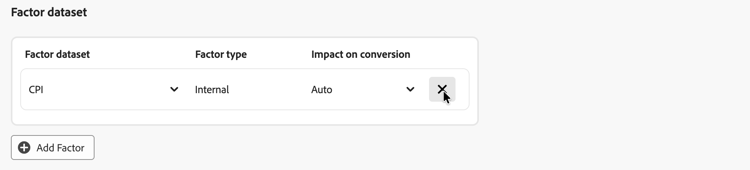
Factor dataset 섹션에서 내부 또는 외부 요소가 포함된 데이터 세트를 관리할 수 있습니다.
-
요소 데이터 집합을 추가하려면 Add Factor을(를) 선택하십시오. 모델에 최대 30개의 요소를 추가할 수 있습니다.
-
드롭다운 메뉴에서 Factor dataset을(를) 선택합니다. 사용 가능한 계수는 데이터 집합 규칙에서 조화된 필드를 정의한 계수입니다.
선택한 데이터 집합에 따라 Factor type은(는) Internal 또는 External입니다. -
드롭다운 메뉴에서 Impact on conversion을(를) 선택합니다. 사용 가능한 옵션은 Auto, Positive 또는 Negative입니다. 기본 옵션은 Auto이며, 이를 통해 모델이 계수 데이터 세트의 영향을 결정할 수 있습니다.
-
-
요소 데이터 집합을 삭제하려면

-
-
모델에 대한 전환 확인 기간을 정의하려면 Define lookback window 섹션에서 Give contribution credit to touchpoints occurring within… weeks prior to the conversion에
1에서52사이의 값을 입력하십시오. -
모델에 대한 교육 기간을 정의하려면 Define training window에서 채점 전환을 시작할 위치를 선택합니다.

다음 중 하나를 선택할 수 있습니다.
-
Have Mix Modeler select a helpful training window 및
-
Manually input a training window. 선택한 경우 Include events the following years prior to a conversion의 연도 수를 정의합니다.
이 입력은 모델에 필요합니다. 연도 수는 Advanced 단계에서 구성할 수 있는 채널 adstock의 제한 방법을 결정합니다.
-
-
다음 단계로 진행하려면 Next을(를) 선택하십시오. 추가 구성이 필요한 경우 빨간색 윤곽선과 텍스트가 추가 구성이 필요한 사항을 설명합니다.
이전 단계로 돌아가려면 Back을(를) 선택하십시오.
모델 구성을 취소하려면 Cancel을(를) 선택하십시오.
고급 advanced
Advanced 단계에서 고급 설정을 지정할 수 있습니다. 이 단계에서는 점유율 사용을 정의하고, MTA(다중 터치 속성)에 대한 모델을 사용하도록 설정하고, 사전 지식을 정의하고, 채널 데이터를 정의할 수 있습니다.
공유 사용
Spend share 섹션에서:
-
과거 마케팅 투자 비율을 사용하여 마케팅 데이터가 희소할 때 모델을 알리려면 Allow spend share을(를) 활성화합니다. 이 설정은 특히 다음 시나리오에서 권장됩니다.
- 채널에 충분한 관찰이 없습니다(예: 지출 빈도가 낮거나 노출 횟수 또는 클릭 수).
- 데이터가 희박할 수 있는 스파이크하지만 일반적이고 잠재적으로 비용이 높은 미디어(일부 브랜드의 TV 등)를 모델링합니다.
note NOTE 일회성 투자(예: 슈퍼볼 광고)의 경우 지출 점유율에 의존하지 않고 해당 데이터를 요소로 통합합니다.
MTA
MTA enabled 섹션에서:
사전 지식
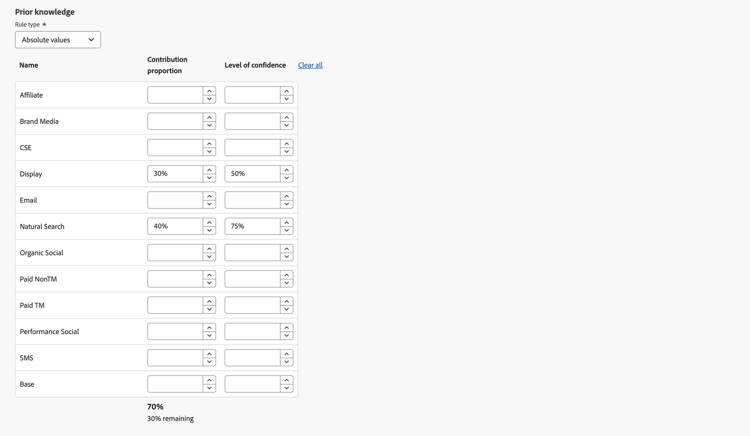
Prior knowledge 섹션에서:
-
기본적으로 Absolute values인 Rule type을(를) 선택하십시오.
-
Contribution proportion 열을 사용하여 Name 아래에 나열된 채널에 대한 기여도 백분율을 지정하십시오.
-
필요한 경우 각 채널에 대해 Level of confidence 백분율을 추가할 수 있습니다.
-
필요한 경우 Clear all을(를) 사용하여 Contribution proportion 및 Level of confidence 열에 대한 모든 입력 값을 지웁니다.
채널 adstock
Channel adstock 섹션에서 모델에 정의한 각 채널(마케팅 채널)에 대해 개별 adstock 전환 확인(이월 또는 감소 효과)과 지연(지연된 응답 시간)을 정의할 수 있습니다.
이 채널 데이터 세트 구성을 사용하면 서로 다른 마케팅 채널이 시간 경과에 따라 비즈니스 결과에 미치는 영향을 세밀하게 제어할 수 있습니다. 또는 시스템 기본값과 한 가지 크기로 모두 맞춤 구성을 사용할 수 있습니다.
채널 데이터 구성은 채널별 뉘앙스를 캡처하는 데 도움이 됩니다. 예를 들어 TV 캠페인의 장기간 지속되는 영향, 유료 검색의 짧은 기간 동안의 영향 또는 인플루언서 지출과 관찰할 수 있는 전환 간의 지연 등이 있습니다. 광고 전환 확인 및 지연 매개 변수를 실험하여 보다 정확하고 사용자 지정적이며 신뢰할 수 있는 통찰력을 생성합니다. 궁극적으로 채널 데이터 구성을 통해 보다 정확한 예산 배분과 더 나은 비즈니스 의사 결정을 수행할 수 있습니다.
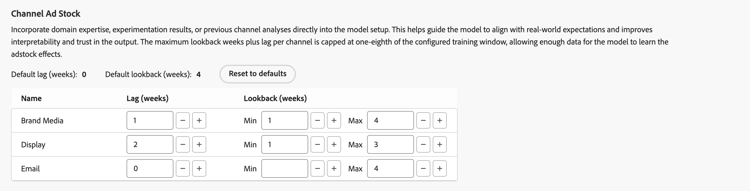
채널 adstock을 구성하려면:
-
각 채널(Name)에 대해 Lag (weeks), Min Lookback (weeks) 및 Max Lookback (weeks) 값을 정의하십시오. 각 값에 대해:
- 값을 늘리려면


채널당 총 지연 주 수 + 최대 전환 확인 주가 구성된 교육 기간의 1/8로 제한됩니다. 이 상한을 사용하면 모델이 Adstock 효과를 학습하기에 충분한 데이터를 사용할 수 있습니다. 예를 들어 2년 교육 기간의 경우 한 채널에 대한 최대 Lag (weeks) 및 Lookback (weeks)은(는) 13주입니다. 이 상한은 값을 정의할 때 적용됩니다.
- 값을 늘리려면
-
모든 채널 adstock을 기본값으로 재설정하려면 다음을 수행합니다.
- Reset to defaults를 선택합니다.
옵션 설정
Set options 단계에서 교육 및 채점을 예약하고 모델에 대한 세부 인사이트 보고 필드를 지정할 수 있습니다.
일정
Schedule 섹션에서 모델 교육 및 채점을 예약할 수 있습니다.
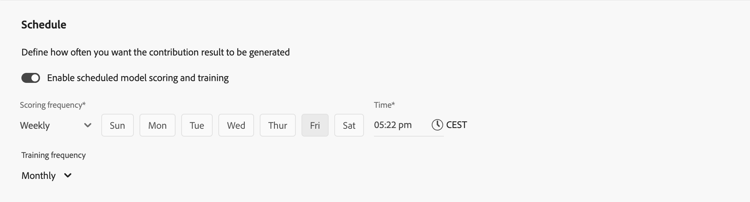
모델 채점 및 교육을 스케줄링하려면
-
Enable scheduled model scoring and training을(를) 켭니다.
-
Scoring frequency 선택:
- Daily: 올바른 시간(예:
05:22 pm)을 입력하거나
- Weekly: 요일을 선택하고 올바른 시간(예:
05:22 pm)을 입력하거나 - Monthly: 모든 드롭다운 메뉴에서 요일을 선택하고 올바른 시간(예:
05:22 pm)을 입력하거나
- Daily: 올바른 시간(예:
-
드롭다운 메뉴에서 Training frequency을(를) 선택합니다. Monthly, Quarterly, Yearly 또는 None.
세분화된 통찰력 보고 필드
Granular insights reporting fields 섹션은 세분화된 증분 보고 기능을 사용합니다. 이 기능을 사용하면 전환율과 접점 증분 점수를 분류하기 위해 조정된 필드를 선택할 수 있습니다.

별도의 모델을 생성하지 않고도 세분화된 보고 열을 사용하여 모델 보고에서 드릴다운할 수 있도록 이러한 통합 필드를 정의합니다.
예를 들어 매출에 중점을 둔 모델을 구축하지만 캠페인, 미디어 유형, 지역 및 트래픽 소스 성과에도 관심이 있습니다. 세분화된 증분 보고 기능이 없으면 네 개의 개별 모델을 빌드해야 합니다. 세분화된 증분 보고 기능을 사용하여 캠페인, 미디어 유형, 지역 및 트래픽 소스에 대한 수익 모델을 분류할 수 있습니다.
- 통합 필드 선택에서 Includes 아래의 통합 필드를 하나 이상 선택하십시오. 선택한 조화화된 필드가 패널에 추가됩니다.
- Harmonized 필드

- Clear all을(를) 선택하여 선택된 모든 조화 필드를 제거합니다.
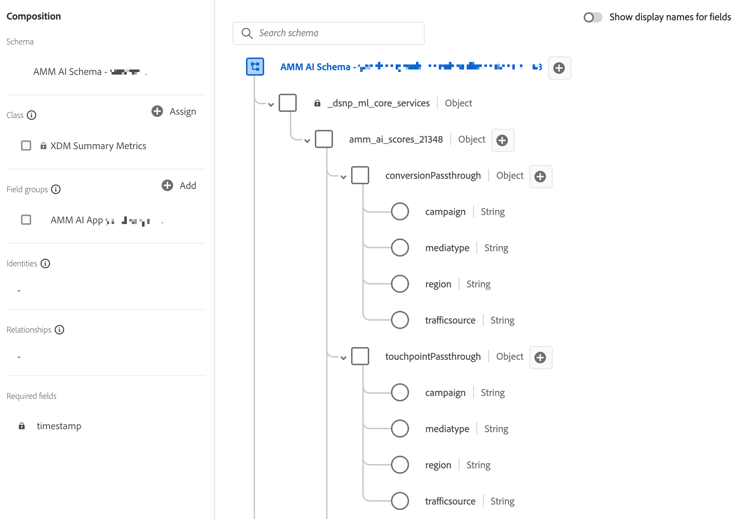
세분화된 증분 보고를 위해 선택한 조화 필드는 모델을 채점한 결과 발생하는 Experience Platform 스키마 및 데이터 세트의 일부로 사용할 수 있습니다. 세분화된 인사이트 보고 필드는 conversionPassthrough 및 touchpointPassthrough 개체 내에서 찾을 수 있습니다.
세분화된 증분 보고를 사용할 수 있는 모델의 스키마에 있는
완료
-
모델 구성을 완료하려면 Finish을(를) 선택하십시오.
-
Create instance? 대화 상자에서 Ok을(를) 선택하여 첫 번째 교육 및 채점 실행을 즉시 트리거합니다. 모델이 상태

취소할 Cancel을(를) 선택하십시오.
-
추가 구성이 필요한 경우 빨간색 윤곽선과 텍스트가 추가 구성이 필요한 사항을 설명합니다.
-
-
이전 단계로 돌아가려면 Back을(를) 선택하십시오.
-
모델 구성을 취소하려면 Cancel을(를) 선택하십시오.