Adobe Commerce 데이터베이스에 대한 쿼리 연결 및 실행
Adobe Commerce on cloud 프로젝트에 연결하고, 오프사이트 사용을 위해 데이터베이스 덤프를 만들고, PII(개인 식별 정보)를 마스킹 또는 제거하는 방법을 알아봅니다. 로컬 덤프, MySQL Workbench 또는 TablePlus와 같은 GUI 또는 magento-cloud CLI를 사용하여 데이터에 액세스합니다.
비디오 콘텐츠
- MySQL Workbench 또는 TablePlus와 같은 데이터베이스 관리 도구를 사용하여 원격 Adobe Commerce 클라우드 프로젝트에 연결합니다.
- 프로젝트에 연결하고 명령줄에서 SQL을 실행합니다.
다음 방법 중 하나를 사용하여 클라우드 프로젝트에서 Adobe Commerce 데이터에 액세스할 수 있습니다.
- 로컬 DB 덤프를 사용합니다.
- MySQL Workbench 또는 TablePlus와 같은 애플리케이션을 사용하여 원격 클라우드 환경에 대한 DB 연결을 엽니다.
magento-cloudCLI를 사용하여 클라우드 환경에 직접 연결하고 원격 서버에서 명령을 실행합니다.
고객 정보를 제거하기 위해 스크러빙하는 데이터베이스 덤프를 선호합니다. 필요하지 않은 경우 고객 데이터를 완전히 제거합니다.
Adobe Commerce Cloud CLI 도구 사용
데이터베이스 덤프를 만들려면 Adobe Commerce Cloud CLI가 설치되어 있어야 합니다. 로컬 컴퓨터에서 디렉터리를 열고 다음 명령을 실행합니다. your-project-id을(를) 프로젝트 ID(asasdasd45q과(와) 유사)로 바꿉니다. your-environment-name을(를) master 또는 staging 같은 환경 이름으로 바꾸십시오.
magento-cloud db:dump -p your-project-id -e your-environment-name
프로젝트 ID나 환경을 잘 모를 경우 명령에서 이를 생략할 수 있습니다.
magento-cloud db:dump
CLI에서 올바른 프로젝트 및 환경을 지정하라는 메시지가 표시됩니다. 다음 예제에서는 해당 대화 상자를 표시합니다. 이 예에서는 계정에 할당된 여러 프로젝트를 보여 주지만 사용 가능한 프로젝트는 하나만 있을 수 있습니다.
디렉터리로 변경
cd ~/Downloads/db-tutorial
이제 명령을 실행하여 데이터베이스 덤프를 생성합니다.
magento-cloud db:dump
프로젝트 또는 환경을 지정하지 않았으므로 Adobe Commerce Cloud CLI에서 몇 가지 질문을 합니다. 다음 예제는 샘플 대화 상자를 보여 줍니다.
Enter a number to choose a project:
  [0] demo-ralbin (ral32nryq4123)
  [1] adobe-commerce-demo (abc123zzkipexnqo)
  [2] DX Tutorials - Commerce (abasrpikfw4123)
 > 2

Enter a number to choose an environment:
Default: master
  [0] master (type: production)
  [1] remote-db (type: development)
 > 1

Creating SQL dump file: /Users/<username>/Downloads/db-tutorial/abasrpikfw4123--remote-db-ecpefky--mysql--main--dump.sql
Adobe Commerce ECE 도구 사용
Adobe Commerce CLI 도구가 없는 경우 프로젝트로 ssh하여 ece 명령 vendor/bin/ece-tools db-dump을(를) 실행할 수 있습니다.
샘플 응답:
ssh abasrpikfw4123-remote-db-ecpefky--mymagento@ssh.us-4.magento.cloud

 __  __                   _          ___ _             _
|  \/  |__ _ __ _ ___ _ _| |_ ___   / __| |___ _  _ __| |
| |\/| / _` / _` / -_) ' \  _/ _ \ | (__| / _ \ || / _` |
|_|  |_\__,_\__, \___|_||_\__\___/  \___|_\___/\_,_\__,_|
            |___/

 Welcome to Magento Cloud.

 This is environment remote-db-ecpefky
 of project abasrpikfw4123.

web@mymagento.0:~$ vendor/bin/ece-tools db-dump
The db-dump operation switches the site to maintenance mode, stops all active cron jobs and consumer queue processes, and disables cron jobs before starting the dump process.
Your site will not receive any traffic until the operation completes.
Do you wish to proceed with this process? (y/N)?y
[2024-02-13T19:01:45.130999+00:00] INFO: Starting backup.
[2024-02-13T19:01:45.155039+00:00] NOTICE: Enabling Maintenance mode
[2024-02-13T19:01:46.404427+00:00] INFO: Trying to kill running cron jobs and consumers processes
[2024-02-13T19:01:46.420149+00:00] INFO: Running Magento cron and consumers processes were not found.
[2024-02-13T19:01:46.420434+00:00] INFO: Waiting for lock on db dump.
[2024-02-13T19:01:46.420499+00:00] INFO: Start creation DB dump for main database...
[2024-02-13T19:01:50.697886+00:00] INFO: Finished DB dump for main database, it can be found here: /app/var/dump-main-1707850906.sql.gz
[2024-02-13T19:01:51.628328+00:00] NOTICE: Maintenance mode is disabled.
[2024-02-13T19:01:51.628419+00:00] INFO: Backup completed.
web@mymagento.0:~$ exit
logout
Connection to ssh.us-4.magento.cloud closed.
SFTP 또는 rsync을(를) 사용하여 데이터베이스 덤프를 로컬 환경으로 가져옵니다.
다음 예제에서는 rsync을(를) 사용하여 파일을 ~/Downloads/db-tutorial 폴더로 가져옵니다.
rsync -avrp -e ssh abasrpikfw4123-remote-db-ecpefky--mymagento@ssh.us-4.magento.cloud:/app/var/dump-main-1707850906.sql.gz ~/Downloads/db-tutorial
터미널 창은 몇 가지 정보를 출력합니다. 여기 몇 가지 출력 예가 있습니다
rsync -avrp -e ssh abasrpikfw4123-remote-db-ecpefky--mymagento@ssh.us-4.magento.cloud:/app/var/dump-main-1707850906.sql.gz ~/Downloads/db-tutorial
receiving file list ... done
dump-main-1707850906.sql.gz

sent 38 bytes  received 2691041 bytes  358810.53 bytes/sec
total size is 2690241  speedup is 1.00
파일의 내용을 보고 파일이 성공적으로 다운로드되었는지 확인합니다.
ls -lah
total 29840
drwxr-xr-x    4 <username>  staff   128B Feb 13 13:02 .
drwx------@ 103 <username>   staff   3.2K Feb 13 12:52 ..
-rw-r--r--    1 <username>   staff    11M Feb 13 12:53 abasrpikfw4123--remote-db-ecpefky--mysql--main--dump.sql
-rw-r--r--    1 <username>   staff   2.6M Feb 13 13:01 dump-main-1707850906.sql.gz
데이터가 있는 경우 고객 데이터를 제거하거나 마스킹하여 정리해야 합니다. 다음 샘플 스크립트는 시작하는 데 도움이 됩니다.
이 예제는 고객 데이터를 무작위 문자열로 전환하지만 모든 항목을 유지합니다. 이 예에는 고객 PII를 타사 테이블 및 핵심 테이블에서 찾을 수 있음을 보여 주는 몇 가지 추가 테이블이 포함되어 있습니다. 모든 테이블의 데이터를 주의 깊게 검사하고 고객 데이터를 마스킹 또는 제거합니다.
일반적으로 설계자 또는 리드 개발자는 데이터베이스 덤프의 마스킹 및 살균을 담당하는 유일한 사람입니다. 전용 소독제를 비치하면 원시 데이터 노출이 줄어들어 규정 준수 규칙 및 규정 위반 기회가 줄어든다.
SET FOREIGN_KEY_CHECKS=0;
UPDATE customer_entity SET email = REPLACE(email, SUBSTRING(email, LOCATE('@', email) +1), CONCAT(UUID(), '.com'));
UPDATE email_contact SET email = REPLACE(email, SUBSTRING(email, LOCATE('@', email) +1), CONCAT(UUID(), '.com'));
UPDATE sales_invoice_grid SET customer_email = 'customer@example.com', customer_name  = 'Jack Smith';
UPDATE sales_order SET customer_email = 'customer@example.com', customer_firstname = 'Sally', customer_lastname = 'Smith', remote_ip = '127.0.0.1';
UPDATE sales_order_address SET region = 'Ohio', postcode = '12345-1234', lastname = 'Smith', street = '123 Main street', region_id = 44, city = 'Phoenix', telephone = NULL, firstname = 'Jane', company = NULL;
UPDATE sales_order_grid SET customer_email = 'customer@example.com', shipping_name = 'Jack', billing_name = 'Jack Smith', billing_address = '123 Main Street', shipping_address = '321 Pine Street', customer_name = 'Jane Smith';
UPDATE sales_shipment_grid SET customer_email = 'customer@example.com', customer_name = 'Jane Smith', billing_address = '123 Main street', billing_name = 'Jack Doe', shipping_name = 'Susie Smith';
UPDATE quote SET customer_email = 'customer@example.com', customer_firstname = 'Sally', customer_lastname = 'Jones', customer_dob = NULL, remote_ip = '127.0.0.1';
UPDATE quote_address SET email = 'customer@example.com', firstname = 'Jack', lastname = 'Smith', company = NULL, street = '123 Main st', city = 'AnyCity', region = 'Some State', region_id = 44, postcode = '12345-1234', telephone = NULL;
UPDATE magento_rma SET customer_custom_email = 'customer@example.com' WHERE customer_custom_email IS NOT NULL;
UPDATE customer_address_entity SET firstname = 'Jack', lastname = 'Smith', telephone = '909-555-1212', postcode = NULL,  region = NULL, street = '123 Main street', city = 'Anycity', company = NULL;
UPDATE customer_grid_flat SET name = 'Jane Doe', email = 'customer@example.com', dob = NULL, gender = NULL, taxvat = NULL, shipping_full = '', billing_full = '', billing_firstname = 'Jack', billing_lastname = 'Smith', billing_telephone = NULL, billing_postcode = NULL, billing_country_id = NULL, billing_region = NULL, billing_street = '123 Main street', billing_city = 'Anycity', billing_fax = NULL, billing_vat_id = NULL, billing_company = NULL;
UPDATE sales_creditmemo_grid SET billing_name = 'Sally', billing_address = '123 Main Street', customer_name = 'Jack Smith', customer_email = 'customer@example.com';
UPDATE magento_rma_grid SET customer_name = 'Jack Smith';
UPDATE newsletter_subscriber SET subscriber_email = 'customer@example.com';
UPDATE core_config_data SET value = '' WHERE path = 'orderexport/general/serial';
UPDATE core_config_data SET value = '' WHERE path = 'productexport/general/serial';
UPDATE core_config_data SET value = '' WHERE path = 'trackingimport/general/serial';
UPDATE core_config_data SET value = '' WHERE path = 'stockimport/general/serial';
UPDATE core_config_data SET value = '' WHERE path = 'remarketing/onescript/merchant_id';
UPDATE core_config_data SET value = '' WHERE path = 'remarketing/onescript/merchant_id';
UPDATE core_config_data SET value = '' WHERE path = 'algoliasearch_credentials/credentials/application_id';
UPDATE core_config_data SET value = '' WHERE path = 'algoliasearch_credentials/credentials/search_only_api_key';
UPDATE core_config_data SET value = '' WHERE path = 'tax/avatax/production_account_number';
UPDATE core_config_data SET value = '' WHERE path = 'tax/avatax/production_license_key';
UPDATE core_config_data SET value = '' WHERE path = 'design/head/includes';
UPDATE core_config_data SET value = '' WHERE path = 'payment/braintree/merchant_id';
UPDATE core_config_data SET value = '' WHERE path = 'payment/braintree/public_key';
UPDATE core_config_data SET value = '' WHERE path = 'payment/braintree/private_key';
UPDATE core_config_data SET value = '' WHERE path = 'system/full_page_cache/fastly/fastly_service_id';
UPDATE core_config_data SET value = '' WHERE path = 'system/full_page_cache/fastly/fastly_api_key';
UPDATE core_config_data SET value = '' WHERE path = 'google/analytics/container_id';
UPDATE core_config_data SET value = '' WHERE path = 'analytics/general/token';
UPDATE vault_payment_token SET public_hash = UUID(), details = '{"type":"VI","maskedCC":"1111","expirationDate":"01\/2019"}';
TRUNCATE customer_log;
TRUNCATE customer_visitor;
TRUNCATE magento_logging_event;
TRUNCATE oauth_consumer;
TRUNCATE oauth_nonce;
TRUNCATE oauth_token;
TRUNCATE password_reset_request_event;
TRUNCATE acknowledgement;
TRUNCATE acknowledgement_report;
TRUNCATE avatax_log;
TRUNCATE avatax_queue;
TRUNCATE cron_schedule;
SET FOREIGN_KEY_CHECKS=1;
또는 정보를 마스킹하는 대신 레코드를 삭제할 수 있으므로 새 DB가 더 작아집니다. PII가 마스킹되거나 제거되면 데이터는 로컬 환경에서 사용하기 위해 팀원에게 안전하게 제공될 수 있습니다.
Adobe Commerce 클라우드 프로젝트에 대한 원격 DB 연결
이 방법을 사용하면 라이브 데이터를 실수로 편집하고 삭제할 수 있습니다. 주의해서 사용하세요. 가능한 경우 데이터베이스 백업 및 오프라인 검토를 선호합니다. 경우에 따라 Adobe Commerce Cloud에서 직접 데이터에 액세스해야 합니다. 이 워크플로우는 여전히 위험을 안고 있습니다. GUI는 확인 메시지를 추가하지 않으므로 실수로 데이터를 변경하거나 제거할 수 있습니다.
원격 데이터베이스 연결은 편리하지만 위험합니다. 사용자가 프로덕션에 연결되어 있다는 것을 쉽게 잊어버리고 데이터를 삭제하거나 변경할 수 있습니다. 읽기 전용 복제본에 연결할 수 있지만 무거운 SQL은 여전히 사이트에 영향을 줍니다. Adobe은 쓰기 가능한 데이터베이스에 대한 일상적인 원격 연결을 권장하지 않습니다. 위험 요소를 이해할 때만 아래 단계를 사용하십시오.
SSH 터널 설정:
magento-cloud tunnel:open
프로젝트를 선택하고 환경을 선택하면 mysql 그래픽 인터페이스 설정에 사용되는 명령의 출력이 나타납니다.
magento-cloud tunnel:open

Enter a number to choose a project:
  [0] demo-ralbin (ral32nryq4123)
  [1] adobe-commerce-demo (abc123zzkipexnqo)
  [2] DX Tutorials - Commerce (abasrpikfw4123)
 > 2

Enter a number to choose an environment:
Default: master
  [0] master (type: production)
  [1] remote-db (type: development)
 > 1

SSH tunnel opened to database at: mysql://user:@127.0.0.1:30000/main
SSH tunnel opened to redis at: redis://127.0.0.1:30001
SSH tunnel opened to opensearch at: http://127.0.0.1:30002
SSH tunnel opened to rabbitmq at: amqp://guest:guest@127.0.0.1:30003

Logs are written to: /Users/<user>/.magento-cloud/tunnels.log

List tunnels with: magento-cloud tunnels
View tunnel details with: magento-cloud tunnel:info
Close tunnels with: magento-cloud tunnel:close

Save encoded tunnel details to the MAGENTO_CLOUD_RELATIONSHIPS variable using:
  export MAGENTO_CLOUD_RELATIONSHIPS="$(magento-cloud tunnel:info --encode)"
SSH tunnel opened to database at 명령 옵션을 사용하여 MySQL 그래픽 인터페이스를 사용하여 연결을 설정하십시오.
SSH tunnel opened to database at: mysql://user:@127.0.0.1:30000/main
적절한 정보를 얻었으므로 이제 클라우드 콘솔에 이러한 값을 입력합니다.
클라우드 콘솔의 클라우드 자격 증명에서 SSH 호스트 이름과 사용자 이름을 찾을 수 있습니다.
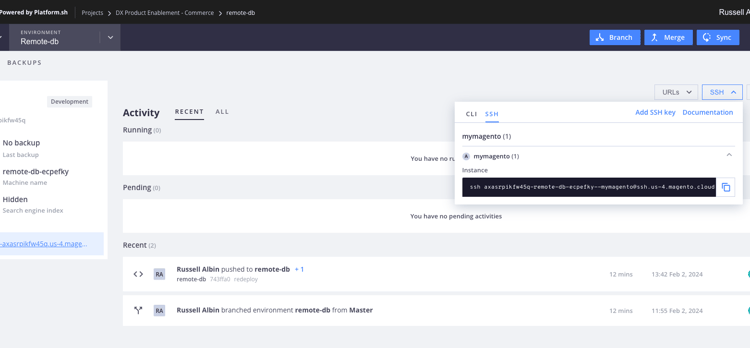
다음은 한 가지 예입니다. ssh abasrpikfw4123-remote-db-ecpefky--mymagento@ssh.us-4.magento.cloud
이 예에서 SSH 호스트 이름은 @ 기호 ssh.us-4.magento.cloud 뒤에 있는 모든 것입니다.
SSH 사용자 이름은 @ 기호 앞에 있는 모든 것입니다. abasrpikfw4123-remote-db-ecpefky--mymagento
데이터베이스에 연결할 값 찾기
MariaDB 데이터베이스에 직접 액세스하려면 SSH를 사용하여 원격 클라우드 환경에 로그인하고 데이터베이스에 연결합니다.
-
SSH를 사용하여 원격 환경에 로그인합니다.
code language-bash magento-cloud ssh -
$MAGENTO_CLOUD_RELATIONSHIPS 변수의
database및type속성에서 MySQL 로그인 자격 증명을 검색합니다.code language-bash echo $MAGENTO_CLOUD_RELATIONSHIPS | base64 -d | json_pp또는
code language-bash php -r 'print_r(json_decode(base64_decode($_ENV["MAGENTO_CLOUD_RELATIONSHIPS"])));'응답에서 MySQL 정보를 찾습니다. For example:
code language-json "database" : [ { "password" : "", "rel" : "mysql", "hostname" : "nnnnnnnn.mysql.service._.magentosite.cloud", "service" : "mysql", "host" : "database.internal", "ip" : "###.###.###.###", "port" : 3306, "path" : "main", "cluster" : "projectid-integration-id", "query" : { "is_master" : true }, "type" : "mysql:10.3", "username" : "user", "scheme" : "mysql" } ],
그런 다음 MySQL GUI에서 구성 값을 사용합니다. 다음 예제에서는 MySQL Workbench를 사용하지만, MySQL 연결을 지원하는 앱도 유사한 필드를 갖게 됩니다.
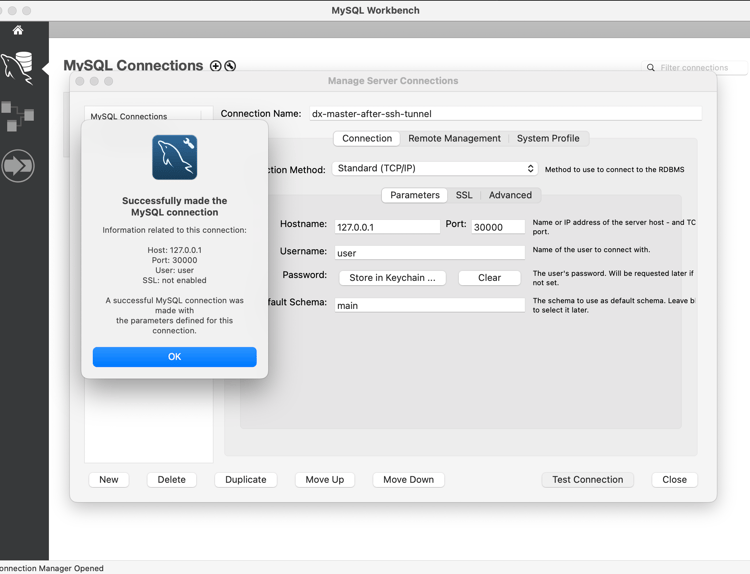
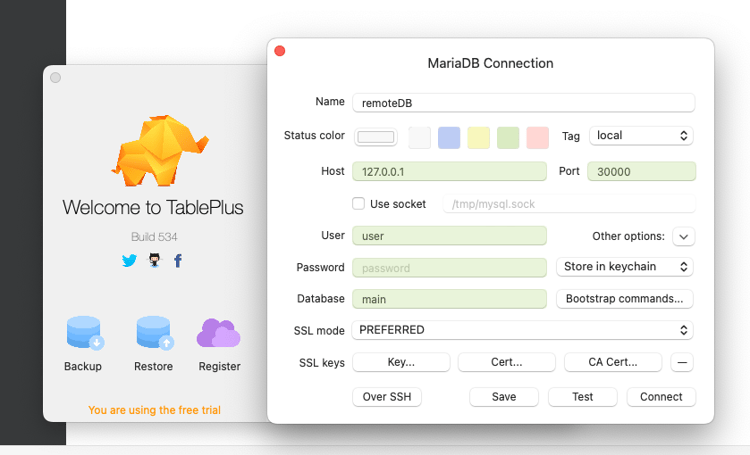
연결을 구성한 후 MySQL GUI를 사용하여 원격 Adobe Commerce 클라우드 프로젝트에서 쿼리를 실행할 수 있습니다.
SQL을 실행하기 위해 클라우드 프로젝트 데이터베이스에 직접 연결
다음 메서드는 magento-cloud CLI를 사용하여 MySQL 데이터베이스에 직접 연결하고 SQL을 실행하여 쿼리를 빠르게 실행합니다. 이 데이터베이스의 복사본이 필요한 경우 데이터베이스 덤프를 만들기하는 다른 방법 중 하나를 사용하십시오.
magento-cloud db:sql

Enter a number to choose a project:
  [0] demo-ralbin (ral32nryq4123)
  [1] adobe-commerce-demo (abc123zzkipexnqo)
  [2] DX Tutorials - Commerce (abasrpikfw4123)
 > 2

Enter a number to choose an environment:
Default: master
  [0] master (type: production)
  [1] remote-db (type: development)
 > 1

Welcome to the MariaDB monitor.  Commands end with ; or \g.
Your MariaDB connection id is 273454
Server version: 10.6.15-MariaDB-1:10.6.15+maria~deb10-log mariadb.org binary distribution

Copyright (c) 2000, 2018, Oracle, MariaDB Corporation Ab and others.

Type 'help;' or '\h' for help. Type '\c' to clear the current input statement.
예를들어 core_config_data 테이블에서 path 열의 일부로 secure 단어가 포함된 모든 레코드를 찾을 수 있습니다.
MariaDB [main]> SELECT * FROM core_config_data WHERE path LIKE '%secure%' \G;
*************************** 1. row ***************************
 config_id: 5
     scope: default
  scope_id: 0
      path: web/unsecure/base_url
     value: http://remote-db-ecpefky-abasrpikfw4123.us-4.magentosite.cloud/
updated_at: 2024-02-02 18:03:17
*************************** 2. row ***************************
 config_id: 6
     scope: default
  scope_id: 0
      path: web/secure/base_url
     value: https://remote-db-ecpefky-abasrpikfw4123.us-4.magentosite.cloud/
updated_at: 2024-02-02 18:03:17
*************************** 3. row ***************************
 config_id: 8
     scope: default
  scope_id: 0
      path: web/secure/use_in_adminhtml
     value: 1
updated_at: 2023-04-26 19:43:58
3 rows in set (0.001 sec)

ERROR: No query specified

MariaDB [main]>