Pythonプラグインを作成する
このステップバイステップガイドでは、特定の書き出しプリセットを持つテクスチャセットのチャンネルを書き出すことができる簡単なPythonプラグインを作成する方法について説明します。
プラグインフォルダーに移動
新しいPythonプラグインを追加するために、Substance 3D Painterのプラグインフォルダーに簡単なスクリプトファイルを作成できます。
Pythonフォルダにアクセスするには、次の場所に移動します。
NOTE
フォルダー「プラグイン」はJavascriptプラグイン用です。 Pythonプラグインは「python/plugins」フォルダーに入れる必要があります。
2 – 新しいプラグインファイルの作成
プラグインフォルダーのルートで、新しいテキストファイルを作成し、「custom_export.py」という名前を付けます。
3 – スクリプトコンテンツ
空のスクリプトファイルをテキストエディターで開き、次のコードスニペットを貼り付けます。 ビヘイビアーについて詳しくは、コードコメントを参照してください。
import os

# Substance 3D Painter modules
import substance_painter.ui
import substance_painter.export
import substance_painter.project
import substance_painter.textureset

# PySide module to build custom UI
from PySide2 import QtWidgets

plugin_widgets = []

def export_textures() :
    # Verify if a project is open before trying to export something
    if not substance_painter.project.is_open() :
        return

    # Get the currently active layer stack (paintable)
    stack = substance_painter.textureset.get_active_stack()

    # Get the parent Texture Set of this layer stack
    material = stack.material()

    # Build Export Preset resource URL
    # - Context: name of the library where the resource is located
    # - Name: name of the resource (filename without extension or Substance graph path)
    export_preset = substance_painter.resource.ResourceID(
        context="starter_assets",
        name="PBR Metallic Roughness" )

    print( "Preset:" )
    print( export_preset.url() )

    # Setup the export settings
    resolution = material.get_resolution()

    # Setup the export path, in this case the textures
    # will be put next to the spp project file on the disk
    Path = substance_painter.project.file_path()
    Path = os.path.dirname(Path) + "/"

    # Build the configuration
    config = {
        "exportShaderParams"  : False,
        "exportPath" : Path,
        "exportList" : [ { "rootPath" : str(stack) } ],
        "exportPresets" : [ { "name" : "default", "maps" : [] } ],
        "defaultExportPreset" : export_preset.url(),
        "exportParameters" : [
            {
                "parameters" : { "paddingAlgorithm": "infinite" }
            }
        ]
    }

    substance_painter.export.export_project_textures( config )

def start_plugin():
    # Create a text widget for a menu
    Action = QtWidgets.QAction("Custom Python Export",
            triggered=export_textures)

    # Add this widget to the existing File menu of the application
    substance_painter.ui.add_action(
    substance_painter.ui.ApplicationMenu.File,
    Action )

    # Store the widget for proper cleanup later when stopping the plugin
    plugin_widgets.append(Action)

def close_plugin():
    # Remove all widgets that have been added to the UI
    for widget in plugin_widgets:
    substance_painter.ui.delete_ui_element(widget)

    plugin_widgets.clear()

if __name__ == "__main__":
    start_plugin()
プラグインを読み込んで有効にする
Substance 3D Painterを起動して、アプリケーションがプラグインを検出できるようにします。
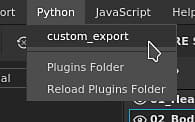
Pythonメニューをクリックし、プラグイン名をクリックして有効にします。
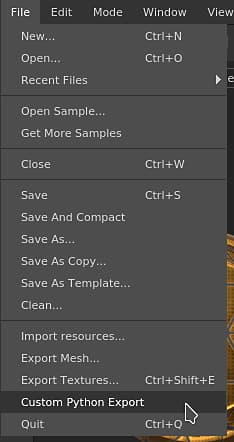
最後に、ファイルメニューをクリックし、カスタムPython書き出しを選択して、スクリプトの書き出し機能をトリガーします。
recommendation-more-help
substance-3d-dev-help-painter-python-guide