(レガシー) Apple SSO クックブック (REST API V1) apple-sso-cookbook-rest-api-v1
Adobe Pass Authentication REST API V1は、iOS、iPadOS、またはtvOSで動作するクライアントアプリケーションのエンドユーザー向けに、パートナーシングルサインオン(SSO)をサポートしています。
このドキュメントは、既存のREST API V1 ドキュメントの拡張機能として機能します。このドキュメントは、こちらにあります。
Cookbook apple-sso-cookbook-rest-api-v1-cookbook
Apple SSO ユーザーエクスペリエンスを活用するには、Appleが開発した ビデオ サブスクライバーのアカウントフレームワーク をアプリケーションに統合する必要がありますが、Adobe Pass Authentication REST API V1 コミュニケーションでは、次の手順に従う必要があります。
権限 apple-sso-cookbook-rest-api-v1-permission
Settings -> TV ProviderまたはtvOSのSettings -> Accounts -> TV Provider*に移動することで、ユーザーの判断を変えることができます。認証 apple-sso-cookbook-rest-api-v1-authentication
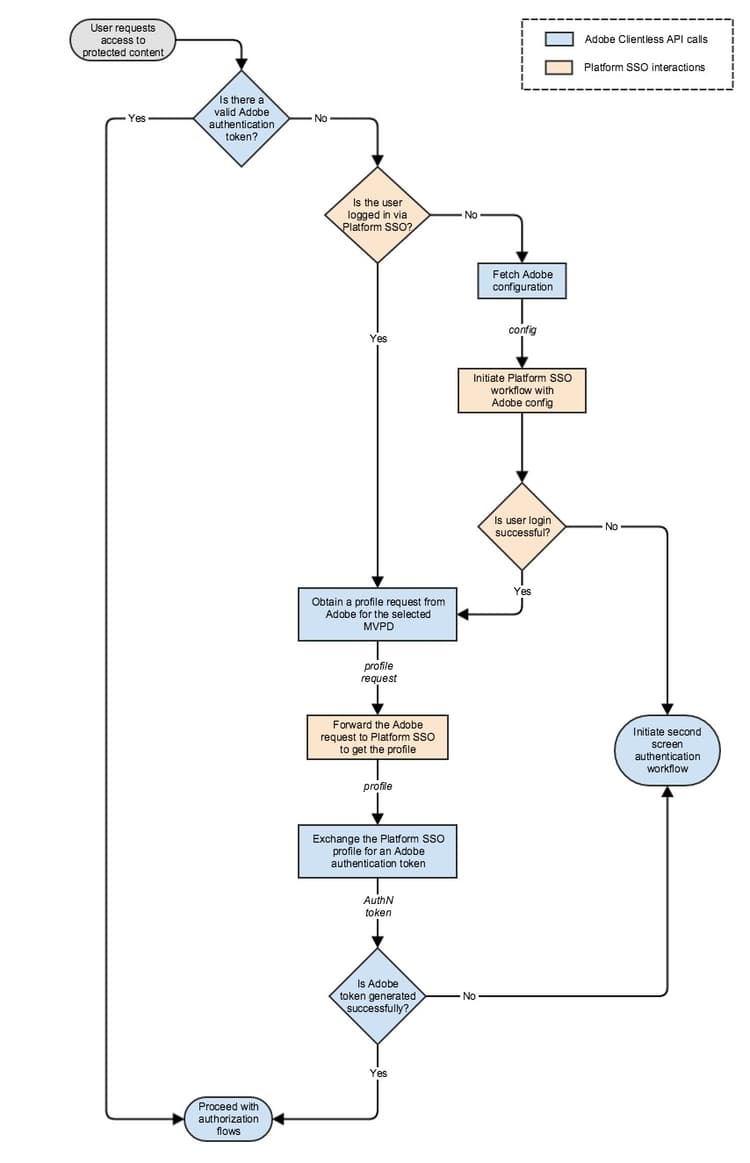
手順:「有効なAdobe認証トークンはありますか?」 step1
手順:「ユーザーはパートナーSSO経由でログインしていますか?」 step2
...
let videoSubscriberAccountManager: VSAccountManager = VSAccountManager();

videoSubscriberAccountManager.checkAccessStatus(options: [VSCheckAccessOption.prompt: true]) { (accessStatus, error) -> Void in
            switch (accessStatus) {
            // The user allows the application to access subscription information.
            case VSAccountAccessStatus.granted:
                    // Construct the request for subscriber account information.
                    let vsaMetadataRequest: VSAccountMetadataRequest = VSAccountMetadataRequest();

                    // This is actually the SAML Issuer not the channel ID.
                    vsaMetadataRequest.channelIdentifier = "https://saml.sp.auth.adobe.com";

                    // This is the subscription account information needed at this step.
                    vsaMetadataRequest.includeAccountProviderIdentifier = true;

                    // This is the subscription account information needed at this step.
                    vsaMetadataRequest.includeAuthenticationExpirationDate = true;

                    // This is going to make the Video Subscriber Account Framework to refrain from prompting the user with the providers picker at this step.
                    vsaMetadataRequest.isInterruptionAllowed = false;

                    // Submit the request for subscriber account information - accountProviderIdentifier.
                    videoSubscriberAccountManager.enqueue(vsaMetadataRequest) { vsaMetadata, vsaError in
                        if (vsaMetadata != nil && vsaMetadata!.accountProviderIdentifier != nil) {
                            // The vsaMetadata!.authenticationExpirationDate will contain the expiration date for current authentication session.
                            // The vsaMetadata!.authenticationExpirationDate should be compared against current date.
                            ...
                            // The vsaMetadata!.accountProviderIdentifier will contain the provider identifier as it is known for the platform configuration.
                            // The vsaMetadata!.accountProviderIdentifier represents the platformMappingId in terms of Adobe Pass Authentication configuration.
                            ...
                            // The application must determine the MVPD id property value based on the platformMappingId property value obtained above.
                            // The application must use the MVPD id further in its communication with Adobe Pass Authentication services.
                            ...
                            // Continue with the "Obtain a profile request from Adobe for the selected MVPD" step.
                            ...
                            // Continue with the "Forward the Adobe request to Partner SSO to obtain the profile" step.
                            ...
                        } else {
                            // The user is not authenticated at platform level, continue with the "Fetch Adobe configuration" step.
                            ...
                        }
                    }

            // The user has not yet made a choice or does not allow the application to access subscription information.
            default:
                // Continue with the "Initiate regular authentication workflow" step.
                ...
            }
}
...
手順:「Adobe設定を取得」 step3
enablePlatformServices、boardingStatus、displayInPlatformPicker、platformMappingId、requiredMetadataFieldsに注意し、他の手順でコードスニペットに表示されるコメントに特に注意してください。手順「Adobe設定を使用したパートナーSSO ワークフローの開始」 step4
    ...
    let videoSubscriberAccountManager: VSAccountManager = VSAccountManager();

    // This must be a class implementing the VSAccountManagerDelegate protocol.
    let videoSubscriberAccountManagerDelegate: VideoSubscriberAccountManagerDelegate = VideoSubscriberAccountManagerDelegate();

    videoSubscriberAccountManager.delegate = videoSubscriberAccountManagerDelegate;

    videoSubscriberAccountManager.checkAccessStatus(options: [VSCheckAccessOption.prompt: true]) { (accessStatus, error) -> Void in
                switch (accessStatus) {
                // The user allows the application to access subscription information.
                case VSAccountAccessStatus.granted:
                        // Construct the request for subscriber account information.
                        let vsaMetadataRequest: VSAccountMetadataRequest = VSAccountMetadataRequest();

                        // This is actually the SAML Issuer not the channel ID.
                        vsaMetadataRequest.channelIdentifier = "https://saml.sp.auth.adobe.com";

                        // This is the subscription account information needed at this step.
                        vsaMetadataRequest.includeAccountProviderIdentifier = true;

                        // This is the subscription account information needed at this step.
                        vsaMetadataRequest.includeAuthenticationExpirationDate = true;

                        // This is going to make the Video Subscriber Account Framework to prompt the user with the providers picker at this step.
                        vsaMetadataRequest.isInterruptionAllowed = true;

                        // This can be computed from the [Adobe Pass Authentication](/help/authentication/provide-mvpd-list.md) service response in order to filter the TV providers from the Apple picker.
                        vsaMetadataRequest.supportedAccountProviderIdentifiers = supportedAccountProviderIdentifiers;

                        // This can be computed from the [Adobe Pass Authentication](/help/authentication/provide-mvpd-list.md) service response in order to sort the TV providers from the Apple picker.
                        if #available(iOS 11.0, tvOS 11, *) {
                            vsaMetadataRequest.featuredAccountProviderIdentifiers = featuredAccountProviderIdentifiers;
                        }

                        // Submit the request for subscriber account information - accountProviderIdentifier.
                        videoSubscriberAccountManager.enqueue(vsaMetadataRequest) { vsaMetadata, vsaError in
                            // This represents the checks for the "Is user login successful?" step.
                            if (vsaMetadata != nil && vsaMetadata!.accountProviderIdentifier != nil) {
                                // The vsaMetadata!.authenticationExpirationDate will contain the expiration date for current authentication session.
                                // The vsaMetadata!.authenticationExpirationDate should be compared against current date.
                                ...
                                // The vsaMetadata!.accountProviderIdentifier will contain the provider identifier as it is known for the platform configuration.
                                // The vsaMetadata!.accountProviderIdentifier represents the platformMappingId in terms of Adobe Pass Authentication configuration.
                                ...
                                // The application must determine the MVPD id property value based on the platformMappingId property value obtained above.
                                // The application must use the MVPD id further in its communication with Adobe Pass Authentication services.
                                ...
                                // Continue with the "Obtain a profile request from Adobe for the selected MVPD" step.
                                ...
                                // Continue with the "Forward the Adobe request to Partner SSO to obtain the profile" step.
                                ...
                            } else {
                                // The user is not authenticated at platform level.
                                if (vsaError != nil) {
                                    // The application can check to see if the user selected a provider which is present in Apple picker, but the provider is not onboarded in platform SSO.
                                    if let error: NSError = (vsaError! as NSError), error.code == 1, let appleMsoId = error.userInfo["VSErrorInfoKeyUnsupportedProviderIdentifier"] as! String? {
                                        var mvpd: Mvpd? = nil;

                                        // The requestor.mvpds must be computed during the "Fetch Adobe configuration" step.
                                        for provider in requestor.mvpds {
                                            if provider.platformMappingId == appleMsoId {
                                                mvpd = provider;
                                                break;
                                            }
                                        }

                                        if mvpd != nil {
                                            // Continue with the "Initiate regular authentication workflow" step, but you can skip prompting the user with your MVPD picker and use the mvpd selection, therefore creating a better UX.
                                            ...
                                        } else {
                                            // Continue with the "Initiate regular authentication workflow" step.
                                            ...
                                        }
                                    } else {
                                        // Continue with the "Initiate regular authentication workflow" step.
                                        ...
                                    }
                                } else {
                                    // Continue with the "Initiate regular authentication workflow" step.
                                    ...
                                }
                            }
                        }

                // The user has not yet made a choice or does not allow the application to access subscription information.
                default:
                    // Continue with the "Initiate regular authentication workflow" step.
                    ...
                }
    }
    ...
手順:「ユーザーログインは成功しますか?」 step5
vsaMetadata!.accountProviderIdentifierに有効な値が含まれており、現在の日付が*vsaMetadata!.authenticationExpirationDate*値を渡していない場合、ユーザーログインは成功します。手順「選択したMVPDのAdobeからのプロファイルリクエストの取得」 step6
platformMappingIdを表していることに注意してください。 したがって、MVPD ID プロパティ値は、Adobe Pass Authentication Provide MVPD List API サービスのメディアを通じてplatformMappingId*値を使用して判断する必要があります。手順:「Adobe リクエストをパートナーSSOに転送してプロファイルを取得する」 step7
    ...
    let videoSubscriberAccountManager: VSAccountManager = VSAccountManager();

    videoSubscriberAccountManager.checkAccessStatus(options: [VSCheckAccessOption.prompt: true]) { (accessStatus, error) -> Void in
                switch (accessStatus) {
                // The user allows the application to access subscription information.
                case VSAccountAccessStatus.granted:
                        // Construct the request for subscriber account information.
                        let vsaMetadataRequest: VSAccountMetadataRequest = VSAccountMetadataRequest();

                        // This is actually the SAML Issuer not the channel ID.
                        vsaMetadataRequest.channelIdentifier = "https://saml.sp.auth.adobe.com";

                        // This is going to include subscription account information which should match the provider determined in a previous step.
                        vsaMetadataRequest.includeAccountProviderIdentifier = true;

                        // This is going to include subscription account information which should match the provider determined in a previous step.
                        vsaMetadataRequest.includeAuthenticationExpirationDate = true;

                        // This is going to make the Video Subscriber Account Framework to refrain from prompting the user with the providers picker at this step.
                        vsaMetadataRequest.isInterruptionAllowed = false;

                        // This are the user metadata fields expected to be available on a successful login and are determined from the [Adobe Pass Authentication](/help/authentication/provide-mvpd-list.md) service. Look for the requiredMetadataFields associated with the provider determined in a previous step.
                        vsaMetadataRequest.attributeNames = requiredMetadataFields;

                        // This is the payload from [Adobe Pass Authentication](/help/authentication/retrieve-profilerequest.md) service.
                        vsaMetadataRequest.verificationToken = profileRequestPayload;

                        // Submit the request for subscriber account information.
                        videoSubscriberAccountManager.enqueue(vsaMetadataRequest) { vsaMetadata, vsaError in
                            if (vsaMetadata != nil && vsaMetadata!.samlAttributeQueryResponse != nil) {
                                var samlResponse: String? = vsaMetadata!.samlAttributeQueryResponse!;

                                // Remove new lines, new tabs and spaces.
                                samlResponse = samlResponse?.replacingOccurrences(of: "[ \\t]+", with: " ", options: String.CompareOptions.regularExpression);
                                samlResponse = samlResponse?.components(separatedBy: CharacterSet.newlines).joined(separator: "");
                                samlResponse = samlResponse?.trimmingCharacters(in: CharacterSet.whitespacesAndNewlines);

                                // Base64 encode.
                                samlResponse = samlResponse?.data(using: .utf8)?.base64EncodedString(options: []);

                                // URL encode. Please be aware not to double URL encode it further.
                                samlResponse = samlResponse?.addingPercentEncoding(withAllowedCharacters: CharacterSet.init(charactersIn: "!*'();:@&=+$,/?%#[]").inverted);

                                // Continue with the "Exchange the Partner SSO profile for an Adobe authentication token" step.
                                ...
                            } else {
                                // Continue with the "Initiate regular authentication workflow" step.
                                ...
                            }
                        }

                // The user has not yet made a choice or does not allow the application to access subscription information.
                default:
                    // Continue with the "Initiate regular authentication workflow" step.
                    ...
                }
    }
    ...
手順:「Adobe認証トークンのパートナーSSO プロファイルの交換」 step8
vsaMetadata!.samlAttributeQueryResponse!はSAMLResponse*を表します。これはToken Exchangeで渡す必要があり、呼び出しを行う前に文字列の操作とエンコード(Base64でエンコードされ、URL)が必要です。手順:「Adobe トークンは正常に生成されますか?」 step9
204 No Content*の正常な応答であるAdobe Pass Authentication Token Exchangeを通じて、これを実装します。手順:「通常の認証ワークフローの開始」 step10
- アプリケーションは、1番目のデバイス(画面)でエンドユーザーに表示しない登録コード 🔗を取得する必要があります。
- アプリケーションは、登録コードとWKWebViewまたはSFSafariViewController コンポーネントを使用して、1番目のデバイス(画面)で認証を開始する必要があります。
- アプリケーションは、WKWebViewまたはSFSafariViewController コンポーネントが閉じた後、1番目のデバイス(画面)で ポーリングを開始して認証状態を把握する必要があります。
- 認証トークンが生成されると、アプリケーションは、1番目のデバイス(画面)で ポーリング を停止する必要があります。
手順:「認証フローを続行」 step11
ログアウト apple-sso-cookbook-rest-api-v1-logout
Video Subscriber Account Frameworkでは、デバイス システム レベルでテレビ プロバイダーのアカウントにサインインしたユーザーをプログラムでログアウトするためのAPIが提供されていません。 したがって、ログアウトを完全に有効にするには、iOS/iPadOSの Settings -> TV Provider から明示的にログアウトするか、tvOSの Settings -> Accounts -> TV Provider から明示的にログアウトする必要があります。 ユーザーが持つもう1つのオプションは、特定のアプリケーション設定セクション(テレビプロバイダーへのアクセス)からユーザーの購読情報にアクセスする権限を取り消すことです。
- Adobe Pass Authentication サービスの「tokenSource」 ユーザーメタデータ を使用して、パートナーSSOを介したログインの結果として認証が行われたかどうかを判断する必要があります。
- "tokenSource"の値が"Apple"と等しい場合、tvOS onlyで
Settings -> Accounts -> TV Providerから明示的にログアウトするようにユーザーに指示または指示する必要があります。 - アプリケーションは、ダイレクト HTTP呼び出しを使用して、Adobe Pass Authentication サービスから ログアウト を開始する必要があります。 これは、MVPD側のセッションのクリーンアップを容易にするものではありません。
- Adobe Pass Authentication サービスの「tokenSource」 ユーザーメタデータ を使用して、パートナーSSOを介したログインの結果として認証が行われたかどうかを判断する必要があります。
- 「tokenSource」の値が 「Apple」 に等しい場合、iOS/iPadOS onlyで
Settings -> TV Providerから明示的にログアウトするように指示または指示する必要があります。 - アプリケーションは、WKWebViewまたはSFSafariViewController コンポーネントを使用して、Adobe Pass Authentication サービスから ログアウト を開始する必要があります。 これにより、MVPD側のセッションのクリーンアップが容易になります。