AEM Forms as a Cloud Service でのヘッドレスアダプティブフォームの有効化 enable-headless-adaptive-forms-on-aem-forms-cloud-service
AEM Forms as a Cloud Service でヘッドレスアダプティブフォームを有効にすると、AEM Forms Cloud Service インスタンスを使用してヘッドレスフォームの作成、公開、複数のチャネルへの配信を開始できるようになります。ヘッドレスアダプティブフォームを使用するには、アダプティブフォームコアコンポーネントを有効にした環境が必要です。
検討事項
-
新しい AEM Forms as a Cloud Service プログラムを作成すると、ヘッドレスアダプティブフォームはご利用の環境で既に有効になっています。
-
コアコンポーネントが有効になっていない、古い Forms as a Cloud Service プログラムを実行している場合は、まず Cloud Service リポジトリに Adaptive Forms コアコンポーネントの依存関係を追加します。更新したリポジトリを各環境にデプロイして、ヘッドレスアダプティブフォームを有効にします。
-
Cloud Service 環境で既にコアコンポーネントベースのアダプティブフォームを作成できる場合、ヘッドレスアダプティブフォームは自動的に有効になります。その後、これらのフォームをヘッドレスエクスペリエンスとして、モバイル、web、ネイティブアプリまたはフォームを必要とするサービスに配信できます。
AEM Forms as a Cloud Service 環境でヘッドレスアダプティブフォームを有効にする
AEM Forms as a Cloud Service 環境でヘッドレスアダプティブフォームを有効にするには、以下の手順を順番どおりに実行します。
1. AEM Forms as a Cloud Service Git リポジトリを複製する clone-git-repository
-
Cloud Manager にログインし、組織とプログラムを選択します。
-
プログラムの概要 ページから パイプライン カードに移動します。
-
「リポジトリ情報にアクセス」ボタンをクリックし、Git リポジトリにアクセスして管理します。このページには以下の情報が含まれます。
- Cloud Manager Git リポジトリへの URL。
- Git リポジトリの資格情報(ユーザー名とパスワード)Git ユーザー名。
「パスワードを生成」をクリックして、パスワードを表示または生成します。
-
ローカルコンピューターでターミナルまたはコマンドプロンプトを開いて、次のコマンドを実行します。
code language-shell git clone [Git Repository URL]プロンプトが表示されたら、資格情報を入力します。リポジトリがローカルコンピューターに複製されます。
2. Git リポジトリにアダプティブフォームコアコンポーネントの依存関係を追加 add-adaptive-forms-core-components-dependencies
-
プレーンテキストコードエディターで Git リポジトリフォルダーを開きます。例:VS Code。
-
[AEM Repository Folder]\pom.xmlファイルを編集用に開きます。 -
core.forms.components.version、core.forms.components.af.versionおよびcore.wcm.components.versionコンポーネントのバージョンを、コアコンポーネントのドキュメントで指定されているバージョンに置き換えます。コンポーネントが存在しない場合は、これらのコンポーネントを追加します。code language-xml <!-- Replace the version with the latest released version at https://github.com/adobe/aem-core-forms-components/tags --> <properties> <core.forms.components.version>2.0.14</core.formscomponents.version> <core.forms.components.af.version>2.0.14</core.forms.components.af.version> <core.wcm.components.version>2.21.2</core.wcmcomponents.version> </properties>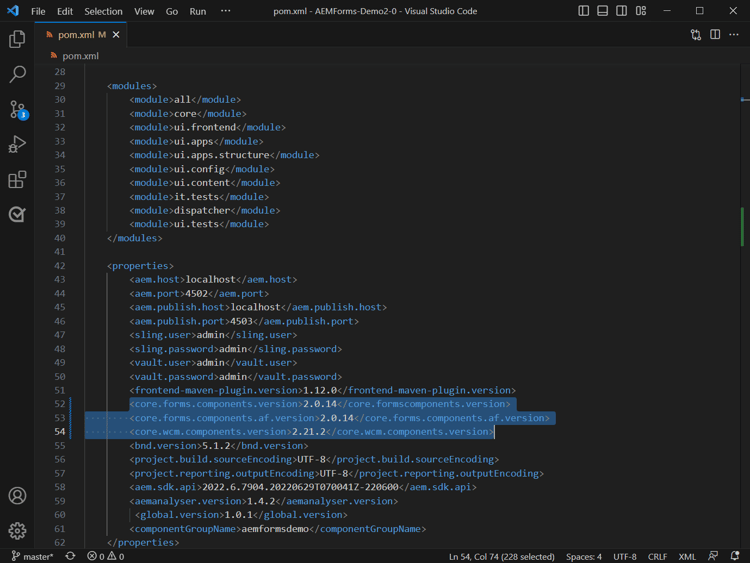
-
[AEM Repository Folder]\pom.xmlファイルの依存関係セクションに次の依存関係を追加し、ファイルを保存します。code language-xml <!-- WCM Core Component Examples Dependencies --> <dependency> <groupId>com.adobe.cq</groupId> <artifactId>core.wcm.components.examples.ui.apps</artifactId> <type>zip</type> <version>${core.wcm.components.version}</version> </dependency> <dependency> <groupId>com.adobe.cq</groupId> <artifactId>core.wcm.components.examples.ui.content</artifactId> <type>zip</type> <version>${core.wcm.components.version}</version> </dependency> <dependency> <groupId>com.adobe.cq</groupId> <artifactId>core.wcm.components.examples.ui.config</artifactId> <version>${core.wcm.components.version}</version> <type>zip</type> </dependency> <!-- End of WCM Core Component Examples Dependencies --> <!-- Forms Core Component Dependencies --> <dependency> <groupId>com.adobe.aem</groupId> <artifactId>core-forms-components-core</artifactId> <version>${core.forms.components.version}</version> </dependency> <dependency> <groupId>com.adobe.aem</groupId> <artifactId>core-forms-components-apps</artifactId> <version>${core.forms.components.version}</version> <type>zip</type> </dependency> <dependency> <groupId>com.adobe.aem</groupId> <artifactId>core-forms-components-af-core</artifactId> <version>${core.forms.components.version}</version> </dependency> <dependency> <groupId>com.adobe.aem</groupId> <artifactId>core-forms-components-af-apps</artifactId> <version>${core.forms.components.version}</version> <type>zip</type> </dependency> <dependency> <groupId>com.adobe.aem</groupId> <artifactId>core-forms-components-examples-apps</artifactId> <type>zip</type> <version>${core.forms.components.version}</version> </dependency> <dependency> <groupId>com.adobe.aem</groupId> <artifactId>core-forms-components-examples-content</artifactId> <type>zip</type> <version>${core.forms.components.version}</version> </dependency> <!-- End of AEM Forms Core Component Dependencies --> -
[AEM Repository Folder]/all/pom.xmlファイルを編集用として開きます。次の依存関係を<embeddeds>セクションに追加し、ファイルを保存します。code language-xml <!-- WCM Core Component Examples Dependencies --> <!-- inside plugin config of filevault-package-maven-plugin --> <!-- embed wcm core components examples artifacts --> <embedded> <groupId>com.adobe.cq</groupId> <artifactId>core.wcm.components.examples.ui.apps</artifactId> <type>zip</type> <target>/apps/${appId}-vendor-packages/content/install</target> </embedded> <embedded> <groupId>com.adobe.cq</groupId> <artifactId>core.wcm.components.examples.ui.content</artifactId> <type>zip</type> <target>/apps/${appId}-vendor-packages/content/install</target> </embedded> <embedded> <groupId>com.adobe.cq</groupId> <artifactId>core.wcm.components.examples.ui.config</artifactId> <type>zip</type> <target>/apps/${appId}-vendor-packages/content/install</target> </embedded> <!-- embed forms core components artifacts --> <embedded> <groupId>com.adobe.aem</groupId> <artifactId>core-forms-components-af-apps</artifactId> <type>zip</type> <target>/apps/${appId}-vendor-packages/application/install</target> </embedded> <embedded> <groupId>com.adobe.aem</groupId> <artifactId>core-forms-components-af-core</artifactId> <target>/apps/${appId}-vendor-packages/application/install</target> </embedded> <embedded> <groupId>com.adobe.aem</groupId> <artifactId>core-forms-components-examples-apps</artifactId> <type>zip</type> <target>/apps/${appId}-vendor-packages/content/install</target> </embedded> <embedded> <groupId>com.adobe.aem</groupId> <artifactId>core-forms-components-examples-content</artifactId> <type>zip</type> <target>/apps/${appId}-vendor-packages/content/install</target> </embedded>note note NOTE ${appId}を appId に置き換えます。${appId}を見つけるには、[AEM Repository Folder]/all/pom.xmlファイル内で-packages/application/install用語を検索します。-packages/application/install用語の前のテキストが${appId}です。例えば、次のコードはmyheadlessformが${appId}です。code language-none com.myheadlessform myheadlessform.ui.apps zip /apps/myheadlessform-packages/application install -
[AEM Repository Folder]/all/pom.xmlファイルの<dependencies>セクションに、次の依存関係を追加し、ファイルを保存します。code language-xml <!-- Other existing dependencies --> <!-- wcm core components examples dependencies --> <dependency> <groupId>com.adobe.cq</groupId> <artifactId>core.wcm.components.examples.ui.apps</artifactId> <type>zip</type> </dependency> <dependency> <groupId>com.adobe.cq</groupId> <artifactId>core.wcm.components.examples.ui.config</artifactId> <type>zip</type> </dependency> <dependency> <groupId>com.adobe.cq</groupId> <artifactId>core.wcm.components.examples.ui.content</artifactId> <type>zip</type> </dependency> <!-- forms core components dependencies --> <dependency> <groupId>com.adobe.aem</groupId> <artifactId>core-forms-components-af-apps</artifactId> <type>zip</type> </dependency> <dependency> <groupId>com.adobe.aem</groupId> <artifactId>core-forms-components-examples-apps</artifactId> <type>zip</type> </dependency> <dependency> <groupId>com.adobe.aem</groupId> <artifactId>core-forms-components-examples-content</artifactId> <type>zip</type> </dependency> -
[AEM Repository Folder]/ui.apps/pom.xmlを開いて編集します。af-core bundle依存関係を追加し、ファイルを保存します。code language-xml <dependency> <groupId>com.adobe.aem</groupId> <artifactId>core-forms-components-af-core</artifactId> </dependency>note note NOTE 次のアダプティブフォームのコアコンポーネントアーティファクトがプロジェクトに含まれていないことを確認します。 <dependency><groupId>com.adobe.aem</groupId><artifactId>core-forms-components-apps</artifactId></dependency>および <dependency><groupId>com.adobe.aem</groupId><artifactId>core-forms-components-core</artifactId></dependency> -
ファイルを保存して閉じます。
3. プロジェクトを更新して、最新バージョンのフォームのコアコンポーネントを含める
-
[AEM アーキタイププロジェクトフォルダー]/pom.xml を編集用に開きます。
-
ファイルを保存して閉じます。
4. 更新を Git リポジトリにコミットし、パイプラインを実行してリポジトリをデプロイする Commit-the-updates-to-your-git-repository
-
コードを Git リポジトリにコミットするには:
-
ターミナルまたはコマンドプロンプトを開きます。
-
[AEM Repository Folder]に移動し、次のコマンドをリスト順に実行します。code language-shell git add pom.xml git add all/pom.xml git add ui.apps/pom.xml git commit -m "Added dependencies for Adaptive Forms Core Components" git push origin
-
-
ファイルが Git リポジトリにコミットされた後、パイプラインを実行します。
パイプラインが正常に実行されると、対応する環境でアダプティブフォームのコアコンポーネントが有効になります。また、アダプティブフォーム(コアコンポーネント)テンプレートと Canvas 3.0 テーマが、Forms as a Cloud Service 環境に追加され、コアコンポーネントベースのアダプティブフォームをカスタマイズして作成するオプションが提供されます。
よくある質問 faq
コアコンポーネントとは core-components
コアコンポーネントは、AEM で web サイトの開発時間を短縮しメンテナンスコストを削減するための、標準化された web コンテンツ管理(WCM)コンポーネントのセットです。
コアコンポーネントの有効化に関しては、どのような機能が追加されますか? core-components-capabilities
お使いの環境でアダプティブフォームのコアコンポーネントを有効にすると、空白のコアコンポーネントベースのアダプティブフォームテンプレートと Canvas 3.0 テーマが環境に追加されます。お使いの環境でアダプティブフォームのコアコンポーネントを有効にすると、次の操作を実行できます。
- コアコンポーネントベースのアダプティブフォームの作成。
- コアコンポーネントベースのアダプティブフォームテンプレートの作成。
- コアコンポーネントベースのアダプティブフォームテンプレート用のカスタムテーマの作成。
- コアコンポーネントベースのアダプティブフォームの JSON 表現を、フォームのヘッドレス表現を必要とするモバイル、web、ネイティブアプリ、サービスなどのチャネルに提供。
アダプティブフォームのコアコンポーネントは、自分の環境で有効になっていますか? enable-components
お使いの環境でアダプティブフォームのコアコンポーネントが有効になっていることを確認するには:
-
AEM Forms Cloud Service Git リポジトリの
[AEM Repository Folder]/all/pom.xmlファイルを開きます。 -
次の依存関係を検索します。
- core-forms-components-af-core
- core-forms-components-core
- core-forms-components-apps
- core-forms-components-af-apps
- core-forms-components-examples-apps
- core-forms-components-examples-content
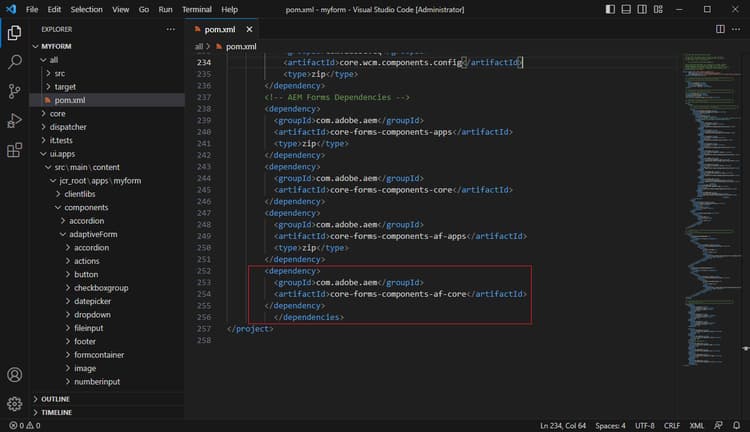
依存関係が存在する場合、お使いの環境でアダプティブフォームのコアコンポーネントが有効になります。