例
このパッケージでは、カスタマイズの例も提供しています(guides_extension/srcで利用可能)。 以下は、それぞれの簡単な説明です。
-
コンテキストメニュー:この例では、
file_optionsコンテキストメニューをカスタマイズして、DeleteおよびEditオプションを削除し、DuplicateオプションをDownloadオプションに置き換えました。 コンテキストメニューのコードサンプルをダウンロードします。code language-typescript enum VIEW_STATE { APPEND = 'append', PREPEND = 'prepend', REPLACE = 'replace', } const loadDitaFile = (filePath, uuid) =>{ return $.ajax({ type: 'POST', url: '/bin/referencelistener', data: { operation: 'getdita', path: filePath, type: uuid ? 'UUID' : 'PATH', cache: false, }, }) } const fileOptions = { id: "file_options", contextMenuWidget: "repository_panel", view: { items: [ { component: "div", target: { key: "displayName", value: "Delete", viewState: VIEW_STATE.REPLACE } }, { component: "div", target: { key: "displayName", value: "Edit", viewState: VIEW_STATE.REPLACE } }, { "displayName": "Download", "data": { "eventid": "downloadFile" }, "icon": "downloadFromCloud", "class": "menu-separator", target: { key: "displayName", value: "Duplicate", viewState: VIEW_STATE.REPLACE } }, ] }, controller: { downloadFile() { const path = this.getValue('selectedItems')[0].path loadDitaFile(path, true).then((file) => { function download_file(name, contents) { const mime_type = "text/plain"; const blob = new Blob([contents], { type: mime_type }); const dlink = document.createElement('a'); dlink.download = name; dlink.href = window.URL.createObjectURL(blob); dlink.onclick = function () { // revokeObjectURL needs a delay to work properly const that = this; setTimeout(function () { window.URL.revokeObjectURL(that.href); }, 1500); }; dlink.click(); dlink.remove(); } download_file(path, file.xml) }); } } } export default fileOptions -
左パネル:この例では、
left tab panelをカスタマイズして、「TEST EXTENSION」というタイトルの別のtabと、ラベルがTest Tab Panelの対応するtab panelを作成しました。
左パネル のコードサンプルをダウンロードします。code language-typescript const tabLeftPanel = { "id": "left_panel_container", "tabView": { "id": "left_panel_container", "tabs": [ { "component": "tab", "id": "new_tab_extension", "extraclass": "collection-panel-tab", "showClass": "@visibleTabs.collection_panel", "on-click": "tabClick", "icon": "collection", "title": "TEST EXTENSION", "label": "TEST EXTENSION", "prevTabID": "condition_panel" }, ], "tabPanels": [ { "component": "tabPanel", "tabId": "new_tab_extension", "showClass": "@visibleTabs.citation_panel", "items": [ { "id": "annotation_toolbox" } ], }, ] } } export default tabLeftPanel -
右側パネル:この例では、
right tab panelをカスタマイズして、「TEST EXTENSION」というタイトルの別のtabと、ラベルがNew Tab Panelの対応するtab panelを作成しました。 右側のパネル のコードサンプルをダウンロードします。code language-typescript const rightPanel = { "id": "right_panel_container", "tabView": { "id": "right_panel_container_tab", "tabs": [ { "component": "tab", "id": "new_tab_extension", "on-click": "tabClick", "icon": "collection", "title": "TEST EXTENSION", }, ], "tabPanels": [ { "component": "tabPanel", "tabId": "new_tab_extension", "items": [ { "component": "label", "label": "New Tab Label", } ], }, ] } } export default rightPanel -
リポジトリパネル: リポジトリパネル のコードサンプルをダウンロードします。
code language-typescript export enum VIEW_STATE2 { APPEND = 'append', PREPEND = 'prepend', REPLACE = 'replace', } export default { class: "flex bg-red-100 bg-green-200 bg-green-300 mr-4", id: 'repository_panel', view: { className: '', items: [ { target: { key: "id", value: 'respository-' , }, component: 'widget', id: 'loading_shimmer', viewState: VIEW_STATE2.REPLACE, index: 2, }, { component: 'button', label: 'Close', 'on-click': 'cancel', variant: 'secondary', quiet: true, index: 20, }, { label: "@testLabel", component: "label" } ], }, controller: { init: function() { console.log('subject: ', this.subject) this.subscribe({ key: 'rename', next: () => { console.log('rename using extension') } }) console.log('Logging view config ', this.viewConfig) this.next(this.viewConfig.items[1].searchModeChangedEvent, { searchMode: true }) this.subscribeAppEvent({ key: 'app.active_document_changed', next: () => { console.log('active doc changed subs') } }) this.subscribeAppModel('app.mode', () => { console.log('app mode subs') } ) this.subscribeParentEvent({ key: 'tabChange', next: () => { console.log('tab change subs') } }) this.parentEventHandlerNext('tabChange', { data: 'map_panel' }) this.appModelNext('app.mode', 'author') this.appEventHandlerNext('app.active_document_changed', 'active doc changed') }, cancel: function (args) { this.setValue('testLabel', 'testlabel2') }, }, model: { deps: ['testLabel'], }, } -
ツールバー:この例では、
Insert Element、Insert Paragraph、Insert Numbered List、Insert Bulleted Listのボタンを、これらすべてを含む単一のMore Insert Optionsボタンに置き換えました。 ツールバーのコードサンプルをダウンロードします。code language-typescript import { VIEW_STATE } from "./review_app_examples/review_comment" const topbarExtend = { id: "toolbar", view: { items: [ { component: "div", target: { key: "title", value: "Insert Element", viewState: VIEW_STATE.REPLACE } }, { component: "div", target: { key: "title", value: "Insert Paragraph", viewState: VIEW_STATE.REPLACE } }, { component: "div", target: { key: "title", value: "Insert Numbered List", viewState: VIEW_STATE.REPLACE } }, { component: "div", target: { key: "title", value: "Insert Bulleted List", viewState: VIEW_STATE.REPLACE } }, { "component": "button", "extraclass": "insert-multimedia", "icon": "more", "variant": "action", "quiet": true, "holdAffordance": true, "title": "More Insert Options", "elementID": "toolbar_insert", "on-click": { "name": "APP_SHOW_OPTIONS_POPOVER", "args": { "target": "toolbar_insert", "extraclass": "new_options_buttons", "items": [ { "component": "button", "icon": "add", "variant": "action", "quiet": true, "title": "Insert Element", "on-click": "AUTHOR_SHOW_INSERT_ELEMENT_UI" }, { "component": "button", "icon": "textParagraph", "variant": "action", "quiet": true, "title": "Insert Paragraph", "on-click": "INSERT_P" }, { "component": "button", "icon": "textNumbered", "variant": "action", "quiet": true, "title": "Insert Numbered List", "on-click": "AUTHOR_INSERT_REMOVE_NUMBERED_LIST" }, { "component": "button", "icon": "textBulleted", "variant": "action", "quiet": true, "title": "Insert Bulleted List", "on-click": "AUTHOR_INSERT_REMOVE_BULLETED_LIST" }, { "component": "button", "icon": "table", "variant": "action", "quiet": true, "title": "Insert Table", "on-click": "AUTHOR_INSERT_ELEMENT", } ] }, }, target: { key: "title", value: "Insert Table", viewState: VIEW_STATE.REPLACE } }, ] }, controller: { init() { console.log(this.proxy.getValue("canUndo")) this.proxy.subscribeAppEvent({ key: "editor.preview_rendered", next: async function (e) { console.log(this.proxy.getValue("canUndo")) }.bind(this) }) }, INSERT_P() { this.next("AUTHOR_INSERT_ELEMENT", "p") } } } export default topbarExtend -
メタデータパネルの「管理」ボタン:この例では、選択したファイルが読み取り専用モードになっているときに無効になるように、管理 ボタン(レポートページのメタデータパネルにある)をカスタマイズしました。 これにより、編集用ではないファイルのメタデータが誤って編集されるのを防ぐことができます。 メタデータパネル 🔗の管理ボタンのコードサンプルをダウンロードします。
code language-typescript const mapConsoleActionBar = { id: "map_console_action_bar", view: { items: [ { "key": "manageTags", "component": "button", "title": "Manage", "on-click": "reports.manage_report", "label": "Manage", "icon": "s2AppGear", "type": "secondary", "variant": "action", "quiet": true, "show": "@showManageTags", "disabled": "$$extensionMap.overrideShowManageTags", target: { key: "title", value: "Manage", viewState: 'replace' } }, { "key": "selectAll", "component": "button", "title": "@selectAllTitle", "on-click": "SELECT_ALL", "label": "@selectAllTitle", "variant": "action", "extraclass": "select-all-button", "quiet": true, "show": "@showSelectAllButton", "hide": "$$extensionMap.overrideShowManageTags", target: { key: "key", value: "selectAll", viewState: 'replace' } }, ] } } function getAutoCheckoutConfigFromAppModel() { const config = tcx.model.getValue(tcx.model.KEYS.EDITOR_CHECKOUT_CONFIG) return config === true || config === 'true' } const bulkMetadataEditorController = { id: "bulkmetadata_report_view", controller: { rowSelectionChanged() { const selectedItems = this.getValue('selectedItems'); let areReadOnlyFilesSelected = false; let autoCheckoutConfig = getAutoCheckoutConfigFromAppModel(); for (let idx = 0; idx < selectedItems.length; idx++) { const item = selectedItems[idx].obj; const isLocked = Boolean(item.isCheckedOut); if (autoCheckoutConfig && !isLocked) { areReadOnlyFilesSelected = true; break; } } this.setExtensionAppState('overrideShowManageTags', areReadOnlyFilesSelected); } } } export { mapConsoleActionBar, bulkMetadataEditorController }
アプリの例の確認
-
注釈ツールボックス:この例では、AEMで現在のレビュートピックを開く注釈ツールボックスに別のボタンを追加しました。 Annotation Toolboxのコードサンプルをダウンロードします。
code language-typescript import { VIEW_STATE } from './review_comment' export default { id: 'annotation_toolbox', view: { items: [ { component: 'button', icon: 'linkOut', title: 'openTopicInAEM', 'on-click': 'openTopicInAEM', target: { key: 'value', value: 'addcomment', viewState: VIEW_STATE.APPEND }, }, ], }, controller: { openTopicInAEM: function (args) { const topicIndex = tcx.model.getValue(tcx.model.KEYS.REVIEW_CURR_TOPIC) const { allTopics = {} } = tcx.model.getValue(tcx.model.KEYS.REVIEW_DATA) || {} tcx.appGet('util').openInAEM(allTopics[topicIndex]) }, }, } -
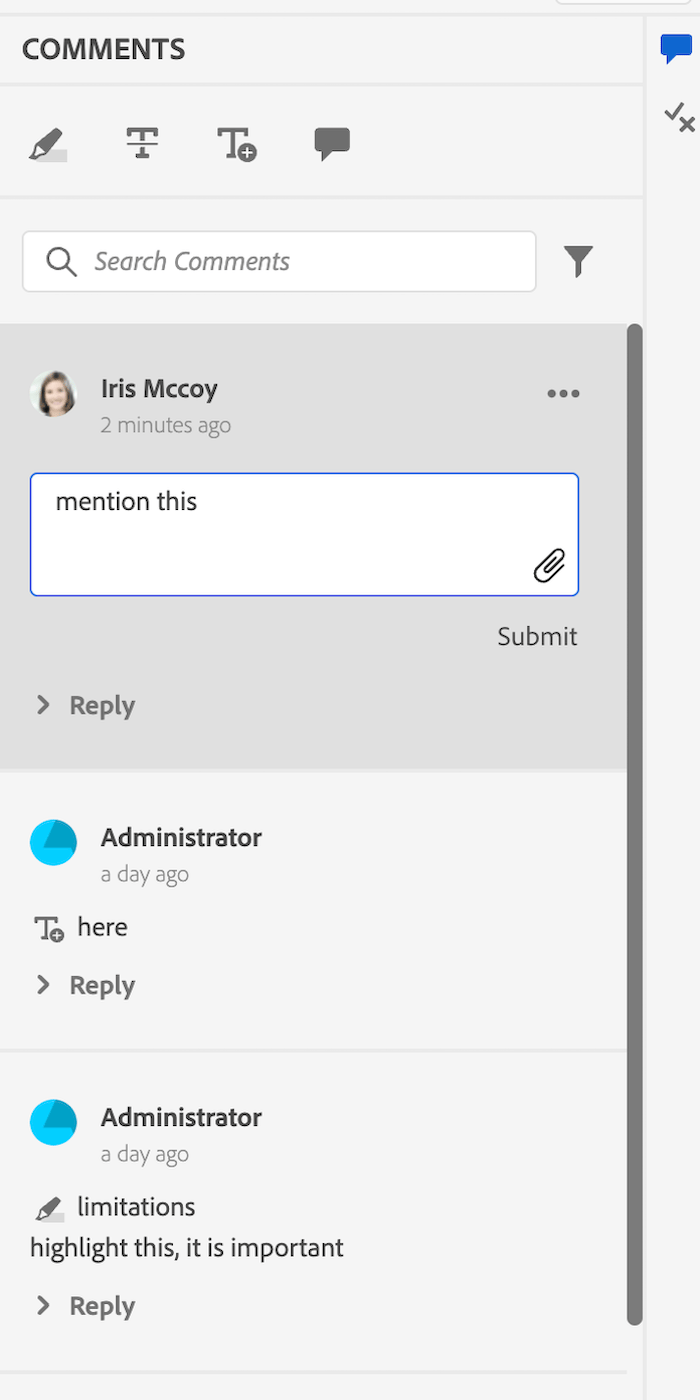
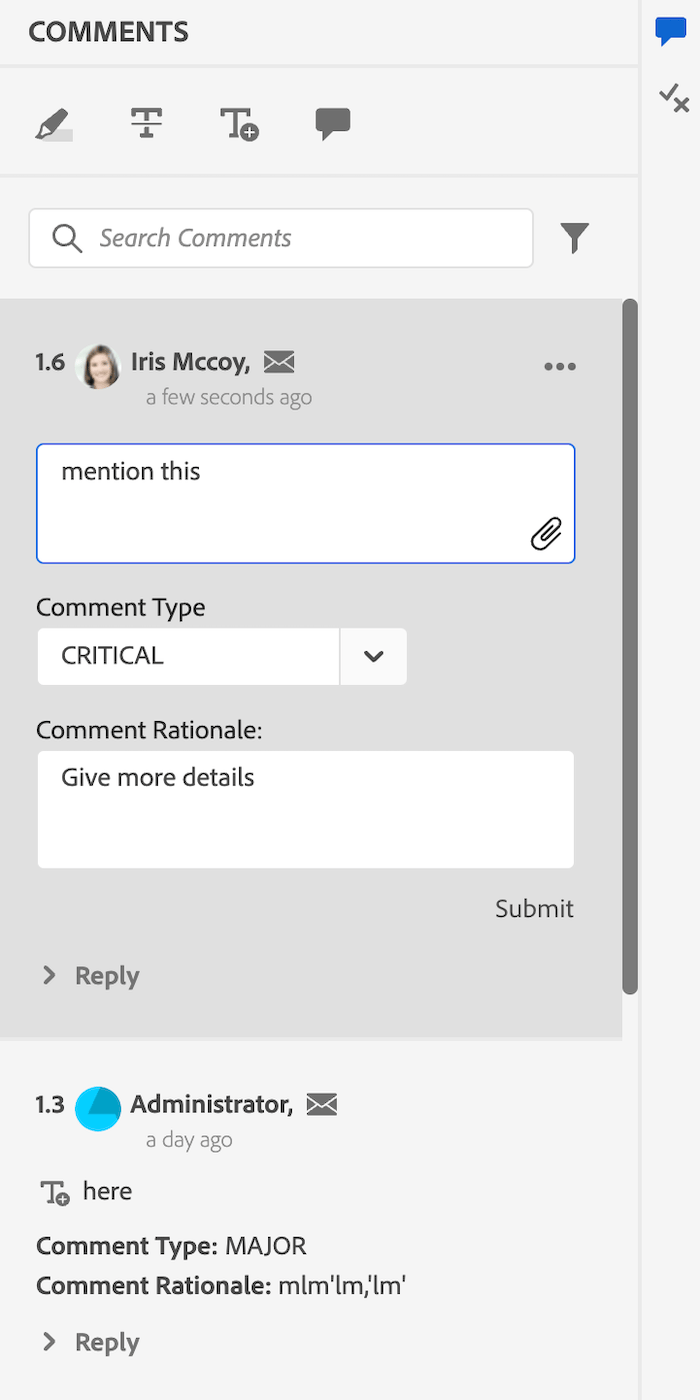
コメントを確認:この例では、ユーザー名をユーザー情報(コメンターのフルネームとタイトルから成る)に置き換え、一意のコメント ID、mailTo アイコン、およびコメントの重大度と根拠を言及するための入力フィールドを追加しました。
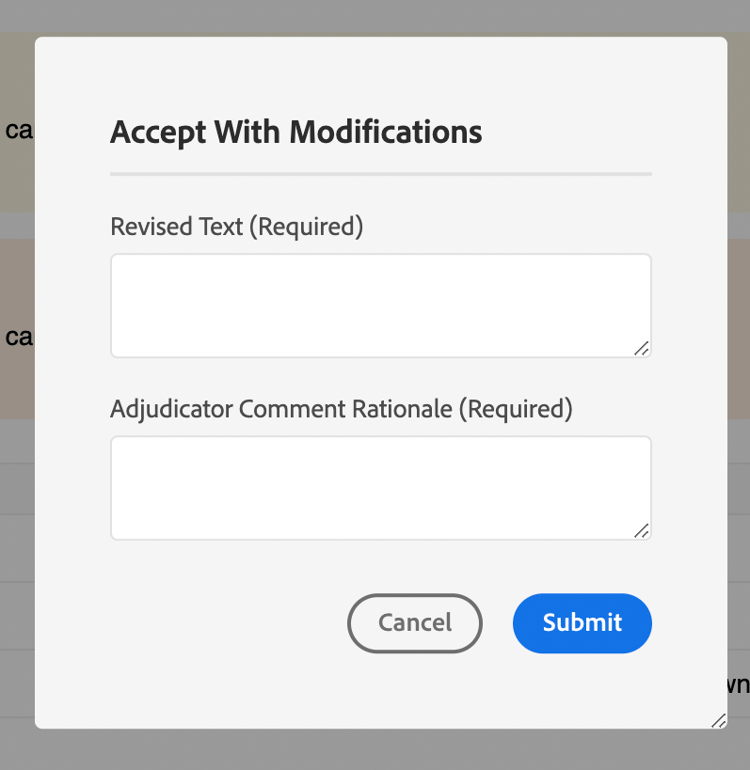
また、ダイアログを開くXMLEditor側のコメントにaccept with modificationボタンを追加しました。Review Commentのコードサンプルをダウンロードします。code language-typescript export enum VIEW_STATE { APPEND = 'append', PREPEND = 'prepend', REPLACE = 'replace', } const reviewComment = { id: 'review_comment', view: { items: [ { component: 'label', label: '@extraProps.commentUniqId', extraclass: 'commentUniqId', target: { key: 'extraclass', value: 'user-image', viewState: VIEW_STATE.PREPEND, }, }, { component: 'div', extraclass: 'user-info', items: [ { component: 'label', "label": "@extraProps.userInfo", "extraclass": "reviewer-name", }, { component: 'button', icon: 'email', extraclass: 'mailto-icon', "on-click": "openMailTo" } ], target: { key: 'extraclass', value: 'reviewer-name', viewState: VIEW_STATE.REPLACE, }, }, { component: 'div', extraclass: 'comment-details', items: [ { component: 'div', extraclass: 'comment-type-text', items: [ { component: 'label', label: 'Comment Type: ', "extraclass": "severity-label", }, { component: 'label', label: '@extraProps.severity' } ], }, { component: 'div', extraclass: 'comment-rationale', items: [ { component: 'label', label: 'Comment Rationale: ', extraclass: 'comment-rationale-label' }, { component: 'label', label: '@extraProps.commentRationale' } ], }, ], target: { key: 'id', value: 'attachment_tiles', viewState: VIEW_STATE.PREPEND, }, }, { component: 'div', items: [ { component: 'div', extraclass: 'edit-comment-type', items: [ { component: 'label', "label": "Comment Type", }, { "component": "comboBox", "data": "@extraProps.labels", "extraclass": "severity-combobox", "multiple": false, "placeholder": "", 'value': "@extraProps.severity", "on-change": "changeSeverity", "on-keyup": { "name": "changeSeverity", "eventArgs": { "keys": ["ENTER"] } }, }, ], }, { component: "div", extraclass: 'edit-comment-rationale', items: [ { component: 'label', label: 'Comment Rationale' }, { component: "textarea", extraclass: "edit-textfield", "id": "edit_comment_rationale", "data": "@extraProps.commentRationale", "on-keyup": { "name": "submitEditComment", "eventArgs": { "keys": [ "ENTER" ] } }, "stopKeyPropagation": true }, ], }, ], target: { key: 'class', value: 'comment-block', viewState: VIEW_STATE.APPEND, }, }, { component: "button", "icon": "MultipleAdd", "variant": "action", "quiet": true, "extraclass": "hover-item", "title": "Accept with Modifications", "on-click": "acceptWithModification", target: { key: 'title', value: 'Reject comment', viewState: VIEW_STATE.APPEND, }, } ], }, controller: { init: function () { const reqComment = tcx.commentStore.getComment(this.getValue('commentId')) this.setValue('extraProps', reqComment.extraProps) this.setValue("labels", ['None', 'CRITICAL', 'MAJOR', 'SUBSTANTATIVE', 'ADMINISTRATIVE']) }, sendAcceptWithModificationProps(args) { this.next('updateExtraProps', args) }, changeSeverity: function (args) { this.setValue("severity", args.data) this.next('updateExtraProps', { 'severity': this.getValue("severity") } ) }, changeCommentRationale: function () { this.next('updateExtraProps', { 'commentRationale': this.getValue("commentRationale") } ) }, submitEditComment({ domEvent }: { domEvent?: KeyboardEvent } = {}) { if (domEvent?.key === 'Enter') { this.setValue('commentRationale', _.trim(this.getValue('commentRationale'))) } if (this.getValue("originalCommentRationale") !== this.getValue("commentRationale")) { this.setValue("originalCommentRationale", this.getValue("commentRationale")) this.next('changeCommentRationale') } }, openMailTo() { const mailToLink = `mailto:${this.getValue("userEmail")}` tcx.util.openLink(mailToLink) }, acceptWithModification() { tcx.eventHandler.next(tcx.eventHandler.KEYS.APP_SHOW_DIALOG, { id: 'accept_with_modification_dialog', args: { onSuccess: (extraProps) => this.next('sendAcceptWithModificationProps', extraProps), } }) } } } export default reviewComment -
コメント返信:この例では、ユーザー名をユーザー情報(コメンターのフルネームとタイトルで構成)に置き換え、コメントヘッダーにmailTo アイコンを追加しました。 コメント返信のコードサンプルをダウンロードします。
code language-typescript import { VIEW_STATE } from "./review_comment" const commentReply = { id: 'comment_reply', view: { items: [ { component: 'div', extraclass: 'user-info', items: [ { component: 'label', label: "@extraProps.userInfo", "extraclass": "user-name", }, { component: 'button', icon: 'email', extraclass: 'mailto-icon', "on-click": "openMailTo" } ], target: { key: 'extraclass', value: 'user-name', viewState: VIEW_STATE.REPLACE, }, }, ], }, model: { deps: [], }, controller: { init: function () { const reqComment = tcx.commentStore.getComment(this.getValue('commentId')) const reqReply = reqComment.findReply(this.getValue('replyId')) this.setValue('extraProps', reqReply.extraProps) }, openMailTo(){ const mailToLink = `mailto:${this.getValue("userEmail")}` tcx.util.openLink(mailToLink) } } } export default commentReply -
インラインレビューパネル:このファイルでは、
Review CommentとComment Replyの例で言及されている一意のコメント IDを計算して割り当てます。-
setCommentIdメソッドは、コメント数に応じて、各コメントに一意のコメント IDを設定します。 -
setUserInfoは、各コメントにフルネームとタイトルを使用して、userInfoの値を設定します。 -
onNewCommentEventは、新しいコメントまたは返信のたびにsetUserInfoメソッドが呼び出されることを保証します。 -
updatedProcessComments関数は新しいコメントイベントごとに実行され、新しいコメントイベントを取得するとsetCommentIdが呼び出されます。
インラインレビューパネル のコードサンプルをダウンロードします。
code language-typescript export const updatedProcessComments = function (data, topicIndex) { const newCommentEvents = ["highlight", "strikethrough", "addcomment", "insertext"] _.each(data, (event: any) => { const identify = _.findIndex(newCommentEvents, eventType => eventType === event.eventType) if (identify !== -1) { this.next('setCommentId', { event, topicIndex }) } }) } const inline_extend = { id: 'inline_review_panel', model: { deps: ['commentCount'], }, controller: { init: function () { this.setValue("commentCount", {}) tcx.model.subscribeVal(tcx.model.KEYS.REVIEW_DATA, (reviewData) => { for (let topicId of reviewData.topicsinReview) { topicId = topicId.toString() tcx.commentStore.onProcessEvent(topicId, (events) => updatedProcessComments.call(this, events, topicId)) } }) }, onNewCommentEvent(args) { const events = _.get(args, "events") const currTopicIndex = tcx.model.getValue(tcx.model.KEYS.REVIEW_CURR_TOPIC) || this.getValue('currTopicIndex') || "0" const event = _.get(_.get(events, currTopicIndex), '0') const newComment = _.get(args, 'newComment') const newReply = _.get(args, 'newReply') if ((newComment || newReply) && event) { this.next('setUserInfo', event) } }, setUserInfo(event) { tcx.api?.getUserInfo(event.user).subscribe(userData => { const extraProps = { "userFirstName": userData?.givenName || '', "userLastName": userData?.familyName || '', "userTitle": userData?.title || '', "userJobTitle": userData?.jobTitle || '', 'userEmail': userData?.email || '', } const name = `${extraProps.userFirstName} ${extraProps.userLastName}, ${extraProps.userJobTitle}` if (_.trim(name) === ',') { extraProps.userInfo = userData.displayName } else { extraProps.userInfo = name } const data = { ...event, extraProps } this.next( 'sendExtraProps', data ) }) }, setCommentId({ event, topicIndex }) { const processingComments = this.getValue('processingComments') const modelComment = _.find(processingComments, { commentId: event.commentId }) const reqComment = tcx.commentStore.getComment(event.commentId) const commentCount = this.getValue('commentCount') if (_.has(this.getValue('commentCount'), topicIndex)) { commentCount[topicIndex] += 1 this.setValue("commentCount", commentCount) } else { commentCount[topicIndex] = 1 } if (reqComment) { this.setValue("commentCount", commentCount) const commentUniqId = `${Number(topicIndex) + 1}.${commentCount[topicIndex]}` reqComment.extraProps.set("commentUniqId", commentUniqId) modelComment?.extraProps?.set("commentUniqId", commentUniqId) } }, }, } export default inline_extend -
-
トピックレビューパネル:このファイルは インラインレビューパネル を拡張し(前に示したように)、追加されたカスタマイズがレビューアプリ側でも機能するようになります。 トピックレビューパネル のコードサンプルをダウンロードします。
code language-typescript import inline_extend from './inline_review_panel'; import { updatedProcessComments } from './inline_review_panel'; const topic_reviews_extend = { id: 'topic_reviews', model: { deps: [], }, controller: { ...inline_extend.controller, init: function () { this.setValue("commentCount", {}) tcx.model.subscribeVal(tcx.model.KEYS.REVIEW_DATA, (reviewData) => { for (let topicId of reviewData.topicsinReview) { topicId = topicId.toString() tcx.commentStore.onProcessEvent(topicId, (events) => updatedProcessComments.call(this, events, topicId)) } }) }, }, } export default topic_reviews_extend -
変更ダイアログで同意:これは、アプリに新しいウィジェットを追加する例です。 ここでは、2つの入力テキストフィールド
Revised TextとAdjudicator Comment Rationaleを持つ新しいダイアログを作成しました。 変更ダイアログで同意のコードサンプルをダウンロードします。code language-typescript const acceptWithModification = { id: 'accept_with_modification_dialog', view: { component: "dialog", "header": { "items": [ { component: 'label', extraclass: "header", label: 'Accept With Modifications', } ] }, content: { items: [ { component: 'div', "extraclass": "revised-text", items: [ { component: 'label', label: 'Revised Text (Required)', extraclass: 'revised-text-label' }, { component: "textarea", "extraclass": "revised-text-textarea", "data": "@extraProps.revisedText", "stopKeyPropagation": true, } ] }, { component: 'div', "extraclass": "adjudication-rationale", items: [ { component: 'label', label: 'Adjudicator Comment Rationale (Required)', extraclass: 'adjudication-rationale-label' }, { component: "textarea", extraclass: "adjudication-rationale-textarea", "data": "@extraProps.adjudicationRationale", "on-keyup": { "name": "", "eventArgs": { "keys": [ "ENTER" ] } }, "stopKeyPropagation": true } ] }, ], }, footer: { "items": [ { "component": "button", "label": "Cancel", "on-click": "handleClose", "variant": "secondary" }, { "component": "button", "label": "Submit", "variant": "cta", "on-click": "submitAcceptWithModification" } ] } }, model: { deps: [], }, controller: { init: function () { }, submitAcceptWithModification: function () { const extraProps = { 'revisedText': this.getValue("revisedText"), 'adjudicationRationale': this.getValue("adjudicationRationale"), } this.args.onSuccess(extraProps) this.next('handleClose') }, handleClose() { tcx.eventHandler.next(tcx.eventHandler.KEYS.APP_HIDE_DIALOG, { id: 'accept_with_modification_dialog' }) } } } export default acceptWithModification -
リビジョンを保存:これは、既存のダイアログを更新する方法の例です。 「公開」ボタンを追加します。 ダイアログのコンテンツを変更できます。 ここでjsonを参照してください:
save_revision。 リビジョンを保存のコードサンプルをダウンロードします。code language-typescript enum VIEW_STATE { APPEND = 'append', PREPEND = 'prepend', REPLACE = 'replace', } const saveRevision = { id: 'save_revision', view: { items: [ { component: "button", label: 'publish', target: { key: 'label', value: 'Save', viewState: VIEW_STATE.APPEND } } ] } } export default saveRevision
カスタマイズ前とカスタマイズ後のレビューパネルを次に示します。