[執筆:Atish Goswami]{class="badge informative" title="アティッシュ ゴスワミ"} [PaaS のみ]{class="badge informative" title="Adobe Commerce on Cloud プロジェクト(Adobeが管理する PaaS インフラストラクチャ)およびオンプレミスプロジェクトにのみ適用されます。"}
データベースプロファイラーの設定
Commerce データベースプロファイラーは、ページに実装されているすべてのクエリを表示します。これには、各クエリの時間や、適用されたパラメーターが含まれます。
手順 1:デプロイメント設定を変更する
<magento_root>/app/etc/env.php を変更して、database profiler クラス に次の参照を追加します。
        'profiler' => [
            'class' => '\Magento\Framework\DB\Profiler',
            'enabled' => true,
        ],
次に例を示します。
 'db' =>
  array (
    'table_prefix' => '',
    'connection' =>
    array (
      'default' =>
      array (
        'host' => 'localhost',
        'dbname' => 'magento',
        'username' => 'magento',
        'password' => 'magento',
        'model' => 'mysql4',
        'engine' => 'innodb',
        'initStatements' => 'SET NAMES utf8;',
        'active' => '1',
        'profiler' => [
            'class' => '\Magento\Framework\DB\Profiler',
            'enabled' => true,
        ],
      ),
    ),
  ),
手順 2:出力の設定
Commerce アプリケーションのブートストラップファイルで出力を設定します。このファイルは、<magento_root>/pub/index.php の場合も、web サーバーの virtual host configuration に格納されている場合もあります。
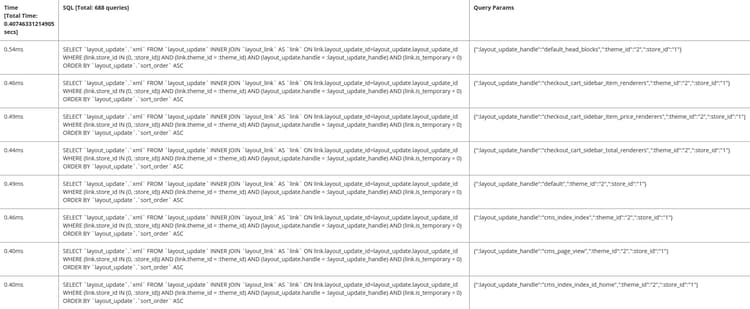
次の例では、結果が 3 列のテーブルに表示されます。
- 合計時間(ページ上のすべてのクエリの実行時間の合計を表示します)
- SQL (すべての SQL 問合せを表示します。行ヘッダーには問合せの件数が表示されます)
- クエリパラメーター(各 SQL クエリのパラメーターを表示します)
出力を設定するには、ブートストラップファイルの $bootstrap->run($app); 行の後に次のテキストを追加します。
/** @var \Magento\Framework\App\ResourceConnection $res */
$res = \Magento\Framework\App\ObjectManager::getInstance()->get('Magento\Framework\App\ResourceConnection');
/** @var Magento\Framework\DB\Profiler $profiler */
$profiler = $res->getConnection('read')->getProfiler();
echo "<table cellpadding='0' cellspacing='0' border='1'>";
echo "<tr>";
echo "<th>Time <br/>[Total Time: ".$profiler->getTotalElapsedSecs()." secs]</th>";
echo "<th>SQL [Total: ".$profiler->getTotalNumQueries()." queries]</th>";
echo "<th>Query Params</th>";
echo "</tr>";
foreach ($profiler->getQueryProfiles() as $query) {
    /** @var Zend_Db_Profiler_Query $query*/
    echo '<tr>';
    echo '<td>', number_format(1000 * $query->getElapsedSecs(), 2), 'ms', '</td>';
    echo '<td>', $query->getQuery(), '</td>';
    echo '<td>', json_encode($query->getQueryParams()), '</td>';
    echo '</tr>';
}
echo "</table>";
手順 3:結果の表示
結果を表示するには、ストアフロントまたは管理者の任意のページに移動します。 次に例を示します。
recommendation-more-help
386822bd-e32c-40a8-81c2-ed90ad1e198c