サイトに web トラッキングタグを挿入 inserting-tags-in-your-site
簡単な方法 simple-method
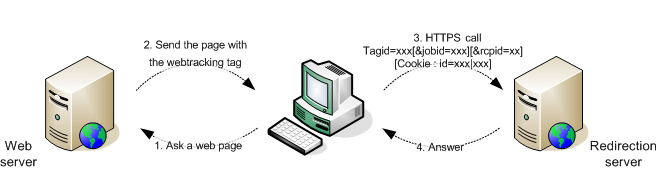
このメソッドでは、トラッキング対象の Web ページのHTMLソースコードに <img> のHTMLタグを挿入することで、リダイレクトサーバーへの HTTP 呼び出しを行います。
例:
<img height='0' width='0' alt='' src='https://localhost/r/12343?tagid=home'
挿入されたタグがリダイレクトサーバーに接続されます。
コンソールで追跡するページを定義する場合、サンプルの web トラッキングタグを生成して、web ページのソースコードにコピー&ペーストすることができます。
ただし、TRANSACTION タイプのタグを使用する場合、取引情報(金額、項目数)および拡張スキーマで定義された情報を挿入するには、JavaScriptを使用してサンプルタグを変更する必要があります。
タグの静的挿入 static-insertion-of-tags
静的タグ挿入を実行するには、コンソールで生成された、または手動で作成されたタグをコピーして web ページのソースに貼り付けるだけです。
例:フォームを表示するページへの web トラッキングタグの挿入。
<html>
  <...>
  <body>
  <script>
      document.write("<img height='0' width='0' alt='' src='https://localhost/r/" + Math.random().toString() + "?tagid=home'>");
    </script>
    <noscript>
     <img height='0' width='0' alt='' src='https://localhost/r/?tagid=home'>
    </noscript>
    <h1>My site</h1>
    <form action="http://localhost/amount.md">
      Quantity: <input type="text" name="quantity"/><br/><br/>
      Amount: <input type="text" name="amount"/><br/><br/>
      <input value="Save" type="submit">
    </form>
  </body>
</html>
確認ページへの TRANSACTION タイプの web トラッキングタグの挿入(「amount.md」)。
<html>
  <body>
    <script>
      function getURLparam(name)
      {
        var m = location.search.match new RegExp("[?&]" + name + "=([^&]+)"));
        return m ? unescape(m[1]) : "";
      }

       var params = "https://localhost/r/" + Math.random().toString() + "?tagid=amount&amount="
                      +getURLparam("amount")+"&article="+getURLparam("quantity");
       document.write("<img height='0' width='0' src='"+params+"'/>");
    </script>

    <h1>Approval confirmation</h1>
  </body>
</html>
Web トラッキングタグの動的な生成 dynamic-generation-of-web-tracking-tags
Web ページが動的に生成される場合、ページ生成時に web トラッキングタグを追加できます。
例:JSP に追加された web トラッキング。
<%@page import="java.util.Random" %>
<html>
  <body>
    <img height='0' width='0' alt='' src='https://localhost/r/<%=new Random().nextInt()%>?tagid=home'>
    <h1>My site</h1>
    <form action="https://localhost/amount.md">
      Quantity: <input type="text" name="quantity"/><br/><br/>
      Amount: <input type="text" name="amount"/><br/><br/>
      <input value="Save" type="submit">
    </form>
  </body>
</html>
<%@page import="java.util.Random" %>
<html>
  <body>
    <%
      String strParams = new Random().nextInt() + "?tagid=amount";
      strParams += "&amount="+request.getParameter("amount");
      strParams += "&article="+request.getParameter("quantity");
    %>
    <img height='0' width='0' alt=''
     src='http://localhost/r/<%=strParams%>'>
    <h1>Approval confirmation</h1>
    </body>
</html>
最適方法 optimum-method-
リダイレクトサーバーに送信される情報を制御したい場合、最も信頼できる方法は、ページ生成言語を使用して HTTP クエリを同期的に実行することです。
作成する URL は、「Web トラッキングタグ:定義 で定義されている構文ルールに従う必要があます。
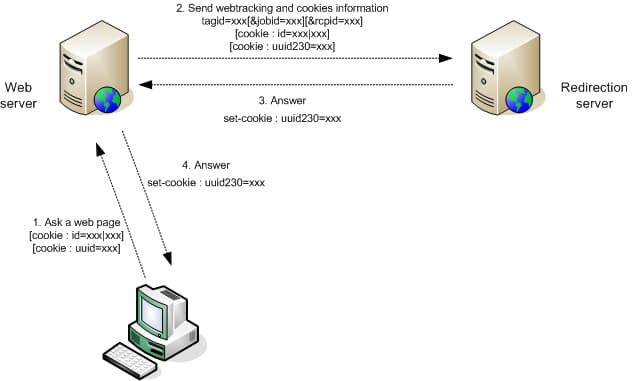
例:アカウント番号を使用した受信者認証を使用した、Java での動的生成。
[...]
  // Recipient account, amount and articles
  String strAccount = request.getParameter("account");
  String strAmount = request.getParameter("amount");
  String strArticle = request.getParameter("article");

  StringBuffer strCookies = new StringBuffer();
  String strSetCookie = null;

  // Get cookies from client request
  Cookie[] cookies = request.getCookies();
  for(int i=0; i< cookies.length; i++ )
  {
    Cookie c = cookies[i];
    String strName = c.getName();
    if( strName.equals("id") || strName.equals("uuid") || strName.equals("uuid230") )
      // Helper function to add cookies in string
      AddCookie(strCookies, c);
  }
  // Now perform a synchronous HTTP request to inform redirection server
  // Add a tagid in auto-discover mode, and a default jobId to use (in hexa)
  StringBuffer strURL = new StringBuffer("https://www.adobe.com/r/a?tagid=cmd_page%7Ct&jobid=27EE");
  if( strAccount != null )
    AddParameter(strURL, "rcpid", "saccount="+strAccount);
  if( strAmount != null )
    AddParameter(strURL, "amount", strAmount);
  if( strArticle != null )
    AddParameter(strURL, "article", strArticle);

  URL url = new URL(strURL.toString());
  HttpURLConnection connection = (HttpURLConnection)url.openConnection();
  // Add the client cookies
  if( strCookies.length() > 0 )
    connection.setRequestProperty("Cookie", strCookies.toString());

  int errcode = connection.getResponseCode();

  // Now add the Adobe Campaign cookies if the server returned one :
  if( errcode == 200 )
  {
    strSetCookie = connection.getHeaderField("Set-Cookie");
    if( strSetCookie != null && strSetCookie.length() > 0 )
      response.addHeader("Set-Cookie", strSetCookie);
  }
  [...]