Adobe Commerce teams face competing pressures from revenue, customers, leadership, marketing, operations, and IT, and unmanaged tension becomes commerce risk. This framework helps commerce leaders prevent incidents, respond to bot and agent-driven attacks, and build a risk-reduction playbook.
What is the commerce risk problem?
A site can look healthy on the surface while risk builds underneath it. When that risk turns into an incident, revenue, customer trust, and the team's time are all on the line. The goal is not to make commerce operations sound more complicated, but rather it is to show how a handful of repeatable disciplines can make an Adobe Commerce environment far more predictable. None of the pressures teams face are wrong on their own. The risk shows up when an organization has no shared operating model for balancing them.
This article walks through the modern commerce risk problem, how to prevent incidents through better operations, how to respond to real-world issues, and how to build a risk-reduction playbook, starting with the pressure that commerce teams already feel every day.
Why competing team pressures create commerce risk
The following competing pressures often bolster commerce risk:
-
Revenue - Revenue is always on the line. In any organization, it's the top-line concern everyone focuses on, and it flows down into everything else.
-
Customers - Customers expect the site to work every time. Every time someone returns, they need the same experience they've come to expect, with the customer journey intact from browsing through checkout.
-
Leadership - Leadership needs the site to stay up close to 99 percent of the time, even through deployments, releases, and patches, so they can tell stakeholders and shareholders that uptime is consistent.
-
Marketing - Marketing wants campaigns to move quickly. The team needs to be nimble, building campaigns around whatever is happening in the supply chain at that moment, whether that means putting products on sale or clearing excess inventory. That speed depends on stability and communication across every team.
-
Operations - Operations needs accuracy in inventory, orders, and fulfillment, and the Adobe Commerce environment is what feeds that information to the operations team.
-
IT - IT has to protect the platform, staying on top of Adobe security patches, possible vulnerabilities, and any deployment that needs monitoring.
None of these expectations are wrong on their own. The risk shows up when there is no shared operating model for balancing them.
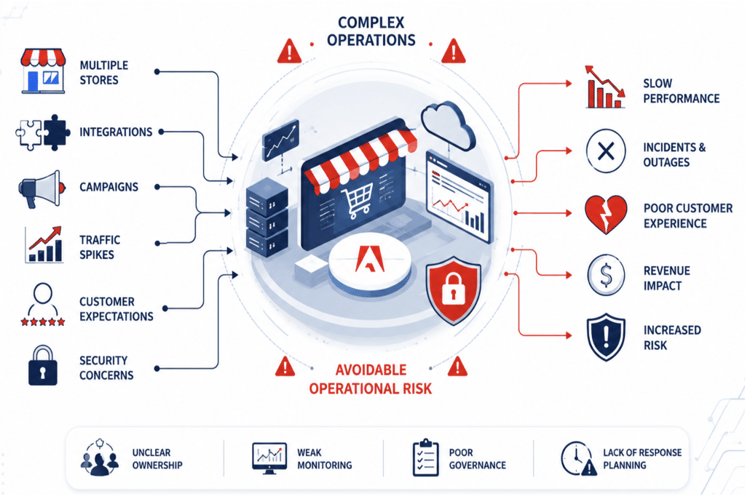
Modern Adobe Commerce operations are more complex than ever. Teams are managing multiple stores, integrations, campaigns, traffic spikes, customer expectations, and security concerns all at once. Many incidents are not caused by the platform itself. They come from avoidable operational risk:
-
Unclear ownership
-
Weak monitoring
-
Poor governance
-
Unmanaged store-scope changes
-
Lack of response planning
Preventing incidents with better operations
Before adding more customization, teams need stronger operating discipline. Five practices help prevent incidents before they start.
-
Run regular platform health checks, sometimes called a SWAT (Site-Wide Analysis Tool) review.
-
Right-size infrastructure as the business grows.
-
Use native Adobe Commerce capabilities first.
-
Create governance around changes.
-
Prepare support escalation readiness before issues happen.
Responding to real-world issues
A practical look at incident response covers what to check first, who to contact, what evidence to collect, and how to protect the customer experience during an active issue.
Constructing incident response
-
Check first. Identify what needs to be checked first the moment an incident is detected.
-
Know who to contact. Identify which team to contact and how to escalate to Adobe Support if needed.
-
Collect the right evidence. Document what evidence to gather and how to communicate internally.
New Relic validation uses monitoring data and internal testing to diagnose an issue and confirm resolution.
Why agent activity often goes unnoticed
Every checkout flow is a magnet for automated agents.
At first glance, everything appears stable. No frontend issues, no system failures. But these agents are specifically designed to blend in. Without proper observability, early signals are missed.
It is important to note that the problem is not the attack itself; it is the lack of visibility into behavior, since issues tend to surface only as payment failures, inventory inconsistencies, or operational spikes. The goal is to stay ahead of automated actors without disrupting real customers, which takes layered defenses and strong visibility: detecting patterns through well-defined alerts and queries before the impact becomes visible.
Where the system is most vulnerable
Guest checkout removes identity validation, making it a primary entry point for agents. Combined with delayed detection, the problem escalates quickly.
Key patterns to monitor
-
Sudden spikes in checkout or payment API calls
-
Abnormal payment failure rates
-
High request frequency on specific endpoints
-
Low interaction depth with frontend flows
Custom NRQL queries, meaning queries written in New Relic's own query language, and dashboards enable early detection. Setting alerts gives teams the ability to respond before customers are affected.
Layered defenses against automated agents
No single control is enough. Each layer plays a role, but together they form a robust defense, and coordination across application, infrastructure, and platform teams is essential.

reCAPTCHA: First line of defense

GEO restriction: Simple but effective
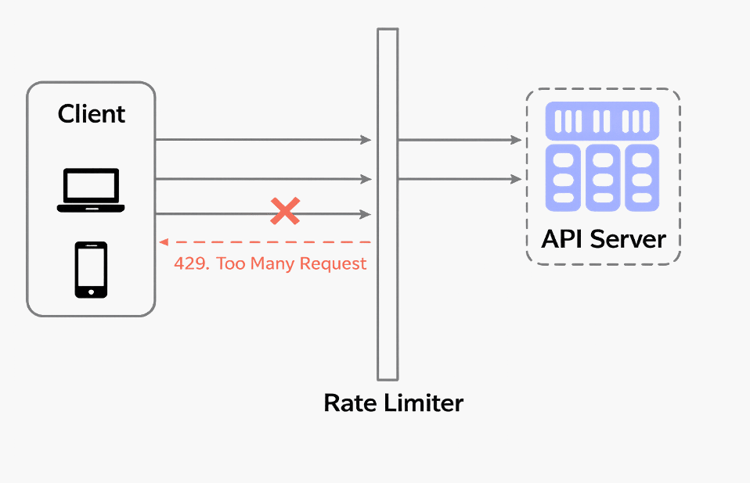
Rate limiting: control and user experience
Proactive measures are essential for safeguarding against any automated attack. Prioritize configuring alerts, use platform logs for investigation, and calibrate rate limits based on traffic behavior. Collaborate with the team to enhance observability and refine security controls. The best point of contact here is Adobe Support.
By adopting these strategies, businesses can protect the customer experience while scaling confidently. The journey toward robust security is ongoing, so stay vigilant and adaptive to emerging threats.
Building a risk-reduction playbook
Actionable steps to improve stability, protect customer experience, and support long-term growth fall into six parts.
-
Assess risk. Identify the areas most likely to impact revenue, customer experience, security, or platform stability.
-
Define governance. Assign clear ownership, approval paths, QA expectations, and rollback plans before deployments.
-
Monitor and detect. Use alerts, New Relic, security scans, and performance trends to catch issues before customers do.
-
Respond fast. Use an incident process to validate impact, escalate with evidence, protect critical flows, and communicate quickly.
-
Recover and learn. Confirm the platform is stable, document what happened, and update the playbook for future issues.
-
Improve continuously. Turn health checks, incidents, and support learnings into better processes and documentation.
Conclusion: Actionable next steps
-
Establish a common operating model that balances revenue, customer experience, leadership reporting, marketing agility, operations accuracy, and IT security needs.
-
Run a recurring Adobe Commerce health check that reviews New Relic, security scan results, alerts, slow transactions, cache behavior, failed integrations, and support-ticket trends on a regular schedule.
-
Build governance around store scope, deployments, and admin changes, with an owner, QA plan, approval path, and rollback plan for every meaningful change.
-
Create an incident response playbook that defines what to check first, which team to contact, what evidence to collect, and how to escalate to Adobe Support.
-
Prioritize configuring alerts, use platform logs for investigation, and calibrate rate limits based on traffic behavior.
-
Layer defenses using reCAPTCHA, GEO restriction, and rate limiting, and collaborate across teams to enhance observability and refine controls.
Watch the full recording of the Skill Exchange session: Security, Stability, and Risk Mitigation for Modern Commerce Operations here.
Key takeaways
-
Create a recurring health check process. Review New Relic, Security Scan results, alerts, slow transactions, cache behavior, failed integrations, and support-ticket trends on a regular schedule.
-
Build governance around changes. Treat websites, stores, store scopes, extensions, and deployments as business-risk decisions. Every meaningful change needs an owner, QA plan, approval path, and rollback plan.
-
Create an incident response playbook. Document what to check first, who to contact, what evidence to collect, how to escalate to Adobe Support, and how to communicate during bot attacks, slowdowns, or failed deployments.
-
Every checkout flow is a magnet for automated agents. Visibility is everything, and no single control is enough.
-
Complexity does not have to become chaos. It becomes risk only when there is no common operating model for balancing competing team pressures.
Frequently Asked Questions from Skill Exchange
How do you proactively block bot attacks?
Confirm traffic is routed through Fastly with the WAF enabled, and block direct access to the origin. Monitor New Relic for unusual IPs, regions, or traffic spikes, and apply rate limiting as patterns emerge. In multi-store environments, verify that any blocking won't affect legitimate customers before rolling it out. Bot behavior changes constantly, so this is best treated as an ongoing practice rather than a one-time fix.
How do you protect REST APIs when attackers are targeting them to place fraudulent orders?
Adobe Commerce's built-in rate limiting, configured through Fastly, is the first line of defense. From there, use New Relic to identify the IP address or request fingerprint behind the activity, then block it directly in the Fastly VCL script. Response status codes should be checked after applying limits to confirm they're taking effect, and logs should continue to be monitored for repeat attempts, since this is a continuous process rather than a single fix.
What native Adobe Commerce settings should you check first to reduce operational risk, and why?
SWAT is the fastest way to surface risk, showing MySQL utilization, indexing and queue backlogs, application errors, and infrastructure pressure. Ahead of any high-traffic event or promotion, New Relic can be used to baseline normal activity and flag traffic that looks automated or unrelated to genuine customers. Combining this with Adobe's built-in IP blocking and rate limiting closes most common gaps. Settings should be evaluated together rather than in isolation, with changes rolled out incrementally to keep the environment stable.
For attacks tied to legacy modules, what's the most effective next step?
Requesting a root cause analysis from Adobe support is the most reliable path forward. Their team can investigate New Relic data in depth and often surface issues that wouldn't be visible from the merchant side alone.
For a team that has already accumulated operational risk, what's a realistic first step toward reversing it?
The starting point is a current operational risk playbook that reflects what the team has actually experienced, including who to contact and which teams need to be involved when something goes wrong. New issues will always surface, but a well-maintained playbook keeps the response fast and consistent instead of reactive. Third-party alerting can supplement this, though Adobe support remains the most dependable source for fast, accurate incident information. When an issue occurs, checking it against the playbook first, to confirm whether it matches a known pattern or represents something new, should guide the response.