Création d’un plug-in Python
Ce guide étape par étape décrit comment créer un plug-in Python simple qui permet d’exporter les canaux d’un Jeu de textures avec un paramètre prédéfini d’exportation spécifique.
Accédez au dossier des plug-ins
Pour ajouter un nouveau plug-in Python, un fichier de script simple peut être créé dans le dossier du plug-in de Substance 3D Painter.
Pour accéder au dossier python, accédez à :
2 - Création du nouveau fichier de plug-in
À la racine du dossier du plug-in, créez un nouveau fichier texte et donnez-lui le nom custom_export.py .
3 - Contenu du script
Ouvrez le fichier de script vide dans un éditeur de texte et collez l’extrait de code suivant. Consultez les commentaires du code pour plus de détails sur son comportement.
import os

# Substance 3D Painter modules
import substance_painter.ui
import substance_painter.export
import substance_painter.project
import substance_painter.textureset

# PySide module to build custom UI
from PySide2 import QtWidgets

plugin_widgets = []

def export_textures() :
    # Verify if a project is open before trying to export something
    if not substance_painter.project.is_open() :
        return

    # Get the currently active layer stack (paintable)
    stack = substance_painter.textureset.get_active_stack()

    # Get the parent Texture Set of this layer stack
    material = stack.material()

    # Build Export Preset resource URL
    # - Context: name of the library where the resource is located
    # - Name: name of the resource (filename without extension or Substance graph path)
    export_preset = substance_painter.resource.ResourceID(
        context="starter_assets",
        name="PBR Metallic Roughness" )

    print( "Preset:" )
    print( export_preset.url() )

    # Setup the export settings
    resolution = material.get_resolution()

    # Setup the export path, in this case the textures
    # will be put next to the spp project file on the disk
    Path = substance_painter.project.file_path()
    Path = os.path.dirname(Path) + "/"

    # Build the configuration
    config = {
        "exportShaderParams"  : False,
        "exportPath" : Path,
        "exportList" : [ { "rootPath" : str(stack) } ],
        "exportPresets" : [ { "name" : "default", "maps" : [] } ],
        "defaultExportPreset" : export_preset.url(),
        "exportParameters" : [
            {
                "parameters" : { "paddingAlgorithm": "infinite" }
            }
        ]
    }

    substance_painter.export.export_project_textures( config )

def start_plugin():
    # Create a text widget for a menu
    Action = QtWidgets.QAction("Custom Python Export",
            triggered=export_textures)

    # Add this widget to the existing File menu of the application
    substance_painter.ui.add_action(
    substance_painter.ui.ApplicationMenu.File,
    Action )

    # Store the widget for proper cleanup later when stopping the plugin
    plugin_widgets.append(Action)

def close_plugin():
    # Remove all widgets that have been added to the UI
    for widget in plugin_widgets:
    substance_painter.ui.delete_ui_element(widget)

    plugin_widgets.clear()

if __name__ == "__main__":
    start_plugin()
Chargement et activation du plug-in
Lancez Substance 3D Painter pour faire découvrir le plug-in à l’application.
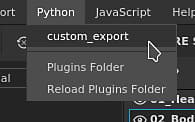
Cliquez sur le menu Python, puis sur le nom du plug-in pour l’activer :
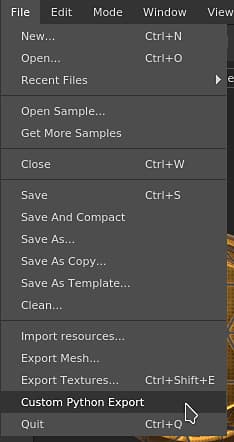
Enfin, cliquez sur le menu Fichier et sélectionnez Exportation Python personnalisée pour déclencher la fonction d’exportation du script :