Modèle d’architecture de référence globale Monorepo
Ces informations s’appliquent à :
Ce guide explique comment configurer Adobe Commerce avec le modèle d’architecture de référence globale (GRA) Monorepo.
Le modèle GRA Monorepo implique un référentiel Git unique pour héberger toutes les personnalisations courantes. Ce référentiel Git unique est exposé via le compositeur en tant que packages de compositeurs distincts.
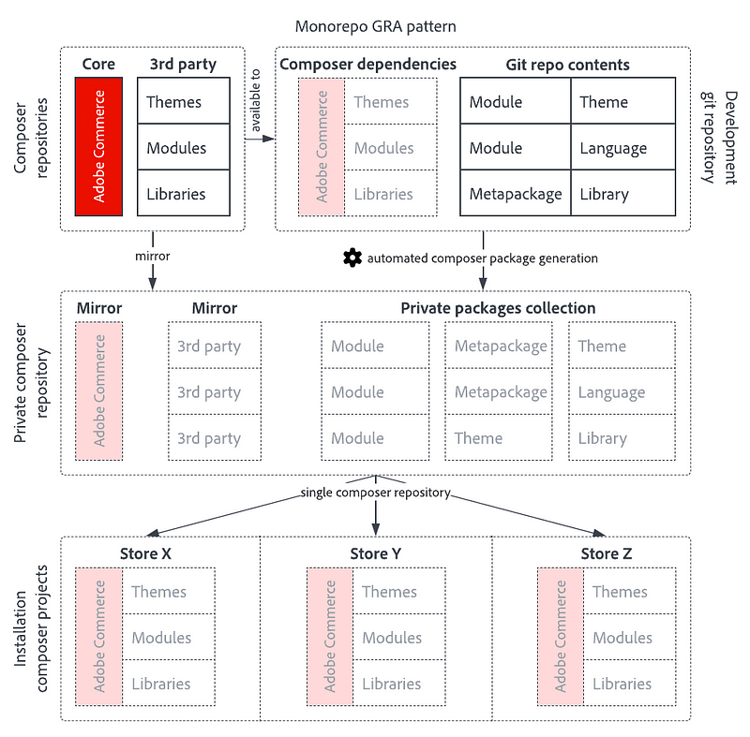
Avantages et inconvénients de ce modèle
Avantages :
- Idéal pour les tests fonctionnels
- Réutilisation du code via un référentiel de code partagé
- Flexibilité totale dans l’installation des packages, chaque package GRA peut être mis à niveau, rétrogradé ou rétroporté individuellement
- Prise en charge complète du contrôle de version sémantique
- Aucun outil spécial, infrastructure complexe ou stratégie de branchement spéciale requis
- Prise en charge de tous les types de packages pris en charge par le compositeur
- Idéal pour les environnements éphémères, qui sont facultatifs, mais utiles pour les équipes de diffusion à volume élevé
Inconvénients :
- Possibilité de déployer des combinaisons de packages qui n’ont pas été développés dans la même configuration, nécessité de procédures de test strictes
- Le motif GRA monorepo peut être complexe au début. Affecter un responsable qui aide l’équipe à travailler avec le système
Configuration d’Adobe Commerce avec le modèle GRA de packages distincts
La structure du répertoire
La structure de répertoires finale d’une installation Adobe Commerce complète avec le modèle GRA Packages distinct présente la structure de répertoires suivante :
.
├── app/
│   └── etc/
│       └── config.php
├── packages/
│   └── ...
├── composer.json
└── composer.lock
Un référentiel Git de production possède la structure de répertoires suivante :
.
├── app/
│   └── etc/
│       └── config.php
├── composer.json
└── composer.lock
La différence est que les instances de production s’installent à partir du compositeur, où le monoréférentiel contient sa propre copie de chaque package dans le répertoire des packages.
Préparation d’un référentiel de production
Créez un référentiel pour la première instance d’Adobe Commerce, qui représente un magasin web pour Brand X.
mkdir gra-monorepo-brand-x
cd gra-monorepo-brand-x
composer create-project --repository-url=https://repo.magento.com/ magento/project-enterprise-edition .
git init
git remote add origin git@github.com:AntonEvers/gra-monorepo-brand-x.git
git add composer.json composer.lock
git commit -m 'initialize Brand X repository'
git push -u origin main
Installez Adobe Commerce avec bin/magento setup:install. Validez les app/etc/config.php résultants et les fichiers du compositeur. Le compositeur gère tout le reste, donc rien d’autre n’est dans Git.
Préparation du référentiel monorepo
Le référentiel monorepo commence par les mêmes étapes.
mkdir gra-monorepo
cd gra-monorepo
composer create-project --repository-url=https://repo.magento.com/ magento/project-enterprise-edition .
Installez Adobe Commerce avec bin/magento setup:install, validation et notification push.
git init
git remote add origin git@github.com:AntonEvers/gra-monorepo.git
git add composer.json composer.lock app/etc/config.php
git commit -m 'initialize monorepo GRA development repository'
git push -u origin main
Préparation au développement de monorepo
Pour le développement monorepo, apportez les modifications suivantes à votre fichier composer.json :
- Modifiez le nom et la description du package afin qu’il soit clair que ce package est votre package monorepo.
- Supprimez l’attribut version de composer.json, car la version est gérée à l’aide des balises Git pour ce référentiel.
- Remplacez la section required par un méta package qui sera créé ultérieurement.
- Remplacez la stabilité minimale par dev.
- Ajoutez un référentiel de type chemin d’accès qui pointe vers
packages/*/*pour héberger les packages monorepo, y compris les alias de branche pour chaque package qu’il contient - Ajoutez un alias de branche pour le projet lui-même
La comparaison Git suivante montre la différence entre une installation Adobe Commerce propre et les modifications mentionnées ci-dessus :
@@ -1,6 +1,6 @@
 {
-    "name": "magento/project-enterprise-edition",
-    "description": "eCommerce Platform for Growth (Enterprise Edition)",
+    "name": "antonevers/gra-monorepo",
+    "description": "Monorepo repository for Global Reference Architecture development",
     "type": "project",
     "license": [
         "proprietary"
@@ -15,11 +15,8 @@
         "preferred-install": "dist",
         "sort-packages": true
     },
-    "version": "2.4.7-p3",
     "require": {
-        "magento/product-enterprise-edition": "2.4.7-p3",
-        "magento/composer-dependency-version-audit-plugin": "~0.1",
-        "magento/composer-root-update-plugin": "^2.0.4"
+        "antonevers/gra-meta-brand-x": "self.version"
     },
     "autoload": {
         "exclude-from-classmap": [
@@ -69,16 +66,33 @@
             "Magento\\Tools\\Sanity\\": "dev/build/publication/sanity/Magento/Tools/Sanity/"
         }
     },
-    "minimum-stability": "stable",
+    "minimum-stability": "dev",
     "prefer-stable": true,
     "repositories": [
         {
+            "type": "path",
+            "url": "packages/*/*",
+            "options": {
+                "versions": {
+                    "antonevers/gra-meta-brand-x": "1.4.x-dev",
+                    "antonevers/gra-meta-foundation": "1.4.x-dev",
+                    "antonevers/gra-component-foundation": "1.4.x-dev",
+                    "antonevers/module-gra": "1.4.x-dev",
+                    "antonevers/module-3rdparty": "1.4.x-dev",
+                    "antonevers/module-local": "1.4.x-dev"
+                }
+            }
+        },
+        {
             "type": "composer",
             "url": "https://repo.magento.com/"
         }
     ],
     "extra": {
-        "magento-force": "override"
+        "magento-force": "override",
+        "branch-alias": {
+            "dev-main": "1.4.x-dev"
+        }
     }
 }
Utilisation de métapaquets
Pour obtenir les métapaquets et les exemples de modules utilisés dans cet exemple, téléchargez l’exemple de code depuis AntonEvers/gra-meta-foundation sur GitHub.
Les métapaquets de compositeur regroupent plusieurs packages de compositeur dans un seul package. Lorsqu’un métapaquet est requis, tous les packages qu’il regroupe sont automatiquement installés via la section Composer required du métapaquet.
Pour cet exemple, il existe deux métapaquets :
- antonevers/gra-meta-brand-x : métapaquet contenant tout ce qui constitue « Brand X »
- antonevers/gra-meta-foundation : métapaquet contenant tout ce qui est toujours installé dans une marque
Le métapaquet de marque nécessite le métapaquet de base. Lorsque le métapaquet de marque est requis, le métapaquet de base l’est également automatiquement. Consultez les deux fichiers composer.json des métapaquets pour voir comment ils sont liés :
antonevers/gra-meta-brand-x :
{
    "name": "antonevers/gra-meta-brand-x",
    "type": "metapackage",
    "license": [
        "OSL-3.0",
        "AFL-3.0"
    ],
    "require": {
        "antonevers/gra-meta-foundation": "^1.4",
        "antonevers/module-local": "^1.4"
    }
}
antonevers/gra-meta-foundation :
{
    "name": "antonevers/gra-meta-foundation",
    "type": "metapackage",
    "license": [
        "OSL-3.0",
        "AFL-3.0"
    ],
    "require": {
        "antonevers/gra-component-foundation": "^1.4",
        "antonevers/module-gra": "^1.4",
        "antonevers/module-3rdparty": "^1.4",
        "magento/composer-dependency-version-audit-plugin": "~0.1",
        "magento/composer-root-update-plugin": "^2.0.4",
        "magento/product-enterprise-edition": "2.4.7-p3"
    }
}
Les métapaquets sont un bon moyen d’organiser le code qui appartient à tous. Utilisez des métapaquets pour définir des groupes de packages régionaux, globaux, spécifiques à une marque ou tout regroupement logique pour vous. Si vous maintenez plusieurs installations d’Adobe Commerce, les matapackages sont un moyen sûr et polyvalent de définir le contexte dans lequel un package est attendu.
Les métapaquets existent dans le monorepo à l’intérieur du répertoire packages. Là, la structure du répertoire du vendor est mise en miroir :
.
├── packages/
│   └── antonevers
│       ├── gra-meta-brand-x
│       │   └── composer.json
│       └── gra-meta-foundation
│           └── composer.json
├── composer.json
└── composer.lock
Ajout et développement de modules
Les modules Monorepo existent dans le répertoire packages. Ainsi, le compositeur peut les trouver via le référentiel de type de chemin d’accès.
Pour obtenir les métapaquets et les exemples de modules utilisés dans cet exemple, téléchargez l’exemple de code depuis AntonEvers/gra-meta-foundation sur GitHub.
.
├── packages/
│   └── antonevers
│       ├── gra-meta-brand-x
│       ├── gra-meta-foundation
│       ├── module-3rdparty
│       ├── module-gra
│       └── module-local
├── composer.json
└── composer.lock
Si nécessaire, vous pouvez avoir plusieurs espaces de noms dans le répertoire packages.
Le développement a lieu dans le répertoire des packages. Les liens symboliques vers les packages à l’intérieur du répertoire packages sont créés dans le répertoire vendor une fois que vous exécutez composer update. Ainsi, le code fait partie de l’installation d’Adobe Commerce.
Pour activer les modules qui ont été ajoutés, exécutez bin/magento module:enable --all ou uniquement pour des modules spécifiques.
À l’heure actuelle, vous devriez disposer d’une installation Adobe Commerce fonctionnelle avec les trois exemples de modules installés et opérationnels. Vous pouvez vérifier si les modules sont installés et fonctionnent en exécutant les commandes :
bin/magento test:gra
bin/magento test:3rdparty
bin/magento test:local
Création automatisée de packages
Il existe plusieurs options pour automatiser la création de packages. Voici quelques options :
- Packagiste privé
- Symplify Monorepo Builder
- Créer votre propre solution
Private Packagist automatise la reconnaissance des packages dans le monorepo Git et les expose via le compositeur. Il est compatible avec Adobe Commerce, rapide, peu entretenu et non sujet aux erreurs, c’est pourquoi ce guide se concentre sur l’option Packagiste privé .
Ce guide n’est pas en mesure d’expliquer comment configurer Private Packagist ; consultez les documents.
Vous avez la possibilité de transformer un package en un monoréférentiel une fois que vous avez configuré la synchronisation des organisations et que vos référentiels Git se synchronisent automatiquement avec Private Packagist.
Tout d’abord, dans l’onglet packages , trouvez le monorepo :
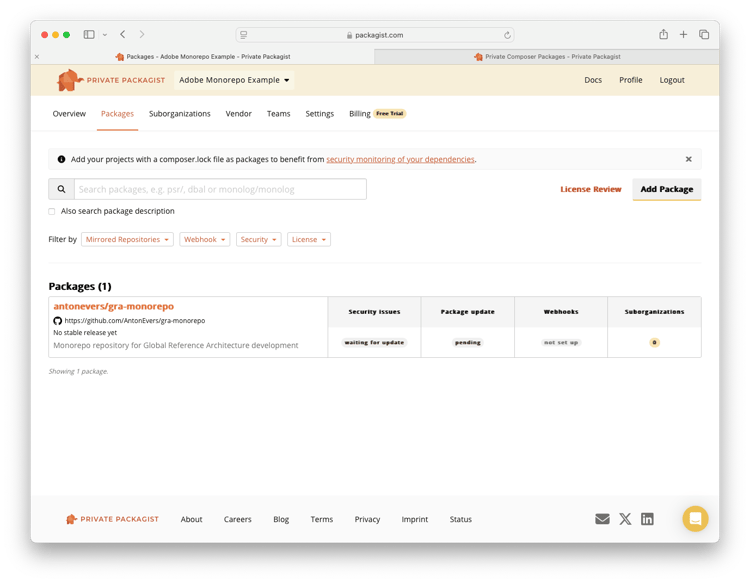
Cliquez sur le package monorepo et cliquez sur « Modifier » dans l’écran des détails, qui vous mène à la page suivante :
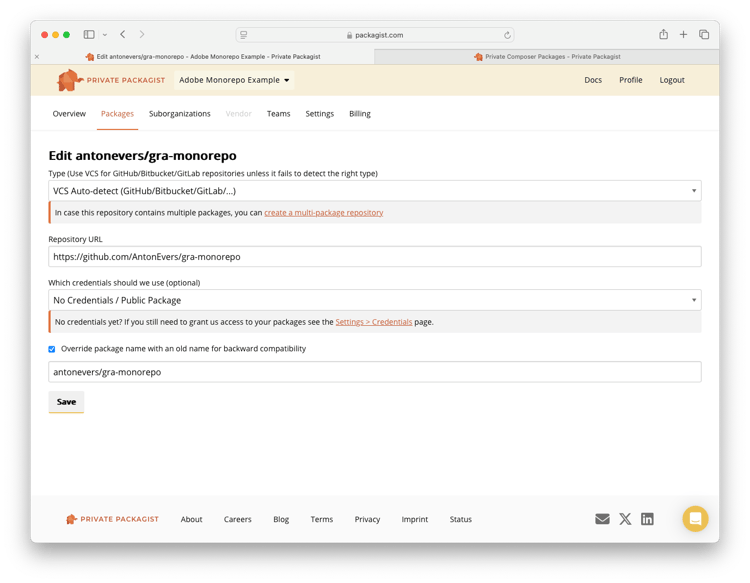
Sous le premier champ de saisie se trouve un lien indiquant : Créez un référentiel à packages multiples. Cliquez sur ce lien.
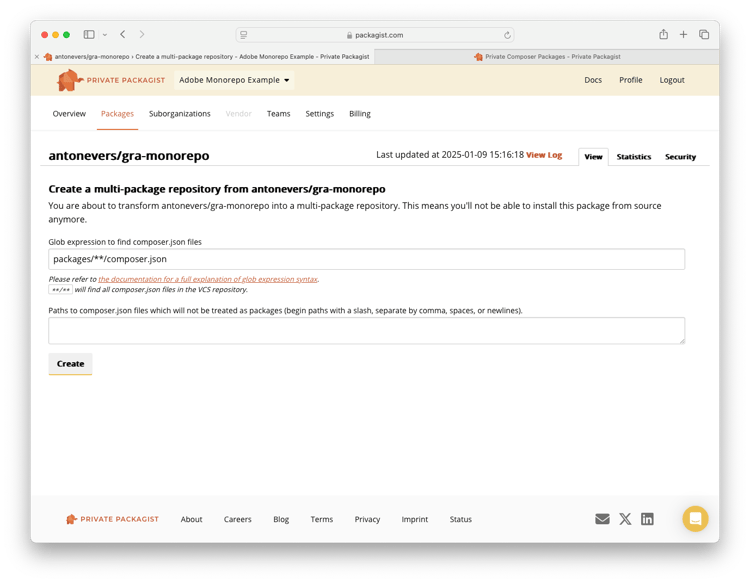
Définissez l’emplacement où les packages du compositeur se trouvent dans votre monorepo. Dans cet exemple, l’emplacement est packages/**/composer.json. Pour limiter ou élargir la recherche de packages à extraire par Private Packagist, modifiez l’emplacement.
L’onglet Packages affiche tous les packages trouvés après l’enregistrement et le monorepo lui-même n’est plus visible en tant que package de compositeur :
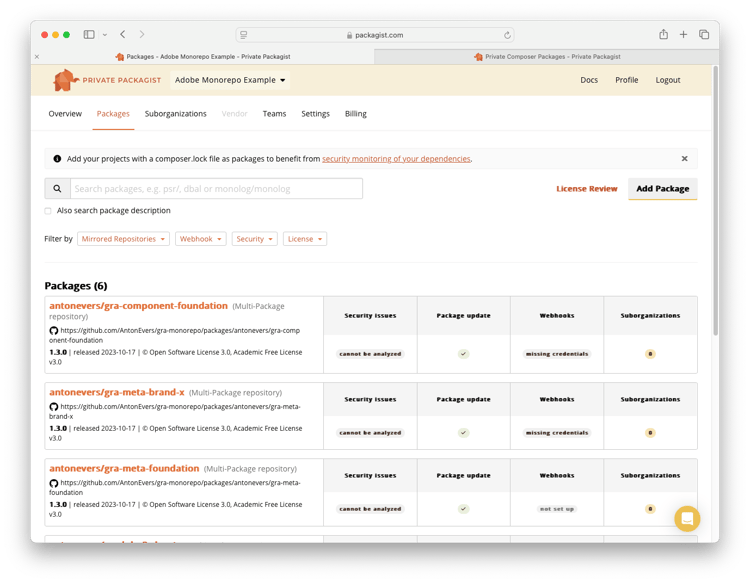
Une version est créée dans le compositeur pour chaque package du monoréférentiel, pour chaque balise ou branche créée sur le monoréférentiel dans Git.
Installation des packages dans l’environnement de production
Suivez les instructions de Private Packagist pour ajouter Private Packagist en tant que référentiel de compositeur. Private Packagist peut et doit être utilisé comme miroir pour tous vos référentiels Composer et Git, y compris packagist.org. Ainsi, les informations d’identification ne doivent pas être partagées avec les développeurs et vous avez un contrôle total sur chaque package. Cet exemple ne suit pas cette bonne pratique, car il expose la base de code Adobe Commerce publiquement.
Téléchargez GRA Monorepo Brand X sur GitHub pour voir un exemple de magasin de production.
Dans le magasin de production, il n’existe aucun répertoire packages et tous les packages sont installés via le compositeur. Le seul package requis est :
    "require": {
        "antonevers/gra-meta-brand-x": "^1.0"
    },
Pourtant, l’intégralité d’Adobe Commerce et de GRA est installée selon les exigences de ce métapaquet.
Contrôle de version
Tous les packages du monorepo reçoivent la même version que le monorepo lui-même. Considérez cela comme la publication de nouvelles versions de l’ensemble de l’application. En production, cependant, vous pouvez installer un mélange de packages provenant de différentes versions de monorepo.
Environnements éphémères
Si vous utilisez des environnements éphémères ou si vous envisagez de les utiliser, le monorepo est un excellent choix. Chaque version et branche du monorepo contient tous les fichiers de modules Adobe Commerce, tiers et personnalisés. Avec une installation complète dans chaque branche, il est possible d’exécuter tous les types de tests, y compris les tests fonctionnels. Avec d’autres configurations GRA, telles que les packages distincts ou les packages en masse GRA, vous devez d’abord créer un environnement Adobe Commerce fonctionnel avant d’exécuter des tests fonctionnels. Du point de vue de DevOps, monorepo le rend beaucoup plus simple.
Exemples de code
Les exemples de code de cet article ont été combinés dans un ensemble de référentiels Git, que vous pouvez utiliser pour tester la preuve de concept.
- Exemple de référentiel monorepo : https://github.com/AntonEvers/gra-monorepo
- Exemple de magasin de production : https://github.com/AntonEvers/gra-monorepo-brand-x