Find your Data Feed ID
At times, you may need to contact Adobe in case of a failed data feed delivery or with a request to resend a data feed file. It becomes convenient for customer support team to handle such requests if the Data feed ID is provided by the customer.
Find your Data Feed ID
Hi everybody, this is Gary. At times you may need to contact Adobe regarding a data feed file. It can be convenient for the customer support team to handle any request if the data feed ID is provided them by the customer. Let's take a look to see where we can find that in Adobe Analytics.
Open the Data Feeds interface
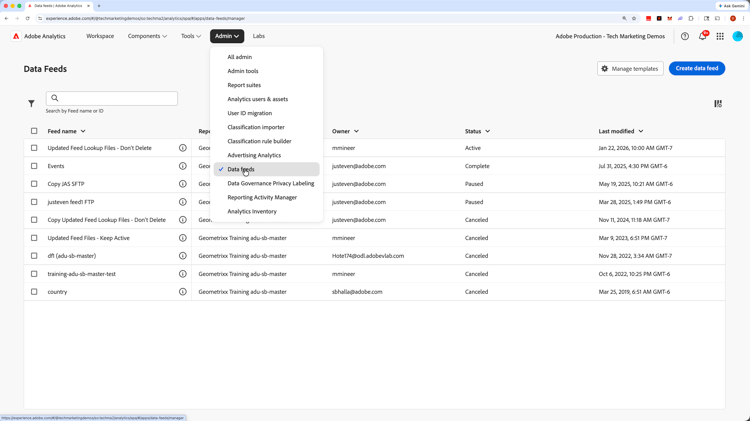
After logging into Adobe Analytics from the Experience Cloud site, click on the Admin menu and select Data feeds. If you don't have this option available to you, please contact and Adobe Analytics administrator at your company.
- :callout[]{type="rectangle" x1="93.16" y1="21.34" x2="98.1" y2="27.94"}
Add the Feed ID column as needed
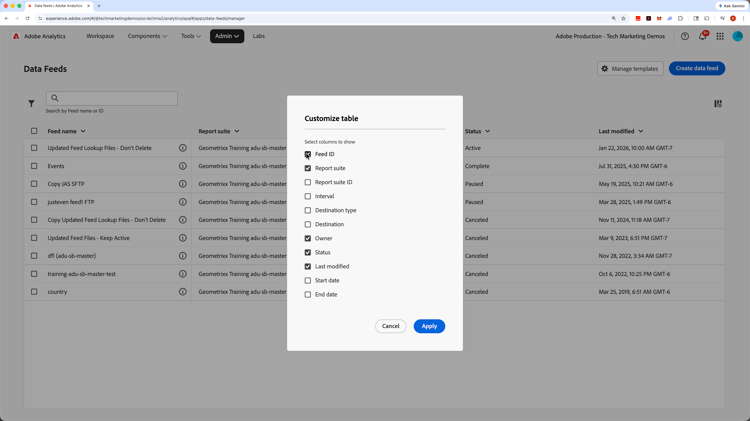
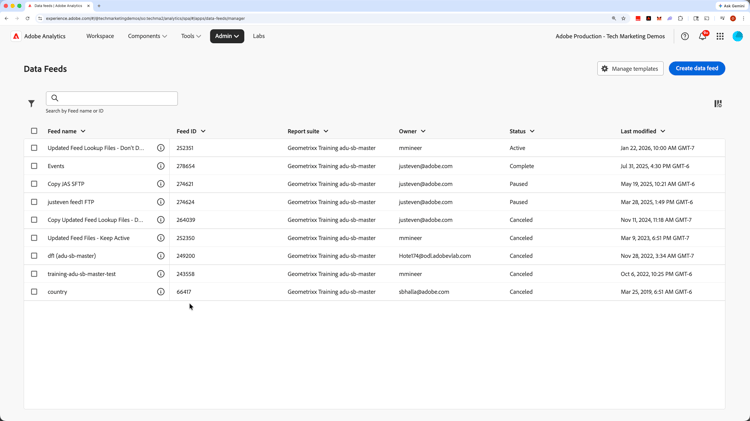
When you come into the Data Feeds UI, you should see a list of your current data feeds. If the Feed ID column is not already visible, click on the column selector on the right side of the interface. Then check the box to show the Feed ID, and apply the change.
Find your Data Feed ID
Now that your feed ID column is visible, you can get the ID for your specific data feed and provide that to the customer support team or whomever needs it. Thanks, and have a great day!