Thinking about an Adobe certification but not sure where to start? This guide walks you through choosing the right exam, preparing in a way that fits your experience, and showing up on exam day feeling confident. It shares practical tips on where to study, how to actually use exam guides and practice tests, and what to expect along the way—so you’re building real skills, not just chasing a badge.
Over the past few years, I’ve had the privilege of helping close to twenty colleagues and community members prepare for their Adobe certifications. Many of them started with doubt, unsure of where to begin, worried they were not ready, or simply overwhelmed by the idea of a formal exam. Watching each person grow more confident and comfortable through the process has been one of the most fulfilling parts of this journey for me.
I’ve been through this path myself several times and currently hold more than ten active certifications across Adobe CX Enterprise and Experience Platform solutions. I mention this not to highlight the number, but to say that I genuinely understand what the preparation journey feels like. There are moments of excitement, confusion, steady progress, and the occasional self-doubt. Every learner I have supported has taught me something new, and this article brings together the practical guidance that, in my experience, has consistently helped people succeed.
Why certification matters
Most candidates do not take a certification exam just to collect a badge. The process of gaining a certification helps uncover gaps in daily work, pushes you to revisit areas of the tool you may not use often, and strengthens your confidence in conversations, analysis, and decision-making. Many learners also find that certification opens new opportunities, whether through project visibility, expanded responsibilities, or recognition within their teams.
As someone who has mentored many learners, I can confidently say: The prep journey is as valuable as the certificate itself.
Choosing the right starting point
Adobe offers three certification levels - Professional, Expert, and Master - across key job roles like Business Practitioner, Developer, and Architect.
-
If you’re just starting:
-
Choose a Professional-level exam for Business Practitioner or Developer based on your role or aspiration.
-
At this level, the expectation is that you can perform day-to-day tasks, navigate the UI confidently, apply features in real-world workflows, and support your team’s activities. You may still rely on others for more complex design or architecture work, and that is perfectly normal.
-
-
If you’re an active user:
-
The Expert exam is often a better fit.
-
This level assumes you have a deeper understanding of the product. You can configure advanced features, troubleshoot and integrate across systems, lead implementation or analytics reporting tasks, and provide guidance to others on best practices.
-
-
If you design or architect solutions:
-
The Master level is your destination.
-
Here, you are expected to design full solutions, create scalable architectures, lead large implementation or optimization programs, make product-level decisions, and influence governance and strategic direction rather than just execution.
-
Here are the major certification tracks for Adobe Analytics and Customer Journey Analytics with links to the Adobe Certification Portal:
Adobe Analytics
-
Professional: Business Practitioner, Developer, Data Analyst (Note: Data Analyst does not count toward partner requirements for your organization)
-
Expert: Business Practitioner, Developer
-
Master: Architect
Adobe Customer Journey Analytics (CJA)
-
Professional: Business Practitioner, Developer
-
Expert: Developer
For your first certification, especially if you’re new, I strongly recommend pursuing the Professional level. It gives you a foundational credential, boosts your confidence, and sets the stage for Expert and Master later.
In addition to the Adobe Analytics and Adobe Customer Journey Analytics certification links shared above, all current exams and their details are always available from the certification catalog on the Adobe Certification Portal.
Preparing for the exam based on your experience
Not everyone should prepare the same way. Just like Adobe has Learn and Grow tracks in Skill Exchange, I’ve split this into two paths:
Group A: You already use the tool daily
If you are already comfortable with the product, your goal is to convert your experience into exam-ready clarity.
- Start with the exam guide: This is always the first step. Mark the areas that you feel strong in and the ones you want to revise. This automatically gives you a preparation plan.
- Revisit the UI: Open the product and go through the screens mentioned in the guide. This is something experienced users often skip. But doing a quick run-through of the UI refreshes your memory and immediately helps you eliminate wrong answers during the exam.
- Watch Experience League videos on 2x speed: This is honestly one of my favorite tips. When you already know the basics, watching the videos faster lets you pick up quick reminders, analogies, or small hints that you might have forgotten.
- Do the practice test: This is non-negotiable. The practice test shows you exactly how the questions feel, how much time you need, and what your weak spots are. Take it seriously and treat it like the real exam. (Do not use AI tools or Google search during the exam time.)
- Strengthen your weak areas: After the practice test, pick the 3 to 5 topics where you struggled the most. Rewatch the videos or re-read the related articles from the product documentation.
- When your practice score is comfortably above the passing mark, book the exam: Aim for confidence, not perfection. Remember to focus more on sections that have more weightage.
Group B: You are newer and just getting started
This path is about building familiarity, reducing fear, and establishing a solid foundation. Even if you have minimal experience with the tool, a certification can help you gain momentum and open opportunities. Here is what I recommend:
-
Start with the Experience League learning resources: Follow the beginner or Professional-level paths for your product. These are designed for new learners and include:
- Step-by-step tutorials
- Guided exercises
- Video lessons
- Hands-on conceptual walkthroughs
- They are structured in the right order, making the learning process feel manageable. (If your company is an Adobe partner, the Solution Partner Portal has additional foundational courses, but this is optional.)
-
Watch the tutorial videos: These videos help you visualize the UI and understand how features connect. They make the product features feel more familiar. Pay attention to:
- Where each feature is located
- How data flows
- What options appear on different screens
- If a video says, “this is an older UI,” pause and go to the UI and observe the difference. Also, search for updated docs.
- Go through every link in the exam guide: These links are carefully curated. They contain explanations, examples, and scenarios that often appear in the exam.
- Attempt a practice test even before you feel ready: This step reduces fear almost instantly. It shows you what the questions look like and helps you understand what the exam values. Your first score is not important. Awareness is.
- Strengthen your weak areas: After your practice test, use Experience League videos, articles, and tutorials to fill your gaps. Repeat the practice test once or twice until concepts start clicking.
Where to learn: Essential learning resources
A question almost everyone asks me at the start is, “Where should I actually study from?”
It can feel confusing because Adobe has multiple learning resources.
Here’s the simple, practical breakdown I share with my mentees, the same approach that has consistently worked for people I’ve helped.
Exam guides: Your must-have roadmap
Always begin with the exam guide. It tells you exactly what's on the test, how each topic is weighted, and directly links to important articles.
And here is something I always recommend: take a quick look at the exam guide for the next level above the one you are preparing for. A quick skim helps you understand how the concepts mature as you progress, and it gives you a broader sense of where your learning journey is heading.
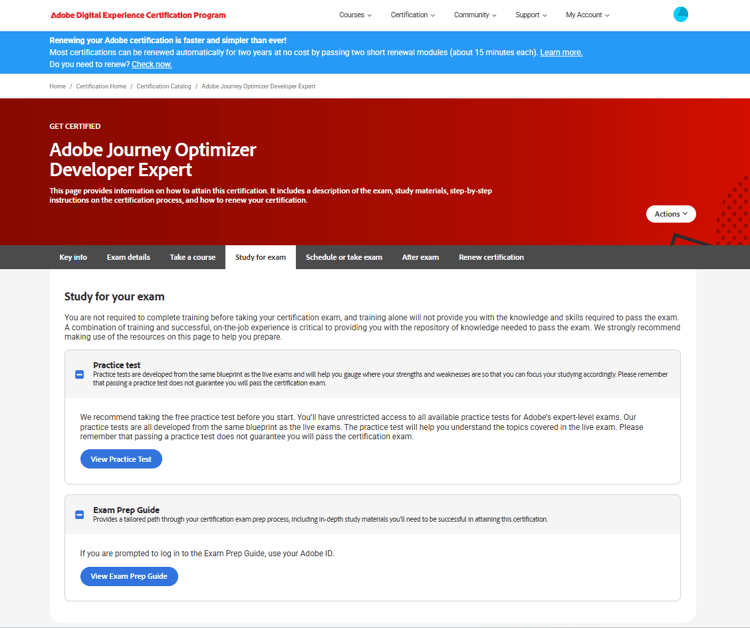
You can find the exam prep guide on the Study for Exam tab of the specific certification page within the certification portal. The practice test is also available in this section.
Practice tests: The biggest confidence booster
If there is one thing I encourage every learner to do early, it’s the practice test. It gives you a feel for the real exam, the way questions are worded, the time pressure, the single-select vs multi-select patterns, and the overall pacing. Your first score truly doesn’t matter; what matters is the clarity it gives you about what to focus on next.
Many candidates underestimate the practice test and later realize how valuable it could have been. It does more than just test you; it teaches you. It shows you which areas you’re strong in and which ones need revision. It also helps you build discipline around timing so that you don’t spend too long on a single question during the actual exam. And once you see your practice scores steadily improving, your confidence automatically grows and the exam feels less intimidating.
When mentoring learners, I usually suggest a simple flow:
-
Schedule one full-length practice test under exam-like conditions (quiet, timed).
-
Score it and identify 3-5 weak areas.
-
Focus your next study block on those weak areas (via UI walkthroughs + tutorial videos + articles).
-
Retake the practice test once your score is “comfortably above” the pass threshold, and you’re ready to book the real exam.
Experience League: Your main learning space
Experience League is where most of your certification preparation happens. It’s organized, beginner-friendly, constantly updated, and closely aligned with how Adobe expects you to understand the product. Whenever I mentor someone, this is always the first place I guide them to. Experience League provides exactly the breadth and depth that you need to prepare for certifications across Adobe CX Enterprise and Experience Platform.
To make the most of Experience League, here are the key sections worth spending time on:
Tutorials
Tutorials are great for understanding the UI, common workflows, and the overall product flow. If you're new, these make everything feel much more approachable.
Documentation
Documentation is where you find the official, detailed explanation of each feature related to the product. It’s also where many exam-level nuances come from, so spending some time here really helps.
Playlists
This is my personal favorite. Adobe Experience League Playlists are curated sets of short, focused videos that help you learn specific concepts or workflows across Adobe solutions. Each playlist groups related topics so you can build knowledge in a logical, guided sequence without searching through scattered content. They’re ideal for brushing up on a feature, exploring a new capability, or quickly onboarding to a product area. New playlists are added regularly, keeping the learning fresh and targeted.
You can use the filters to curate the playlists based on Product, Role, and Experience Level
Community
Community is where real practitioners come together to ask questions, solve problems, and exchange practical experience. You find everything from common troubleshooting threads and best-practice guidance to deeper architectural discussions and exam preparation insights. Many conversations include inputs from Adobe Community Advisors, Champions, and experienced implementers who share real-world perspectives you won’t find in documentation. It’s one of the best places to learn from real-world use cases and stay up-to-date on how others are addressing similar challenges.
Solution Partner Portal (SPP) & Adobe Premium Learning Subscription
If your organization is part of the Adobe Solution Partner Program, the SPP portal gives you access to partner-only enablement, deeper technical content, structured learning paths, and sometimes even discounted exam vouchers. This goes beyond the standard Experience League curriculum and can be a strong advantage during certification prep.
Your organization may also have a Premium Learning Subscription (formerly ADLS). These Adobe-authored instructor-led and on-demand courses follow certification objectives closely. Many ILT sessions include hands-on labs using Adobe sandboxes, as well as additional modules and guided learning. Sandbox availability may vary depending on the course or subscription.
The SPP and Premium Learning paths are not mandatory for certification, but they can provide helpful structure, deeper context, and practical exposure that make your preparation stronger.
Hands-on learning with sandboxes
Hands-on practice can make a remarkable difference in how comfortably you approach your certification exam. While Adobe does not provide fully open public sandboxes, there are several reliable ways to access practical environments depending on your organization and learning path.
Most learners use the environments that come with their organization’s existing Adobe licenses. For Adobe Analytics and Customer Journey Analytics demo workspace access, you can also submit a request through Adobe’s sandbox-access form. The Adobe Premium Learning Subscription includes guided lab environments and requestable sandboxes to select courses, an excellent option if you prefer structured, instructor-supported practice.
If your organization uses Adobe Experience Platform (AEP) or Adobe Experience Manager (AEM) Cloud Service, you have access to built-in development sandboxes as part of the product. These environments allow you to explore features, test workflows, and experiment freely without impacting your organization’s production data.
Beyond the resources above, even small amounts of exploratory practice can be incredibly helpful. Exploring new parts of the product, trying Exam Guide workflows, and paying attention to real-world behaviors, like analysis, debugging, or reporting, can make concepts feel more intuitive and easier to recall on exam day.
Exam registration, delivery & proctoring
Here are the key things to know about scheduling an Adobe exam:
-
Go to the Adobe Certification Portal (Certification Catalog), choose the exam you want to take, and then select the Manage exam button. For more details, please refer to Adobe’s FAQ on this.
-
Fees & vouchers: The exam page shows the cost. Some regional discounts and discounts for partners and students apply automatically. And if you’re an employee at an Adobe Partner, your employer may have free voucher schemes or reimbursement options for you. Please check with your L&D team on this.
-
Delivery: Most Adobe exams are online with remote proctoring. You need a webcam, a mic, stable internet, and a quiet space. The proctoring vendor checks your environment. It is recommended to uninstall remote-sharing applications if you’ve installed them.
Updated proctoring & software requirements
Adobe’s certification exams are now delivered via Measure Learning, using the “Guardian Browser” (a secure custom browser) as part of the remote proctoring environment. Before your exam you must install the Guardian Browser and run a system-readiness check. You see the option to install it once you successfully schedule your exam. On exam day, you need a webcam, mic, a quiet workspace, and the proctor may request a screen share, camera pan of your room, and might ask you to close or uninstall remote-sharing software.
Be sure to check your computer’s compatibility and have the Guardian Browser installed well in advance - issues on the day of the exam (for example, firewall blocks, unsupported software, multiple monitors) can lead to delays or disqualification.
Retake rules: If you fail, there will be a waiting period before you can retry the same exam. If you fail to pass an Adobe certification exam on your first attempt, you must wait at least 24 hours before taking the exam again. Failure to pass an exam on the second or any subsequent attempt requires a waiting period of 15 calendar days before your next attempt. Please note that you need to use a new voucher for each attempt.
Exam day: Tactics & common pitfalls to avoid
Here are my top practical tips for the day of the exam. These are the small things that make a large difference:
-
Flag hard questions: If a question has multiple plausible answers and you’re unsure, flag it and move on. Later questions may give context or remind you of relevant details.
-
Avoid overthinking single-select traps: Many candidates fall into the “two answers look right” trap and waste time.
-
Sometimes two answers look correct, but one is more aligned with:
- What the UI actually does
- What Adobe docs consistently emphasize
- The “recommended” workflow from official tutorials
- When in doubt: Read the question carefully, take a pause, recall your knowledge, then pick the best answer.
-
Don’t chase perfection: Your goal is to pass. You don’t need 100%. There is no “special badge” for high scorers. Adobe’s certificate-awarding mechanism is the same for someone who just passes and someone who scores higher. So, don’t get tensed if a few of the questions seem very difficult. Flag them and come back later.
-
Manage your time: If you have ~60 questions and 90 minutes (example), aim for about 1.5 minutes per question initially. Don’t spend more than 6 minutes on a single question and risk rushing the rest. Again, flag difficult questions and revisit later.
-
Relax and do a quick review: If time permits, use the last 5-10 minutes to revisit flagged questions after your first pass.
What happens after the exam
It’s important to know what happens after you hit “Submit” and pass your exam — this is often overlooked.
Immediately after submitting
You see a provisional pass or fail message on the screen.
Within 24 to 72 hours
You receive an email with:
- Your official score
- Confirmation of your certification
- Instructions to claim your digital badge
Your badge also appears under My Account → Achievements in your certification portal.
Certification validity and renewal: Most Adobe certifications are valid for two years. Within ~180 days before expiration, you receive a renewal notification. Renewal usually involves taking short learning modules and passing quizzes rather than full re-exams.
Final words: Your next step
If certification has been on your mind, start now. Choose the certification that aligns with your current role, open the exam guide, book a practice test, and mark a date in your calendar.
Remember:
- Certification is not just about the badge - the learning you gain during preparation helps you do better in your day job.
- A well-prepared exam leads to confidence, not just a certification.
Every learner who has taken this path has found it rewarding not only because of the badge, but because of the clarity and confidence they gained during preparation.
Certification is a journey. And you don’t have to take it alone - the Experience League community is full of practitioners who are cheering you on.