The Adobe Target Sample Size Calculator helps you estimate how many visitors you need to run a successful manual A/B Test by using your page’s daily unique visitors, baseline conversion rate, and desired confidence (95%) and power (80%) levels. After entering these values and the number of offers (including control), use the resulting test duration to prioritize pages that can complete within 20 weeks or less.
Overview
Adobe Target Sample Size Calculator ensures that your activity has sufficient visitors to achieve your goals. When running a manual A/B Test activity, as opposed to Auto-Allocate, the Target Sample Size Calculator helps to determine the sample size required for a successful test. As a manual A/B Test is a fixed horizon test, the Adobe Target Sample Size Calculator provides a rough estimate of the sample size needed.
How to Use
- Navigate to the Adobe Target Sample Size Calculator.
- Set confidence level to 95%.
- Set the statistical power to 80%.
- Set the appropriate number of offers, including control.
- After identifying pages with high traffic and conversion rates, take the Unique Visitors value for the page and divide this value by the number of days in your date range (that is, If the date range encompasses the last full 30 days, divide the number of Unique Visitors by 30). You enter the resulting value under “Total Number of Daily Visitors.”
- To identify the baseline conversion rate value, take the number of Form Successes per page and divide it by the number of Unique Visitors to the page (that is, Form Success/Unique Visitors)
- After inputting all the data values, check to see how many weeks it will take to complete the test. Focus on identifying pages with values that take at most 20 weeks to complete the test.
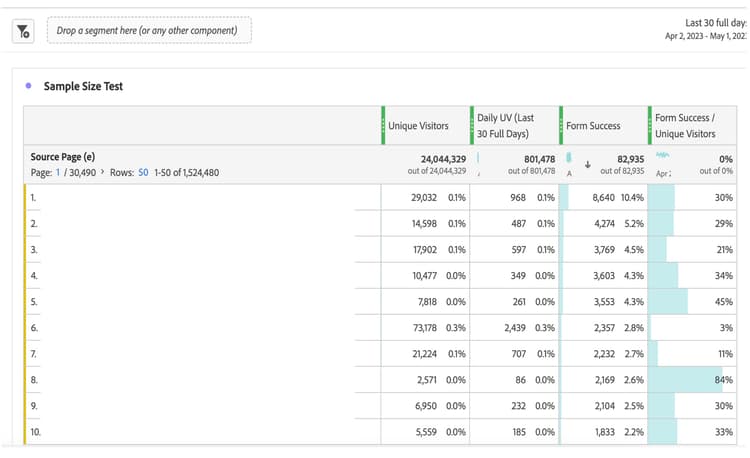
After creating a table similar to the above, you can identify pages with the highest conversion rates to uncover specific pages that show potential opportunities for personalization. For instance, if a page shows a high form success conversion rate, consider leveraging this page to run an A/B test. Moreover, you can continue to uncover opportunities for personalization on specific pages by monitoring the changes in conversion rates.