A clear breakdown of how the Identity Extension and the Identity for Edge Network extension work in the Adobe Experience Platform Mobile SDK, clarifying their roles in managing ECID and when each should be used in modern mobile identity architectures.
Introduction
When designing a customer identity strategy using the Adobe Experience Platform (AEP) Mobile SDK, a common question arises: how to manage Identity Extension and the Identity for Edge extension?
Both the extensions manage customer identifiers and the Experience Cloud ID (ECID), but they serve distinct purposes and are optimized for different Adobe solution architectures. Understanding their roles is essential to building a scalable, future-ready identity foundation for your mobile applications.
What is the Identity Extension?
The Identity Extension (com.adobe.marketing.mobile:identity) is part of the Mobile Core SDK and primarily manages Experience Cloud ID (ECID) generation and persistence, synchronizing customer identifiers (customer IDs) with the Adobe Identity service. It supports Adobe CX Enterprise solutions like Adobe Analytics (AppMeasurement) and Adobe Audience Manager (AAM).
What is Identity for Edge?
The Identity for Edge Network extension (com.adobe.marketing.mobile:edgeidentity) is designed for the Adobe Experience Platform Edge Network. It manages identities in real time to support data collection and personalization use cases. The extension generates and persists the Experience Cloud ID (ECID) while also supporting additional identity namespaces. It efficiently handles identity updates for Edge data collection and enables identity stitching across AEP Real-Time CDP, Customer Journey Analytics (CJA), and Adobe Journey Optimizer (AJO).
In Adobe Data Collection Tags (Launch),
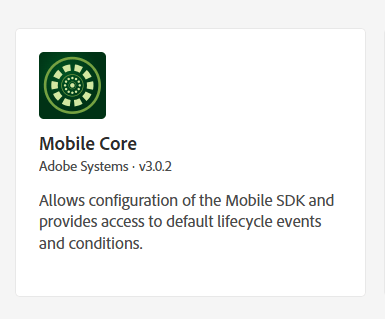
Identity for Experience Cloud ID Service is included as part of the Mobile Core extension.
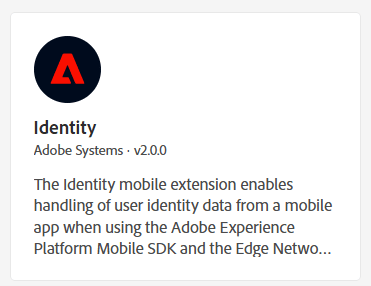
The Identity for Edge Network can be installed from below extension
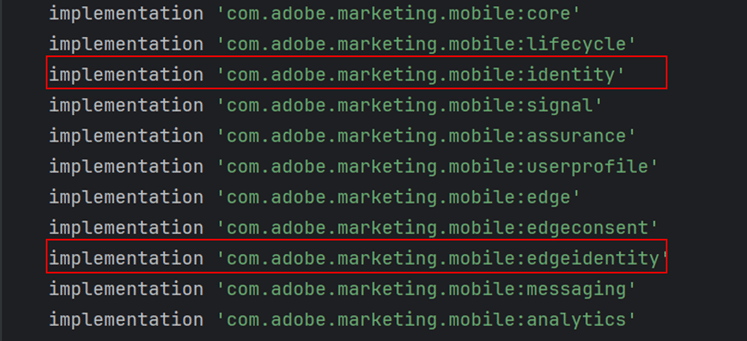
The two extensions are added as shown below in the Gradle file (Android)
Managing both Identity Extensions
In scenarios where you use both Adobe Experience Platform Edge extensions and Adobe Solutions extensions (such as Analytics or Target), you should register both Identity for Edge Network and Identity for Experience Cloud ID Service. These extensions can coexist, ensuring data flows to both Edge-based and legacy services.
ECID synchronization
ECID management and migration:
The Identity for Edge Network and Identity for Experience Cloud ID Service extensions each manage their own ECID. Upon the first launch after upgrading to the Edge Network extension, the existing ECID from the Experience Cloud ID Service extension is migrated to the Edge extension. This results in both sharing the same ECID value initially.
Behavior after resetIdentities and privacy changes:
Invoking the resetIdentities API makes each extension generate a new ECID independently, causing them to differ. Similarly, changing the privacy status to optedOut clears the ECID of the Experience Cloud ID Service extension, and switching back to optedIn generates a new ECID for it, while the Edge Network ECID remains unchanged.
Identity linking in AEP:
When both extensions hold different ECIDs, the Edge Network extension includes the ECID from the Experience Cloud ID Service extension in its IdentityMap. This ensures that the Adobe Experience Platform Identity Service can link both ECIDs within the customer’s Identity Graph.
Below is an example of an IdentityMap containing ECIDs from both extensions.

Regenerating a new ECID safely when using both extensions
To generate new ECIDs without linking the old ones in Adobe’s Identity Graph, follow this sequence. In the above example, first - Set privacy status to optedOut to clear the ECID from the Identity direct service extension.
MobileCore.setPrivacyStatus(MobilePrivacyStatus.OPT_OUT);
The identity map would then only have ECID from Edge Identity.
"identityMap" : {
      "ECID" : [
        {
          "id" : "81766628797489658169123381027155644132",
          "authenticatedState" : "ambiguous",
          "primary" : false
        }
      ]
    }
Call resetIdentities to regenerate a new ECID in the Identity for Edge Network extension.
MobileCore.resetIdentities();
Call getExperienceCloudId on the Identity for Edge Network extension. This ensures that the new ECID is generated before continuing.
The Identity Map is updated with the new ECID
Identity.getExperienceCloudId(new AdobeCallback<String>() {
    @Override
    public void call(String s) {
        //sample code
    }
});
This ensures that the new ECID is generated before continuing. The Identity Map is updated with the new ECID
"identityMap" : {
      "ECID" : [
        {
          "id" : "71866628797489658169123381027155644231",
          "authenticatedState" : "ambiguous",
          "primary" : false
        }
      ]
Set privacy status to optedIn to generate a new ECID in the Identity direct service extension.
MobileCore.setPrivacyStatus(MobilePrivacyStatus.OPT_IN);
After completing the above steps, each identity extension will have its own, different, ECID. The new ECIDs get linked under a new Identity Graph for the customer.
"identityMap" : {
      "ECID" : [
        {
          "id" : "71866628797489658169123381027155644231",
          "authenticatedState" : "ambiguous",
          "primary" : false
        },
        {
          "id" : "37357527655405132265917409409236401111",
          "authenticatedState" : "ambiguous",
          "primary" : false
        }
      ]
    }
Key differences between the two extensions
Feature
Identity Extension (Mobile Core SDK)
Identity for Edge (Edge Network SDK)
Conclusion
Choosing the right Identity solution in the AEP Mobile SDK depends on your app’s data flows and the Adobe services that you use. Use the legacy Identity Extension when you need support for classic Analytics or Audience Manager on the Mobile Core SDK. Choose Identity for Edge Network when you are building on the Edge architecture for Real-Time CDP, CJA, or Journey Optimizer. In hybrid scenarios, you should register both extensions to enable smooth ECID migration and synchronization through the XDM IdentityMap. Regenerating ECIDs requires a specific sequence. First, clear the legacy ECID by opting out. Next, reset the Edge identities. Then, opt back in to generate a new legacy ECID. When passing ECIDs into WebViews, always fetch fresh URL variables, ensure the orgID matches, and avoid double-encoding. Following these practices helps maintain consistent and accurate customer identity across both legacy and modern Adobe platforms.