Reporting and dashboards can do more than track tasks: they can translate the same underlying data into a language each stakeholder actually understands, turning Workfront from a project tracker into a two-way communication tool between teams, managers, and executives.
Shaping the lens to see Workfront as a powerful communication tool
Here's my hot take: if you only see Workfront as your organization's project management tool, you're missing the bigger picture. Yes, it has an enormous amount of customizable functionality that can automate and streamline your workflows. We know that it displays what tasks we have to do and what projects our teams are working on, and that it allows us to store and proof documents in a consistent way. We understand that it's the central hub to connect our other work systems and creative tools. But Workfront, and the data within it, is talking to us. We need to learn how to listen to it.
Within Workfront there are the "traditional," or what I would consider base-level, communication features: project updates where we type notes and tag colleagues to keep them up to speed, document proofing that allows us to give feedback on files, and object descriptions where we can explain the details of what needs to be worked on. Words are good. Words are necessary. But when I talk about communication, real communication, I'm talking about something more meaningful. While words can be helpful, and sometimes even misleading, we need to tap into what Workfront is telling us about our data without relying on our colleagues, or even AI, to literally spell everything out all the time.
Basic assumptions in communication
Think about your everyday communication with your family. You see your spouse is setting out six plates for dinner instead of four, and you remember right away that your in-laws are coming over to eat. Yes, words can help clear up what's uncertain, but if I'm relying on my wife to tell me that she's overwhelmed instead of picking up on clues as she's sprinting around the house with a panicked look in her eyes before the dinner party, I need to step up my game.
In Workfront, we can easily understand the concept because we experience this in small ways. If you see a task's completion percentage change, you kind of know the assignee is working on it without them saying it. When you see a project's due date has already passed but the project isn't complete, you can assume something has not gone according to plan without a project manager having to tell you. Since my colleagues and I are all different humans who don't share the same brain and can't read each other's minds, we have to understand and agree on universal terminology and rules for how we play the game. For example, when my team sees a project that's "Awaiting Feedback," we instantly know it's not moving forward without more information, and we know that we need to check the project updates if we want to see exactly why.
Basic tip: include the Last Note - Note Text field in your team's project reports so anyone viewing the list can see each project's latest update without navigating into project updates.
Pro tip: use text mode to stack columns, and include who submitted the last update and the date they entered it. If nobody has made an update since last week, that's your cue to nudge them again.
You can create custom project and task statuses tailored to your teams, but no matter what, you need to be consistent with what exactly each status means so the entire team knows how and when to use them. If you have statuses like On Hold, Stalled, or Awaiting Feedback, your team needs to know the difference between them, allowing them to immediately have more accurate assumptions about what's going on without having to hear it explicitly spelled out in a production meeting. This level of the process is where we start moving forward with better communication, but it's not enough. We need to be more advanced.
"As a project manager, my job is to facilitate communication, not just move tasks through the system."
- Tim Wyckoff, Adobe Champion & Creative Workflow and Operations Manager at Shaw Industries
The project (communication) manager
In one capacity or another, I've been a project manager for most of my life. In understanding the part I've played for so long, I see that project managers are required to act as a link between different stakeholders in an organization in order to help exchange information so that processes can flow smoothly and deliverables can be achieved. Communication is the grease that facilitates the gears in that exchange of information, and when PMs are asked to increase the number of projects they support, often with fewer resources, efficiency is vital. Project managers need to consider who they are communicating to so they can figure out how to do it, and they have to scale that up in a way that doesn't leave them exhausted from having to physically explain everything to every stakeholder at any given moment.
If somebody thinks that a PM is just supposed to make sure the project brief is entered with all the required fields filled out, or that a task gets assigned and gets completed on time, I think we're missing the complexity of what the project manager is able to offer with Workfront.
Communication is not a one-way street
Information flowing back and forth is the artful balance of communication. I can give a lecture to my direct reports about what Corporate says they need to do, but if I'm not actively receiving information back from them, some people call this "listening," I'm not really communicating at all, I'm just a professor who already knows it all. The project manager has to be an expert in facilitating that flow of information down to the task "doers" but also back up to the C-suite stakeholders. Often that requires a PM to act as a language interpreter, and in many situations PMs aren't even completely fluent in either language. How do I know exactly what the C-suite folks want to see if they don't tell me explicitly, and how can I pass that down to my creatives? If I'm not a graphic designer, how am I supposed to know what exactly they need in order to get their creative work done? We have to be able to hear what one team member is saying so we can translate that into meaningful data for the other team members to understand in their language.
Workfront reporting and dashboards to translate the same work for different audiences
Reporting is a huge piece of the communication tool that allows us to see projects and tasks from different angles so we can understand the data within them in various contexts. Task reports can communicate to team members exactly what their team expects them to complete and when. The same task report filters, viewed in a slightly different format with alternate groupings, can be used to communicate back up the chain to show the boss meaningful insights about her team's work, things like, "We've got too much work going on, and we need to outsource," or "We're spending a lot of time on projects with Team A, and they might need their own dedicated person for a certain type of task." It's essentially the same task report for the same group of projects, but when viewed differently, it helps interpret the story for another user in a language they can understand.
Pro tip: The report "menu"
One thing I've done to help my organization, and frankly myself given the limited amount of time available in a day, is create a dashboard that has what I consider a menu of different reporting options in it. Imagine walking into a busy, high-volume restaurant that runs on speed and efficiency. Imagine if the server who met you had to sit down with each and every table, ask everyone seated what they thought they were hungry for tonight, and if they didn't know already, explain every ingredient in the kitchen and let them guess what the chef could make that would suit their taste in that moment. That's a nightmare for efficiency, which is why the restaurant has a menu, often with pictures of the food, to help patrons make decisions they'll be happy with and speed up the order-taking process.
In the same way, my report menu dashboard shows a collection of reports that use the same exact filter. There are 13 reports on this menu that are just copies of the same initial report, starting with a basic table that simply shows the list of projects. On reports 2 through 13, I've altered the views and groupings on table reports, aggregated different numeric columns to show sum totals of financials or averages of anticipated hours, or added a Gantt chart on another to show the overall project timelines and their progress. I also have pie charts to show how project information can be grouped by each brand in our enterprise, and column graphs to show the breakdown of project types across all the product categories we represent. What's important to one team member may not be relevant to another. But the point here is, I don't have to tell each stakeholder what Workfront can do and the insights it can reveal about our data. I can show them without even saying a word.
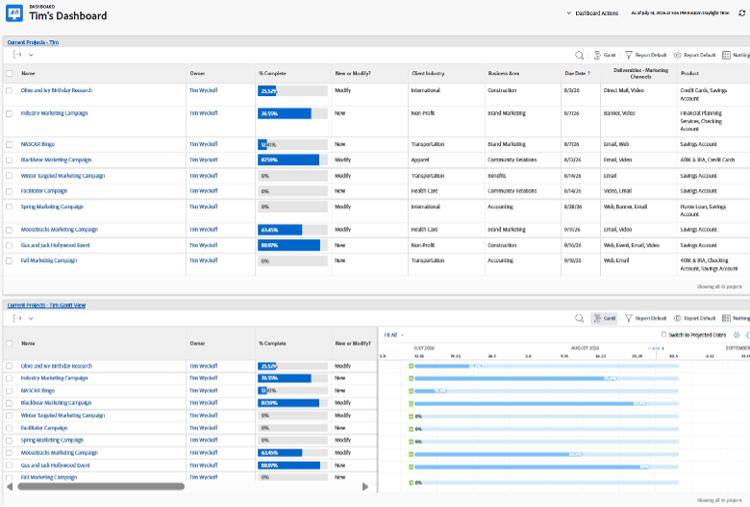
The same project list, viewed as a table and as a Gantt chart, straight from the report menu.
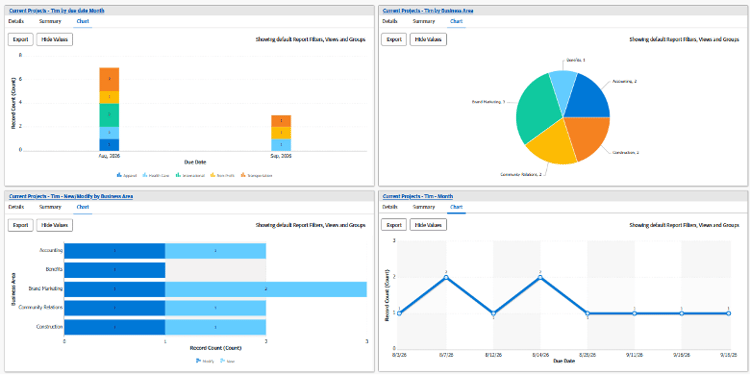
Four different chart views, built from the exact same underlying report.
Listen first
But before I even show the dashboard menu, I start with a conversation. For the record, I'm in no way "anti-talking," so I do use actual words for this part. I have to listen and understand what stakeholders really need so I can focus on solutions that I believe will fit them best. I can try to tell them a hundred things Workfront can do, at great length, but I've probably wasted a lot of time if I'm not showing them what they truly need to see.
When I'm consulting to see what someone needs out of a report or dashboard, I start by asking a lot of questions so I can understand their needs. I'll prompt them with things like, "What do you need to know right now to get your work done?" or "What are you curious about with your team's projects?" I'll also try to see if they want reporting that does a bit more "storytelling" that might show their work in a particular way. Ultimately, I want to get to the point where Workfront is giving them the information they need in a moment's notice, allowing them to make good business decisions with real-time information. Then, like a good sommelier, I can point them to the menu items that are most fit for their preferences, and we can make minor adjustments from there.
Money talks
If you didn't know, executives are really drawn to reports when there's money involved. They focus more on these reports, they tend to ask more questions about them, and some even get visibly excited. And it makes sense. They're not necessarily people obsessed with money, but that's the topic they typically have to answer questions about at the end of the day. So when creating reports, anytime we can directly or indirectly connect a monetary figure to a group of projects or dates and time, that gets people's attention.
Going back to basics, you must have real, trustworthy data in order to give your reports the power to make them useful. Where the data is vague, hypothetical, or requires a mess of asterisks next to it to allow for known errors, your stakeholders will quickly lose interest.
New product launches are the most important part of my organization's work. When I connect our product launch projects to an anticipated amount of sales or projected costs, it's as if I lit fireworks in the office. Everyone starts paying attention.
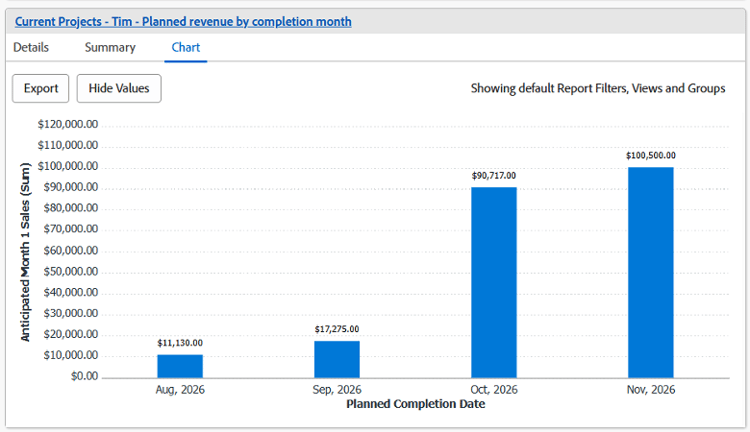
Planned revenue by completion month, another item on the same report menu.
The same goes for information we get from cancelled projects. If there's a history of cancelled projects across a group or team, but we've been consistently logging hours worked on those projects, we have an opportunity to look at the cost of the human effort we've put into them. Those are real, wasted dollars, which may be a normal expectation to some degree, but it's helpful to track those trends across teams.
Unsurprisingly, that's often their "aha moment" when they start to realize the value Workfront can bring. It's when they start to understand that the effort to gather and analyze good, clean data is worth the lift. It's when they start encouraging others who may be more reluctant to adopt Workfront that the insights gained have tremendous value. It's when they start asking for more.
Give them direct access to living Workfront dashboards, not static exports
It's not uncommon for me to get requests from stakeholders to export Workfront data into a spreadsheet or PDF because the user is more familiar with those file formats. Often they're afraid they're going to "break something" in Workfront, or they'll get lost navigating through the system. And I get it: Workfront can be tricky to navigate for people who aren't regularly working in the system, so part of me understands why some administrators and project managers go along with those requests and just send a spreadsheet. But I will always push back on those requests and maintain that giving our users direct access to live Workfront reports is the best practice.
Certainly user restrictions are necessary to protect the integrity of the ecosystem that's been created, but a huge value of this tool is that it's a living, functioning garden of information. When we export information, that data is no longer alive. And if someone is curious about digging in for more details, the insights they could gain have already been cut off at the roots.
Focusing report information and tailoring reports to their target audience puts the right information in an accessible place that minimizes extra clicks and navigation errors.
Start simple
The best place to start is with simple reports: show active and completed work, and prove the data can be trusted. Capitalize on easy wins. Begin working on things you can manage and track within your own team's realm. For example, it can be a simple process change like requiring your team to log hours for each project. If we log hours and show how much time we've spent on a particular type of project, we can start to get real financial data around the cost of doing business. Stakeholders want to know the ROI, so they should probably know more about what's involved in the "I."
When it comes to reporting, start with reports that give basic information. Show the number of projects your team is actively working on, and show the number of projects that have been completed this year. If you want to get a little more advanced, you can show requested completion date versus actual completion date, or planned hours versus the actual amount of hours it has taken.
Use Workfront's graphs and charts as ways to visualize the same data within your projects and help tell your work stories with pictures.
Let Workfront speak
An organization's success rises and falls on its ability to communicate effectively. Often conceived of solely as a project management tool, Workfront, when used thoughtfully, can be harnessed to provide clear, significant data that speaks across teams and enables stakeholders to make informed decisions.
You've used Workfront to manage projects. Now let it communicate a much bigger story.
FAQ
How is this different from just building more reports?
The shift isn't about volume, it's about audience. The same underlying data, filtered and grouped differently, tells a different story to a task doer, a manager, and an executive. The report menu approach is about having those translations ready before someone asks.
Why push back on exporting Workfront data to spreadsheets or PDFs?
A static export freezes the data at one moment and cuts off the ability to dig deeper. A live Workfront report or dashboard stays connected to real-time information, so stakeholders can explore further instead of hitting a dead end.
What's the easiest way to make executives pay attention to a report?
Connect it to money, directly or indirectly. Reports tied to anticipated revenue, projected costs, or the cost of cancelled work tend to get far more attention and questions than reports without a financial angle.
Where should a team start if they have no reporting culture yet?
Start simple: show active and completed work, and prove the data can be trusted. Something as small as requiring hour logging on projects starts building the financial data stakeholders eventually want.