Most marketers aren't getting bad results from AI. They're just not asking the right way. Prompting is a skill and like any skill, a few simple habits make all the difference. We pulled the best practices from Adobe's internal teams and our marketer community, so you don't have to figure it out alone. Here's what actually works.
Give AI a role before you give it a task
AI performs better when it knows who it's supposed to be. Start your prompt by assigning a persona and use a strong prompting formula (see below):
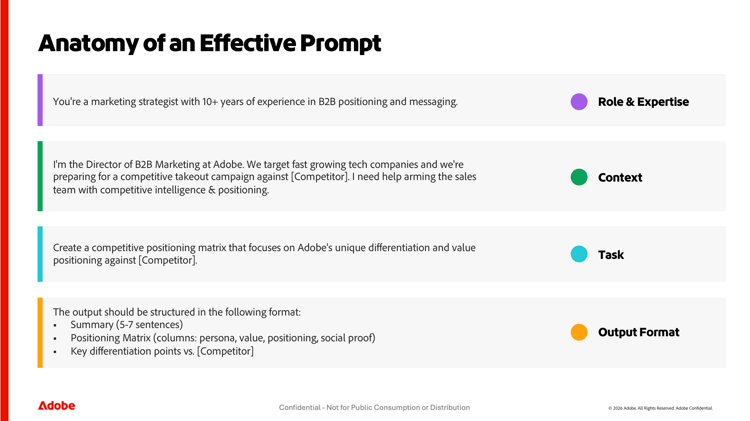
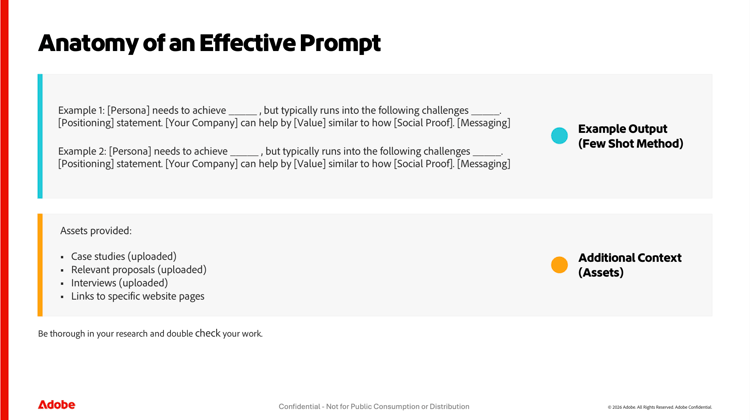
Prompting formulas for your use case such
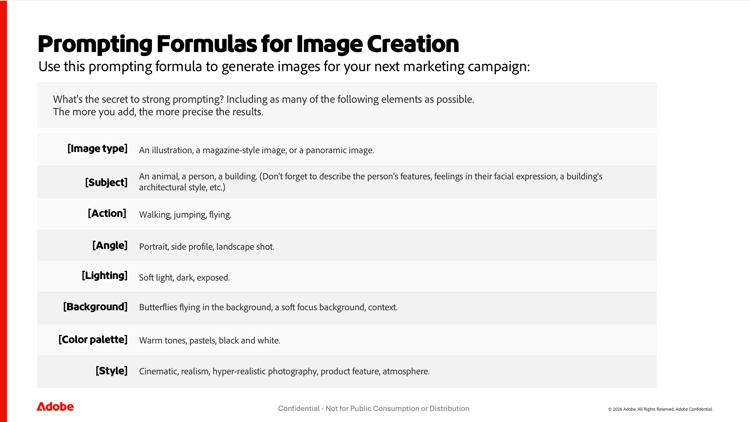
Prompt example
"Twilight portrait [image type] of a snow‑flecked Himalayan snow leopard [subject] poised on a jagged granite outcrop [action], icy breath visible in the crisp mountain air; the sinking sun casts a cool blue‑violet ambiance while a warm rim‑light skims the feline’s dense spotted fur, revealing intricate texture and piercing steel‑blue eyes [context]. Shot on a full‑frame DSLR [frame], 300 mm prime [lens], f/4, ISO 320, 1/2000 s [light settings on camera], capturing pin‑sharp detail, subtle color contrast between cold shadows and amber highlights [colors], and a rugged, nature photojournalism magazine style wilderness aesthetic [style]."
Prompting formula for event marketing
Use this formula to build a full event promotion plan — from the first save-the-date through to post-event follow-up. The more detail you give upfront, the more complete and channel-ready your output will be.
-
[Event type] — Webinar, in-person conference, virtual summit, product launch event
-
[Audience] — Who is attending and what do they care about?
-
[Goal] — Drive registrations, build pipeline, increase brand awareness
-
[Channels] — Email, LinkedIn, paid social, in-app, partner marketing
-
[Timeline] — When is the event? How many weeks of promotion do you have?
Example prompts
You are a B2B messaging strategist. I have one core product message: [paste message]. Rewrite it as 3 separate versions — one for a VP of Marketing at an enterprise company, one for a Marketing Manager at a mid-market SaaS company, and one for a solo marketer at a startup. Each version should speak directly to that persona’s biggest pain point and use their language. Keep each under 100 words.
Now adapt the enterprise version into a LinkedIn post, a 3-line email opener, and a 15-word ad headline. Keep the tone confident but not salesy. Avoid the words ‘innovative’, ‘seamless’, and ‘game-changing'.
Tips from the community
Tip 1: Add context, not just commands
The more relevant detail you give, the less guessing the AI has to do.
Instead of: "Write a social caption."
Try: "Write an Instagram caption for a product launch targeting millennial women. Tone: witty. CTA: swipe up. Keep it under 150 characters."
Tip 2: Use follow up prompts
When drafting a campaign brief, the first output is never what you go with.
AI collapses the slow, back‑and‑forth process of building campaign briefs into a matter of minutes. Instead of sifting through scattered data, pasting insights into documents, and waiting on multiple stakeholders for input, marketers can feed a few key details into an AI assistant and instantly receive a structured, insight‑driven brief. This can dramatically accelerate planning. Here is an approach you can use.
Step 1: Clarify the campaign purpose
-
What are you trying to achieve? (e.g., lead generation, brand awareness)
-
Who is your target audience?
-
What channels will you use?
Step 2: Gather key inputs to prompts
Collect essential details:
-
Business goals and KPIs
-
Budget and timeline
-
Target audience
-
Creative considerations
-
Competitive insights
-
Last year’s campaign brief, if available
Use follow up prompts to review clarity and make your outputs stronger. Here are some examples:
- "Review this brief for clarity, completeness, and alignment with marketing objectives. Suggest improvements."
- "This tone doesn’t match our brand guidelines. We sound more [adjective, e.g. confident / approachable / bold]. Rewrite with that in mind."
Tip 3: Use other AI tools to help you prompt better
One of the most underrated prompting tricks: use AI to improve your prompts. If you’re not sure how to phrase something, paste your rough idea into an AI tool and ask it to help you craft a stronger, more specific version. You can also ask it to generate multiple prompt variations so you can pick the one that best fits your goal.
Try prompts like:
“I want to write a prompt to generate a competitive positioning email. Here’s my rough idea: [paste idea]. Can you turn this into a well-structured prompt I can use?”
“Give me 5 different ways to prompt an AI to write a product launch announcement for a B2B SaaS audience. Vary the angle and tone for each.”
Tip 4: Tell it what to avoid
Constraints are just as powerful as instructions. If you know what you don’t want — a certain tone, a word that feels off-brand, a format that doesn’t work — say so explicitly. AI responds well to negative guidance, and it saves you rounds of editing.
Instead of: “Write a tagline for our brand.”
Try: “Write 5 tagline options. Avoid corporate jargon, buzzwords like ‘innovative’ or ‘cutting-edge,’ and anything longer than 8 words.”
Tip 5: Ask for options, not just one answer
A single output is a starting point. Asking for multiple variations gives you creative range to work with and makes it much easier to identify what direction feels right. Mix the styles you request — curiosity-driven, benefit-driven, urgency-driven — and you’ll get a richer set of choices.
Instead of: “Write an email subject line.”
Try: “Give me 10 email subject line options. Mix curiosity-driven, benefit-driven, and urgency-driven styles.”
Tip 6: Iterate, don’t restart
If the output isn’t quite right, refine it in the same conversation rather than starting over. AI retains context throughout a session — use that to your advantage. Most marketers give up after one bad result. The magic is usually two or three prompts in.
Instead of starting over, try:
“Good start. Now make the tone more conversational and cut it by 30%.”
“Now remove anything that doesn’t directly support the main goal and tighten the opening line.”
The bottom line
You don’t need to be a prompt engineer. You just need to be specific. Give AI a role, add context, set constraints, ask for variety, and refine as you go. Prompting improves with practice — start with one tip today and see what changes.
Quick reference: The prompting formula
Use this as your go-to checklist before submitting any prompt:
-
Role & expertise — Who is the AI playing? (e.g., “You’re a senior B2B copywriter with 10+ years of experience”)
-
Context — Who are you, what’s your goal, and who is your audience?
-
Task — What exactly do you need? Be specific about the deliverable.
-
Output format — How should the response be structured? (length, format, sections)
-
Constraints — What should it avoid? (tone, words, length, style)
Shoutout to the Adobe Community of AI experts
primary
--spectrum-gray-700
000000
white
primary
--spectrum-gray-700
000000
white