The future of work management in Adobe Workfront pairs people with AI as a true partner by automating intake, surfacing real-time insights, and tailoring project health for every department so teams spend less time on administration and more time on meaningful work.
Why AI matters for work management
Adobe Workfront has one mission: helping teams spend more time on work that matters. And while AI is no longer experimental, its role in the enterprise is still misunderstood.
Most people associate AI with content creation. Its real value is in work management. AI can automate repetitive tasks and analyze complex data to surface decisions. It adapts recommendations to how an organization actually operates and expands what teams can accomplish without adding headcount. Teams that use it well move faster and with less friction.
This goes well beyond summaries and prompts. With capabilities like AI Fill-in Form and AI-driven Project Health, Workfront now participates in the full work lifecycle. This spans how requests are captured, how work is routed, and how progress is tracked across departments.
How AI is already changing the way teams work
Workfront's AI Assistant demonstrates this shift in practice. Smart Filters let users run natural language queries instead of navigating time-consuming searches. Catch Me Up summarizes key updates from projects, tasks, and issues on demand. Summarization condenses large programs into executive-ready insights. Formula Generation helps admins build and debug formulas accurately and without guesswork.
Together, these capabilities accelerate decision-making. Leaders spend less time gathering information and more time driving strategy. That's the partnership between people and AI: the system anticipates needs, speeds up delivery, and removes the complexity that slows teams down.
AI in Workfront is also moving into intake and execution. With AI Fill-in Form, the system reads customer emails, formal request for quote (RFQ) documents, and purchase orders. It also completes the intake process automatically. Workflows then route that work to the right teams. The administrative work happens in the background.
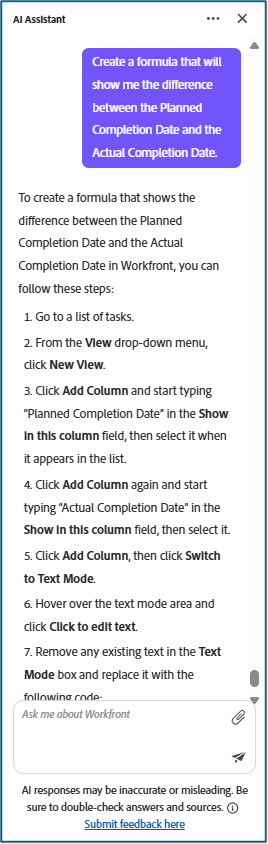
Working with Workfront's AI Assistant
This section covers how to use Workfront's AI Assistant to manage programs, projects, and team workflows. No prior AI experience required.
The AI Assistant handles routine data work: pulling status from multiple projects, flagging risks, drafting executive summaries. As a result, your team spends less time moving information between systems and more time acting on it.
Getting good results is a skill. The way you phrase a request shapes what you get back.
Build the prompts in three steps
-
State your goal. "Help me prepare a weekly executive status summary for our Q4 Product Launch program in Workfront."
-
Define the Workfront objects and fields. "Look at the Program named 'Q4 Product Launch' and its related Projects. Focus on Status, Planned Completion Date, Percent Complete, and any open Issues."
-
Describe the result that you expect. "I expect: (1) a 150–200 word summary in plain language for executives, (2) a short list of the top three risks with their project names, and (3) a note if any project is more than 10% behind its planned completion date." Giving the AI a target lets it check its own output against your criteria.
Share prompts that work
A prompt that delivers what you expected once will deliver it every time. Share it.
One program manager refined a prompt for Catch Me Up: the AI Assistant feature for generating status updates until it consistently produced clear, executive-ready summaries. They shared it with their project management office (PMO), and soon every project owner was running the same prompt. Executives got a consistent view of work. The team cut hours from manual status reporting each week.
Some teams go further. At Krause Automation, one team built a bulletin board inside their team space to collect prompts that had worked. One project manager posted a prompt for identifying who was subscribed to a project. Another shared one for pulling usernames into an initial report. Because every prompt was tested, the team could reuse them without trial and error.
Searching Adobe Experience League for Workfront terminology can also sharpen your prompts, since those terms are embedded in the AI model.
Use prompts to direct the AI
As the AI Assistant takes on more work, such as intake, project health monitoring, status reporting, prompting becomes the main way that you direct it. A prompt tells the system which fields to check, which risks to surface, and which outcomes matter. That makes it worth getting right.
What work management looks like with AI as a partner
Work management has always been about connecting people, processes, and technology to get things done. AI changes the ratio. Teams spend less time moving information between systems and more time acting on it.
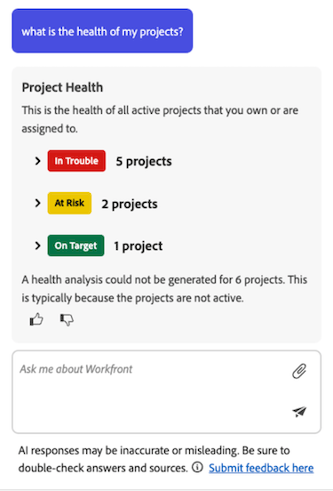
The clearest example is Project Health. In Workfront, the Setup feature lets you configure what "healthy" means for each department, and that distinction matters. Project managers focus on maintenance, health and safety, quality, and logistics. Each group needs signals relevant to their work, not a generic dashboard built around the PMO's view.
Configured by department, Project Health surfaces what each team actually needs. Maintenance sees signals tied to downtime and assets. Health and Safety sees indicators for incidents and compliance. Quality sees defect counts, rework trends, and audit status. Logistics sees dates, handoffs, and delivery risk. When every department runs in the same Workfront instance, making AI functional for each group isn't optional: it's what makes the system useful across the business.
As AI supports more of the operational load, leaders and practitioners get time back for strategy, clarity, and execution. The friction drops. Work moves more easily across systems, functions, and roles.
Looking ahead
The organizations that do well with AI will be the ones that start early, experiment broadly, and scale in ways that fit how they actually work. Workfront is ready to support that now, and its capabilities will keep growing.
The shift is already visible. Prompt by prompt, these tools free up time and surface useful insight. AI improves with feedback, and giving it that feedback, pushing it toward better results, is part of how it gets smarter. Working with Adobe AI engineers to explore what else the system can do has made that process faster. The ability to summarize where a program stands, surface what matters, and build out the formulas and custom fields that used to take hours allows the momentum to keep building.
Features like AI Fill-in Form for customer intake, and Project Health that goes beyond the project manager's view, point toward something larger: Workfront as a real AI partner for every part of the business, not just the PMO.
Mastering prompting, sharing what works, and helping others learn it makes AI more effective for everyone. The guidance is simple: get on the AI bike. Start using it. Experiment. See where it adds value. Give the system feedback. Roll it out in ways that fit your organization.
Every prompt, every question, every piece of feedback moves the work forward. That's what comes next.
Key takeaways
-
AI in Workfront reduces administrative work by automating intake, reporting, and data analysis
-
Well-structured prompts improve the quality and consistency of AI-generated outputs
-
Sharing proven prompts across teams helps scale efficiency and standardize workflows
-
AI-driven features like Project Health should be configured to reflect department-specific needs
-
Teams that experiment early and refine usage over time will see the most value